Tiptap Rich Text Editor (@vicacha-devs/strapi-plugin-tiptap-editor)
TipTap v3 + Edifice IO WYSIWYG editor plugin for Strapi v5. Includes 49 configurable rich-text features, schema-driven custom components, Edifice IO multimedia & structured blocks, relational media & internal link sync, in-editor HTML5 Canvas image studio & voice recorder, speech tools, and WCAG 2.1 AA accessibility.
Features
Section titled “Features”- Powered by TipTap v3.20+ — headless ProseMirror architecture with React NodeViews and zero-side-effect state updates (
useEditorState). - 49 Configurable Features across 4 built-in presets (
minimal,default,full,edifice) plus custom presets inconfig/plugins.tsand runtime overrides in Strapi Admin Settings. - Schema-Driven Custom Components (
components) — reusable block or inline components (with built-inbuttonincluded out of the box), generated attribute dialogs, custom React previews, and shared./sharedschema helpers. - Multi-Format Serialization — stores ProseMirror JSON by default, or outputs sanitized HTML or Markdown per field.
- Edifice IO Multimedia Suite:
- Images (
mediaLibrary) with in-editor HTML5 Canvas Image Crop/Rotate/Flip/Zoom Studio,<figure>/<figcaption>,alt,title, Media Library metadata refresh, alignment, and drag-resize handle. - Videos (
video) via Strapi Media Library or privacy-enhanced YouTube (youtube-nocookie.com), Vimeo, and direct MP4 URLs. - Audio (
audio) via Strapi Media Library or in-browserMediaRecorderVoice Note Recorder with live timer and direct upload. - Attachments (
attachment) with downloadable file cards, MIME badge, and formatted byte size. - Iframes (
iframe) with stricthttps:enforcement,sandboxattributes, and domain allowlisting.
- Images (
- Relational Media & Internal Link Sync:
- Automatically extracts all 4 embedded media types (
image,video,audio,attachment) into a companion<FieldName>Mediafield and internal Strapi links (strapi://collectionName/documentId&linkernodes) into a companion<FieldName>Linkscomponent.
- Automatically extracts all 4 embedded media types (
- Structured Blocks & Editorial Tools:
informationPane,accordion,columns,taskList,conversationHistory,tableOfContents,pageBreak,mathematics,emoji, andslashCommands.
- Typography & Semantic Accessibility Marks:
fontFamily,fontSize,lineHeight,clearFormatting,typography,leadParagraph,abbr, andlanguage(<span lang="..." dir="...">for WCAG 2.1 SC 3.1.2).
- Speech & Productivity Modes:
speechToText,textToSpeech,characterCount,fullscreen, Edifice Read-Only Preview, and JSON / HTML / Markdown Source Inspector.
- Zero-Data-Loss Content Safety:
- Disabling any rich node in a preset renders existing content via read-only NodeViews so content is never silently stripped on save, and unknown unregistered types surface a clear warning via
stripUnknownContent.
- Disabling any rich node in a preset renders existing content via read-only NodeViews so content is never silently stripped on save, and unknown unregistered types surface a clear warning via
Supported Versions
Section titled “Supported Versions”| Plugin Version | Strapi Version | Node.js Version | TipTap Version |
|---|---|---|---|
1.3.x+ |
5.39.0 |
^20.19.0 || ^22.13.0 || >=24.0.0 |
3.20.1 |
Installation
Section titled “Installation”pnpm add @vicacha-devs/strapi-plugin-tiptap-editorpnpm build && pnpm startConfiguration
Section titled “Configuration”The plugin uses a hybrid preset + runtime settings architecture:
- Built-in Presets:
minimal,default,full, andedificework out of the box with zero configuration. - Code-first Presets (
config/plugins.ts): Define custom named presets and theme options in version control. - Runtime Settings UI (
/settings/tiptap-editor): Override global defaults, allowed iframe domains, relational sync, and per-preset feature toggles stored in Strapicore-store.
Built-In Presets
Section titled “Built-In Presets”| Preset Name | Included Features |
|---|---|
minimal |
bold, italic |
default |
bold, italic, underline, strike, code, codeBlock, blockquote, bulletList, orderedList, hardBreak, horizontalRule, history, heading, link, table, textAlign, mediaLibrary, characterCount |
full |
All 49 feature keys enabled |
edifice |
All 49 feature keys enabled (complete Edifice IO Playground experience) |
Defining Custom Presets (config/plugins.ts)
Section titled “Defining Custom Presets (config/plugins.ts)”export default () => ({ 'tiptap-editor': { config: { presets: { minimal: { bold: true, italic: true, link: true }, editorial: { bold: true, italic: true, underline: true, heading: { levels: [1, 2, 3, 4] }, leadParagraph: true, abbr: true, language: true, bulletList: true, orderedList: true, taskList: true, blockquote: true, informationPane: true, accordion: true, columns: true, link: true, linker: true, mediaLibrary: { resize: { enabled: true } }, video: true, audio: true, attachment: true, table: { resizable: true, cellBackground: true }, components: { button: true }, characterCount: { limit: 10000 }, fullscreen: true, }, }, }, },});Field-Level Options (Content-Type Builder)
Section titled “Field-Level Options (Content-Type Builder)”- Output Format (
options.outputFormat):json(default ProseMirror JSON),html(sanitized HTML string), ormarkdown(Markdown string). - Editor Preset (
options.preset): Select which preset this field uses (default,minimal,full,edifice, or custom). - Character Limit (
options.characterLimit): Optional maximum character count for the field. - Placeholder (
options.placeholder): Custom placeholder text when the editor is empty.
Custom Components
Section titled “Custom Components”Components are enabled per preset under a components key mapping component names (^[a-zA-Z][\w-]*$, excluding RESERVED_NODE_NAMES) to true, false, or an options object:
import type { StrapiApp } from '@strapi/strapi/admin';import {  defineRichTextComponent,  registerRichTextComponent,} from '@vicacha-devs/strapi-plugin-tiptap-editor/strapi-admin';import type { RichTextComponentSchema } from '@vicacha-devs/strapi-plugin-tiptap-editor/shared';
export const calloutSchema: RichTextComponentSchema = {  name: 'callout',  label: 'Callout',  content: 'block+',  attributes: {    tone: {      default: 'info',      form: {        type: 'select',        label: 'Tone',        options: [          { value: 'info', label: 'Info' },          { value: 'warning', label: 'Warning' },        ],      },    },  },};
const calloutComponent = defineRichTextComponent<{ tone: 'info' | 'warning' }>({  ...calloutSchema,  label: { id: 'app.components.callout.label', defaultMessage: 'Callout' },  defaultAttrs: { tone: 'info' },  validate: (attrs) => (attrs.tone ? null : { tone: 'Tone is required' }),});
export default { register(_app: StrapiApp) { registerRichTextComponent(calloutComponent); },};- Inline Components: Set
inline: trueon a schema (withoutcontent) to create an inline atom withmarks: ''that renders as a compact<span>chip. - Shared Schema Helpers: Import
RichTextComponentSchema,toNodeSpec,isInlineComponent,buttonSchema,BUILT_IN_COMPONENT_SCHEMAS,stripUnknownContent,isComponentEnabled,getComponentOptions, andRESERVED_NODE_NAMESfrom@vicacha-devs/strapi-plugin-tiptap-editor/shared.
Relational Media & Internal Links Synchronization
Section titled “Relational Media & Internal Links Synchronization”- Companion
<FieldName>MediaField: Add a Multiple Media field named<FieldName>Media(e.g.contentMedia).useRelationalSyncextracts all embeddedimage,video,audio, andattachmentassets (data-asset-id/data-document-id) and updates<FieldName>Media. - Companion
<FieldName>LinksComponent: Define alinks.linkscomponent in your Strapi project and add a<FieldName>Linksfield (e.g.contentLinks). Internal Strapi links inserted vialinkerorstrapi://api::collection.collection/documentIdURIs are grouped by collection and synced automatically.
Available Extensions (49 Feature Keys)
Section titled “Available Extensions (49 Feature Keys)”Inline Formatting, Typography & Semantic Marks
Section titled “Inline Formatting, Typography & Semantic Marks”| Key | Description |
|---|---|
bold, italic, underline, strike, code, superscript, subscript |
Standard inline formatting marks (<strong>, <em>, <u>, <s>, <code>, <sup>, <sub>) |
clearFormatting |
Strip all inline marks and reset block to paragraph |
leadParagraph |
Lead / intro paragraph (<p class="lead-paragraph" data-lead="true">) |
abbr |
Semantic abbreviation (<abbr title="...">) with modal |
language |
WCAG 3.1.2 language & direction (<span lang=".." dir="..">) |
fontFamily, fontSize, lineHeight |
Customizable font family, font size (12px–40px), and line height (1.0–2.0) selectors |
typography |
Smart typography input rules (-- → —, ... → …, (c) → ©) |
Block Elements, Headings, Links, Tables & Colors
Section titled “Block Elements, Headings, Links, Tables & Colors”| Key | Description |
|---|---|
blockquote, codeBlock, bulletList, orderedList, taskList, hardBreak, horizontalRule, history |
Core block elements, interactive checklists, and undo/redo history |
heading |
Visual heading levels (h1–h6), independent SEO tag, and sanitized slug id attributes |
link |
External/internal hyperlinks with protocol validation (https:, mailto:) |
linker |
Internal Strapi Document Linker chip & live search modal |
table |
Resizable tables with row/column controls, cellBackground color picker (TableCellWithBackground, TableHeaderWithBackground), and cell merge/split |
textAlign, textColor, highlightColor |
Paragraph/heading alignment and theme-driven text/highlight color pickers |
informationPane, accordion, columns, conversationHistory, pageBreak, tableOfContents, components |
Edifice IO callout boxes, <details> accordions, 2/3-col CSS grids, discussion logs, page breaks, dynamic TOC, and custom components |
Edifice IO Multimedia, Math, Emoji, Slash & Speech Tools
Section titled “Edifice IO Multimedia, Math, Emoji, Slash & Speech Tools”| Key | Description |
|---|---|
mediaLibrary |
Strapi Media Library images with alt/title/caption popover, metadata sync, resize handle, and HTML5 Canvas crop/rotate/flip/zoom studio |
video |
Strapi Media Library videos (<video controls>) or YouTube/Vimeo/MP4 embeds |
audio |
Strapi Media Library audio or in-browser MediaRecorder voice note recorder |
attachment |
Downloadable file cards with filename, extension badge, MIME type, and size |
iframe |
Sandboxed https: iframes (sandbox="allow-scripts allow-popups", allowedDomains) |
mathematics, emoji, slashCommands |
Inline/block LaTeX math, searchable emoji picker + :shortcode:, and / command palette |
speechToText, textToSpeech |
Web Speech API voice dictation and read-aloud |
characterCount, fullscreen |
Live word/character/reading-time footer bar, fullscreen mode, read-only preview, and JSON/HTML/Markdown source inspector |
Accessibility (WCAG 2.1 AA) & Security
Section titled “Accessibility (WCAG 2.1 AA) & Security”- WCAG 2.1 AA Toolbar Navigation: Roving
ArrowRight/ArrowLeft/Home/End/Escapekeyboard navigation,role="toolbar",aria-label,aria-pressed,aria-live="polite", and WCAG 3.1.2languagemarks. - Defense-in-Depth Security:
- URL & Attribute Sanitization: Blocks
javascript:,vbscript:, protocol-relative (//,/\), anddata:text/htmlacross links, media nodes, custom componenturlattributes, and presetHTMLAttributesoverrides. - DNS-Aware SSRF Protection (
isSsrfSafeUrl&assertSafeResolvedHost): Backend/link-previewand/upload-by-urlroutes validate hostnames and DNS-resolved IPv4/IPv6 addresses, pin DNS records via an undiciAgentdispatcher, disable automatic redirects, and cap response streams (64 KB for link previews, 25 MB for uploads).
- URL & Attribute Sanitization: Blocks
Theme & Public Admin API
Section titled “Theme & Public Admin API”Configure theme.colors ({ label, color }[]) and theme.css / theme.stylesheet in config/plugins.ts.
Import from @vicacha-devs/strapi-plugin-tiptap-editor/strapi-admin:
registerRichTextComponent,defineRichTextComponent,listRichTextComponents,ColorPickerPopoverregisterTiptapExtension,unregisterTiptapExtension,getRegisteredTiptapExtension,getRegisteredTiptapExtensionsMediaLibraryWrapper,ToolbarButton
Backend API Routes
Section titled “Backend API Routes”All admin routes are mounted under /tiptap-editor:
| Method | Path | Description |
|---|---|---|
GET |
/tiptap-editor/presets |
List all available preset names (built-in + custom) |
GET |
/tiptap-editor/presets/:preset |
Get resolved feature configuration for a preset |
GET |
/tiptap-editor/theme |
Get theme colors and custom CSS/stylesheet |
GET / PUT |
/tiptap-editor/settings |
Get or update runtime settings and preset overrides |
GET |
/tiptap-editor/search?q=<query>&locale=<locale> |
Search linkable Strapi collection documents |
GET |
/tiptap-editor/get/:collectionName/:documentId |
Resolve a single Strapi document’s label and publish state |
GET |
/tiptap-editor/identify/:collectionName |
Identify the human-readable title field for a collection |
GET |
/tiptap-editor/link-preview?url=<https_url> |
DNS-aware SSRF-safe OpenGraph metadata preview |
POST |
/tiptap-editor/upload-by-url |
DNS-aware SSRF-safe remote media URL upload |
Content-Type Entities & Where to Find Them
Section titled “Content-Type Entities & Where to Find Them”Registers the plugin::tiptap-editor.RichText custom field in Content-Type Builder & Content Manager alongside Strapi core-store runtime settings (settings), optional links.links internal reference sync, and companion <FieldName>Media relational media tracking.
- Content Manager Rich-Text Fields:
/admin/content-manager(any Collection Type or Single Type field configured with custom fieldplugin::tiptap-editor.RichText) - Content-Type Builder Preset Selector:
/admin/plugins/content-type-builder(PresetSelect, output formatjson | html | markdown, character limit, and placeholder options) - Global Settings Panel:
/admin/settings/tiptap-editor(Settings -> Global Settings -> Tiptap Editor— runtime preset overrides, iframe domain allowlist, and relational sync)
Strapi v5 Content Manager Integration (/admin/content-manager)
Section titled “Strapi v5 Content Manager Integration (/admin/content-manager)”Content Manager Sidebar Group:
Operates Inside Every Content Manager Entry Using plugin::tiptap-editor.RichText
Content Manager Entities & Components
Section titled “Content Manager Entities & Components”- Custom Field
plugin::tiptap-editor.RichText(attached toapi::article.article,api::page.page, or any Collection/Single Type in/admin/content-manager) - Companion
<FieldName>Media&<FieldName>Linksfields automatically synchronized on edit (enableRelationalSync) - Settings Store
plugin::tiptap-editor.settings(core-storemanaged via/admin/settings/tiptap-editor)
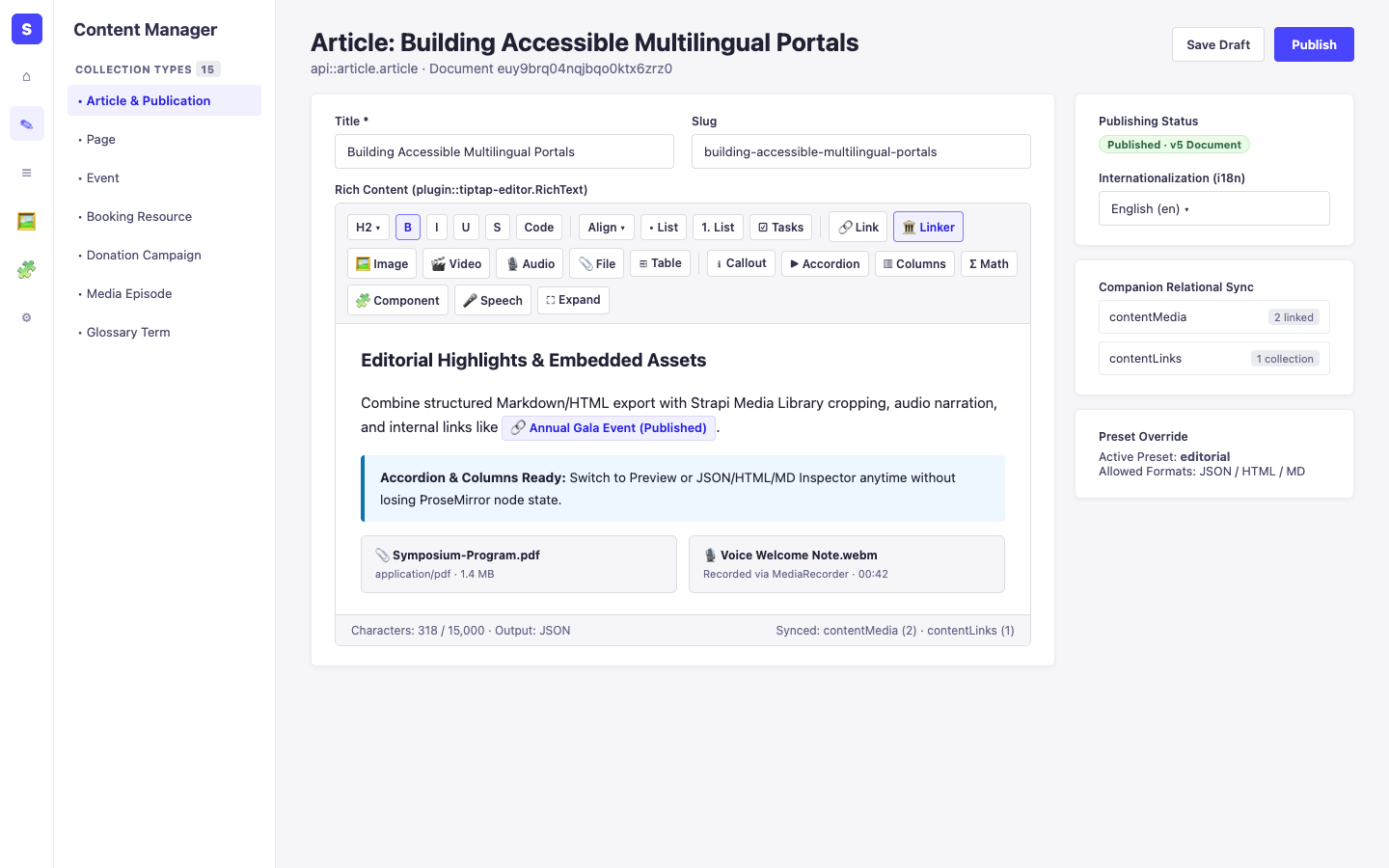
Why This Plugin Creates & Integrates Content Manager Entities
Section titled “Why This Plugin Creates & Integrates Content Manager Entities”@vicacha-devs/strapi-plugin-tiptap-editor delivers a WCAG 2.1 AA WYSIWYG editing workspace directly inside Strapi v5 Content Manager edit views via custom field plugin::tiptap-editor.RichText without creating intrusive standalone tables:
- Hybrid Code + Runtime Presets: Fields inherit code-first presets (
minimal,default,full,edifice, or customconfig/plugins.tspresets) and respect live overrides saved at/admin/settings/tiptap-editor. - Automatic Relational Media & Document Linker Sync:
useRelationalSyncextracts embedded Media Library assets (<FieldName>Media) and internallinkerdocument references (<FieldName>Links) as editors type. - Zero-Data-Loss Fallback: Disabling an extension renders existing nodes read-only rather than dropping structured content on publish.
How to Use in Strapi Content Manager (Step-by-Step)
Section titled “How to Use in Strapi Content Manager (Step-by-Step)”- Add the Custom Field in Content-Type Builder: Open
/admin/plugins/content-type-builder, add custom field Rich Text (Tiptap) (plugin::tiptap-editor.RichText), and pick a preset and output format (json,html, ormarkdown). - Edit Content in Content Manager: Open
/admin/content-managerfor the entry, format text using the roving toolbar,/slash menu, HTML5 Canvas image studio, voice recorder, or custom components, and click Publish. - Review Global Overrides: Visit
/admin/settings/tiptap-editor(Settings -> Global Settings -> Tiptap Editor) to tune allowed iframe domains and runtime feature toggles.
Content Manager & Plugin Workspace Synchronization
Section titled “Content Manager & Plugin Workspace Synchronization”Content Manager Use Cases & Editorial Workflows
Section titled “Content Manager Use Cases & Editorial Workflows”Content Manager Use Case 1 — Authoring Accessible Multilingual Rich Content & Linked Assets
Section titled “Content Manager Use Case 1 — Authoring Accessible Multilingual Rich Content & Linked Assets”- Why & What it is for: Compose localized articles in
/admin/content-managerwith WCAGlanguagespans (dir='rtl'|'ltr'), semantic headings, internal document links, cropped images, and automatic relational asset tracking. - How to use in Content Manager: Open an entry in
/admin/content-manager, switch locale via i18n, insert media/links/blocks in theRichTextfield, verify the inspector preview (JSON/HTML/Markdown), and click Publish.
End-to-End Use Cases & Workflows
Section titled “End-to-End Use Cases & Workflows”Use Case 1 — Configuring Preset-Driven Rich-Text Fields & Output Formats (json, html, markdown)
Section titled “Use Case 1 — Configuring Preset-Driven Rich-Text Fields & Output Formats (json, html, markdown)”- What it is for: Bind fields on
api::article.articleorapi::page.pageto tailored TipTap presets (minimal,default,full,edifice, or custom presets inconfig/plugins.ts) with strict DOMPurify + URL sanitization. - How it works: Assign custom field
plugin::tiptap-editor.RichTextin Content-Type Builder (orfieldBindingsin config), choose preset & output format, and edit richly in/admin/content-manager.
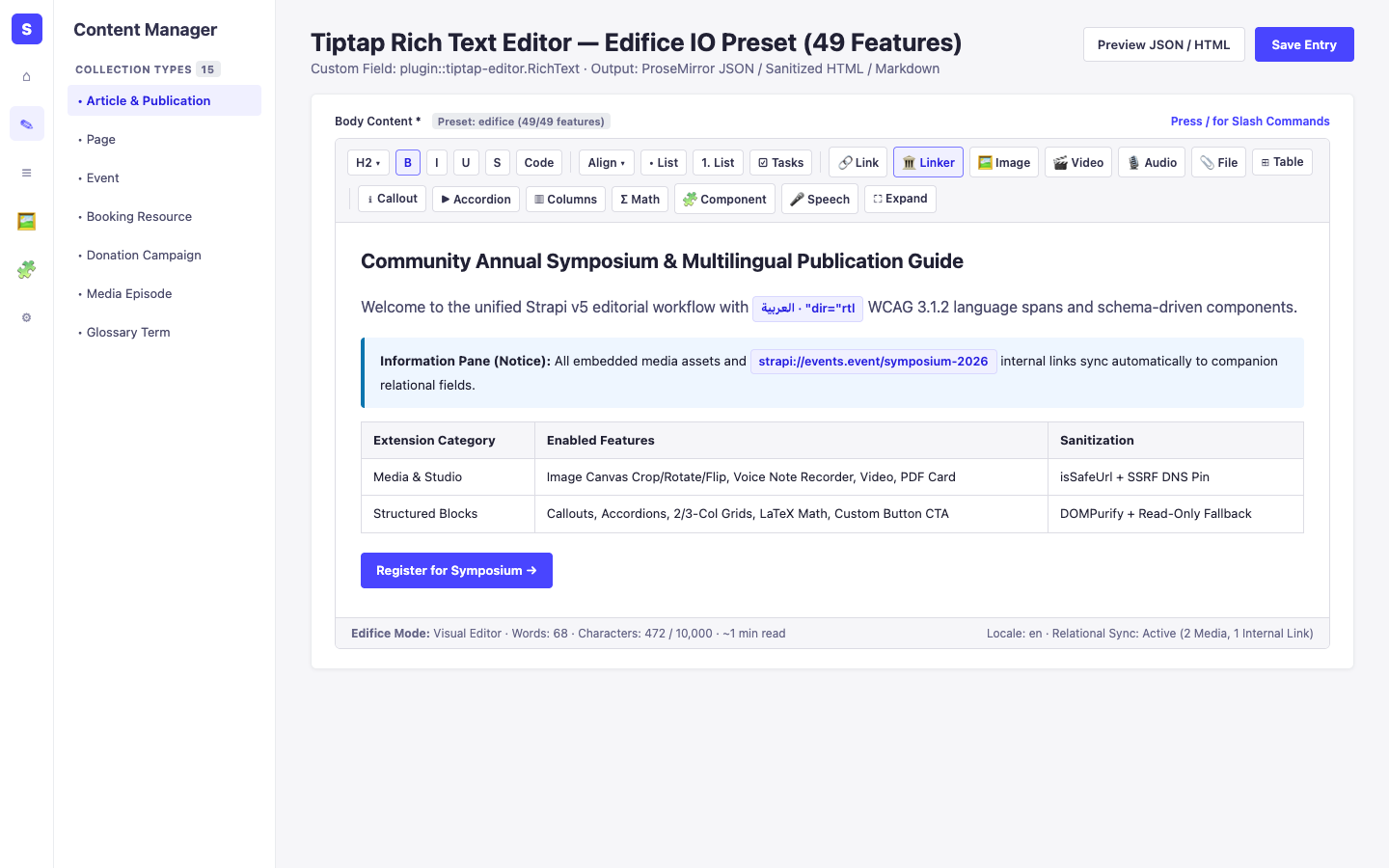
Use Case 2 — Schema-Driven Custom Components, Multimedia Studio & Slash Commands
Section titled “Use Case 2 — Schema-Driven Custom Components, Multimedia Studio & Slash Commands”- What it is for: Let editors insert
buttonCTA atoms, callouts (informationPane), accordions, multi-column grids, LaTeX math, HTML5 Canvas-cropped images, voice recordings, and/slash commands cleanly. - How it works: Register reusable components via
registerRichTextComponent()or use built-in Edifice IO blocks inside/admin/content-managerwith zero-data-loss fallback for unknown nodes.
Use Case 3 — Runtime Governance, Allowed Iframe Domains & SSRF-Safe Media Ingestion
Section titled “Use Case 3 — Runtime Governance, Allowed Iframe Domains & SSRF-Safe Media Ingestion”- What it is for: Manage global editor defaults, trusted iframe host allowlists, per-preset overrides (
PUT /tiptap-editor/settings), link previews (GET /tiptap-editor/link-preview), and remote uploads (POST /tiptap-editor/upload-by-url) safely. - How it works: Open
/admin/settings/tiptap-editorto toggle runtime overrides and configureallowedIframeDomains; remote URL lookups enforce DNS-pinned SSRF checks (isSsrfSafeUrl).
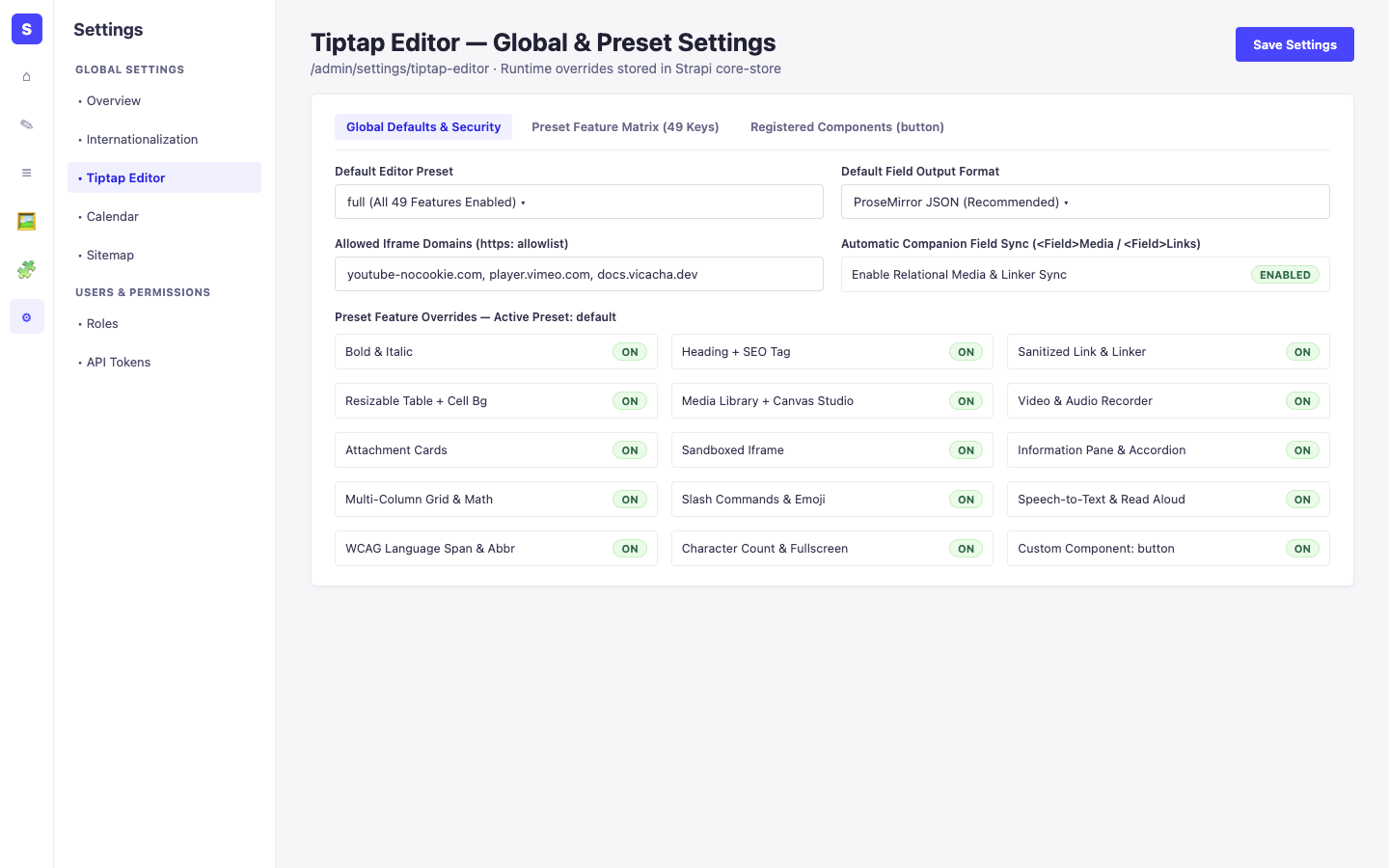
Admin Workspace, Content Manager & Settings Panel Preview
Section titled “Admin Workspace, Content Manager & Settings Panel Preview”
Strapi v5 Content Manager Entities (/admin/content-manager)
Section titled “Strapi v5 Content Manager Entities (/admin/content-manager)”
Settings Panel (Settings -> Configuration)
Section titled “Settings Panel (Settings -> Configuration)”
Explore Content Types & Use Cases, the Developer Guide & Admin UI Tour, and the Interactive OpenAPI Reference for complete schema, workflow diagram, and endpoint documentation.