Editorial Notes & Pins — Developer Guide & Admin UI
1. Installation & Peer Setup
Section titled “1. Installation & Peer Setup”pnpm add @vicacha-devs/strapi-plugin-notes2. Server Configuration (config/plugins.ts)
Section titled “2. Server Configuration (config/plugins.ts)”Add the plugin configuration to your Strapi v5 config/plugins.ts file:
export default ({ env }: { env: (key: string, defaultValue?: string) => string }) => ({ "notes": { enabled: true, config: { enablePinning: true, enableLocaleScoping: true, }, },});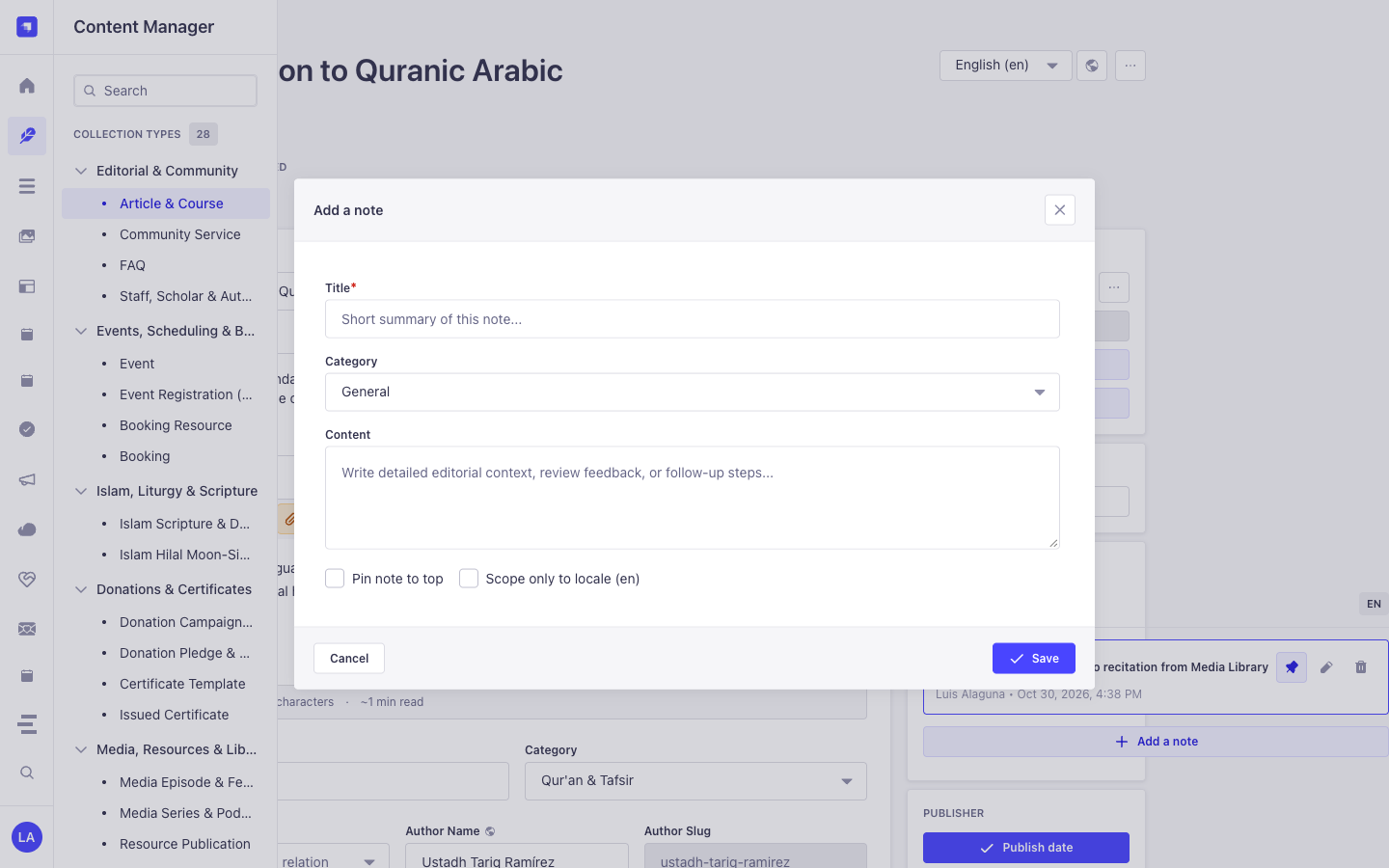
3. Strapi v5 Admin UI Tour
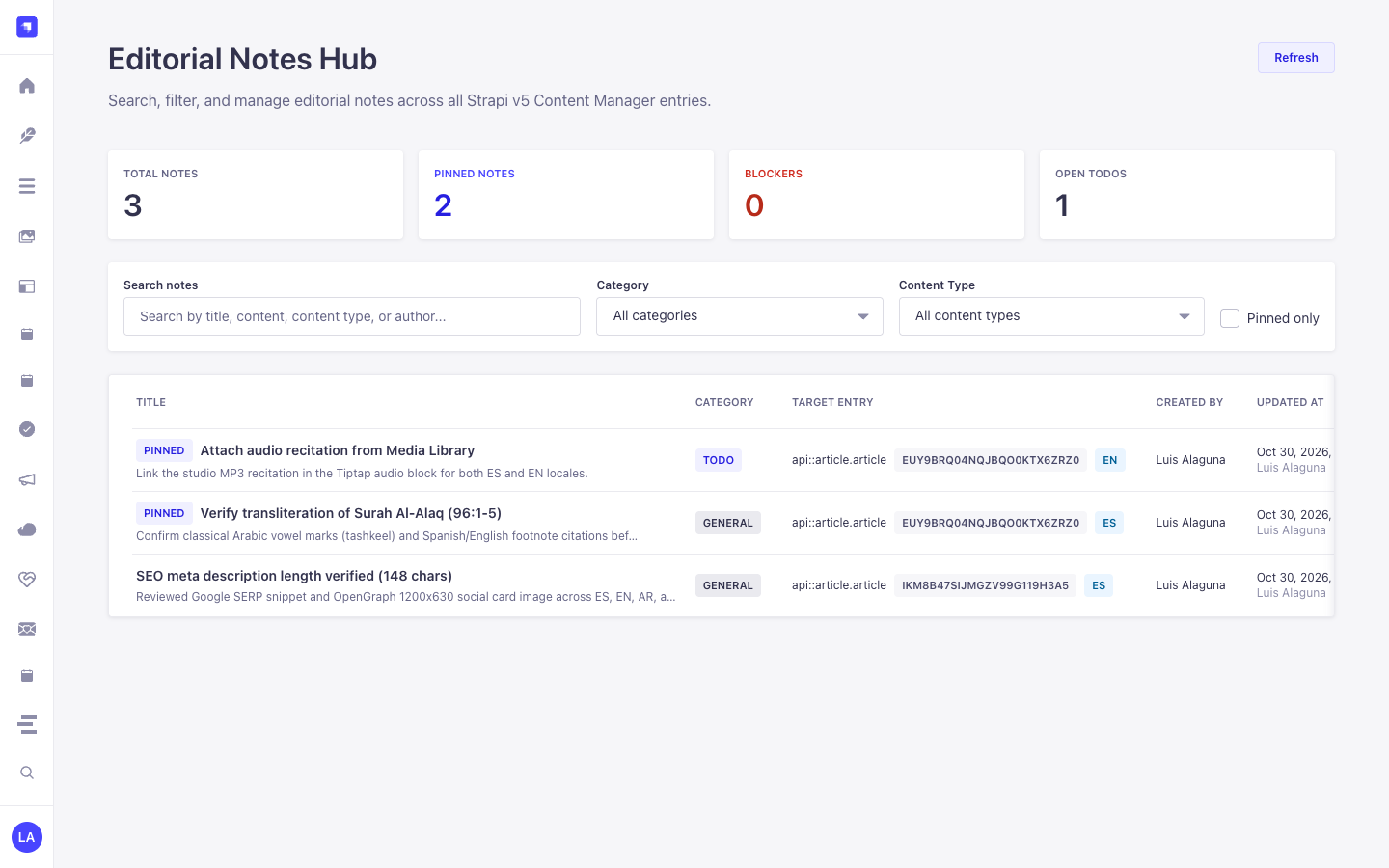
Section titled “3. Strapi v5 Admin UI Tour”Once enabled, the plugin registers its workspace and settings inside the Strapi v5 Admin panel using Strapi Design System v2 components:
Key Localized Admin UI Labels
Section titled “Key Localized Admin UI Labels”| Translation Key | Rendered UI Label |
|---|---|
plugin.name |
Notes |
notes.loading |
Loading Content … |
notes.notification.loadError |
Unable to load notes. |
notes.notification.created |
Note has been successfully created. |
notes.notification.createError |
Failed to create note. |
notes.notification.updated |
Note has been successfully updated. |
notes.notification.updateError |
Failed to update note. |
notes.notification.deleted |
Note has been successfully deleted. |
4. Content-Type Entities, Locations & Schemas (strapi.documents)
Section titled “4. Content-Type Entities, Locations & Schemas (strapi.documents)”Registers one internal polymorphic Collection Type (plugin::notes.note, content-manager.visible: false) that attaches editorial annotations to any Strapi Content Manager document via entitySlug (e.g., api::article.article), entityDocumentId, and entityLocale.
Where to Find Content-Type Entities in Strapi v5
Section titled “Where to Find Content-Type Entities in Strapi v5”- Content Manager Right Side Panel: Open any document in
/admin/content-manager/collection-types/...orsingle-types/...to view, create, and pin notes scoped to that document and locale - Global Notes Hub Workspace:
/admin/plugins/notes(centralized search, category filter, and pin board across all Content-Type entities) - Database Table:
notes(plugin::notes.notequeried viastrapi.documents('plugin::notes.note'))
plugin::notes.note — Notes
Section titled “plugin::notes.note — Notes”Editorial notes attached to Content Manager entity records
Kind:
collectionType· DB Table:notes· Admin Location: Internal (/admin/plugins/notes) · Draft & Publish:No· i18n:No
| Attribute | Strapi Type | Required | Constraints / Target |
|---|---|---|---|
title |
string |
Yes | max: 255 |
content |
text |
No | — |
category |
enumeration |
Yes | enum: general, todo, blocker, idea; default: "general" |
isPinned |
boolean |
No | default: false |
entityId |
integer |
No | — |
entityDocumentId |
string |
No | max: 128 |
entitySlug |
string |
Yes | max: 160 |
entityLocale |
string |
No | max: 32 |
createdByName |
string |
No | max: 120 |
updatedByName |
string |
No | max: 120 |
Strapi v5 Content Manager Integration (/admin/content-manager)
Section titled “Strapi v5 Content Manager Integration (/admin/content-manager)”Content Manager Sidebar Group:
Injected into All Content Manager Collection Types & Single Types (Right Sidebar)
Content Manager Entities & Components
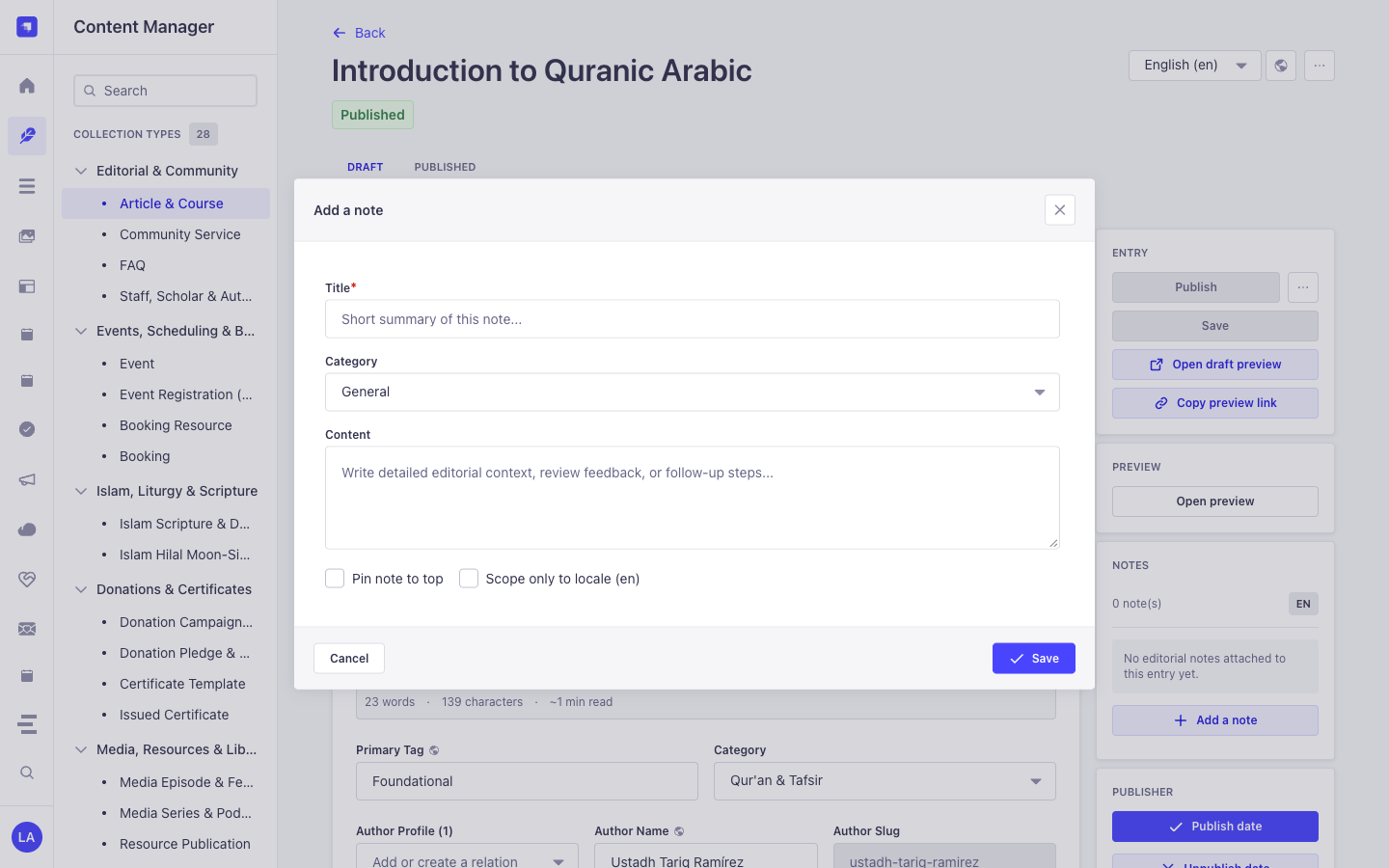
Section titled “Content Manager Entities & Components”- Right-Sidebar Notes (
NOTES) Panel injected into every/admin/content-manager/collection-types/*and/admin/content-manager/single-types/*edit view - Internal Polymorphic Entity
plugin::notes.note(notestable, managed via Content Manager side panel &/admin/plugins/notes)
Why This Plugin Creates & Integrates Content Manager Entities
Section titled “Why This Plugin Creates & Integrates Content Manager Entities”@vicacha-devs/strapi-plugin-notes is purpose-built for the Strapi v5 Content Manager: it injects an interactive Notes panel directly into the right sidebar of every document edit view while keeping plugin::notes.note (content-manager.visible: false) out of the collection list to avoid cluttering the left sidebar:
- Works on Every
api::*andplugin::*Content Manager Entity: Attachgeneral,todo,blocker, orideanotes to anArticle & Course,Event,Donation Campaign,Islam Scripture Entry, orResource Publicationdirectly inside Content Manager. - Per-Locale (
Scope only to locale) or Cross-Locale Pinning: Scope a translation note specifically toen,es,ar, ortr, and pin critical blockers (Pin note to top) so editors see them immediately upon opening the entry.
How to Use in Strapi Content Manager (Step-by-Step)
Section titled “How to Use in Strapi Content Manager (Step-by-Step)”- Open Any Entry in Content Manager: Open any document in
/admin/content-manager/collection-types/...or/admin/content-manager/single-types/.... - Click
+ Add a note: In the right-hand sidebar under NOTES, click the button to open the note modal. - Set Category, Pin & Locale Scope: Enter
Title, selectCategory(General,To-Do,Blocker,Idea), write theContent, optionally checkPin note to toporScope only to locale, and click Save. - Triage Across All Entities: Visit
/admin/plugins/notes(Global Notes Hub) to filter all notes across the entire CMS and click any card to jump back into Content Manager.
Content Manager & Plugin Workspace Synchronization
Section titled “Content Manager & Plugin Workspace Synchronization”Content Manager Use Cases & Editorial Workflows
Section titled “Content Manager Use Cases & Editorial Workflows”Content Manager Use Case 1 — Attaching Locale-Scoped Translation & Scholar Review Notes
Section titled “Content Manager Use Case 1 — Attaching Locale-Scoped Translation & Scholar Review Notes”- Why & What it is for: Leave a
blockerortodoreview note on a course or scripture entry directly inside the Content Manager edit screen. - How to use in Content Manager: Open
/admin/content-manager/collection-types/api::article.article/{documentId}?plugins[i18n][locale]=en, click + Add a note in the right sidebar, checkScope only to locale (en), and save.
5. End-to-End Use Cases & Workflows
Section titled “5. End-to-End Use Cases & Workflows”Use Case 1 — In-Context Editorial Review & Translation Handoff Notes
Section titled “Use Case 1 — In-Context Editorial Review & Translation Handoff Notes”- What it is for: Leave
todo,blocker,idea, orgeneralnotes directly on a draft Article, Event, or Donation Campaign for fellow editors and translators. - How it works: Open the record in Content Manager; the injected side panel queries
GET /notes/entity?entitySlug=...&entityDocumentId=...&entityLocale=...and creates notes viaPOST /notes.
Use Case 2 — Pinning Critical Editorial Blockers to the Top of a Document
Section titled “Use Case 2 — Pinning Critical Editorial Blockers to the Top of a Document”- What it is for: Ensure legal, theological, or fact-checking warnings stay pinned (
isPinned: true) at the top of a Content Manager entry. - How it works: Toggle pin status in the Content Manager side panel (
PUT /notes/{id}), surfacing the note both on the document and in the Global Notes Hub.
Use Case 3 — Cross-Collection Editorial Triage in the Global Notes Hub
Section titled “Use Case 3 — Cross-Collection Editorial Triage in the Global Notes Hub”- What it is for: Review all unresolved
blockerandtodoannotations across every collection type from a single dashboard. - How it works: Navigate to
/admin/plugins/notesto filterplugin::notes.noterecords bycategory,isPinned,entitySlug, or keyword and jump straight to the target document.
6. REST API Endpoints (content-api & admin)
Section titled “6. REST API Endpoints (content-api & admin)”| Method | Endpoint Path | Scope | Controller Handler | Auth |
|---|---|---|---|---|
GET |
/notes/notes |
admin |
notesController.find |
Bearer JWT |
GET |
/notes/notes/stats |
admin |
notesController.stats |
Bearer JWT |
GET |
/notes/notes/{id} |
admin |
notesController.findOne |
Bearer JWT |
POST |
/notes/notes |
admin |
notesController.create |
Bearer JWT |
PUT |
/notes/notes/{id} |
admin |
notesController.update |
Bearer JWT |
DELETE |
/notes/notes/{id} |
admin |
notesController.delete |
Bearer JWT |
GET |
/api/notes/notes |
content-api |
notesController.find |
Bearer JWT |
GET |
/api/notes/notes/{id} |
content-api |
notesController.findOne |
Bearer JWT |
7. Programmatic Server Usage (strapi.plugin & strapi.documents)
Section titled “7. Programmatic Server Usage (strapi.plugin & strapi.documents)”// Registered services on plugin "notes": "notesService", "noteService", "note"const pluginService = strapi.plugin("notes")?.service("notesService");
// Querying records via the Strapi v5 Document Service APIconst records = await strapi.documents("plugin::notes.note").findMany({ limit: 25, sort: "createdAt:desc",});8. Troubleshooting & Verification
Section titled “8. Troubleshooting & Verification”- Admin panel changes not visible: Run
pnpm strapi buildafter modifyingconfig/plugins.ts. - Peer dependency isolation: Keep
hoistPattern: ["*", "!@strapi/*"]inpnpm-workspace.yamlso@strapi/*contexts are never duplicated. - TypeScript type-checking: Validate both
admin/tsconfig.jsonandserver/tsconfig.jsonviapnpm --filter <pkg> test:ts.