Events, RSVP & Check-In — Developer Guide & Admin UI
1. Installation & Peer Setup
Section titled “1. Installation & Peer Setup”pnpm add @vicacha-devs/strapi-plugin-calendar @vicacha-devs/strapi-plugin-events2. Server Configuration (config/plugins.ts)
Section titled “2. Server Configuration (config/plugins.ts)”Add the plugin configuration to your Strapi v5 config/plugins.ts file:
export default ({ env }: { env: (key: string, defaultValue?: string) => string }) => ({ "events": { enabled: true, config: { defaultTimezone: env("CALENDAR_DEFAULT_TIMEZONE", "UTC"), defaultCapacity: 100, waitlistEnabledByDefault: true, }, },});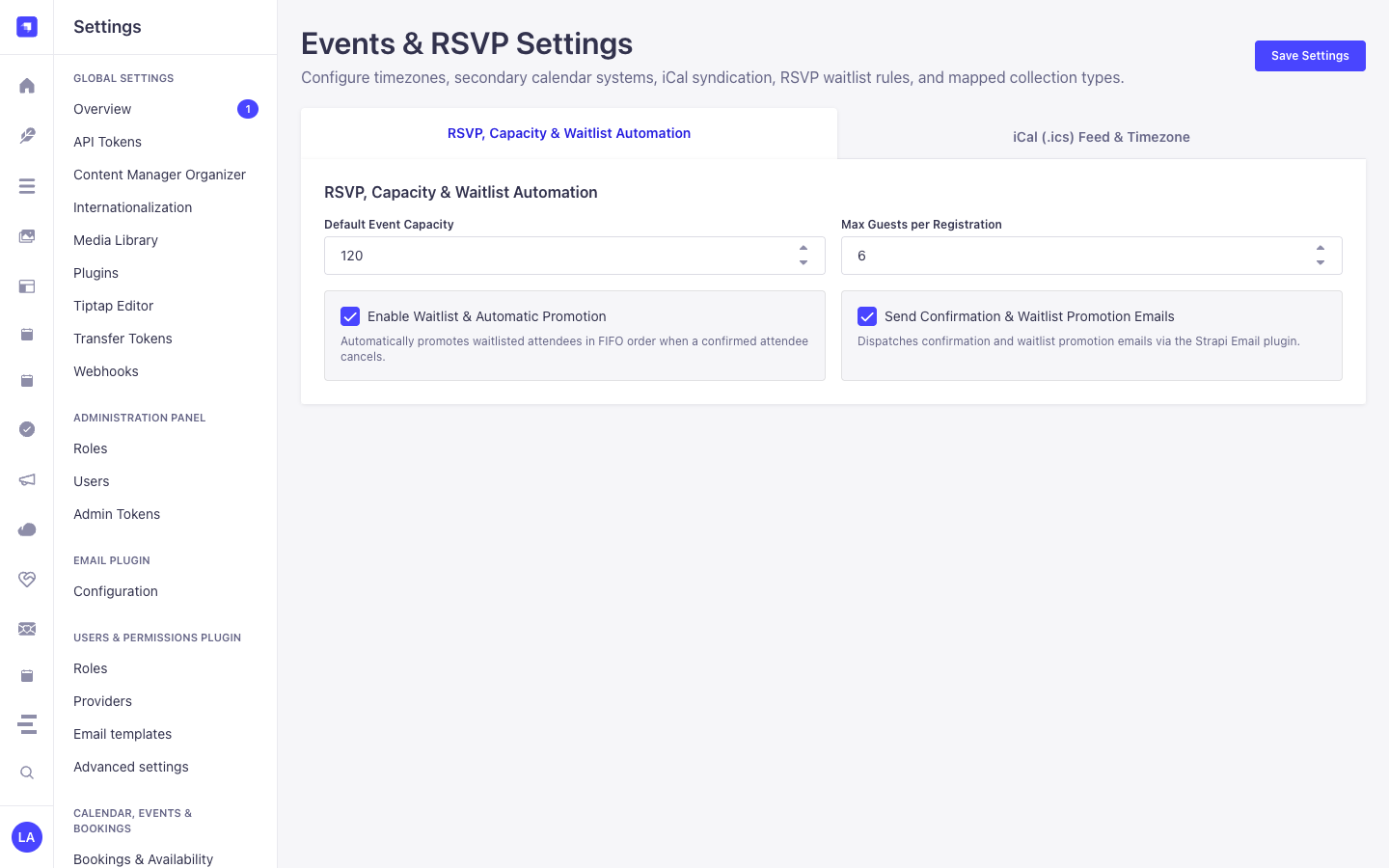
3. Strapi v5 Admin UI Tour
Section titled “3. Strapi v5 Admin UI Tour”Once enabled, the plugin registers its workspace and settings inside the Strapi v5 Admin panel using Strapi Design System v2 components:
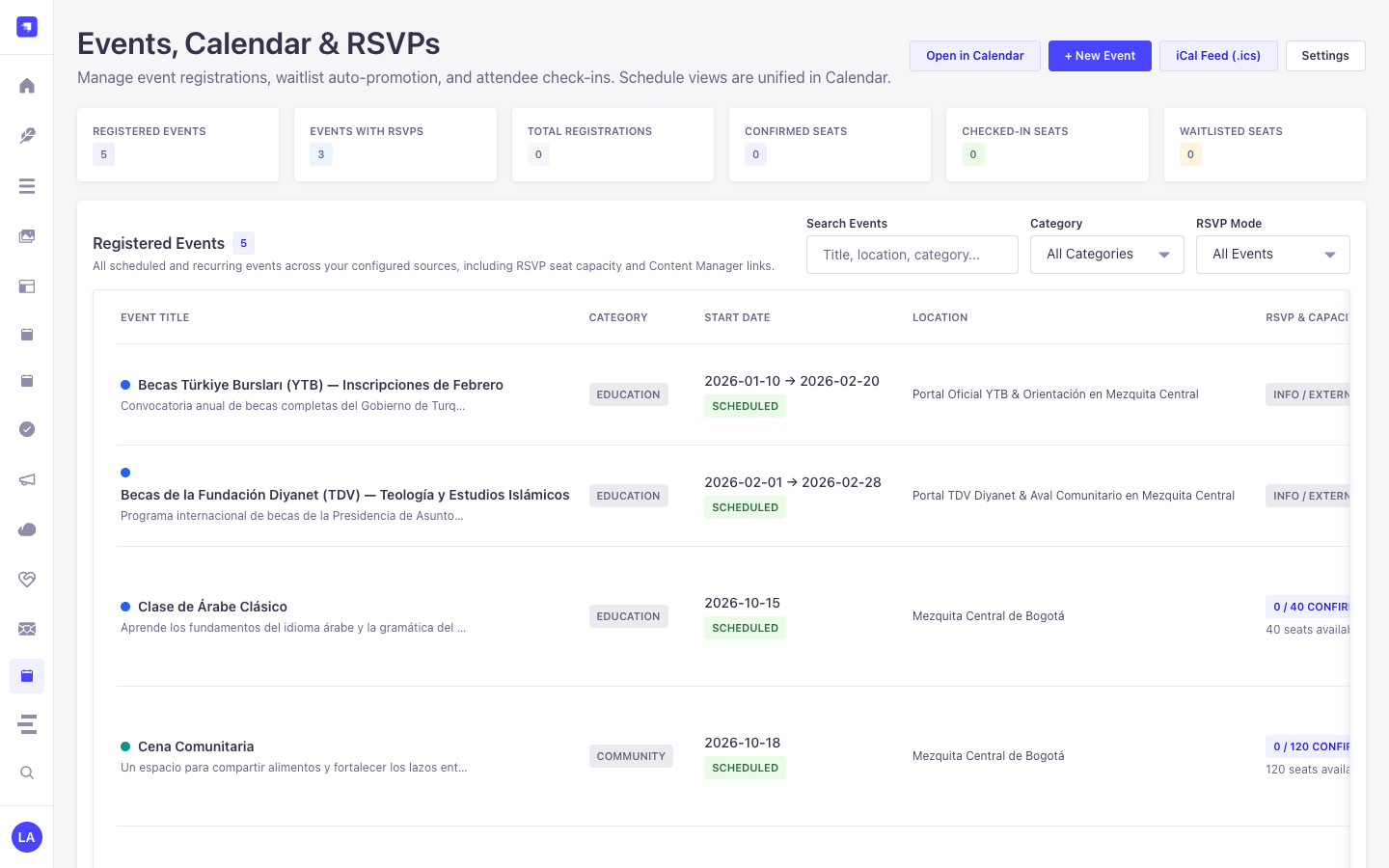
Key Localized Admin UI Labels
Section titled “Key Localized Admin UI Labels”| Translation Key | Rendered UI Label |
|---|---|
sidePanel.title |
Events & RSVP Summary |
sidePanel.secondaryCalendars |
Alternative Calendar Dates |
sidePanel.rsvpStatus |
RSVP & Capacity |
sidePanel.full |
Full / Waitlist |
sidePanel.open |
Open |
sidePanel.confirmedSeats |
Confirmed Seats |
sidePanel.checkedIn |
Checked In |
sidePanel.waitlisted |
Waitlisted Seats |
4. Content-Type Entities, Locations & Schemas (strapi.documents)
Section titled “4. Content-Type Entities, Locations & Schemas (strapi.documents)”Registers two Collection Types (plugin::events.event with draftAndPublish: true & i18n.localized: true, and plugin::events.registration) plus the plugin::events.rrule Custom Field. Also supports binding additional custom api::* event collections via sources[] and extending schemas via schemaExtensions in config/plugins.ts.
Where to Find Content-Type Entities in Strapi v5
Section titled “Where to Find Content-Type Entities in Strapi v5”- Content Manager:
/admin/content-manager/collection-types/plugin::events.event&/admin/content-manager/collection-types/plugin::events.registration(visible: true) - Content-Type Builder:
/admin/plugins/content-type-builderunder Collection Types (Event&Event Registration (RSVP)) + Custom Fieldplugin::events.rrule - Plugin Workspace & Settings:
/admin/plugins/events(Events Manager, RSVP Roster, Waitlist, Check-In) and/admin/settings/events - Database Tables:
plugin_events_itemsandplugin_events_registrations
plugin::events.event — Event
Section titled “plugin::events.event — Event”Recurring & single events managed by strapi-plugin-events
Kind:
collectionType· DB Table:plugin_events_items· Admin Location:/admin/content-manager/collection-types/plugin::events.event· Draft & Publish:Yes· i18n:Yes
| Attribute | Strapi Type | Required | Constraints / Target |
|---|---|---|---|
title |
string |
Yes | max: 200 |
slug |
uid |
Yes | — |
summary |
text |
No | max: 500 |
description |
richtext |
No | — |
startDate |
datetime |
Yes | — |
endDate |
datetime |
No | — |
allDay |
boolean |
No | default: false |
timezone |
string |
No | default: "UTC" |
recurrence |
customField |
No | customField: plugin::events.rrule |
eventStatus |
enumeration |
Yes | enum: scheduled, cancelled, postponed, rescheduled; default: "scheduled" |
locationType |
enumeration |
No | enum: in_person, online, hybrid; default: "in_person" |
location |
string |
No | — |
virtualUrl |
string |
No | — |
category |
string |
No | default: "general" |
speaker |
string |
No | — |
speakerSlug |
string |
No | — |
color |
string |
No | default: "#0D9488" |
featured |
boolean |
No | default: false |
rsvpEnabled |
boolean |
No | default: false |
capacity |
integer |
No | — |
waitlistEnabled |
boolean |
No | default: true |
maxGuestsPerRegistration |
integer |
No | default: 5 |
registrationDeadline |
datetime |
No | — |
alternateDates |
json |
No | — |
poster |
media |
No | — |
actionLinks |
json |
No | — |
spotlightConfig |
json |
No | — |
metadata |
json |
No | — |
plugin::events.registration — Event Registration (RSVP)
Section titled “plugin::events.registration — Event Registration (RSVP)”Attendee RSVPs, waitlists, and check-ins managed by strapi-plugin-events
Kind:
collectionType· DB Table:plugin_events_registrations· Admin Location:/admin/content-manager/collection-types/plugin::events.registration· Draft & Publish:No· i18n:No
| Attribute | Strapi Type | Required | Constraints / Target |
|---|---|---|---|
eventUid |
string |
Yes | default: "plugin::events.event" |
eventDocumentId |
string |
Yes | — |
eventTitle |
string |
No | — |
occurrenceDate |
string |
Yes | — |
attendeeName |
string |
Yes | max: 160 |
attendeeEmail |
email |
Yes | — |
attendeePhone |
string |
No | max: 50 |
guestsCount |
integer |
Yes | default: 1 |
status |
enumeration |
Yes | enum: confirmed, waitlisted, cancelled, checked_in; default: "confirmed" |
checkInToken |
string |
No | private: true |
checkedInAt |
datetime |
No | — |
locale |
string |
No | default: "es" |
notes |
text |
No | max: 2000 |
metadata |
json |
No | — |
Strapi v5 Content Manager Integration (/admin/content-manager)
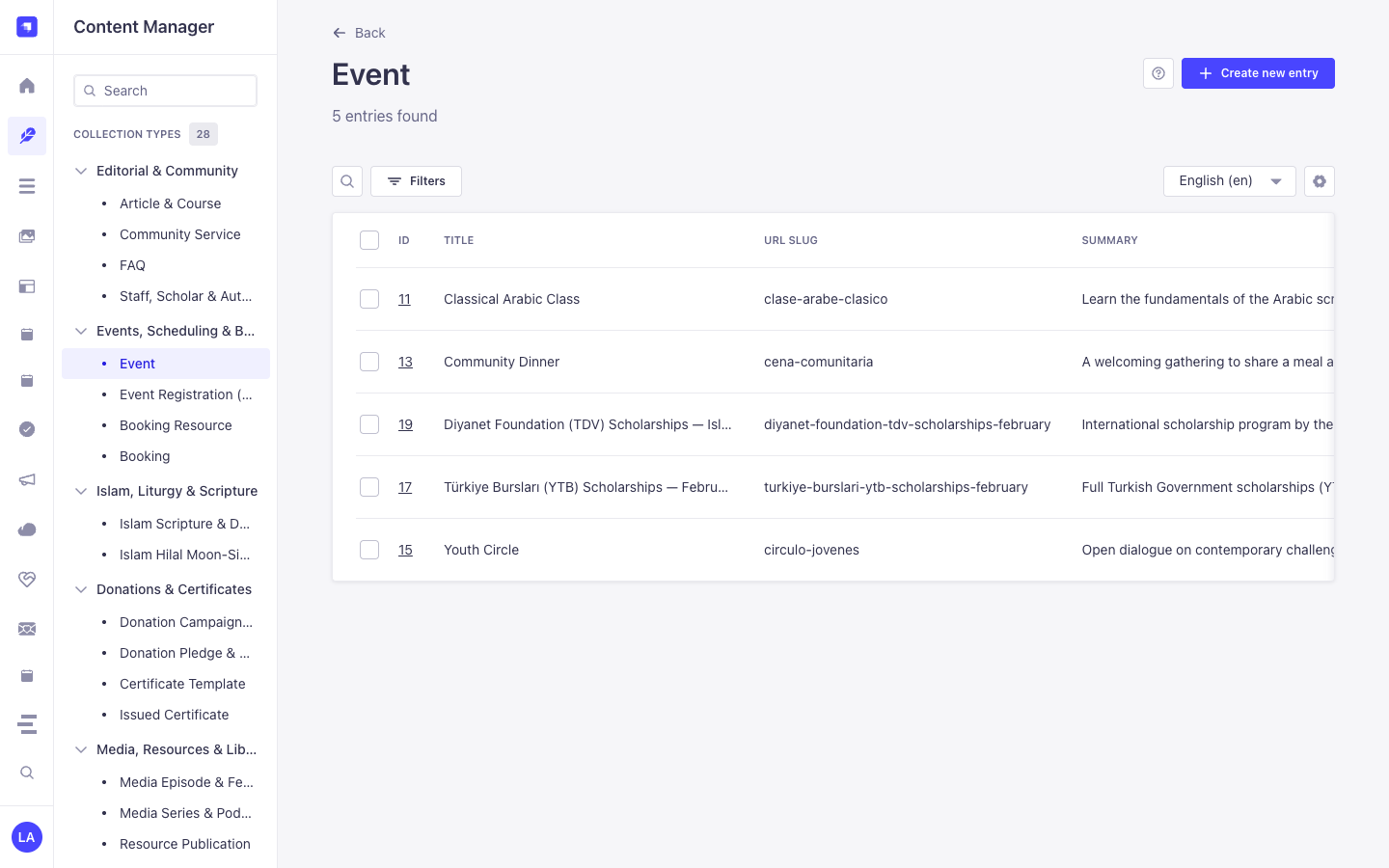
Section titled “Strapi v5 Content Manager Integration (/admin/content-manager)”Content Manager Sidebar Group:
Events, Scheduling & Bookings
Content Manager Entities & Components
Section titled “Content Manager Entities & Components”plugin::events.event(Event —/admin/content-manager/collection-types/plugin::events.event)plugin::events.registration(Event Registration (RSVP) —/admin/content-manager/collection-types/plugin::events.registration)- Custom Field
plugin::events.rrule
Why This Plugin Creates & Integrates Content Manager Entities
Section titled “Why This Plugin Creates & Integrates Content Manager Entities”@vicacha-devs/strapi-plugin-events registers Event (plugin::events.event, with i18n.localized: true and draftAndPublish: true) and Event Registration (RSVP) (plugin::events.registration) as primary Content Manager collection types so editorial teams can author rich multilingual event pages while operations staff manage RSVPs and check-ins:
- Rich Editorial & Speaker Relations: In Content Manager,
Eventrecords support rich-text descriptions, poster images, speaker relations (e.g., linkingStaff, Scholar & Authorapi::leader.leader), virtual meeting URLs, andplugin::events.rrulerecurrence rules. - Multilingual (
i18n) Event Publishing: Author event pages acrossen,es,ar, andtr(?plugins[i18n][locale]=en) with independent draft/publish control per locale. - Injected Right-Sidebar Widgets: Opening an
Eventin Content Manager displays both the Calendar & Schedule widget (Hijri date +.icsexport) and the Event & RSVP Summary panel alongside Editorial Notes. - Direct RSVP Roster Inspection: Inspect, filter, and search individual
Event Registration (RSVP)records (confirmed,waitlisted,checked_in,cancelled) directly in Content Manager.
How to Use in Strapi Content Manager (Step-by-Step)
Section titled “How to Use in Strapi Content Manager (Step-by-Step)”- Open in Content Manager: In the left sidebar, click Content Manager -> Collection Types -> Events, Scheduling & Bookings and select Event (
/admin/content-manager/collection-types/plugin::events.event?plugins[i18n][locale]=en) or Event Registration (RSVP) (/admin/content-manager/collection-types/plugin::events.registration). - Author & Localize Events: Click + Create new entry in Event, fill in
title,slug,summary,description,startDate,endDate,rrule,capacity, andwaitlistEnabled, then click Publish. - Inspect RSVP Registrations: Open Event Registration (RSVP) in Content Manager to filter attendees by
status,occurrenceDate,attendeeEmail, or linkedevent. - Workspace vs. Content Manager: Use Content Manager for rich multilingual event authoring, poster uploads, and speaker relations; use the Events Workspace (
/admin/plugins/events) for 1-click door check-in, waitlist promotion, and formula-sanitized CSV exports.
Content Manager & Plugin Workspace Synchronization
Section titled “Content Manager & Plugin Workspace Synchronization”Content Manager Use Cases & Editorial Workflows
Section titled “Content Manager Use Cases & Editorial Workflows”Content Manager Use Case 1 — Authoring Multilingual Recurring Classes & Community Dinners
Section titled “Content Manager Use Case 1 — Authoring Multilingual Recurring Classes & Community Dinners”- Why & What it is for: Create and translate recurring educational classes (
Classical Arabic Course), youth circles (Weekly Youth Circle), and scholarship announcements (Türkiye Bursları Scholarship Orientation) in Content Manager. - How to use in Content Manager: Open
/admin/content-manager/collection-types/plugin::events.event?plugins[i18n][locale]=en, edit the event attributes andrrulerecurrence, verify the Hijri date in the right sidebar, and publish across locales.
Content Manager Use Case 2 — Filtering Waitlisted or Checked-In Attendees Across Occurrences
Section titled “Content Manager Use Case 2 — Filtering Waitlisted or Checked-In Attendees Across Occurrences”- Why & What it is for: Search attendee registrations by email, occurrence date, or dietary/accessibility notes inside Content Manager.
- How to use in Content Manager: Open
/admin/content-manager/collection-types/plugin::events.registrationand filter bystatus = waitlistedorstatus = checked_in.
5. End-to-End Use Cases & Workflows
Section titled “5. End-to-End Use Cases & Workflows”Use Case 1 — Multilingual Recurring Events with Poster & Speaker Metadata
Section titled “Use Case 1 — Multilingual Recurring Events with Poster & Speaker Metadata”- What it is for: Publish localized single or recurring lectures, workshops, and community gatherings with speaker profiles and virtual/hybrid links.
- How it works: Author records in
plugin::events.event(usingplugin::events.rrulefor recurrence) and query expanded occurrences viaGET /api/events/upcomingorGET /api/events/calendar.
Use Case 2 — Capacity-Controlled Public RSVP & Automatic Waitlist Promotion
Section titled “Use Case 2 — Capacity-Controlled Public RSVP & Automatic Waitlist Promotion”- What it is for: Enforce seat limits (
capacity,maxGuestsPerRegistration) per occurrence date and automatically promote waitlisted guests when someone cancels. - How it works: Visitors submit
POST /api/events/rsvp(creatingplugin::events.registrationasconfirmedorwaitlisted);POST /api/events/rsvp/cancelcancels a seat and promotes the oldest waitlisted record.
Use Case 3 — 1-Click Door Check-In & Formula-Injection-Safe CSV Roster Export
Section titled “Use Case 3 — 1-Click Door Check-In & Formula-Injection-Safe CSV Roster Export”- What it is for: Check in attendees at the venue entrance and export clean attendee rosters for spreadsheets.
- How it works: Use
POST /events/registrations/{documentId}/check-inin/admin/plugins/eventsand download rosters viaGET /events/registrations/export.csv.
6. REST API Endpoints (content-api & admin)
Section titled “6. REST API Endpoints (content-api & admin)”| Method | Endpoint Path | Scope | Controller Handler | Auth |
|---|---|---|---|---|
GET |
/events/settings |
admin |
admin.getSettings |
Bearer JWT |
PUT |
/events/settings |
admin |
admin.updateSettings |
Bearer JWT |
GET |
/events/calendar |
admin |
admin.getCalendar |
Bearer JWT |
POST |
/events/calendar/reschedule |
admin |
admin.reschedule |
Bearer JWT |
POST |
/events/calendar/quick-create |
admin |
admin.quickCreate |
Bearer JWT |
GET |
/events/stats/{documentId} |
admin |
admin.getEventStats |
Bearer JWT |
GET |
/events/registrations |
admin |
admin.listRegistrations |
Bearer JWT |
GET |
/events/registrations/export.csv |
admin |
admin.exportRegistrationsCsv |
Bearer JWT |
POST |
/events/registrations/{documentId}/status |
admin |
admin.updateRegistrationStatus |
Bearer JWT |
POST |
/events/registrations/{documentId}/check-in |
admin |
admin.checkIn |
Bearer JWT |
GET |
/api/events/occurrences |
content-api |
content-api.listOccurrences |
Bearer JWT |
GET |
/api/events/spotlights |
content-api |
content-api.listSpotlights |
Bearer JWT |
GET |
/api/events/feed.ics |
content-api |
content-api.downloadFeedIcs |
Bearer JWT |
GET |
/api/events/{documentId}/invite.ics |
content-api |
content-api.downloadEventInviteIcs |
Bearer JWT |
GET |
/api/events/{documentId}/stats |
content-api |
content-api.getEventStats |
Bearer JWT |
POST |
/api/events/{documentId}/register |
content-api |
content-api.registerAttendee |
Bearer JWT |
POST |
/api/events/registrations/{token}/cancel |
content-api |
content-api.cancelRegistration |
Bearer JWT |
7. Programmatic Server Usage (strapi.plugin & strapi.documents)
Section titled “7. Programmatic Server Usage (strapi.plugin & strapi.documents)”// Registered services on plugin "events": "settings", "occurrence", "rsvp", "ical"const pluginService = strapi.plugin("events")?.service("occurrence");
// Querying records via the Strapi v5 Document Service APIconst records = await strapi.documents("plugin::events.event").findMany({ limit: 25, sort: "createdAt:desc",});8. Troubleshooting & Verification
Section titled “8. Troubleshooting & Verification”- Admin panel changes not visible: Run
pnpm strapi buildafter modifyingconfig/plugins.ts. - Peer dependency isolation: Keep
hoistPattern: ["*", "!@strapi/*"]inpnpm-workspace.yamlso@strapi/*contexts are never duplicated. - TypeScript type-checking: Validate both
admin/tsconfig.jsonandserver/tsconfig.jsonviapnpm --filter <pkg> test:ts.