Global Command Search — Content Types & Use Cases
Package:
@vicacha-devs/strapi-plugin-global-search· Plugin ID:global-search· Admin Workspace:/admin/plugins/global-search
1. Content-Type Entities, Locations & Schemas (strapi.documents)
Section titled “1. Content-Type Entities, Locations & Schemas (strapi.documents)”Operates as a universal zero-schema introspection engine over all registered Strapi v5 Content-Type entities (api::* collection types, single types, and plugin::* entities) plus nested components and dynamic zones. Uses strapi.contentTypes metadata and strapi.documents(uid).findMany() with RBAC permission filtering.
Where to Find Content-Type Entities in Strapi v5
Section titled “Where to Find Content-Type Entities in Strapi v5”- Spotlight Command Palette Overlay: Press
Cmd+K(macOS) orCtrl+K(Windows/Linux) from any Strapi Admin screen (including Content Manager, Calendar, or Settings) - Dedicated Search Workspace:
/admin/plugins/global-search(Global Searchin the main left sidebar) - Settings Panel:
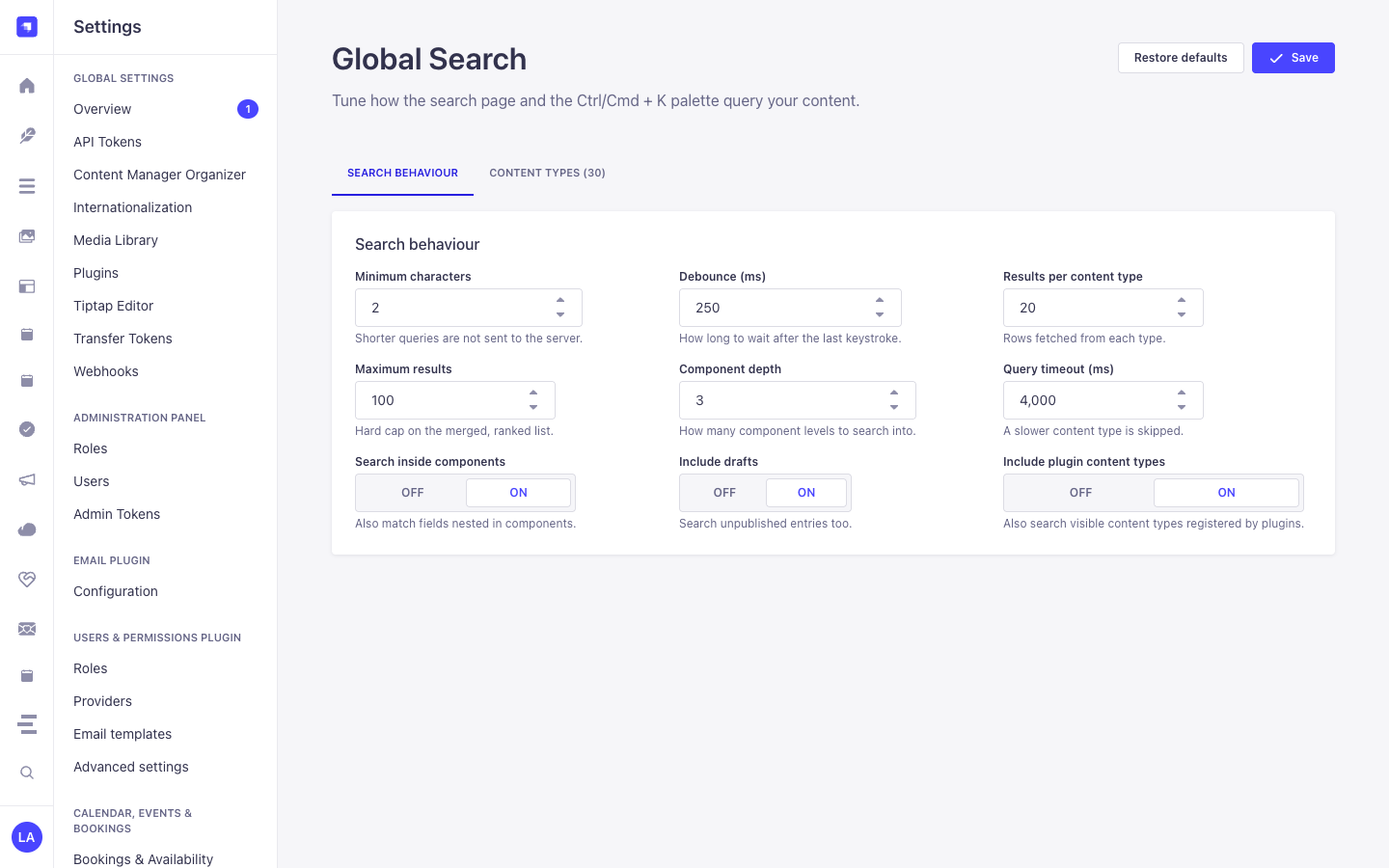
/admin/settings/global-search(Settings -> Global Search -> Configuration— organized into Search behaviour and Content types tabs) - Target Entities: Opens matched documents directly at
/admin/content-manager/collection-types/{uid}/{documentId}?plugins[i18n][locale]={locale}
This plugin operates dynamically across existing Strapi api::* and plugin::* Content-Type entities without creating separate collection tables.
Strapi v5 Content Manager Integration (/admin/content-manager)
Section titled “Strapi v5 Content Manager Integration (/admin/content-manager)”Content Manager Sidebar Group:
All Content Manager Collection Types & Single Types (Cmd+K/Ctrl+K)
Content Manager Entities & Components
Section titled “Content Manager Entities & Components”- Universal Introspection across all
api::*andplugin::*Content Manager Collection Types, Single Types, and Nested Components
Why This Plugin Creates & Integrates Content Manager Entities
Section titled “Why This Plugin Creates & Integrates Content Manager Entities”@vicacha-devs/strapi-plugin-global-search does not create an isolated database table because its entire purpose is to act as a high-speed Content Manager Command Palette & Deep-Link Router over every api::* and plugin::* entity registered in Strapi v5:
- Instant Deep-Linking into Content Manager: Pressing
Enteron any search result navigates directly to/admin/content-manager/collection-types/{uid}/{documentId}?plugins[i18n][locale]={locale}(orsingle-types/{uid}). - Searches Both Host
api::*and Pluginplugin::*Entities: Simultaneously indexes articles, scholars (api::leader.leader), events (plugin::events.event), scripture entries (plugin::islam.scripture-entry), donations (plugin::donations.campaign), and publications (plugin::resources.publication).
How to Use in Strapi Content Manager (Step-by-Step)
Section titled “How to Use in Strapi Content Manager (Step-by-Step)”- Invoke from Anywhere: Press
Cmd+K(macOS) orCtrl+K(Windows/Linux) while inside Content Manager or any plugin page. - Filter by Entity Type, Status & Locale: Type a keyword and narrow results by Collection Type,
Draft/Publishedstatus, ori18nlocale badge. - Open in Content Manager: Press
Enterto open the entry in Content Manager in the current tab, orCmd/Ctrl + Enterto open it in a new tab.
Content Manager & Plugin Workspace Synchronization
Section titled “Content Manager & Plugin Workspace Synchronization”Content Manager Use Cases & Editorial Workflows
Section titled “Content Manager Use Cases & Editorial Workflows”Content Manager Use Case 1 — Jumping Between Plugin Entities & Host Collections Without Leaving the Keyboard
Section titled “Content Manager Use Case 1 — Jumping Between Plugin Entities & Host Collections Without Leaving the Keyboard”- Why & What it is for: Switch from editing a
Booking Resourceto aDonation CampaignorIslam Scripture Entryin Content Manager in under a second. - How to use in Content Manager: Press
Cmd+K, type the title or slug, and pressEnterto load the target document in Content Manager.
3. End-to-End Use Cases & Workflows
Section titled “3. End-to-End Use Cases & Workflows”Use Case 1 — Instant Cmd+K / Ctrl+K Spotlight Navigation Across All Entities
Section titled “Use Case 1 — Instant Cmd+K / Ctrl+K Spotlight Navigation Across All Entities”- What it is for: Jump directly to any Article, Course, Event, Booking, Certificate, or Single Type record from anywhere in Strapi Admin without leaving the keyboard.
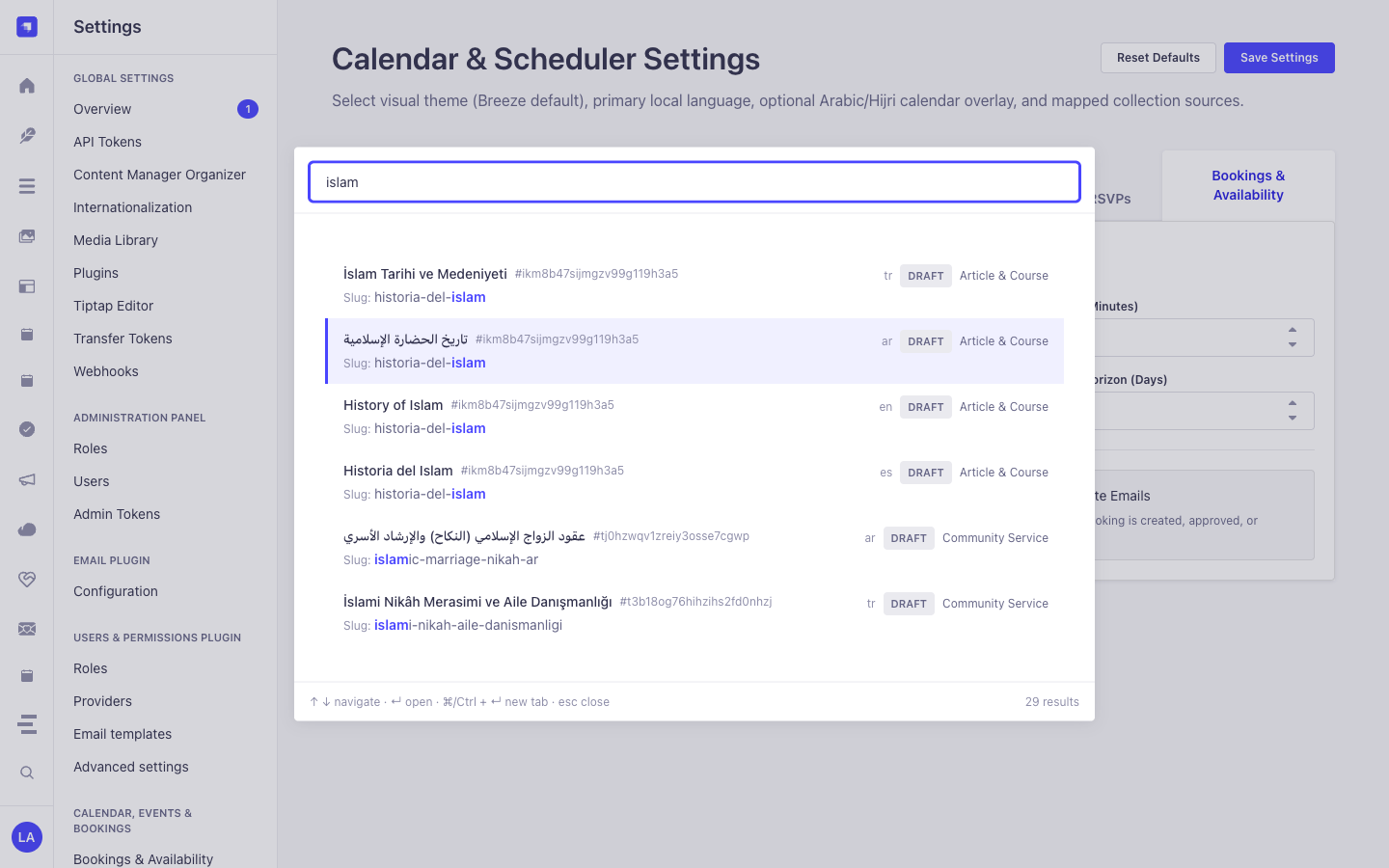
- How it works: Press
Cmd+K, type a query (e.g.,islam), navigate with↑/↓, and pressEnterto open the document in Content Manager (orCmd/Ctrl + Enterfor a new tab).
Use Case 2 — Deep Component & Multilingual Script Search (Arabic, Turkish, Spanish)
Section titled “Use Case 2 — Deep Component & Multilingual Script Search (Arabic, Turkish, Spanish)”- What it is for: Find records by text buried inside repeatable components, SEO meta descriptions, or Arabic/RTL localized variants.
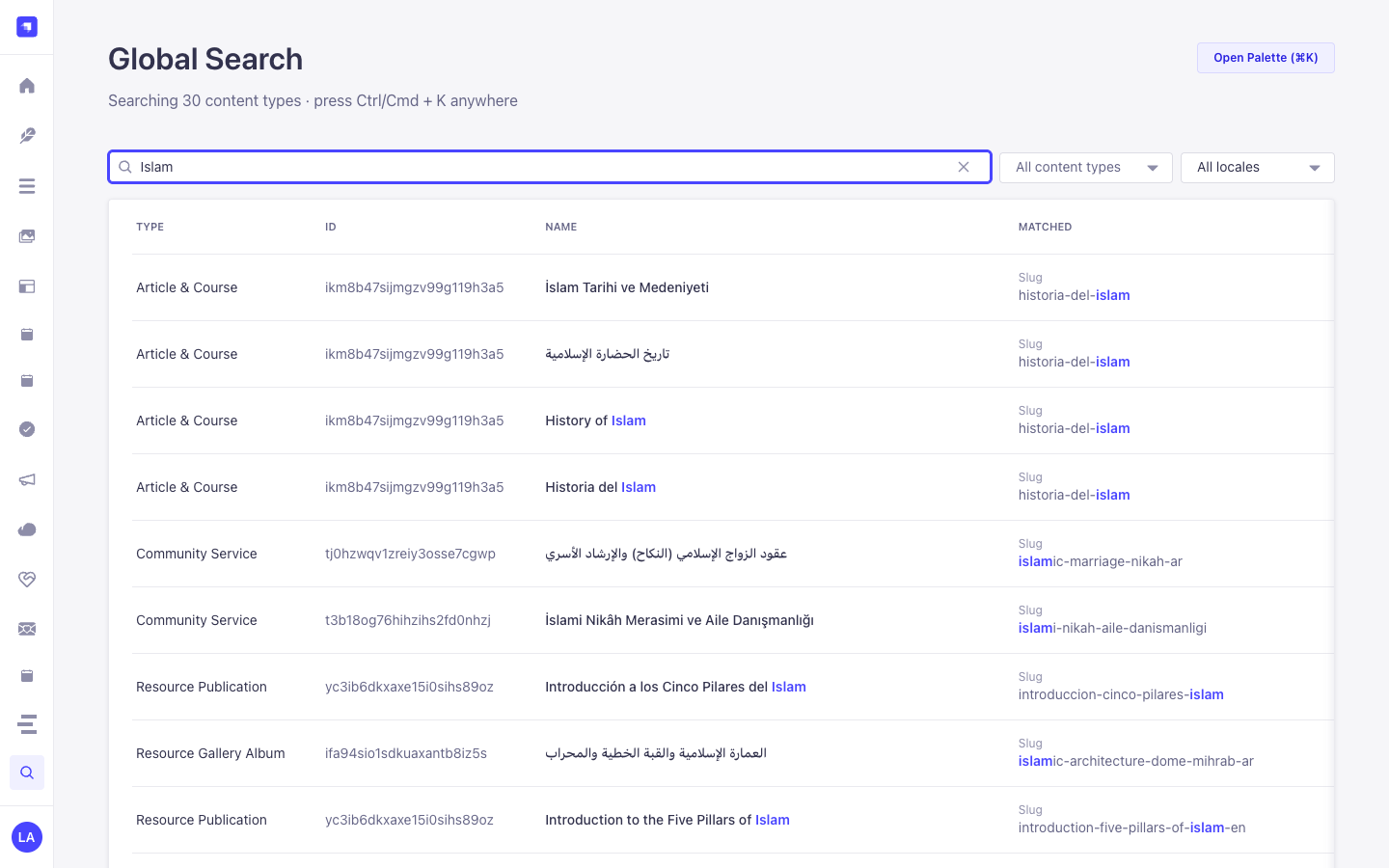
- How it works:
GET /global-search/search?q=...&locale=allnormalizes diacritics and Arabic Alef/Teh Marbuta variants and searches both top-level and nested component fields.
Use Case 3 — Tabbed Search Behaviour & Per-Content-Type Inclusion Tuning
Section titled “Use Case 3 — Tabbed Search Behaviour & Per-Content-Type Inclusion Tuning”- What it is for: Fine-tune query thresholds (
Minimum characters,Debounce (ms),Results per content type,Maximum results,Component depth,Query timeout (ms),Search inside components,Include drafts,Include plugin content types) and toggle which Content-Type entities appear in global search. - How it works: Configure the Search behaviour and Content types tabs in
/admin/settings/global-search(PUT /global-search/settings).