Calendar & Scheduling — Developer Guide & Admin UI
1. Installation & Peer Setup
Section titled “1. Installation & Peer Setup”pnpm add @vicacha-devs/strapi-plugin-calendar2. Server Configuration (config/plugins.ts)
Section titled “2. Server Configuration (config/plugins.ts)”Add the plugin configuration to your Strapi v5 config/plugins.ts file:
export default ({ env }: { env: (key: string, defaultValue?: string) => string }) => ({ "calendar": { enabled: true, config: { defaultView: "dayGridMonth", defaultTimezone: env("CALENDAR_DEFAULT_TIMEZONE", "UTC"), }, },});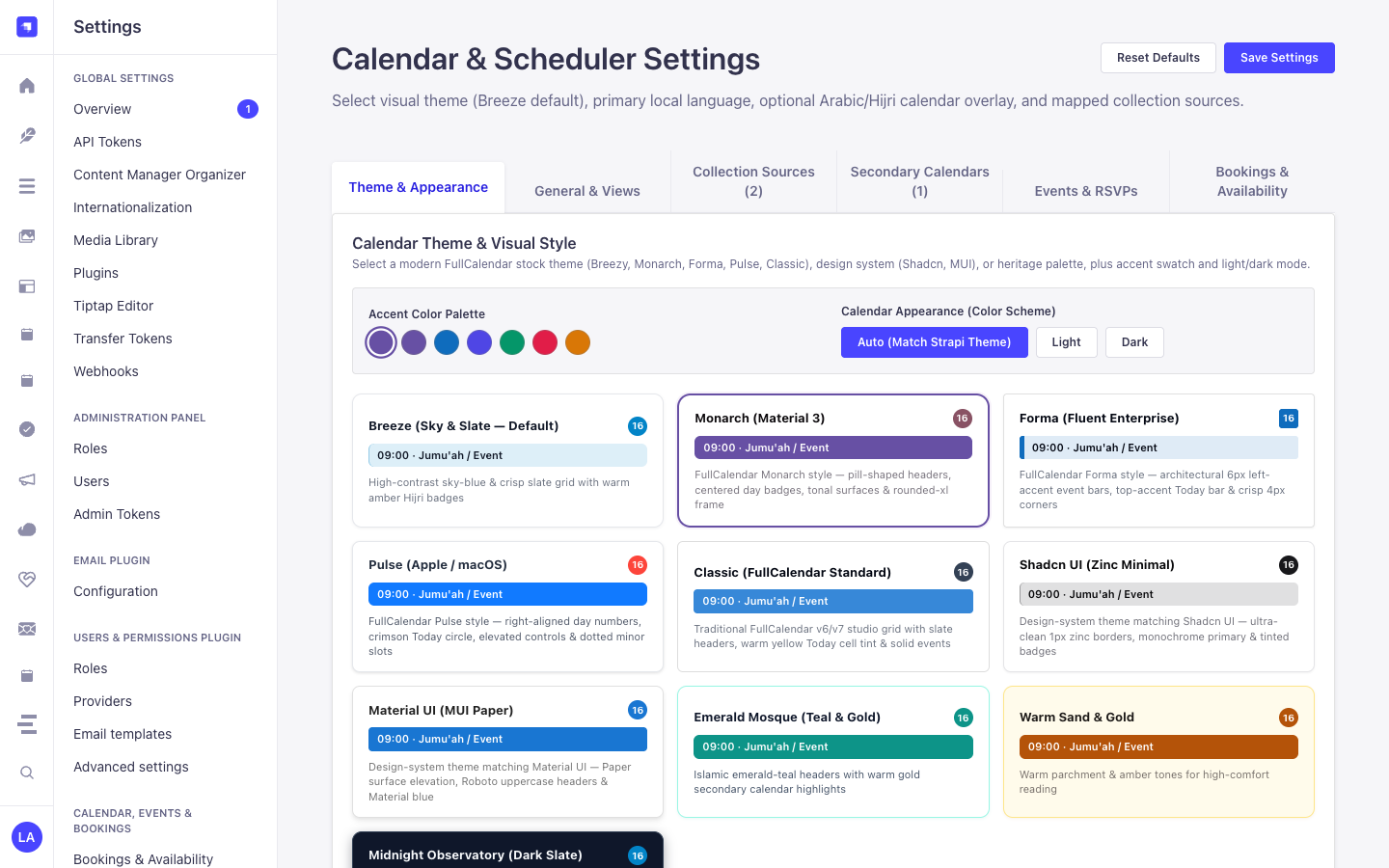
3. Strapi v5 Admin UI Tour
Section titled “3. Strapi v5 Admin UI Tour”Once enabled, the plugin registers its workspace and settings inside the Strapi v5 Admin panel using Strapi Design System v2 components:
Key Localized Admin UI Labels
Section titled “Key Localized Admin UI Labels”| Translation Key | Rendered UI Label |
|---|---|
settings.theme.breeze.label |
Breeze (Sky & Slate — Default) |
settings.theme.breeze.description |
High-contrast sky-blue & crisp slate grid with warm amber Hijri badges |
settings.theme.emerald.label |
Emerald Mosque (Teal & Gold) |
settings.theme.emerald.description |
Islamic emerald-teal headers with warm gold secondary calendar highlights |
settings.theme.sandstone.label |
Andalusian Sandstone (Warm Earth) |
settings.theme.sandstone.description |
Warm terracotta and parchment tones inspired by Andalusian courtyards |
settings.theme.midnight.label |
Midnight Observatory (Dark Slate) |
settings.theme.midnight.description |
Deep slate dark-mode canvas with luminous cyan and gold accents |
4. Content-Type Entities, Locations & Schemas (strapi.documents)
Section titled “4. Content-Type Entities, Locations & Schemas (strapi.documents)”Acts as a multi-collection scheduler engine that binds to any Strapi Content-Type entity (api::* or plugin::*) configured in collections[] or registered dynamically via calendar.service('registry').registerSource(). Also registers the plugin::calendar.rrule Custom Field (json) for RFC 5545 RRULE + RFC 7529 RSCALE recurrence rules.
Where to Find Content-Type Entities in Strapi v5
Section titled “Where to Find Content-Type Entities in Strapi v5”- Bound Content-Type Entities: Any Content Manager collection mapped in
/admin/settings/calendar(e.g.,plugin::events.event,plugin::bookings.booking,api::article.article) - Custom Field in Content-Type Builder: Add the
plugin::calendar.rrulecustom field to any collection type in/admin/plugins/content-type-builder - Plugin Workspace & Settings:
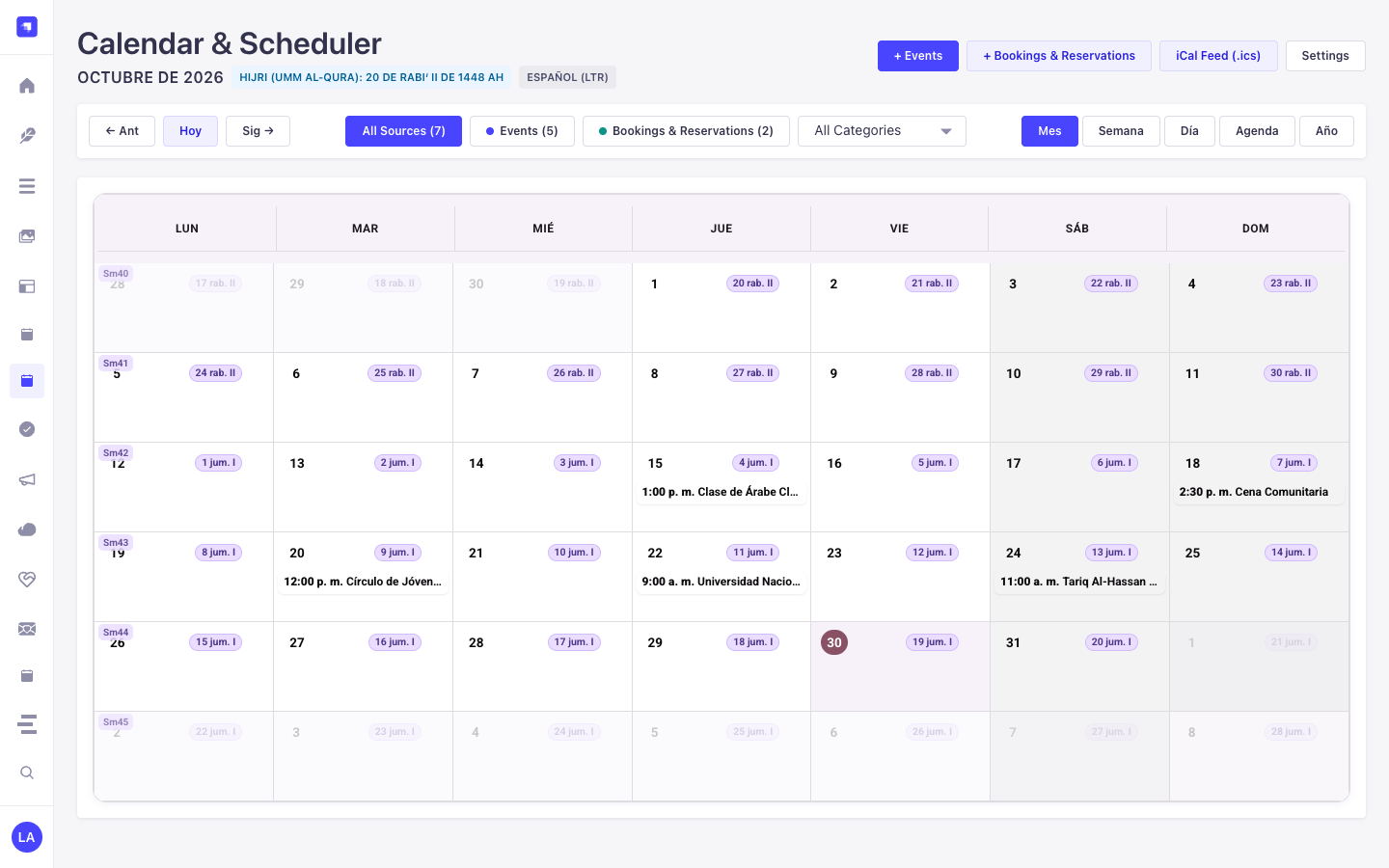
/admin/plugins/calendar(FullCalendar v6 Month/Week/Day/Agenda workspace) and/admin/settings/calendar(General, Prayer & Islamic, Bookings & Availability tabs)
This plugin operates dynamically across existing Strapi api::* and plugin::* Content-Type entities without creating separate collection tables.
Strapi v5 Content Manager Integration (/admin/content-manager)
Section titled “Strapi v5 Content Manager Integration (/admin/content-manager)”Content Manager Sidebar Group:
Events, Scheduling & Bookings
Content Manager Entities & Components
Section titled “Content Manager Entities & Components”- Custom Field
plugin::calendar.rrule(RFC 5545 RRULE + RFC 7529 RSCALE Recurrence Field inside any Content Manager edit view) - Bound Content Manager Collections (
plugin::events.event,plugin::bookings.booking, and any configuredapi::*collection)
Why This Plugin Creates & Integrates Content Manager Entities
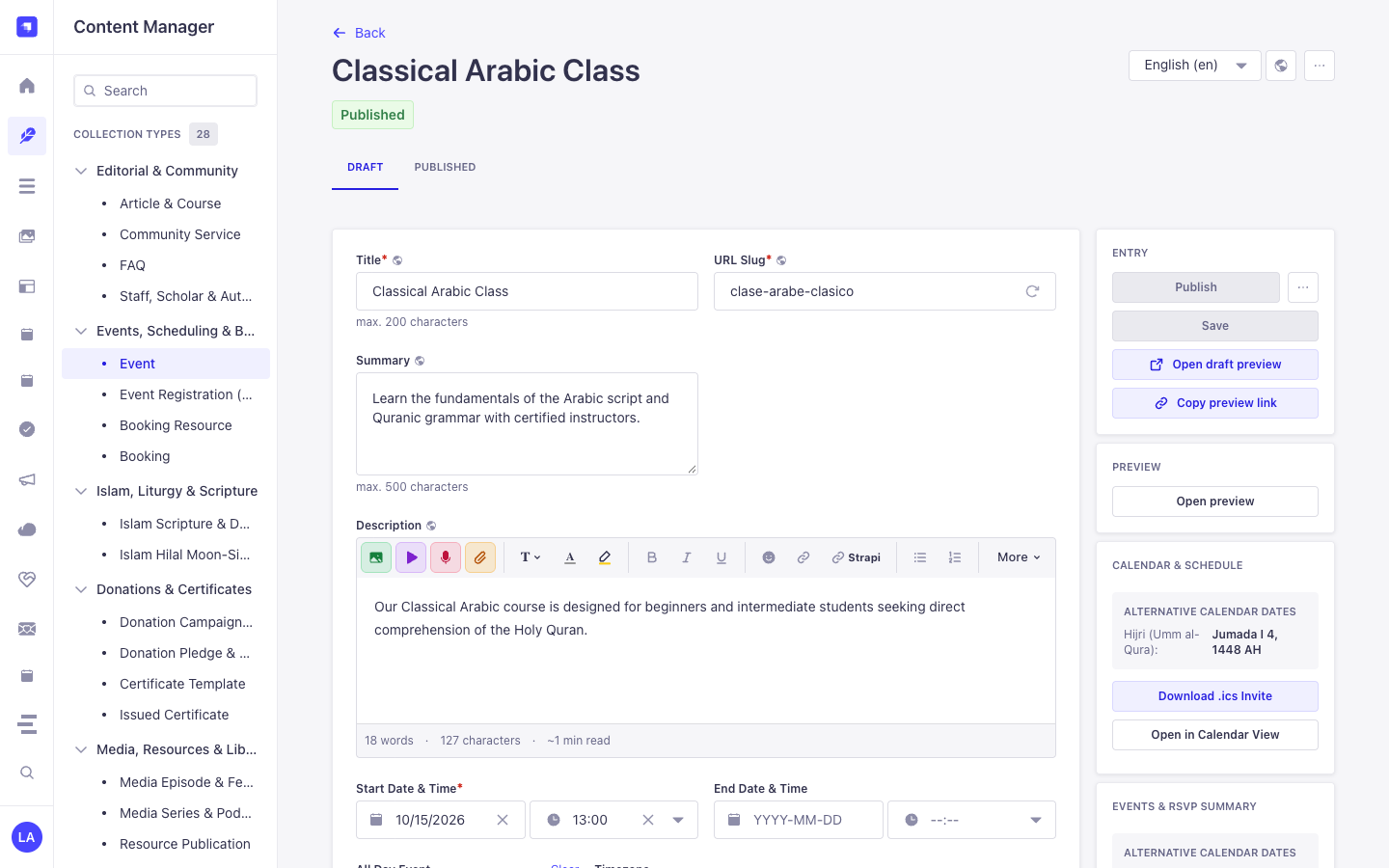
Section titled “Why This Plugin Creates & Integrates Content Manager Entities”Instead of locking schedules inside an isolated table, @vicacha-devs/strapi-plugin-calendar embeds directly into the Strapi v5 Content Manager edit view of any mapped collection (plugin::events.event, plugin::bookings.booking, or custom api::* entities) via its plugin::calendar.rrule Custom Field and right-sidebar Calendar & Schedule widget:
- In-Place Secondary Calendar Preview in Content Manager: When editing an event in Content Manager, the right-sidebar Calendar & Schedule panel automatically computes and displays the corresponding Hijri (Umm al-Qura), Hebrew, or Persian date (
4 Jumada I 1448 AH) plus 1-click.icsdownload and Open in Calendar View buttons. - Visual RFC 5545
RRULE+ RFC 7529RSCALEAuthoring: Theplugin::calendar.rrulecustom field lets editors configure Gregorian or lunar recurrence rules directly inside any Content Manager form. - Zero Data Duplication: Dragging an event in
/admin/plugins/calendaror editing start/end dates in/admin/content-manager/collection-types/plugin::events.eventmutates the exact same Strapi v5 Document Service record.
How to Use in Strapi Content Manager (Step-by-Step)
Section titled “How to Use in Strapi Content Manager (Step-by-Step)”- Open a Bound Collection in Content Manager: Navigate to Content Manager -> Collection Types -> Events, Scheduling & Bookings -> Event (
/admin/content-manager/collection-types/plugin::events.event?plugins[i18n][locale]=en) and open any entry. - Configure Start/End Dates & Recurrence: Edit
startDate,endDate,allDay,timezone, and therrulecustom field directly inside the Content Manager form. - Use the Right-Sidebar Calendar Panel: In the right column of the Content Manager edit view, inspect the live Alternative Calendar Dates badge, click Download .ics Invite, or click Open in Calendar View to jump to
/admin/plugins/calendar. - Bind Additional Content Manager Collections: In
/admin/settings/calendar, map anyapi::*collection’stitleField,startField,endField, andrruleFieldto project its Content Manager entries onto the unified calendar grid.
Content Manager & Plugin Workspace Synchronization
Section titled “Content Manager & Plugin Workspace Synchronization”Content Manager Use Cases & Editorial Workflows
Section titled “Content Manager Use Cases & Editorial Workflows”Content Manager Use Case 1 — Authoring a Localized Recurring Course with Live Hijri Date Preview
Section titled “Content Manager Use Case 1 — Authoring a Localized Recurring Course with Live Hijri Date Preview”- Why & What it is for: Edit a weekly Arabic course (
Classical Arabic Course) in Content Manager while verifying its Umm al-Qura Hijri date and downloading its.icsinvite from the right sidebar. - How to use in Content Manager: Open
/admin/content-manager/collection-types/plugin::events.event/{documentId}?plugins[i18n][locale]=en, setstartDateandrrule, and verify the Calendar & Schedule panel on the right.
5. End-to-End Use Cases & Workflows
Section titled “5. End-to-End Use Cases & Workflows”Use Case 1 — Aggregating Multiple Strapi Collections into One Calendar
Section titled “Use Case 1 — Aggregating Multiple Strapi Collections into One Calendar”- What it is for: Display Events, Bookings, Courses, and Editorial Deadlines from different Content-Type entities on a single color-coded FullCalendar grid.
- How it works: Map each collection’s
uid,titleField,startField,endField, andrruleFieldin/admin/settings/calendarorconfig/plugins.ts, then queryGET /api/calendar/occurrences?start=...&end=....
Use Case 2 — Sacred & Lunar Recurrence (RRULE + RSCALE=ISLAMIC-UMALQURA)
Section titled “Use Case 2 — Sacred & Lunar Recurrence (RRULE + RSCALE=ISLAMIC-UMALQURA)”- What it is for: Schedule annual or monthly recurring events that follow the Hijri, Hebrew, or Persian calendar and automatically project onto Gregorian dates.
- How it works: Attach
plugin::calendar.rruleto your Content-Type entity to author RFC 7529 rules (RSCALE=ISLAMIC-UMALQURA;FREQ=YEARLY;BYMONTH=9;BYMONTHDAY=1).
Use Case 3 — Drag-and-Drop Rescheduling & Quick-Create into Target Entities
Section titled “Use Case 3 — Drag-and-Drop Rescheduling & Quick-Create into Target Entities”- What it is for: Let editors drag an event on the calendar grid or click a date cell to create/update the underlying Strapi document directly.
- How it works: Uses
POST /calendar/quick-createandPOST /calendar/rescheduleto mutate the mappedstrapi.documents(uid)record in place.
Use Case 4 — Public RFC 5545 iCal (.ics) Subscription Feeds
Section titled “Use Case 4 — Public RFC 5545 iCal (.ics) Subscription Feeds”- What it is for: Allow users to subscribe to live calendar feeds in Google Calendar, Apple Calendar, or Outlook.
- How it works: Subscribe to
GET /api/calendar/ical.ics(all sources) orGET /api/calendar/ical/{collectionId}.ics(single source).
6. REST API Endpoints (content-api & admin)
Section titled “6. REST API Endpoints (content-api & admin)”| Method | Endpoint Path | Scope | Controller Handler | Auth |
|---|---|---|---|---|
GET |
/calendar/calendar |
admin |
admin.getCalendar |
Bearer JWT |
POST |
/calendar/calendar/reschedule |
admin |
admin.reschedule |
Bearer JWT |
POST |
/calendar/calendar/quick-create |
admin |
admin.quickCreate |
Bearer JWT |
GET |
/calendar/content-types |
admin |
admin.getContentTypes |
Bearer JWT |
GET |
/calendar/settings |
admin |
admin.getSettings |
Bearer JWT |
PUT |
/calendar/settings |
admin |
admin.updateSettings |
Bearer JWT |
POST |
/calendar/clear-settings |
admin |
admin.clearSettings |
Bearer JWT |
GET |
/api/calendar/occurrences |
content-api |
content-api.getOccurrences |
Bearer JWT |
GET |
/api/calendar/feed.ics |
content-api |
content-api.downloadFeedIcs |
Bearer JWT |
GET |
/api/calendar/{documentId}/invite.ics |
content-api |
content-api.downloadEventIcs |
Bearer JWT |
7. Programmatic Server Usage (strapi.plugin & strapi.documents)
Section titled “7. Programmatic Server Usage (strapi.plugin & strapi.documents)”// Registered services on plugin "calendar": "settings", "registry", "occurrence", "ical"const pluginService = strapi.plugin("calendar")?.service("registry");
// Retrieving plugin settings via Strapi plugin storeconst store = strapi.store({ type: "plugin", name: "calendar" });const settings = await store.get({ key: "settings" });8. Troubleshooting & Verification
Section titled “8. Troubleshooting & Verification”- Admin panel changes not visible: Run
pnpm strapi buildafter modifyingconfig/plugins.ts. - Peer dependency isolation: Keep
hoistPattern: ["*", "!@strapi/*"]inpnpm-workspace.yamlso@strapi/*contexts are never duplicated. - TypeScript type-checking: Validate both
admin/tsconfig.jsonandserver/tsconfig.jsonviapnpm --filter <pkg> test:ts.