SEO & SERP Analyzer (@vicacha-devs/strapi-plugin-seo)
The official plugin to make your Strapi content SEO friendly
Features
Section titled “Features”- Easily see which Content-Types does have the SEO component or not.
- Manage the important tags for your SEO (metatitle, metadescription) and preview your content in the SERP
- Manage your meta social tags (Facebook & Twitter) and preview your post.
- Strong SEO analysis for your content.
Installation
Section titled “Installation”To install this plugin, you need to add an NPM dependency to your Strapi application.
yarn add @vicacha-devs/strapi-plugin-seo
pnpm add @vicacha-devs/strapi-plugin-seo
npm install @vicacha-devs/strapi-plugin-seo
How it works
Section titled “How it works”When clicking on the plugin homepage for the first time, the plugin will automatically look if a shared.seo component exists in your project. If not, the plugin will automatically create it with a sub shared.meta-social component.
If a shared.seo component already exists in your project. You might want to rename it or delete it otherwise, the plugin will not create the necessary component in order to work.
Homepage
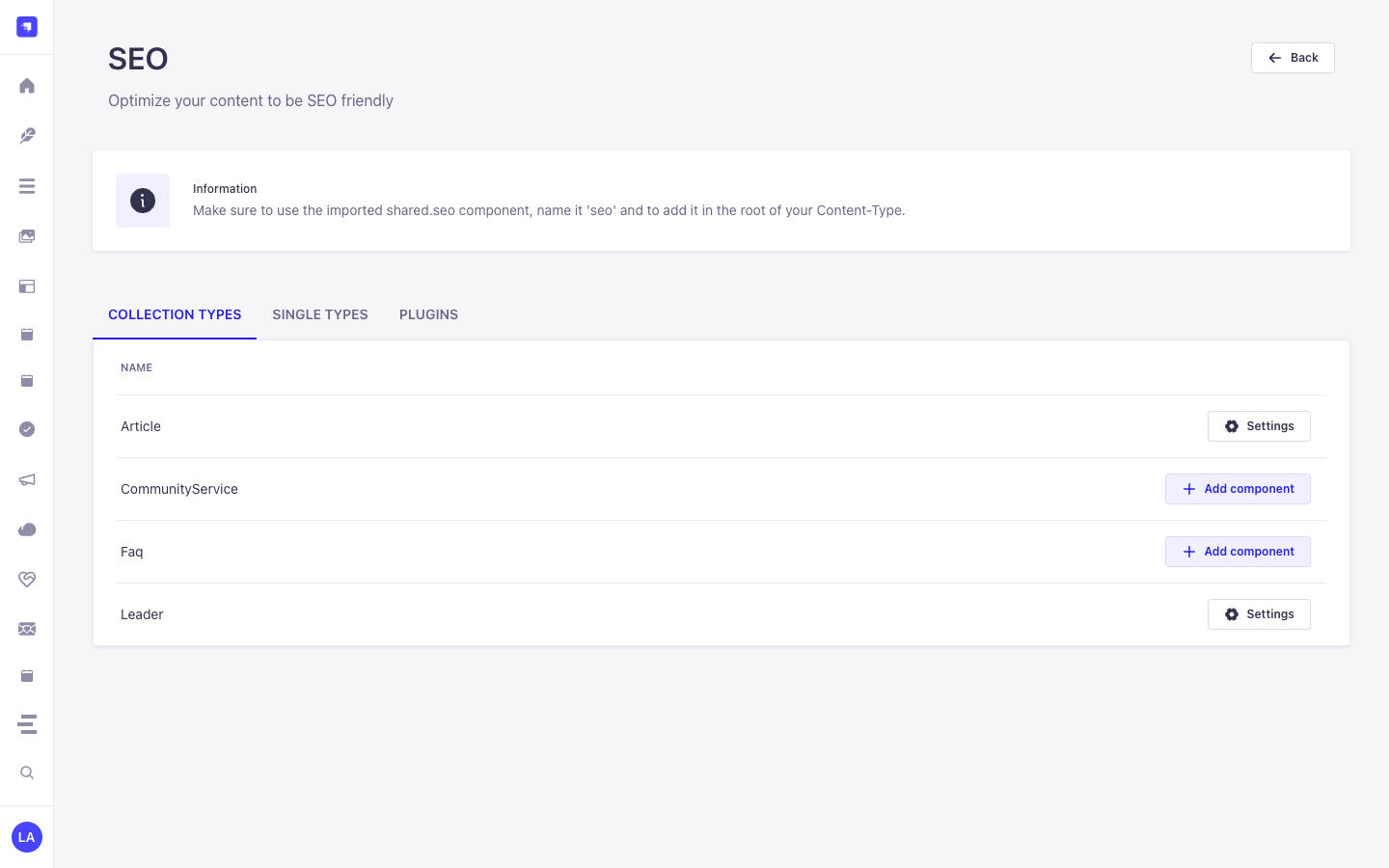
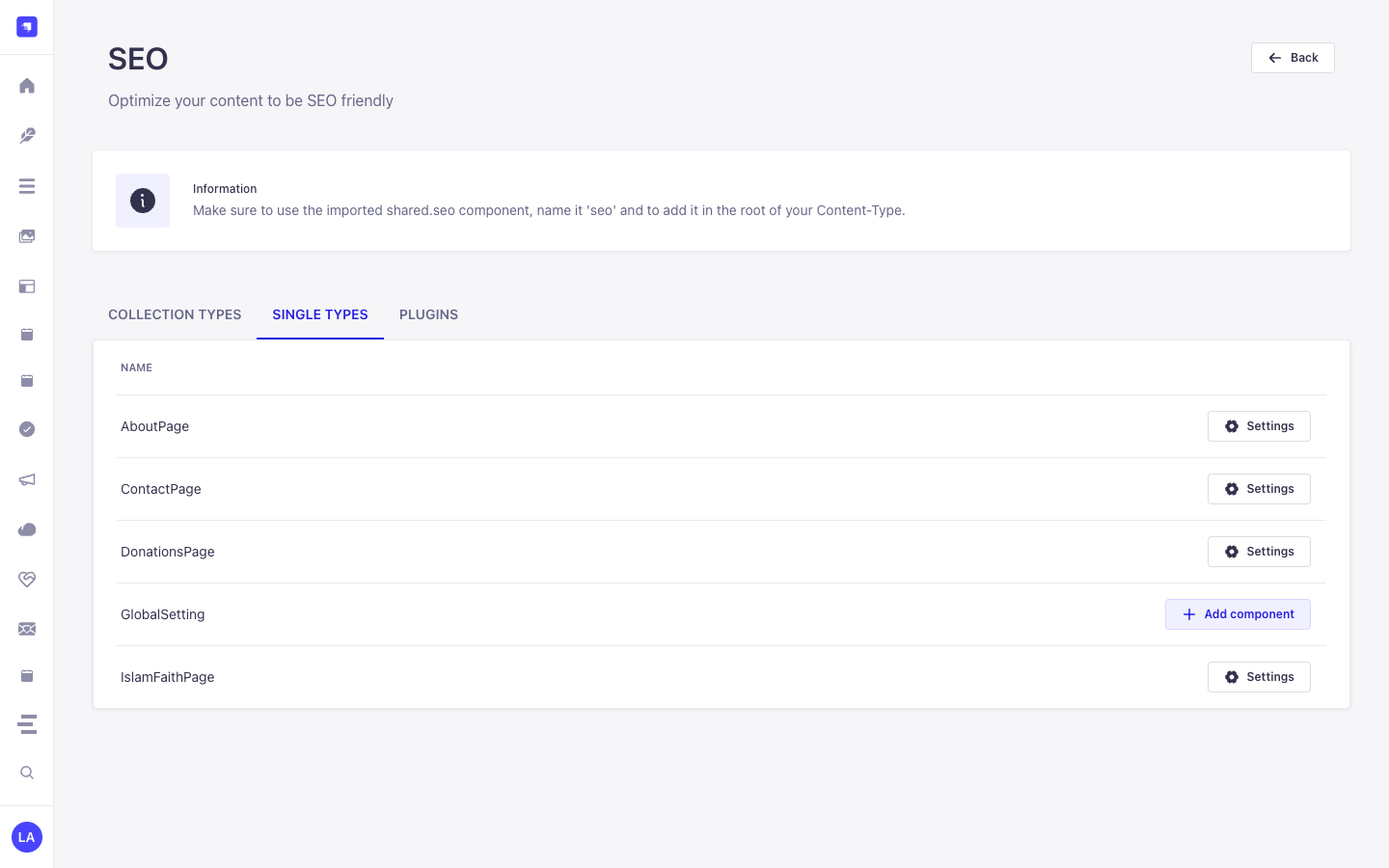
Section titled “Homepage”From there you can get an overview of which content-types contains the SEO component or not. You can quickly add the SEO component to a selected content-type.
Note: By doing this, you will be redirected to the Content-Types builder on the specific content-type. You’ll need to create a new component at the root of this content-type called seo using the existing component the plugin created for you: shared.seo.
Content Manager
Section titled “Content Manager”From any content manager view for a content-type that contains the SEO component, you’ll be able to see a right-side card dedicated for the SEO plugin. From there you can see a quick SEO analysis and action for you to perform (opening preview, opening complete analysis details modal).
Note: You’ll need to fill your SEO component with data to be able to see the SERP preview, Social post preview and complete analysis.
Configuration
Section titled “Configuration”./config/plugins.ts
export default ({ env }: { env: (key: string, defaultVal?: string) => string }) => ({ // ... seo: { enabled: true, config: { autoCreateComponent: true, autoPopulateOnSave: true, generateTitle: ({ doc }) => (typeof doc.title === "string" ? doc.title : null), generateDescription: ({ doc }) => typeof doc.excerpt === "string" ? doc.excerpt : null, generateImage: ({ doc }) => doc.coverImage ?? doc.image ?? null, generateURL: ({ doc }) => typeof doc.slug === "string" ? `${env("PUBLIC_SITE_URL", "")}/${doc.slug}` : null, }, }, // ...});Configuration Options
Section titled “Configuration Options”| Option | Type | Default | Description |
|---|---|---|---|
autoCreateComponent |
boolean |
false |
Automatically creates shared.seo and shared.open-graph on bootstrap if missing. |
autoPopulateOnSave |
boolean |
false |
Registers a strapi.documents.use middleware that fills empty metaTitle, metaDescription, metaImage, and canonicalURL fields on create/update. |
generateTitle |
(ctx) => string | null |
— | Custom title generator ({ uid, doc, locale, strapi }), truncated to 60 chars. |
generateDescription |
(ctx) => string | null |
— | Custom description generator, truncated to 160 chars. |
generateImage |
(ctx) => unknown |
— | Custom social image resolver. |
generateURL |
(ctx) => string | null |
— | Custom canonical URL generator. |
Then, you’ll need to build your admin panel:
yarn build
pnpm build
npm run build
SEO settings page
Section titled “SEO settings page”You’ll be able from the SEO settings page to import a shared.seo & shared.meta-social components from any GitHub repository By default, our components GitHub repository is being used.
Notice: If you decide to import your own components, make sure that they belong to a shared category that their names is the same (seo, meta-social).
Notice2: When adding your SEO component, make sure to name it ‘seo’ and to include it in the root of your Content-Type.
EditView SEO button
Section titled “EditView SEO button”Once you create your SEO component in the edit view inside the Content Manager, the SEO button will appear on the right-links injection zone. You’ll be able to:
- Manage the meta title & description of your content and preview it in SERP (with
noindexdirective awareness). - Auto-generate SEO metadata from the current document via
POST /seo/generate. - Manage your meta social tags (Facebook & Twitter) and preview your post.
- Validate JSON-LD
structuredData(@contextand@typechecks) and run a deep SEO analysis of your content.
Content-Type Entities & Where to Find Them
Section titled “Content-Type Entities & Where to Find Them”Registers and manages two shared Strapi Components (shared.seo and shared.open-graph) inside the Content-Type Builder and injects a live Google SERP, OpenGraph/X Social Card, and Keyword Density Analyzer into the Content Manager edit view for any api::* Collection Type or Single Type that includes shared.seo.
- Content-Type Builder (Components):
/admin/plugins/content-type-builderunder COMPONENTS -> Shared (seo->components_shared_seos,openGraph->components_shared_open_graphs) - Content Manager Edit View: Open any Collection Type or Single Type with the
seocomponent attached (e.g.,/admin/content-manager/single-types/api::about-page.about-page) - Plugin Workspace & Settings:
/admin/plugins/seo(Content-Type SEO Coverage Audit & 1-Click Component Attachment) and/admin/settings/seo
Strapi v5 Content Manager Integration (/admin/content-manager)
Section titled “Strapi v5 Content Manager Integration (/admin/content-manager)”Content Manager Sidebar Group:
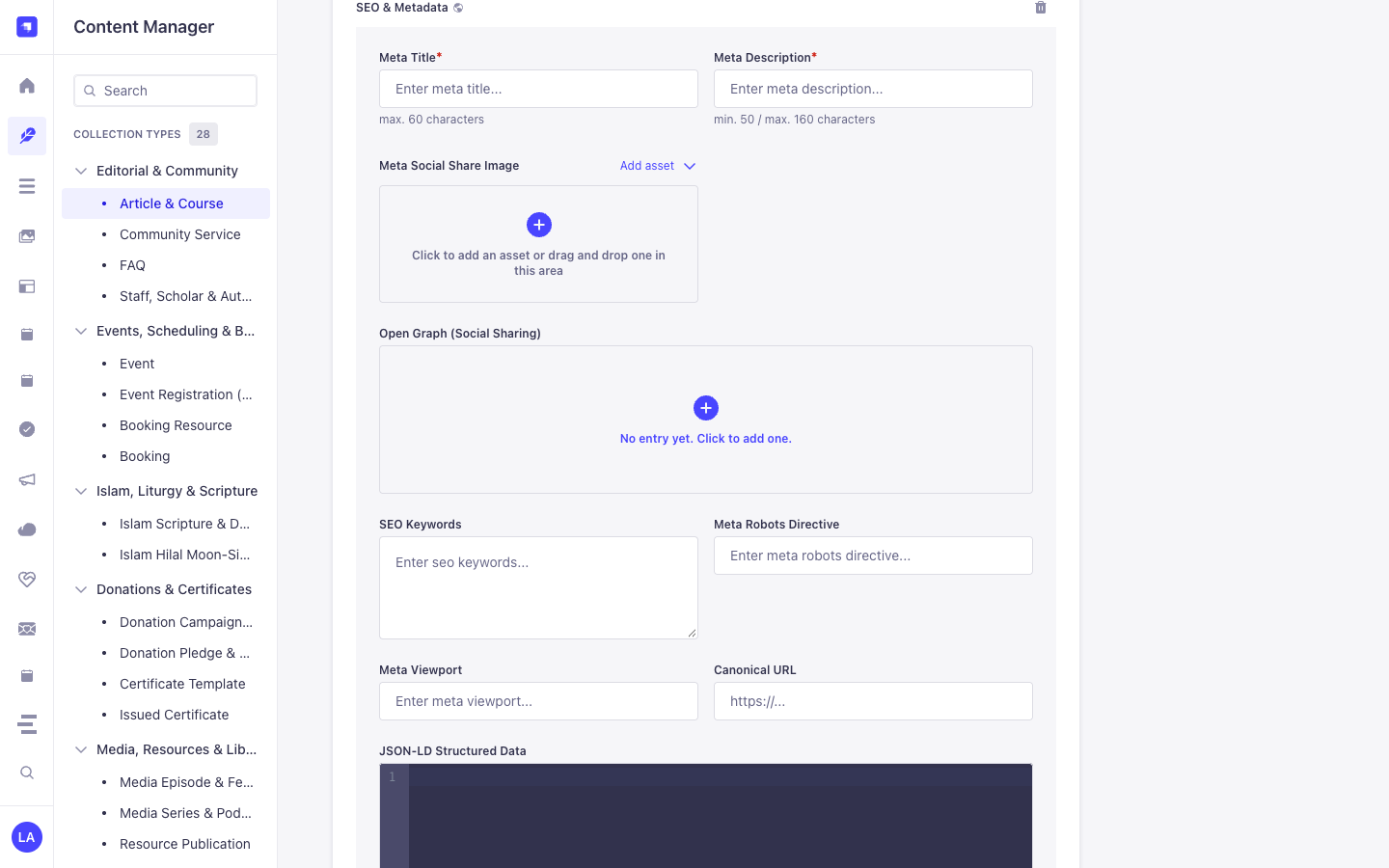
Components (shared.seo— **SEO & Metadata** &shared.open-graph— **Open Graph (Social Sharing)**) inside Content Manager Edit Views
Content Manager Entities & Components
Section titled “Content Manager Entities & Components”- Component
shared.seo(SEO & Metadata attached toapi::article.articleand other Collection/Single Types in Content Manager) - Component
shared.open-graph(Open Graph (Social Sharing) nested insideSEO & Metadata)
Why This Plugin Creates & Integrates Content Manager Entities
Section titled “Why This Plugin Creates & Integrates Content Manager Entities”@vicacha-devs/strapi-plugin-seo registers the reusable shared.seo (SEO & Metadata) and shared.open-graph (Open Graph (Social Sharing)) Strapi Components so every Collection Type (api::article.article, api::page.page) and Single Type in the Strapi v5 Content Manager includes a complete, localized SEO & structured-data panel alongside a live SEO Audit sidebar:
- Native Localization & Draft Support via
SEO & Metadata(shared.seo): Becauseshared.seois embedded directly inside Content Manager entries,Meta Title*(metaTitle, max. 60 chars),Meta Description*(metaDescription, 50–160 chars),Meta Social Share Image(metaImage),SEO Keywords(keywords),Meta Robots Directive(metaRobots),Meta Viewport(metaViewport),Canonical URL(canonicalURL), andJSON-LD Structured Data(structuredData) automatically inherit each document’si18nlocale (en,es,ar,tr) and Draft/Publish state. - Nested Open Graph Social Card Component (
shared.open-graph): Expand Open Graph (Social Sharing) insideSEO & Metadatato customizeogTitle,ogDescription,ogImage,ogUrl, andogTypeper locale.
How to Use in Strapi Content Manager (Step-by-Step)
Section titled “How to Use in Strapi Content Manager (Step-by-Step)”- Attach
shared.seoin/admin/seo: Enable theseocomponent on your target Collection Types and Single Types in/admin/seo(or automatically on bootstrap). - Open Any Entry in Content Manager & Expand
SEO & Metadata: Navigate to/admin/content-manager/collection-types/api::article.article/{documentId}and scroll down to the SEO & Metadata (shared.seo) component panel (click+if no entry has been initialized yet). - Populate Meta, Open Graph & JSON-LD Fields: Fill in
Meta Title*(max. 60 characters),Meta Description*(min. 50 / max. 160 characters), uploadMeta Social Share Image, optionally expandOpen Graph (Social Sharing), configureSEO Keywords,Meta Robots Directive(e.g.index, follow),Meta Viewport(e.g.width=device-width, initial-scale=1),Canonical URL, and paste valid Schema.org JSON intoJSON-LD Structured Data.
Content Manager & Plugin Workspace Synchronization
Section titled “Content Manager & Plugin Workspace Synchronization”Content Manager Use Cases & Editorial Workflows
Section titled “Content Manager Use Cases & Editorial Workflows”Content Manager Use Case 1 — Authoring Localized SEO & Metadata, Open Graph Cards & JSON-LD Structured Data
Section titled “Content Manager Use Case 1 — Authoring Localized SEO & Metadata, Open Graph Cards & JSON-LD Structured Data”- Why & What it is for: Configure per-locale
Meta Title*,Meta Description*,Canonical URL, andJSON-LD Structured Data(structuredData) directly inside an Article (api::article.article) in Content Manager. - How to use in Content Manager: Open
/admin/content-manager/collection-types/api::article.article/{documentId}?plugins[i18n][locale]=en, expand SEO & Metadata, complete the required meta title (<= 60 chars) and meta description (50–160 chars), add your JSON-LD block, and click Publish.
End-to-End Use Cases & Workflows
Section titled “End-to-End Use Cases & Workflows”Use Case 1 — 1-Click shared.seo Component Bootstrap Across Content Types
Section titled “Use Case 1 — 1-Click shared.seo Component Bootstrap Across Content Types”- What it is for: Automatically create the
shared.seoandshared.open-graphcomponents and attach them to Articles, Pages, Events, or Courses without manual field setup. - How it works: On bootstrap (when
autoCreateComponent: true) or via/admin/plugins/seo(POST /seo/component), the plugin registersshared.seoand attaches it to selectedapi::*schemas.
Use Case 2 — Live Google SERP, Social Card Preview & Keyword Density Scoring
Section titled “Use Case 2 — Live Google SERP, Social Card Preview & Keyword Density Scoring”- What it is for: Give editors real-time feedback on
metaTitle(<= 60 chars),metaDescription(50–160 chars),canonicalURL,metaRobots, and focus keyword density while editing. - How it works: Edit the
seocomponent inside any Content Manager entry to preview desktop/mobile Google SERP snippets and OpenGraph social cards.
Use Case 3 — Authoring SEO & Metadata (Meta Title, Meta Description, Open Graph, Canonical URL & JSON-LD Structured Data) in Content Manager
Section titled “Use Case 3 — Authoring SEO & Metadata (Meta Title, Meta Description, Open Graph, Canonical URL & JSON-LD Structured Data) in Content Manager”- What it is for: Configure localized meta titles (
max. 60 characters), meta descriptions (50–160 characters), Open Graph social cards, robots/viewport directives, canonical URLs, and Schema.org JSON-LD (Article,Event,FAQPage,Organization) directly inside the Content Manager edit view. - How it works: Expand SEO & Metadata (
shared.seo) on any entry in/admin/content-manager, populateMeta Title*(metaTitle),Meta Description*(metaDescription),Meta Social Share Image(metaImage),Open Graph (Social Sharing)(openGraph),SEO Keywords(keywords),Meta Robots Directive(metaRobots),Meta Viewport(metaViewport),Canonical URL(canonicalURL), andJSON-LD Structured Data(structuredData), and query via?populate[seo][populate]=*.
Admin Workspace, Content Manager & Settings Panel Preview
Section titled “Admin Workspace, Content Manager & Settings Panel Preview”
Strapi v5 Content Manager Entities (/admin/content-manager)
Section titled “Strapi v5 Content Manager Entities (/admin/content-manager)”
Settings Panel (Settings -> Configuration)
Section titled “Settings Panel (Settings -> Configuration)”
Explore Content Types & Use Cases, the Developer Guide & Admin UI Tour, and the Interactive OpenAPI Reference for complete schema, workflow diagram, and endpoint documentation.