Global Command Search (@vicacha-devs/strapi-plugin-global-search)


Spotlight-style global search for the Strapi v5 admin: every collection type and single type, from a dedicated page or a Ctrl/Cmd + K palette.
Install it, enable it, and start Strapi. It introspects your content types at boot and never needs to know your schema ahead of time.
Strapi 4: use strapi-global-search@1.x. This major (2.x) is Strapi 5 only.
Features
Section titled “Features”- Searches everything — every
api::and Content-Manager-visibleplugin::collection type and single type, including custom fields, structured rich text (ProseMirror / Tiptap JSON), and text fields nested inside components. - Two surfaces — a full search page under the plugins menu, and an instant SPA-navigating command palette (Ctrl/Cmd + K) available from anywhere in the admin.
- Predictable ordering — results are ranked id → name → other fields → nested fields (see below), never by an opaque relevance score.
- Respects your permissions — an editor only ever sees content types they can read in the Content Manager.
- i18n and draft/publish aware — searches every locale by default and finds drafts. Includes UI translations for
en,fr,es,ar, andtr. - No index, no extra services — plain database queries, nothing to keep in sync.
Installation
Section titled “Installation”pnpm add @vicacha-devs/strapi-plugin-global-searchnpm install @vicacha-devs/strapi-plugin-global-searchEnable it in config/plugins.js or config/plugins.ts:
module.exports = { "global-search": { enabled: true, },};Then start your Strapi app (npm run develop). There is no extra build step.
This package has no preinstall / install / postinstall scripts and does not use git or remote URL dependencies. On npm v12 you do not need an allowScripts entry for strapi-global-search.
Result ordering
Section titled “Result ordering”| Priority | Match |
|---|---|
| 1 | id / documentId exact |
| 2 | id / documentId partial |
| 3 | Name (the Content Manager main field) exact |
| 4 | Name starts with the query |
| 5 | Name contains the query |
| 6 | Any other top-level text field |
| 7 | Any text field inside a component |
Ties break on an exact-case match, then the shortest matching value, then the most recently updated entry.
Spotlight Command Palette (Cmd/Ctrl + K)
Section titled “Spotlight Command Palette (Cmd/Ctrl + K)”At bootstrap, the plugin mounts a lightweight React portal (#global-search-portal-root) on document.body so the command palette can be opened on any Strapi v5 Admin route — including inside Content Manager edit views and Settings pages:
| Shortcut | Action |
|---|---|
| ⌘ + K / Ctrl + K | Toggle the Spotlight Command Palette from anywhere in the Strapi v5 Admin panel |
| ↑ / ↓ | Navigate up and down through ranked search results |
↵ (Enter) |
Open the highlighted entry in the current tab via SPA router navigation |
| ⌘/Ctrl + ↵ | Open the highlighted entry in a new browser tab |
| Esc | Close the command palette and restore focus |
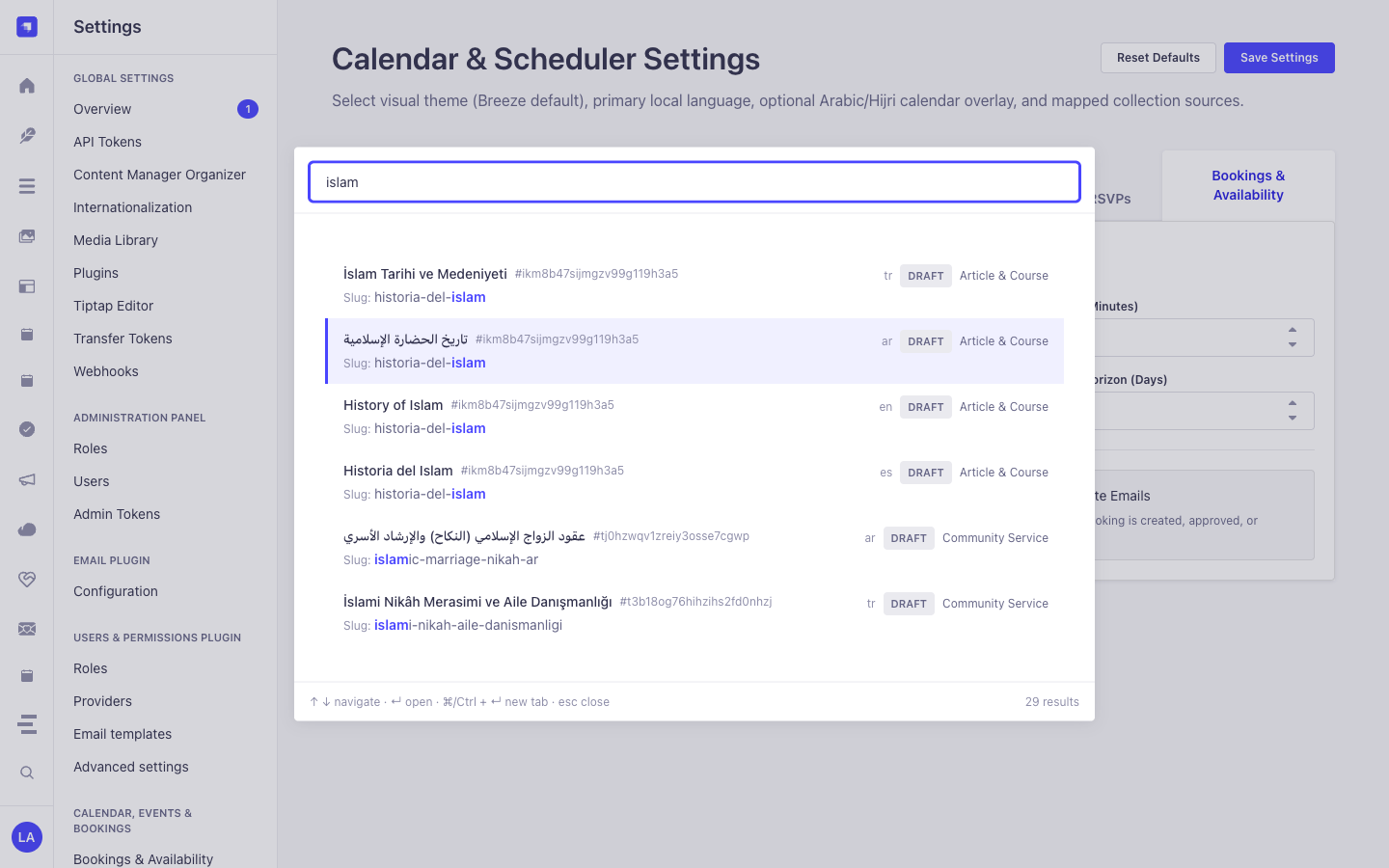
Each result row displays:
- Entry Title & Highlighted Match — matched query substrings are highlighted inline across both the main field and matched secondary/component fields (e.g.,
Slug: historia-del-islam). - Document ID Badge — quick reference to the Strapi v5
documentId(#ikm8b47sijmgzv99g119h3a5). - Locale & Publication State Badges — shows the active i18n locale (
en,es,ar,tr) andDRAFT/PUBLISHEDstatus alongside the human-readable Content-Type label (Article & Course,Community Service,Resource Publication).
Configuration
Section titled “Configuration”Everything is optional and can be changed at Settings → Global Search → Configuration, or pinned in config/plugins.js / config/plugins.ts:
module.exports = { "global-search": { enabled: true, config: { minChars: 2, // minimum query length debounce: 250, // ms to wait after the last keystroke perTypeLimit: 20, // rows fetched per content type maxResults: 100, // cap on the merged, ranked result set deep: true, // search inside components maxDepth: 3, // how many component levels to walk includeDrafts: true, // include unpublished entries includePluginContentTypes: true, // include visible plugin::* content types queryTimeout: 4000, // per-content-type timeout in ms concurrency: 8, // content types queried in parallel excludedContentTypes: [], // e.g. ['api::log.log'] excludedFields: [], // e.g. ['api::article.article:body'] displayFields: {}, // extra fields in the result row, keyed by UID }, },};Permissions
Section titled “Permissions”Two RBAC actions are registered and can be assigned per role:
plugin::global-search.read— use the search page and the palette.plugin::global-search.settings— change the configuration.
Search results are additionally filtered by each user’s Content Manager read permissions.
Performance notes
Section titled “Performance notes”Searching runs live database LIKE queries — there is no index to maintain, but a query on a very large table is only as fast as your database makes it. The plugin keeps this bounded with a per-content-type row limit, a bounded column projection, a per-type timeout, a concurrency cap and a client-side debounce. For very large tables, consider a database index on the fields people actually search, or disable those content types in Settings.
Reported result counts reflect the capped set (perTypeLimit rows per type, maxResults overall) — a + in the UI means there were more matches than were fetched.
Limitations
Section titled “Limitations”- Dynamic zones and blocks fields are not searched: the query engine cannot filter polymorphic JSON columns.
- Relations, media and raw JSON fields are not searched.
- Internal Strapi system plugin content types (such as
plugin::upload.file,plugin::i18n.locale, andplugin::users-permissions.*) are skipped automatically.
Compatibility
Section titled “Compatibility”| Strapi | ^5.0.0 (developed against 5.52.0) |
| Node | 20 – 26 |
| React | 18 |
Publishing and supply chain
Section titled “Publishing and supply chain”Public releases are published from GitHub Actions with npm trusted publishing (OIDC). There is no long-lived 2FA-bypass granular access token. See npm install-time security and GAT bypass2fa deprecation.
License
Section titled “License”MIT
Content-Type Entities & Where to Find Them
Section titled “Content-Type Entities & Where to Find Them”Operates as a universal zero-schema introspection engine over all registered Strapi v5 Content-Type entities (api::* collection types, single types, and plugin::* entities) plus nested components and dynamic zones. Uses strapi.contentTypes metadata and strapi.documents(uid).findMany() with RBAC permission filtering.
- Spotlight Command Palette Overlay: Press
Cmd+K(macOS) orCtrl+K(Windows/Linux) from any Strapi Admin screen (including Content Manager, Calendar, or Settings) - Dedicated Search Workspace:
/admin/plugins/global-search(Global Searchin the main left sidebar) - Settings Panel:
/admin/settings/global-search(Settings -> Global Search -> Configuration— organized into Search behaviour and Content types tabs) - Target Entities: Opens matched documents directly at
/admin/content-manager/collection-types/{uid}/{documentId}?plugins[i18n][locale]={locale}
Strapi v5 Content Manager Integration (/admin/content-manager)
Section titled “Strapi v5 Content Manager Integration (/admin/content-manager)”Content Manager Sidebar Group:
All Content Manager Collection Types & Single Types (Cmd+K/Ctrl+K)
Content Manager Entities & Components
Section titled “Content Manager Entities & Components”- Universal Introspection across all
api::*andplugin::*Content Manager Collection Types, Single Types, and Nested Components
Why This Plugin Creates & Integrates Content Manager Entities
Section titled “Why This Plugin Creates & Integrates Content Manager Entities”@vicacha-devs/strapi-plugin-global-search does not create an isolated database table because its entire purpose is to act as a high-speed Content Manager Command Palette & Deep-Link Router over every api::* and plugin::* entity registered in Strapi v5:
- Instant Deep-Linking into Content Manager: Pressing
Enteron any search result navigates directly to/admin/content-manager/collection-types/{uid}/{documentId}?plugins[i18n][locale]={locale}(orsingle-types/{uid}). - Searches Both Host
api::*and Pluginplugin::*Entities: Simultaneously indexes articles, scholars (api::leader.leader), events (plugin::events.event), scripture entries (plugin::islam.scripture-entry), donations (plugin::donations.campaign), and publications (plugin::resources.publication).
How to Use in Strapi Content Manager (Step-by-Step)
Section titled “How to Use in Strapi Content Manager (Step-by-Step)”- Invoke from Anywhere: Press
Cmd+K(macOS) orCtrl+K(Windows/Linux) while inside Content Manager or any plugin page. - Filter by Entity Type, Status & Locale: Type a keyword and narrow results by Collection Type,
Draft/Publishedstatus, ori18nlocale badge. - Open in Content Manager: Press
Enterto open the entry in Content Manager in the current tab, orCmd/Ctrl + Enterto open it in a new tab.
Content Manager & Plugin Workspace Synchronization
Section titled “Content Manager & Plugin Workspace Synchronization”Content Manager Use Cases & Editorial Workflows
Section titled “Content Manager Use Cases & Editorial Workflows”Content Manager Use Case 1 — Jumping Between Plugin Entities & Host Collections Without Leaving the Keyboard
Section titled “Content Manager Use Case 1 — Jumping Between Plugin Entities & Host Collections Without Leaving the Keyboard”- Why & What it is for: Switch from editing a
Booking Resourceto aDonation CampaignorIslam Scripture Entryin Content Manager in under a second. - How to use in Content Manager: Press
Cmd+K, type the title or slug, and pressEnterto load the target document in Content Manager.
End-to-End Use Cases & Workflows
Section titled “End-to-End Use Cases & Workflows”Use Case 1 — Instant Cmd+K / Ctrl+K Spotlight Navigation Across All Entities
Section titled “Use Case 1 — Instant Cmd+K / Ctrl+K Spotlight Navigation Across All Entities”- What it is for: Jump directly to any Article, Course, Event, Booking, Certificate, or Single Type record from anywhere in Strapi Admin without leaving the keyboard.
- How it works: Press
Cmd+K, type a query (e.g.,islam), navigate with↑/↓, and pressEnterto open the document in Content Manager (orCmd/Ctrl + Enterfor a new tab).
Use Case 2 — Deep Component & Multilingual Script Search (Arabic, Turkish, Spanish)
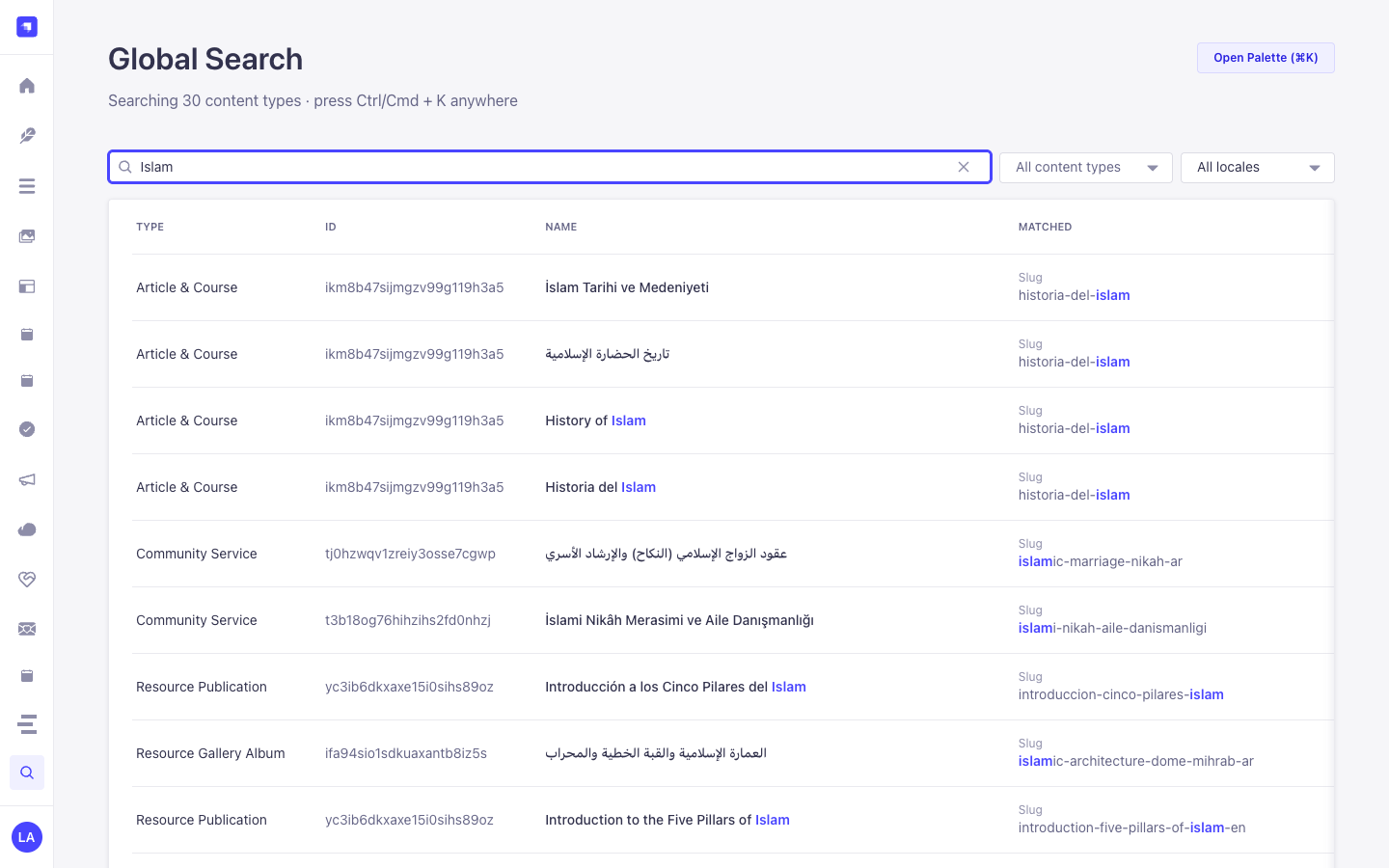
Section titled “Use Case 2 — Deep Component & Multilingual Script Search (Arabic, Turkish, Spanish)”- What it is for: Find records by text buried inside repeatable components, SEO meta descriptions, or Arabic/RTL localized variants.
- How it works:
GET /global-search/search?q=...&locale=allnormalizes diacritics and Arabic Alef/Teh Marbuta variants and searches both top-level and nested component fields.
Use Case 3 — Tabbed Search Behaviour & Per-Content-Type Inclusion Tuning
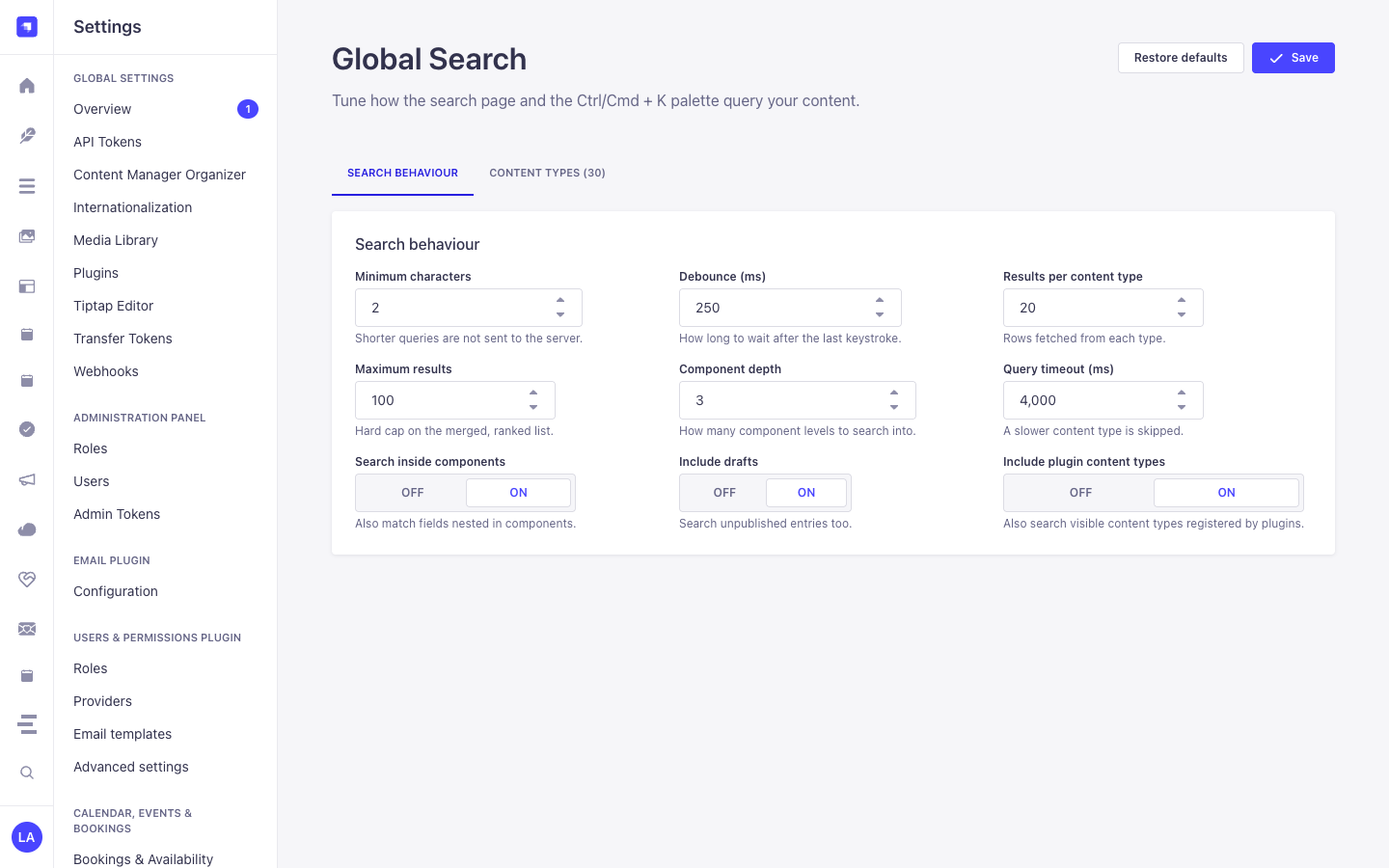
Section titled “Use Case 3 — Tabbed Search Behaviour & Per-Content-Type Inclusion Tuning”- What it is for: Fine-tune query thresholds (
Minimum characters,Debounce (ms),Results per content type,Maximum results,Component depth,Query timeout (ms),Search inside components,Include drafts,Include plugin content types) and toggle which Content-Type entities appear in global search. - How it works: Configure the Search behaviour and Content types tabs in
/admin/settings/global-search(PUT /global-search/settings).
Admin Workspace, Content Manager & Settings Panel Preview
Section titled “Admin Workspace, Content Manager & Settings Panel Preview”
Spotlight Command Palette (Cmd+K / Ctrl+K Overlay)
Section titled “Spotlight Command Palette (Cmd+K / Ctrl+K Overlay)”
Settings Panel (Settings -> Configuration)
Section titled “Settings Panel (Settings -> Configuration)”
Explore Content Types & Use Cases, the Developer Guide & Admin UI Tour, and the Interactive OpenAPI Reference for complete schema, workflow diagram, and endpoint documentation.