Events, RSVP & Check-In (@vicacha-devs/strapi-plugin-events)
Enterprise-grade Events, RFC 5545 Recurrence (RRULE), Multi-Calendar System Engine, RSVP/Capacity/Waitlist & iCal (.ics) plugin for Strapi v5, powered by @vicacha-devs/strapi-plugin-calendar as a required dependency.
Features
Section titled “Features”- Dedicated Events RSVP, Waitlist & Check-In Workspace (
/admin/plugins/events) + Unified Calendar Integration- Required Dependency on
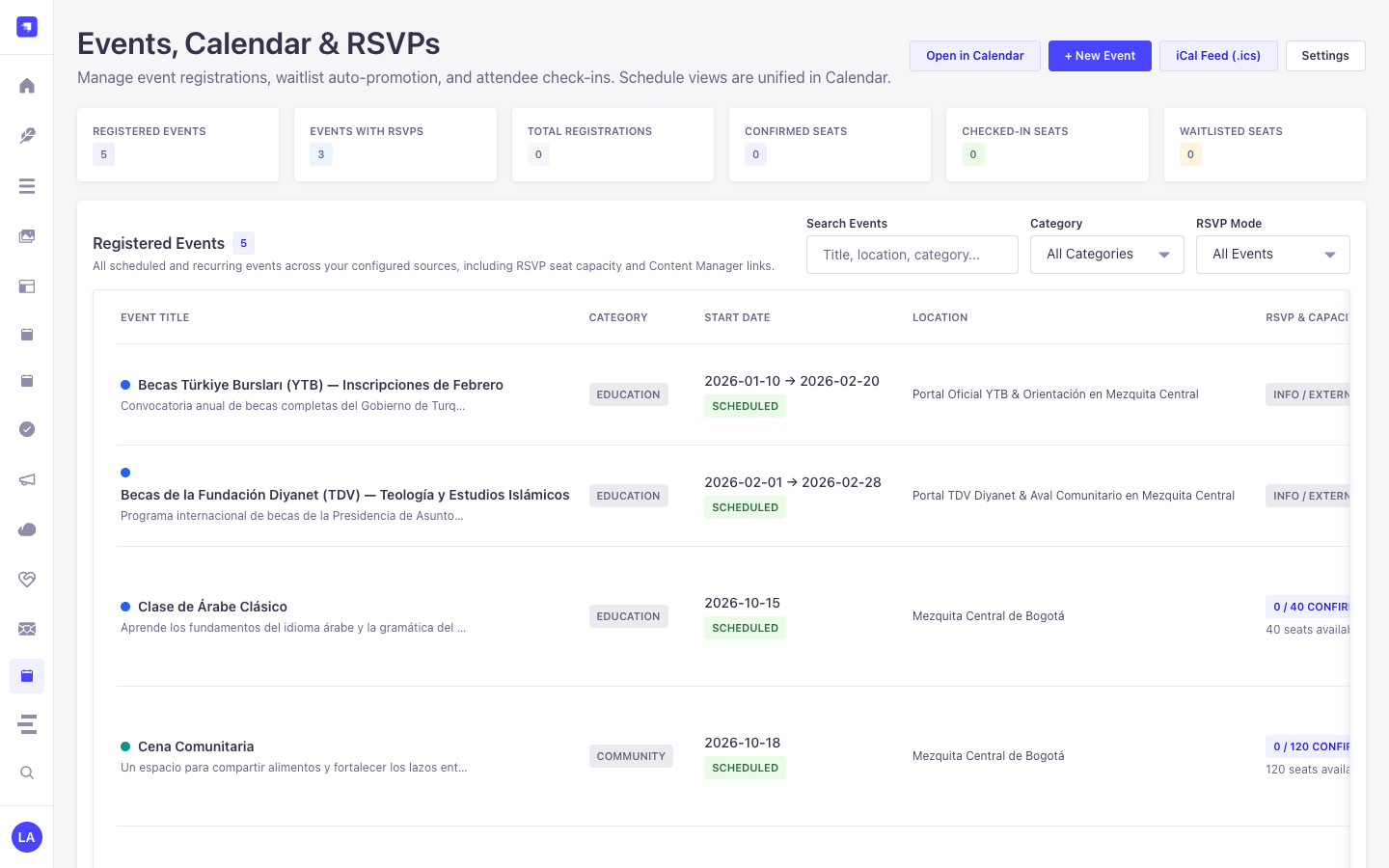
@vicacha-devs/strapi-plugin-calendar: Automatically registers all event sources into the central/admin/plugins/calendarworkspace on server bootstrap so all Month/Week/Day/Agenda/Year schedule views are unified in one place (with a 1-click Open in Calendar shortcut to/admin/plugins/calendar?source=events). - RSVP, Waitlist & Attendee Check-In Workspace: KPI summary cards (Total Registrations, Confirmed Seats, Checked-In Seats, Waitlisted Seats, Events with RSVPs), attendee search & status filters, 1-click attendee check-in, status updates with automatic waitlist promotion, Quick-Create Event panel, and formula-injection-safe CSV export.
- Required Dependency on
- Extensible Secondary Calendar Systems (
secondaryCalendars+ Custom Formatters)- Built-in ECMA-402 / Unicode CLDR support (
islamic-umalqura,islamic-civil,hebrew,persian,buddhist,japanese,chinese,indian,coptic,ethiopic). - Configurable
dayOffset(-2to+2days) for lunar sighting or regional adjustments. - Per-document override field support (
overrideField/alternateDateFields, e.g.hijriDate) so manual dates override the base occurrence while recurring occurrences dynamically compute their dates. - Programmatic custom date formatter registry (
registerCalendarFormatter(id, fn)) for custom non-Intl calendars (e.g., fiscal quarters, academic weeks).
- Built-in ECMA-402 / Unicode CLDR support (
- Declarative Schema & Field Extensions (
schemaExtensions,customFields)- Extend built-in
plugin::events.eventandplugin::events.registrationschemas directly fromconfig/plugins.tswithout modifying plugin source files. - Pass arbitrary collection attributes (
customFields: ['hijriDate', 'speaker', ...]) through toExpandedOccurrence.customFields.
- Extend built-in
- Hybrid Content Model
- Ships ready-to-use
plugin::events.eventandplugin::events.registrationContent-Types (including genericalternateDatesandmetadataJSON fields) and maps any existing Strapi v5 collection types onto the unified Calendar View and API.
- Ships ready-to-use
- RFC 5545 Recurrence (
plugin::events.rrule) & iCal (.ics) Syndication- Visual
RRuleInputcustom field (DAILY,WEEKLY,MONTHLY,YEARLY,INTERVAL,BYDAY,BYMONTHDAY,COUNT,UNTIL,exdates, and per-occurrenceoverrides). - Public
.icssubscription feed (/api/events/feed.ics) and single-event.icsinvites.
- Visual
- RSVP, Seat Capacity, Automatic Waitlist Promotion & 1-Click Check-In
- Enforces capacity per occurrence, automatically promotes waitlisted attendees when confirmed attendees cancel, and exports formula-injection-safe CSVs.
Configuration (config/plugins.ts)
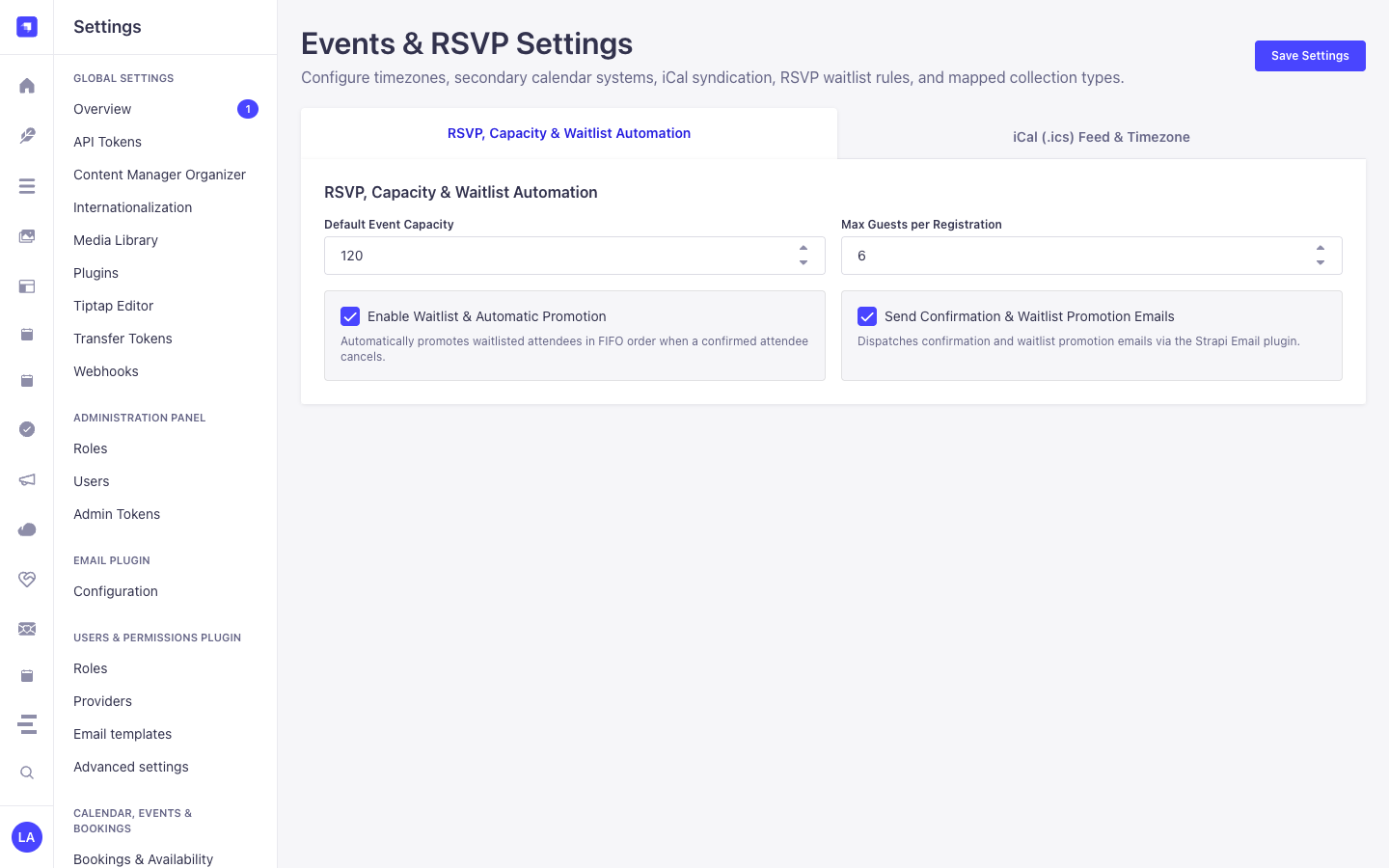
Section titled “Configuration (config/plugins.ts)”export default ({ env }) => ({ events: { enabled: true, config: { defaultTimezone: env('EVENTS_TIMEZONE', 'UTC'), defaultCapacity: 100, waitlistEnabledByDefault: true, defaultMaxGuestsPerRegistration: 5, sendRsvpEmails: true, feedTitle: 'Organization Events Calendar',
// 1. Optional Secondary Calendar Systems (Unicode CLDR or custom formatter ID) secondaryCalendars: [ { id: 'hijri', label: 'Hijri (Umm al-Qura)', intlCalendar: 'islamic-umalqura', dayOffset: env.int('HIJRI_DAY_OFFSET', 0), overrideField: 'hijriDate', enabled: true, }, ],
// 2. Optional Custom Recurrence Presets for Quick-Create & RRuleInput recurrencePresets: [ { id: 'daily', label: 'Daily', rrule: 'FREQ=DAILY;INTERVAL=1' }, { id: 'weekly-fri', label: 'Weekly on Fridays', rrule: 'FREQ=WEEKLY;INTERVAL=1;BYDAY=FR' }, { id: 'monthly', label: 'Monthly', rrule: 'FREQ=MONTHLY;INTERVAL=1' }, ],
// 3. Optional Declarative Schema Extensions on plugin::events.event / registration schemaExtensions: { event: { hijriDate: { type: 'string', pluginOptions: { i18n: { localized: true } }, }, }, },
// 4. Mapped Collection Sources sources: [ { id: 'public-events', label: 'Events', uid: 'api::event.event', color: '#0D9488', enabled: true, fields: { title: 'title', startDate: 'startDate', endDate: 'endDate', rrule: 'recurrence', location: 'location', category: 'category', summary: 'summary', slug: 'slug', capacity: 'capacity', rsvpEnabled: 'rsvpEnabled', alternateDateFields: { hijri: 'hijriDate', }, customFields: ['hijriDate', 'featured'], }, }, ], }, },});Registering a Custom Programmatic Date System
Section titled “Registering a Custom Programmatic Date System”To add a custom non-Intl date system (such as Fiscal Quarters or Academic Weeks), register a formatter in your Strapi application’s src/index.ts:
export default { bootstrap({ strapi }) { strapi .plugin('events') .service('occurrence') .registerCalendarFormatter('custom-fiscal', (date, { compact }) => { const quarter = Math.floor(date.getUTCMonth() / 3) + 1; return compact ? `Q${quarter}` : `FY${date.getUTCFullYear()} Q${quarter}`; }); },};Content-Type Entities & Where to Find Them
Section titled “Content-Type Entities & Where to Find Them”Registers two Collection Types (plugin::events.event with draftAndPublish: true & i18n.localized: true, and plugin::events.registration) plus the plugin::events.rrule Custom Field. Also supports binding additional custom api::* event collections via sources[] and extending schemas via schemaExtensions in config/plugins.ts.
- Content Manager:
/admin/content-manager/collection-types/plugin::events.event&/admin/content-manager/collection-types/plugin::events.registration(visible: true) - Content-Type Builder:
/admin/plugins/content-type-builderunder Collection Types (Event&Event Registration (RSVP)) + Custom Fieldplugin::events.rrule - Plugin Workspace & Settings:
/admin/plugins/events(Events Manager, RSVP Roster, Waitlist, Check-In) and/admin/settings/events - Database Tables:
plugin_events_itemsandplugin_events_registrations
Strapi v5 Content Manager Integration (/admin/content-manager)
Section titled “Strapi v5 Content Manager Integration (/admin/content-manager)”Content Manager Sidebar Group:
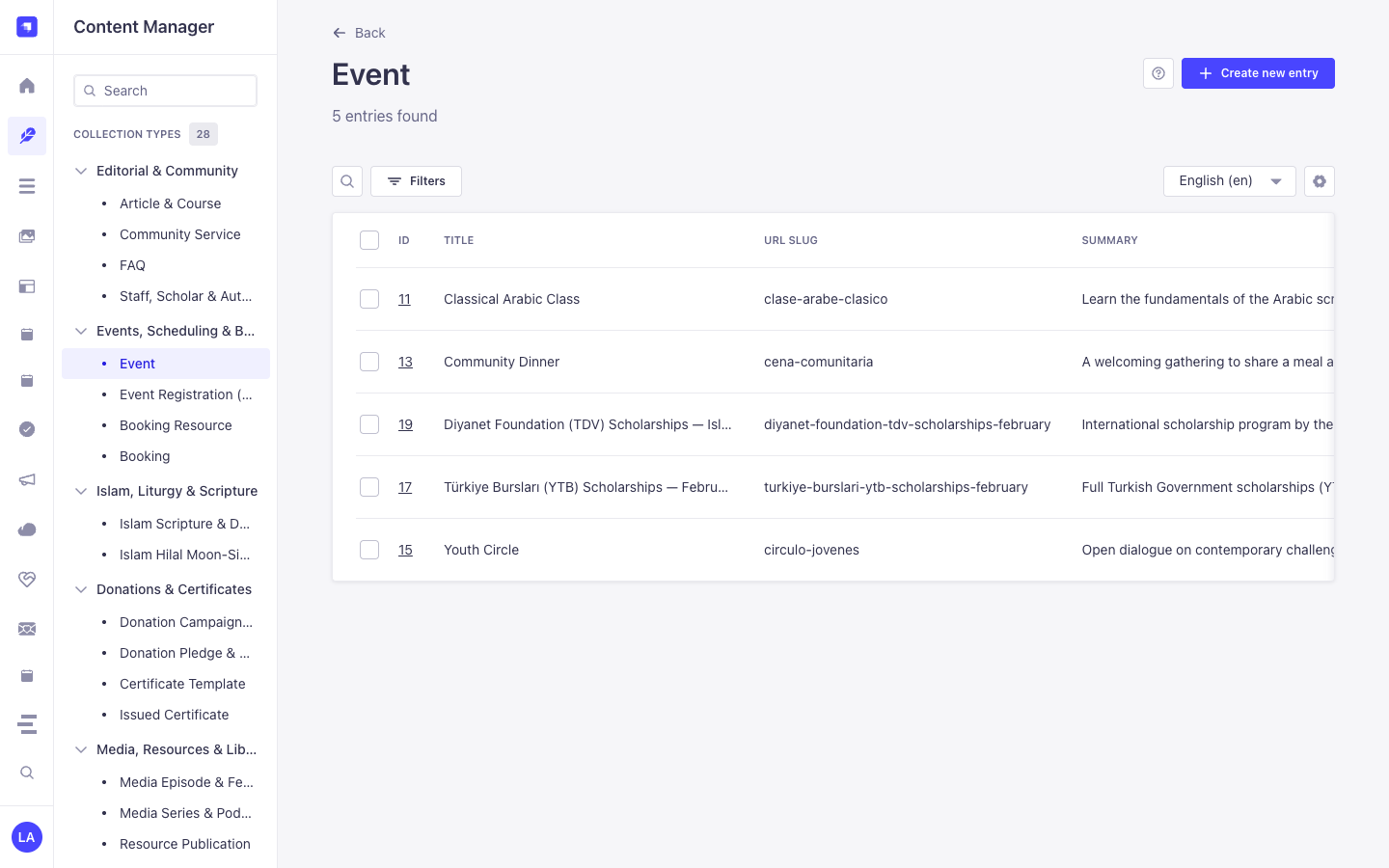
Events, Scheduling & Bookings
Content Manager Entities & Components
Section titled “Content Manager Entities & Components”plugin::events.event(Event —/admin/content-manager/collection-types/plugin::events.event)plugin::events.registration(Event Registration (RSVP) —/admin/content-manager/collection-types/plugin::events.registration)- Custom Field
plugin::events.rrule
Why This Plugin Creates & Integrates Content Manager Entities
Section titled “Why This Plugin Creates & Integrates Content Manager Entities”@vicacha-devs/strapi-plugin-events registers Event (plugin::events.event, with i18n.localized: true and draftAndPublish: true) and Event Registration (RSVP) (plugin::events.registration) as primary Content Manager collection types so editorial teams can author rich multilingual event pages while operations staff manage RSVPs and check-ins:
- Rich Editorial & Speaker Relations: In Content Manager,
Eventrecords support rich-text descriptions, poster images, speaker relations (e.g., linkingStaff, Scholar & Authorapi::leader.leader), virtual meeting URLs, andplugin::events.rrulerecurrence rules. - Multilingual (
i18n) Event Publishing: Author event pages acrossen,es,ar, andtr(?plugins[i18n][locale]=en) with independent draft/publish control per locale. - Injected Right-Sidebar Widgets: Opening an
Eventin Content Manager displays both the Calendar & Schedule widget (Hijri date +.icsexport) and the Event & RSVP Summary panel alongside Editorial Notes. - Direct RSVP Roster Inspection: Inspect, filter, and search individual
Event Registration (RSVP)records (confirmed,waitlisted,checked_in,cancelled) directly in Content Manager.
How to Use in Strapi Content Manager (Step-by-Step)
Section titled “How to Use in Strapi Content Manager (Step-by-Step)”- Open in Content Manager: In the left sidebar, click Content Manager -> Collection Types -> Events, Scheduling & Bookings and select Event (
/admin/content-manager/collection-types/plugin::events.event?plugins[i18n][locale]=en) or Event Registration (RSVP) (/admin/content-manager/collection-types/plugin::events.registration). - Author & Localize Events: Click + Create new entry in Event, fill in
title,slug,summary,description,startDate,endDate,rrule,capacity, andwaitlistEnabled, then click Publish. - Inspect RSVP Registrations: Open Event Registration (RSVP) in Content Manager to filter attendees by
status,occurrenceDate,attendeeEmail, or linkedevent. - Workspace vs. Content Manager: Use Content Manager for rich multilingual event authoring, poster uploads, and speaker relations; use the Events Workspace (
/admin/plugins/events) for 1-click door check-in, waitlist promotion, and formula-sanitized CSV exports.
Content Manager & Plugin Workspace Synchronization
Section titled “Content Manager & Plugin Workspace Synchronization”Content Manager Use Cases & Editorial Workflows
Section titled “Content Manager Use Cases & Editorial Workflows”Content Manager Use Case 1 — Authoring Multilingual Recurring Classes & Community Dinners
Section titled “Content Manager Use Case 1 — Authoring Multilingual Recurring Classes & Community Dinners”- Why & What it is for: Create and translate recurring educational classes (
Classical Arabic Course), youth circles (Weekly Youth Circle), and scholarship announcements (Türkiye Bursları Scholarship Orientation) in Content Manager. - How to use in Content Manager: Open
/admin/content-manager/collection-types/plugin::events.event?plugins[i18n][locale]=en, edit the event attributes andrrulerecurrence, verify the Hijri date in the right sidebar, and publish across locales.
Content Manager Use Case 2 — Filtering Waitlisted or Checked-In Attendees Across Occurrences
Section titled “Content Manager Use Case 2 — Filtering Waitlisted or Checked-In Attendees Across Occurrences”- Why & What it is for: Search attendee registrations by email, occurrence date, or dietary/accessibility notes inside Content Manager.
- How to use in Content Manager: Open
/admin/content-manager/collection-types/plugin::events.registrationand filter bystatus = waitlistedorstatus = checked_in.
End-to-End Use Cases & Workflows
Section titled “End-to-End Use Cases & Workflows”Use Case 1 — Multilingual Recurring Events with Poster & Speaker Metadata
Section titled “Use Case 1 — Multilingual Recurring Events with Poster & Speaker Metadata”- What it is for: Publish localized single or recurring lectures, workshops, and community gatherings with speaker profiles and virtual/hybrid links.
- How it works: Author records in
plugin::events.event(usingplugin::events.rrulefor recurrence) and query expanded occurrences viaGET /api/events/upcomingorGET /api/events/calendar.
Use Case 2 — Capacity-Controlled Public RSVP & Automatic Waitlist Promotion
Section titled “Use Case 2 — Capacity-Controlled Public RSVP & Automatic Waitlist Promotion”- What it is for: Enforce seat limits (
capacity,maxGuestsPerRegistration) per occurrence date and automatically promote waitlisted guests when someone cancels. - How it works: Visitors submit
POST /api/events/rsvp(creatingplugin::events.registrationasconfirmedorwaitlisted);POST /api/events/rsvp/cancelcancels a seat and promotes the oldest waitlisted record.
Use Case 3 — 1-Click Door Check-In & Formula-Injection-Safe CSV Roster Export
Section titled “Use Case 3 — 1-Click Door Check-In & Formula-Injection-Safe CSV Roster Export”- What it is for: Check in attendees at the venue entrance and export clean attendee rosters for spreadsheets.
- How it works: Use
POST /events/registrations/{documentId}/check-inin/admin/plugins/eventsand download rosters viaGET /events/registrations/export.csv.
Admin Workspace, Content Manager & Settings Panel Preview
Section titled “Admin Workspace, Content Manager & Settings Panel Preview”
Strapi v5 Content Manager Entities (/admin/content-manager)
Section titled “Strapi v5 Content Manager Entities (/admin/content-manager)”
Settings Panel (Settings -> Configuration)
Section titled “Settings Panel (Settings -> Configuration)”
Explore Content Types & Use Cases, the Developer Guide & Admin UI Tour, and the Interactive OpenAPI Reference for complete schema, workflow diagram, and endpoint documentation.