Bookings & Reservations — Developer Guide & Admin UI
1. Installation & Peer Setup
Section titled “1. Installation & Peer Setup”pnpm add @vicacha-devs/strapi-plugin-calendar @vicacha-devs/strapi-plugin-bookings2. Server Configuration (config/plugins.ts)
Section titled “2. Server Configuration (config/plugins.ts)”Add the plugin configuration to your Strapi v5 config/plugins.ts file:
export default ({ env }: { env: (key: string, defaultValue?: string) => string }) => ({ "bookings": { enabled: true, config: { defaultTimezone: env("CALENDAR_DEFAULT_TIMEZONE", "UTC"), defaultSlotDurationMinutes: 60, }, },});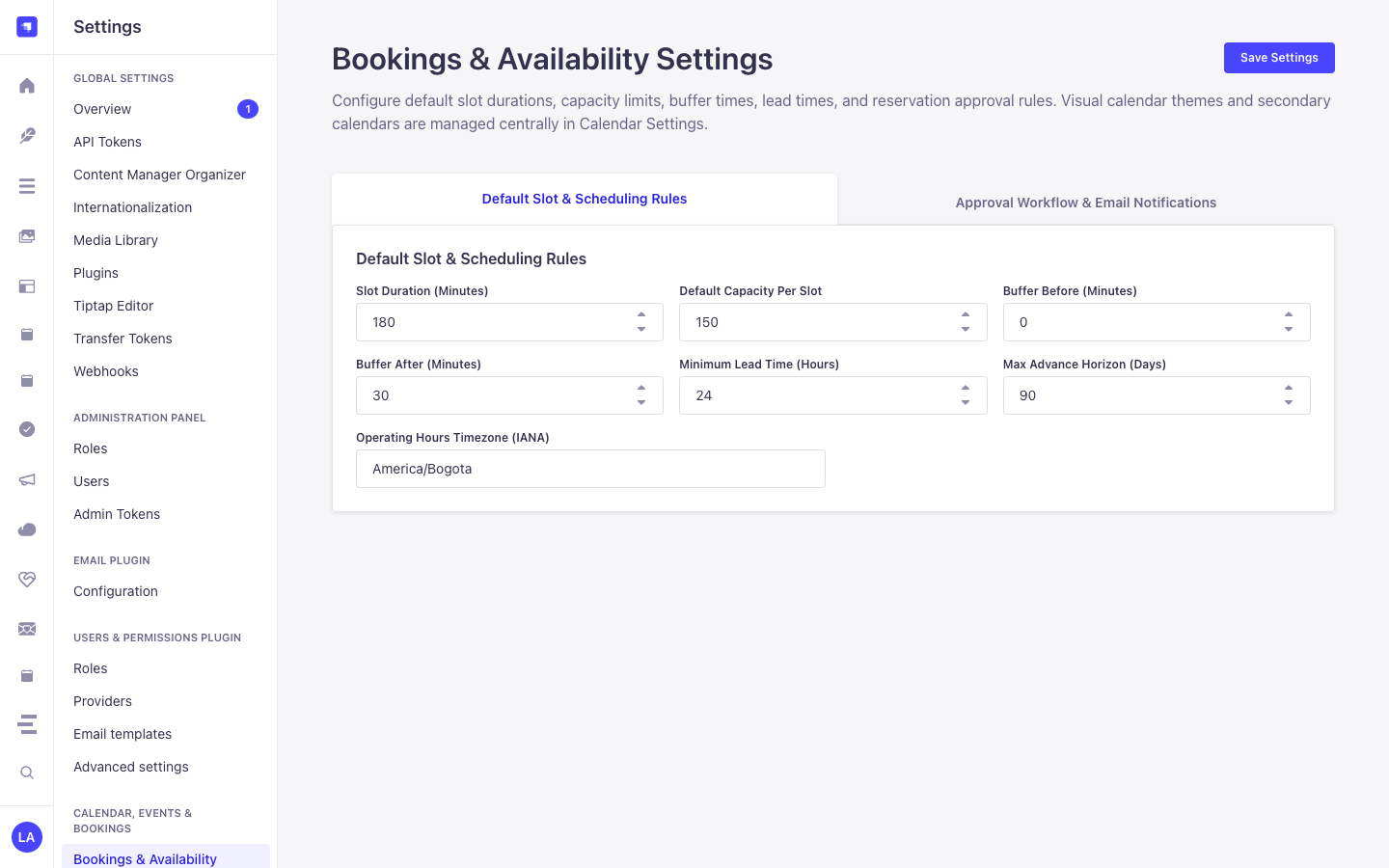
3. Strapi v5 Admin UI Tour
Section titled “3. Strapi v5 Admin UI Tour”Once enabled, the plugin registers its workspace and settings inside the Strapi v5 Admin panel using Strapi Design System v2 components:
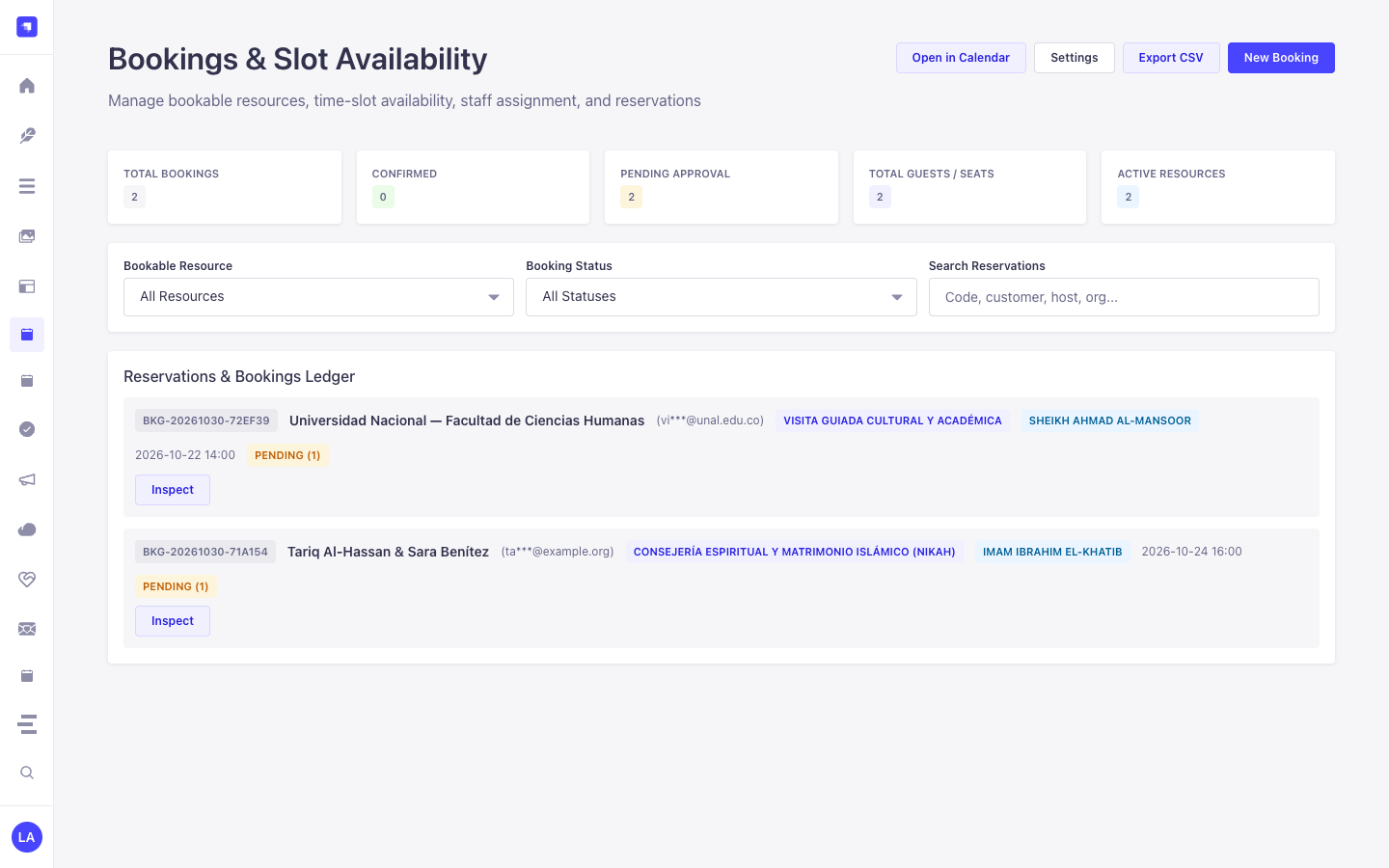
Key Localized Admin UI Labels
Section titled “Key Localized Admin UI Labels”| Translation Key | Rendered UI Label |
|---|---|
settings.theme.breeze.label |
Breeze (Sky & Slate — Default) |
bookings.settings.theme.breeze.label |
Breeze (Sky & Slate — Default) |
settings.theme.breeze.description |
High-contrast sky-blue & crisp slate grid with warm amber Hijri badges |
bookings.settings.theme.breeze.description |
High-contrast sky-blue & crisp slate grid with warm amber Hijri badges |
settings.theme.emerald.label |
Emerald Mosque (Teal & Gold) |
bookings.settings.theme.emerald.label |
Emerald Mosque (Teal & Gold) |
settings.theme.emerald.description |
Islamic emerald-teal headers with warm gold secondary calendar highlights |
bookings.settings.theme.emerald.description |
Islamic emerald-teal headers with warm gold secondary calendar highlights |
4. Content-Type Entities, Locations & Schemas (strapi.documents)
Section titled “4. Content-Type Entities, Locations & Schemas (strapi.documents)”Registers two relational Collection Types (plugin::bookings.resource one-to-many plugin::bookings.booking). Resources define weekly/seasonal availability windows, slot duration, buffers, and capacity; Bookings store individual customer reservations, party size, status transitions, and hashed self-service cancellation tokens. Supports runtime schemaExtensions (resource, booking) and customFields in config/plugins.ts.
Where to Find Content-Type Entities in Strapi v5
Section titled “Where to Find Content-Type Entities in Strapi v5”- Content Manager:
/admin/content-manager/collection-types/plugin::bookings.resource&/admin/content-manager/collection-types/plugin::bookings.booking(visible: true) - Content-Type Builder:
/admin/plugins/content-type-builderunder Collection Types (Booking Resource&Booking) - Plugin Workspace & Settings:
/admin/plugins/bookings(Reservations & Resources manager) and/admin/settings/bookings - Database Tables:
booking_resourcesandbookings
plugin::bookings.booking — Booking
Section titled “plugin::bookings.booking — Booking”Reservation, appointment, or resource slot booking
Kind:
collectionType· DB Table:bookings· Admin Location:/admin/content-manager/collection-types/plugin::bookings.booking· Draft & Publish:No· i18n:No
| Attribute | Strapi Type | Required | Constraints / Target |
|---|---|---|---|
bookingCode |
string |
Yes | max: 48 |
title |
string |
No | max: 200 |
resource |
relation |
No | target: plugin::bookings.resource |
customerName |
string |
Yes | max: 120 |
customerEmail |
email |
Yes | — |
customerPhone |
string |
No | max: 40 |
organization |
string |
No | max: 160 |
startDate |
datetime |
Yes | — |
endDate |
datetime |
Yes | — |
slotLabel |
string |
No | max: 80 |
timezone |
string |
No | max: 64; default: "UTC" |
partySize |
integer |
Yes | default: 1 |
status |
enumeration |
Yes | enum: pending, confirmed, completed, cancelled, no_show; default: "pending" |
preferredLanguage |
string |
No | max: 16 |
assignedHost |
string |
No | max: 120 |
notes |
text |
No | max: 2000 |
internalNotes |
text |
No | max: 2000; private: true |
cancelTokenHash |
string |
No | max: 128; private: true |
sourceCollection |
string |
No | default: "plugin::bookings.booking" |
metadata |
json |
No | — |
plugin::bookings.resource — Booking Resource
Section titled “plugin::bookings.resource — Booking Resource”Bookable service, appointment type, room, staff member, or equipment schedule
Kind:
collectionType· DB Table:booking_resources· Admin Location:/admin/content-manager/collection-types/plugin::bookings.resource· Draft & Publish:No· i18n:No
| Attribute | Strapi Type | Required | Constraints / Target |
|---|---|---|---|
name |
string |
Yes | max: 160 |
slug |
uid |
Yes | — |
resourceType |
enumeration |
Yes | enum: service, appointment, room, staff, equipment, other; default: "service" |
description |
text |
No | — |
color |
string |
No | max: 32; default: "#0d9488" |
timezone |
string |
No | max: 64; default: "UTC" |
slotDurationMinutes |
integer |
Yes | default: 60 |
bufferBeforeMinutes |
integer |
No | default: 0 |
bufferAfterMinutes |
integer |
No | default: 0 |
capacityPerSlot |
integer |
Yes | default: 1 |
maxPartySize |
integer |
No | default: 50 |
minLeadTimeHours |
integer |
No | default: 2 |
maxAdvanceDays |
integer |
No | default: 90 |
requiresApproval |
boolean |
No | default: false |
weeklySchedule |
json |
No | — |
seasonalSchedules |
json |
No | — |
holidayRules |
json |
No | — |
blackoutDates |
json |
No | — |
recurrenceRule |
string |
No | — |
supportedLanguages |
json |
No | — |
assignedHosts |
json |
No | — |
location |
string |
No | max: 240 |
price |
decimal |
No | default: 0 |
currency |
string |
No | max: 10; default: "USD" |
isActive |
boolean |
No | default: true |
metadata |
json |
No | — |
bookings |
relation |
No | target: plugin::bookings.booking |
Strapi v5 Content Manager Integration (/admin/content-manager)
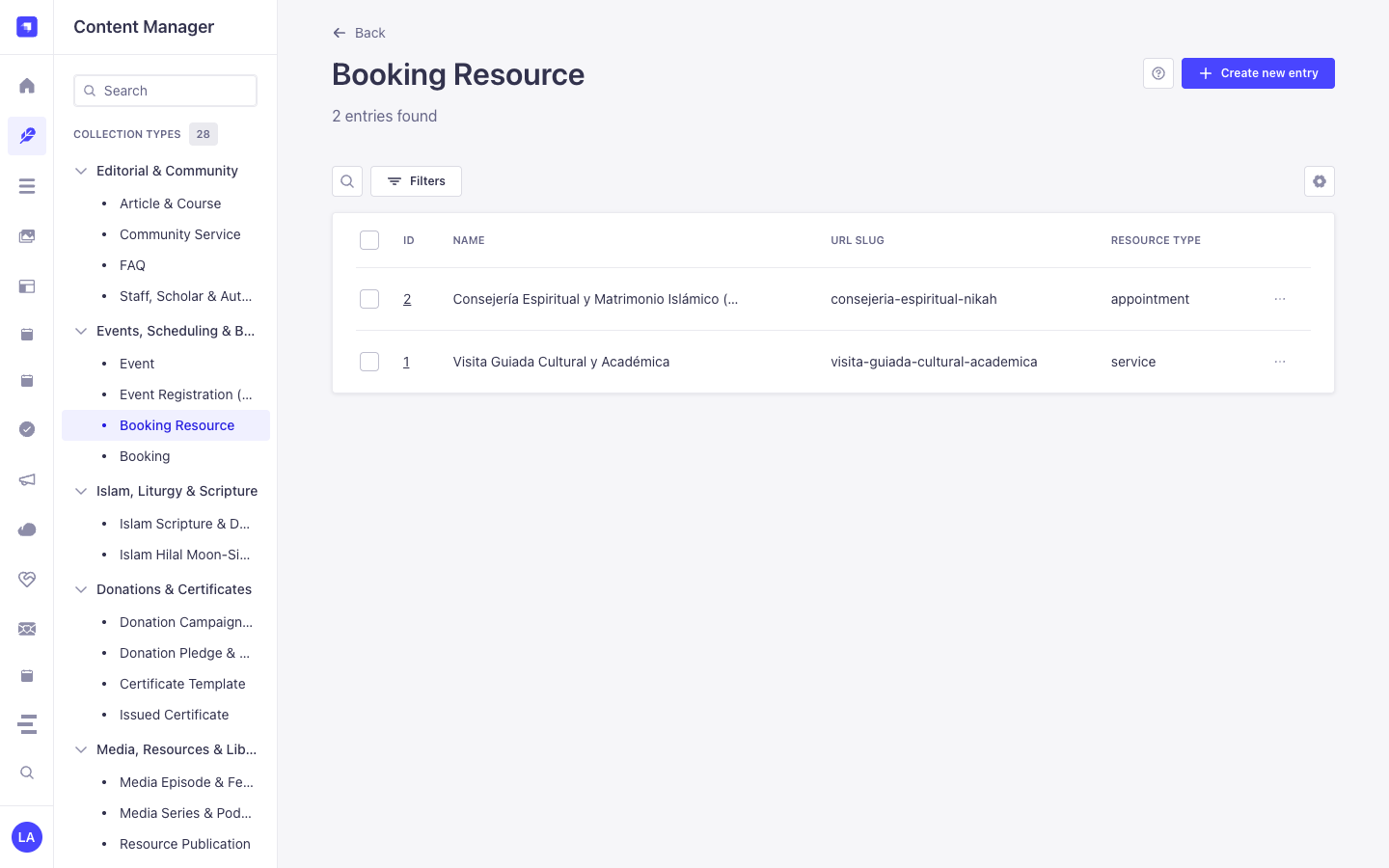
Section titled “Strapi v5 Content Manager Integration (/admin/content-manager)”Content Manager Sidebar Group:
Events, Scheduling & Bookings
Content Manager Entities & Components
Section titled “Content Manager Entities & Components”plugin::bookings.resource(Booking Resource —/admin/content-manager/collection-types/plugin::bookings.resource)plugin::bookings.booking(Booking —/admin/content-manager/collection-types/plugin::bookings.booking)
Why This Plugin Creates & Integrates Content Manager Entities
Section titled “Why This Plugin Creates & Integrates Content Manager Entities”@vicacha-devs/strapi-plugin-bookings registers both Booking Resource (plugin::bookings.resource) and Booking (plugin::bookings.booking) with pluginOptions['content-manager'].visible = true so teams can combine the operational slot-availability engine in /admin/plugins/bookings with Strapi v5’s native Content Manager relational modeling and schema extensibility:
- Relational Linking to Host Entities (
api::*): Link aBooking Resourcedirectly to aStaff, Scholar & Author(api::leader.leader) record, room media gallery, or department viaschemaExtensions.resourceinconfig/plugins.ts. - Custom Intake Attributes (
customFields&schemaExtensions.booking): Inspect and edit custom reservation fields (such asorganizationName,cateringRequired, orequipmentNotes) alongside native Strapi audit columns (createdBy,updatedBy). - Advanced Filtering & Bulk Operations: Filter hundreds of historical reservations by
status,startAt,resource, orcustomerEmailusing Content Manager’s multi-condition filter builder and bulk-delete test records. - Cross-Plugin Side-Panel Ecosystem: Attach internal staff handoff notes via
@vicacha-devs/strapi-plugin-notesin the Content Manager right sidebar or jump straight to a booking viaCmd+K(@vicacha-devs/strapi-plugin-global-search).
How to Use in Strapi Content Manager (Step-by-Step)
Section titled “How to Use in Strapi Content Manager (Step-by-Step)”- Open in Content Manager: In the left sidebar, click Content Manager -> Collection Types -> Events, Scheduling & Bookings and select Booking Resource (
/admin/content-manager/collection-types/plugin::bookings.resource) or Booking (/admin/content-manager/collection-types/plugin::bookings.booking). - Configure Bookable Resources: Click + Create new entry in Booking Resource to define
name,slug,resourceType(room,counselor,equipment,service,appointment),capacity,slotDurationMinutes,bufferBeforeMinutes,bufferAfterMinutes, andweeklyScheduleJSON rules. - Manage & Link Reservations: Open any Booking entry to inspect or update
bookingCode,startAt,endAt,partySize,status, the linkedresourcerelation, and any custom fields registered underconfig.schemaExtensions.booking. - Workspace vs. Content Manager: Use Content Manager for structured resource setup, relational linking, and bulk filtering; use the Bookings Workspace (
/admin/plugins/bookings) for 1-click status transitions (confirmed,completed,no_show) and availability slot testing.
Content Manager & Plugin Workspace Synchronization
Section titled “Content Manager & Plugin Workspace Synchronization”Content Manager Use Cases & Editorial Workflows
Section titled “Content Manager Use Cases & Editorial Workflows”Content Manager Use Case 1 — Linking Counselors & Imams (api::leader.leader) to Bookable Resources
Section titled “Content Manager Use Case 1 — Linking Counselors & Imams (api::leader.leader) to Bookable Resources”- Why & What it is for: Connect each appointment or counseling resource in
plugin::bookings.resourceto an institutional profile inapi::leader.leaderand a Media Library cover photo. - How to use in Content Manager: Extend
resourceviaschemaExtensionsinconfig/plugins.ts, open/admin/content-manager/collection-types/plugin::bookings.resource, select the assigned scholar/counselor relation, and save.
Content Manager Use Case 2 — Auditing & Bulk-Filtering Reservations with Editorial Notes
Section titled “Content Manager Use Case 2 — Auditing & Bulk-Filtering Reservations with Editorial Notes”- Why & What it is for: Filter pending or high-capacity room bookings in Content Manager and attach internal preparation checklists in the right sidebar.
- How to use in Content Manager: Open
/admin/content-manager/collection-types/plugin::bookings.booking, apply a filter onstatus = pendingorpartySize > 20, open the entry, and add a pinned note in the Notes side panel.
5. End-to-End Use Cases & Workflows
Section titled “5. End-to-End Use Cases & Workflows”Use Case 1 — Public Self-Service Slot Discovery & Reservation
Section titled “Use Case 1 — Public Self-Service Slot Discovery & Reservation”- What it is for: Allow website visitors to query available time slots for a room, counselor, imam, or equipment resource and book a slot without double-booking.
- How it works: Query
GET /api/bookings/available-slots?resourceSlug=main-conference-hall&date=2026-05-15, then submitPOST /api/bookings/reserveto create aplugin::bookings.bookingentity and receive a one-time cancellation token.
Use Case 2 — Multi-Host Appointment & Buffer Enforcement
Section titled “Use Case 2 — Multi-Host Appointment & Buffer Enforcement”- What it is for: Manage 1-on-1 consultations or guided tours with automatic pre/post buffer windows (
bufferBeforeMinutes,bufferAfterMinutes), minimum lead time (minLeadTimeHours), and host assignment (assignedHost). - How it works: Configure
weeklySchedule,seasonalSchedules, andblackoutDatesonplugin::bookings.resource; staff approve or markcompleted/no_showviaPUT /bookings/bookings/{documentId}/status.
Use Case 3 — Tokenized Self-Service Rescheduling & Cancellation
Section titled “Use Case 3 — Tokenized Self-Service Rescheduling & Cancellation”- What it is for: Let customers reschedule or cancel their reservation from an email link without requiring a Strapi account.
- How it works: Pass the customer’s
bookingCodeand plaintextcancelToken(verified againstcancelTokenHash) toPOST /api/bookings/rescheduleorPOST /api/bookings/cancel.
Use Case 4 — Unified Calendar & iCal Feed Synchronization
Section titled “Use Case 4 — Unified Calendar & iCal Feed Synchronization”- What it is for: Project all confirmed and pending reservations into the FullCalendar workspace and external Google/Apple Calendar clients.
- How it works: At bootstrap,
bookingsregistersplugin::bookings.bookingwithstrapi.plugin('calendar').service('registry')and exposesGET /api/bookings/feed.ics.
6. REST API Endpoints (content-api & admin)
Section titled “6. REST API Endpoints (content-api & admin)”| Method | Endpoint Path | Scope | Controller Handler | Auth |
|---|---|---|---|---|
GET |
/bookings/settings |
admin |
admin.getSettings |
Bearer JWT |
PUT |
/bookings/settings |
admin |
admin.updateSettings |
Bearer JWT |
GET |
/bookings/schemas |
admin |
admin.discoverSchemas |
Bearer JWT |
GET |
/bookings/resources |
admin |
admin.listResources |
Bearer JWT |
POST |
/bookings/resources |
admin |
admin.saveResource |
Bearer JWT |
GET |
/bookings/calendar |
admin |
admin.getCalendar |
Bearer JWT |
POST |
/bookings/bookings |
admin |
admin.createBooking |
Bearer JWT |
PUT |
/bookings/bookings/{documentId}/status |
admin |
admin.updateBookingStatus |
Bearer JWT |
POST |
/bookings/bookings/reschedule |
admin |
admin.rescheduleBooking |
Bearer JWT |
GET |
/bookings/export.csv |
admin |
admin.exportCsv |
Bearer JWT |
GET |
/bookings/export.ics |
admin |
admin.exportICal |
Bearer JWT |
GET |
/api/bookings/resources |
content-api |
content-api.listPublicResources |
Bearer JWT |
GET |
/api/bookings/available-slots |
content-api |
content-api.getAvailableSlots |
Bearer JWT |
POST |
/api/bookings/reserve |
content-api |
content-api.createReservation |
Bearer JWT |
POST |
/api/bookings/reschedule |
content-api |
content-api.rescheduleReservation |
Bearer JWT |
POST |
/api/bookings/cancel |
content-api |
content-api.cancelReservation |
Bearer JWT |
GET |
/api/bookings/feed.ics |
content-api |
content-api.getICalFeed |
Bearer JWT |
7. Programmatic Server Usage (strapi.plugin & strapi.documents)
Section titled “7. Programmatic Server Usage (strapi.plugin & strapi.documents)”// Registered services on plugin "bookings": "settings", "availability", "reservation"const pluginService = strapi.plugin("bookings")?.service("availability");
// Querying records via the Strapi v5 Document Service APIconst records = await strapi.documents("plugin::bookings.booking").findMany({ limit: 25, sort: "createdAt:desc",});8. Troubleshooting & Verification
Section titled “8. Troubleshooting & Verification”- Admin panel changes not visible: Run
pnpm strapi buildafter modifyingconfig/plugins.ts. - Peer dependency isolation: Keep
hoistPattern: ["*", "!@strapi/*"]inpnpm-workspace.yamlso@strapi/*contexts are never duplicated. - TypeScript type-checking: Validate both
admin/tsconfig.jsonandserver/tsconfig.jsonviapnpm --filter <pkg> test:ts.