XML Sitemap & Hreflang (@vicacha-devs/strapi-plugin-sitemap)
XML Sitemap and Sitemap Index generator for Strapi v5 with automatic multilingual (i18n + xhtml:link hreflang) alternates, collection & plugin content-type URL patterns, nested relation and component placeholders, Google Image Sitemap (xmlns:image) support, custom static URLs, and excluded path rules.
Key Features
Section titled “Key Features”- Dynamic Collection & Plugin Content-Type URL Patterns: Map any visible
api::*orplugin::*collection type to custom URL patterns such as/[locale]/articles/[category.slug]/[slug]. - Automatic
xhtml:linkhreflangAlternates: Automatically links localized Strapi v5 documents sharing the samedocumentIdwith<xhtml:link rel="alternate" hreflang="..." href="..." />(xmlns:xhtml="http://www.w3.org/1999/xhtml"). - Sitemap Index & Multi-File Sub-Sitemaps: Serve either a single
<urlset>at/api/sitemap/sitemap.xmlor a master<sitemapindex>referencing dedicated sub-sitemaps at/api/sitemap/sitemap-:slug.xml. - Google Image Sitemap (
xmlns:image): Include<image:image><image:loc>...</image:loc><image:title>...</image:title></image:image>tags from media fields, automatically resolving relative/uploads/...URLs againstbaseUrland falling back to document titles when media names are empty. - Static Custom URLs & Excluded Paths: Combine static frontend routes (
/about,/es/contact) with dynamic CMS entries while filtering out excluded paths. - Unified Settings Persistence: Synchronizes configuration across Strapi’s internal
plugin::sitemap.sitemap-option,plugin::sitemap.sitemap-content-type, andplugin::sitemap.sitemap-content-type-single-urlentities viaGET / PUT /sitemap/settings.
Installation & Configuration
Section titled “Installation & Configuration”Enable the plugin in config/plugins.ts (or config/plugins.js):
export default ({ env }) => ({ sitemap: { enabled: true, config: { // Optional fallback base URL when baseUrl is not yet set in the Admin UI hostname: env("PUBLIC_SITE_URL", "https://example.com"), // Emit <xhtml:link rel="alternate" hreflang="..." /> across localized documents (default: true) includeHreflang: true, }, },});Public Endpoints (Content API)
Section titled “Public Endpoints (Content API)”GET /api/sitemap/sitemap.xml— Main XML sitemap (<urlset>) or<sitemapindex>when Sitemap Index mode is enabled (auth: false).GET /api/sitemap/sitemap-:slug.xml— Named sub-sitemap (<urlset>) for a specific sitemap definition slug when Sitemap Index mode is enabled (auth: false).
Admin Endpoints
Section titled “Admin Endpoints”GET /sitemap/settings— Retrieve unified sitemap settings (baseUrl,collectionTypes,customURLs,excludedUrls,useSitemapIndex,sitemaps).PUT /sitemap/settings— Update and synchronize unified sitemap settings across all internal sitemap tables.GET /sitemap/content-types— List visibleapi::*andplugin::*collection types available for URL pattern mapping.GET /sitemap/locales— List configured Strapii18nlocale codes.GET /sitemap/allowed-fields?singularName=<type>&populateLinkedModels=<bool>— Inspect scalar, component, media (mediaFields), and first-level relation fields (allowedFields) for pattern interpolation.
URL Pattern Placeholders
Section titled “URL Pattern Placeholders”Patterns use bracket notation ([field]) and support:
- Top-level scalar fields:
[id],[slug],[title] - Locale placeholder:
[locale](automatically falls back to the entry’s configuredlangcodeif the document does not carry alocaleproperty) - Component & nested relation fields:
[meta.canonical],[category.slug],[department.category.slug](whenpopulateLinkedModelsis enabled)
Admin Settings UI (/admin/settings/sitemap — 4 Tabs)
Section titled “Admin Settings UI (/admin/settings/sitemap — 4 Tabs)”Navigate to Settings → Sitemap → Configuration (/admin/settings/sitemap) in the Strapi v5 Admin panel:
- General & Sitemap Index (
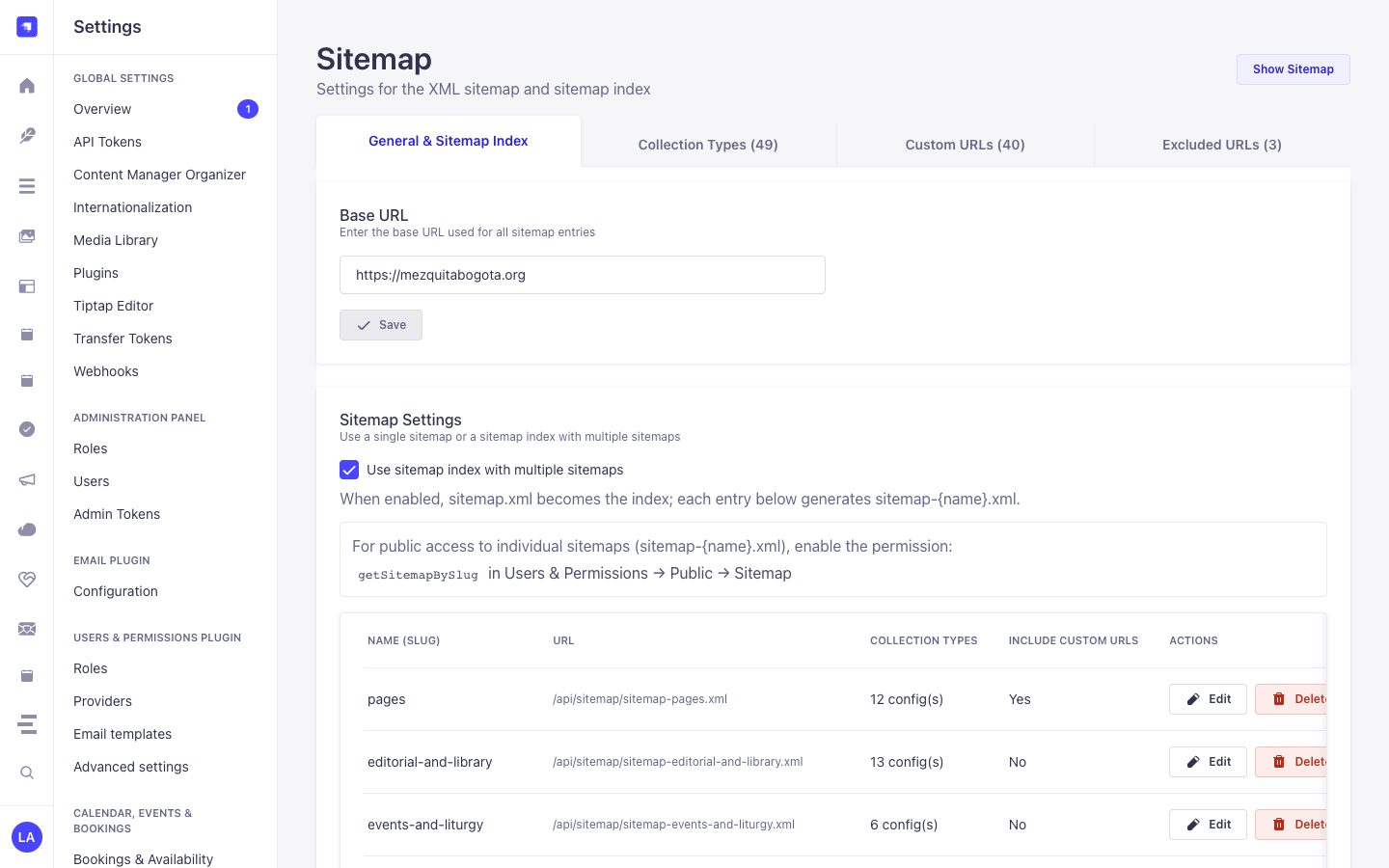
/screenshots/sitemap-settings.png): Configure the canonical Base URL, toggle Use sitemap index with multiple sitemaps (When enabled, sitemap.xml becomes the index; each entry below generates sitemap-{name}.xml.), review the public permission notice (getSitemapBySlug in Users & Permissions → Public → Sitemap), and manage named sub-sitemaps (pages,editorial-and-library,events-and-liturgy). - Collection Types (
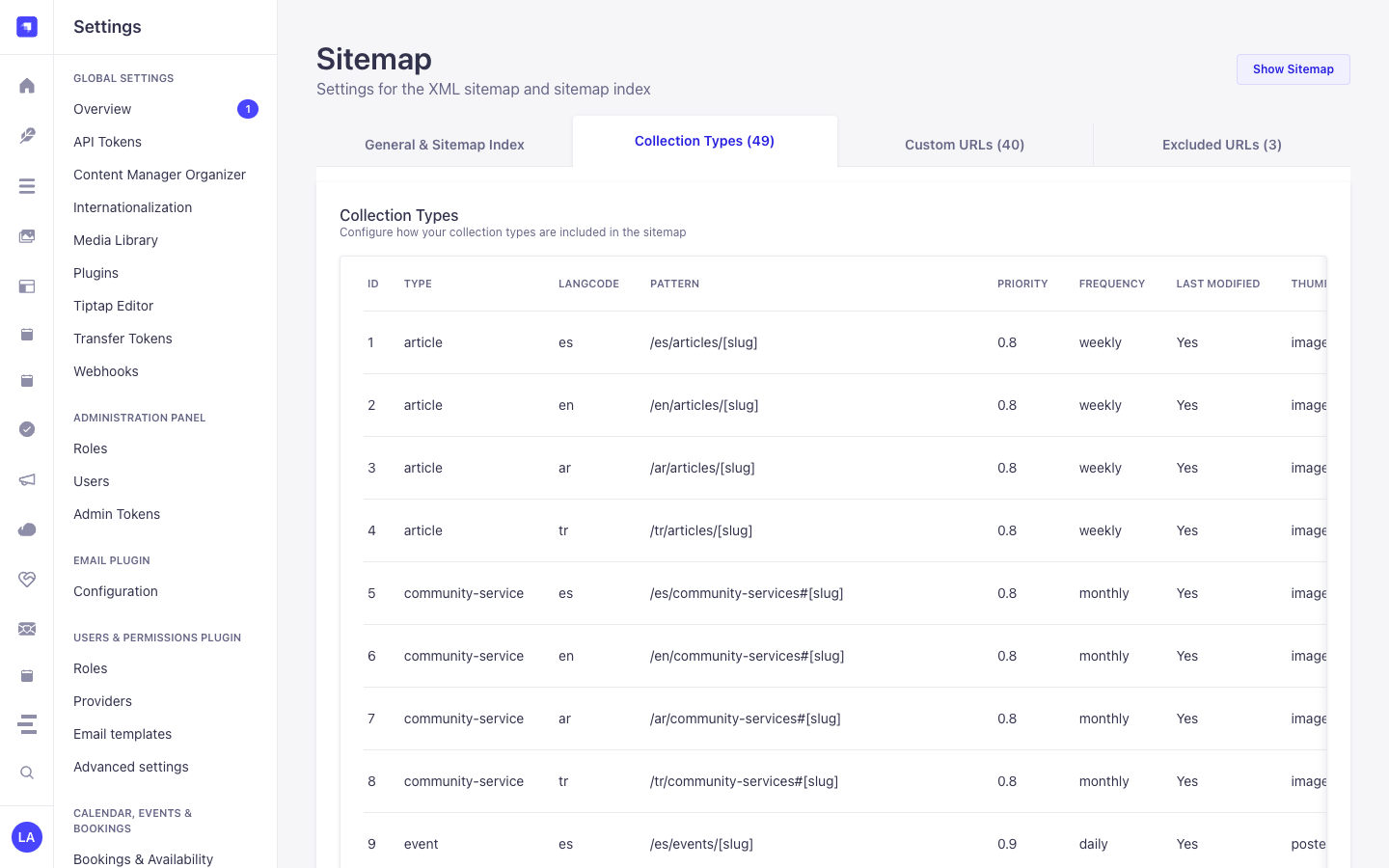
/screenshots/sitemap-admin.png): Bind localizedapi::*andplugin::*collection types (type+langcode) to dynamic URL patterns (/[locale]/articles/[slug]),priority,frequency,lastModified, andthumbnailmedia fields. - Custom URLs (
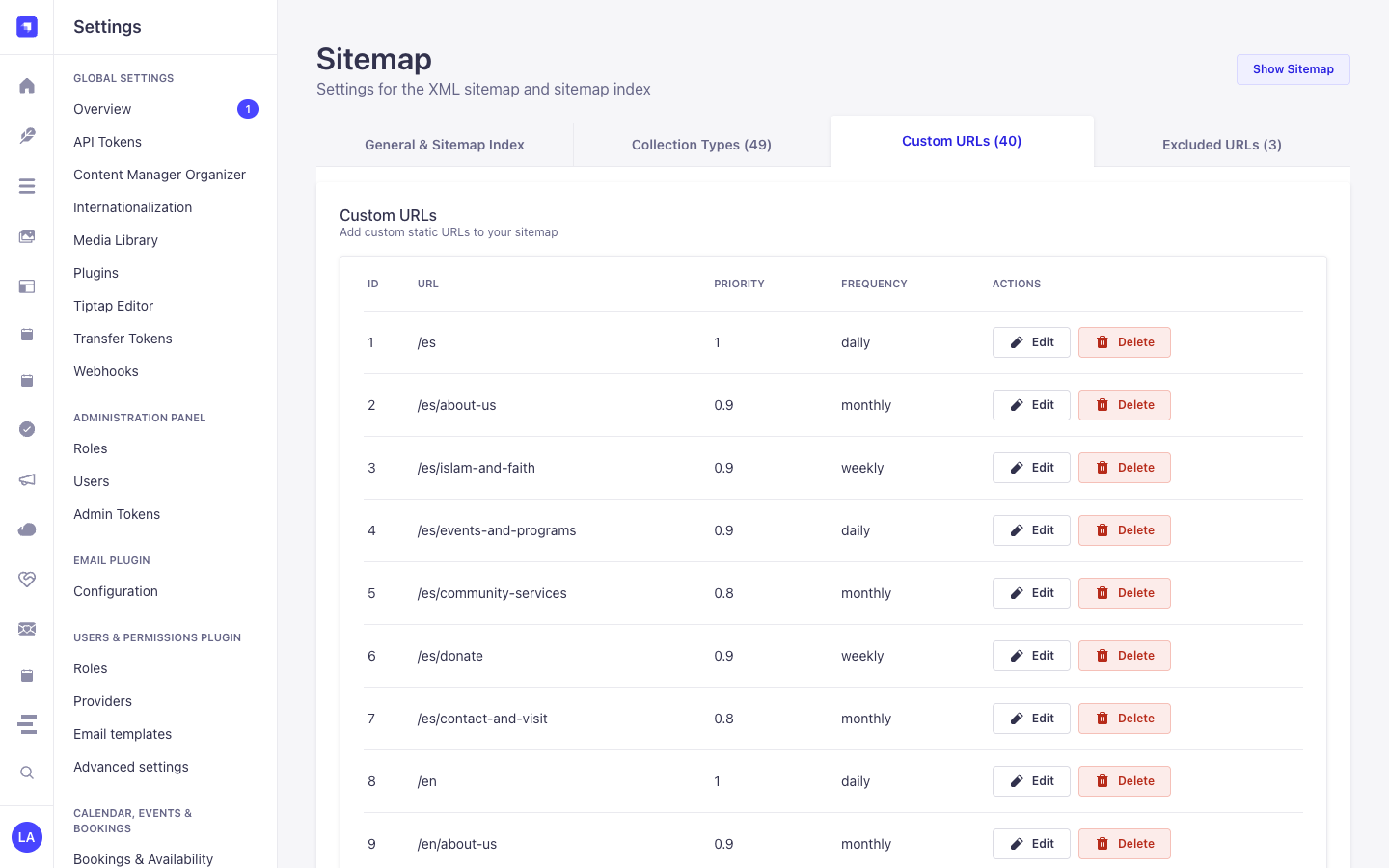
/screenshots/sitemap-content-manager.png): Add, edit, or delete static frontend route entries (/es,/es/about-us,/en/about-us) with per-route priority and frequency. - Excluded URLs (
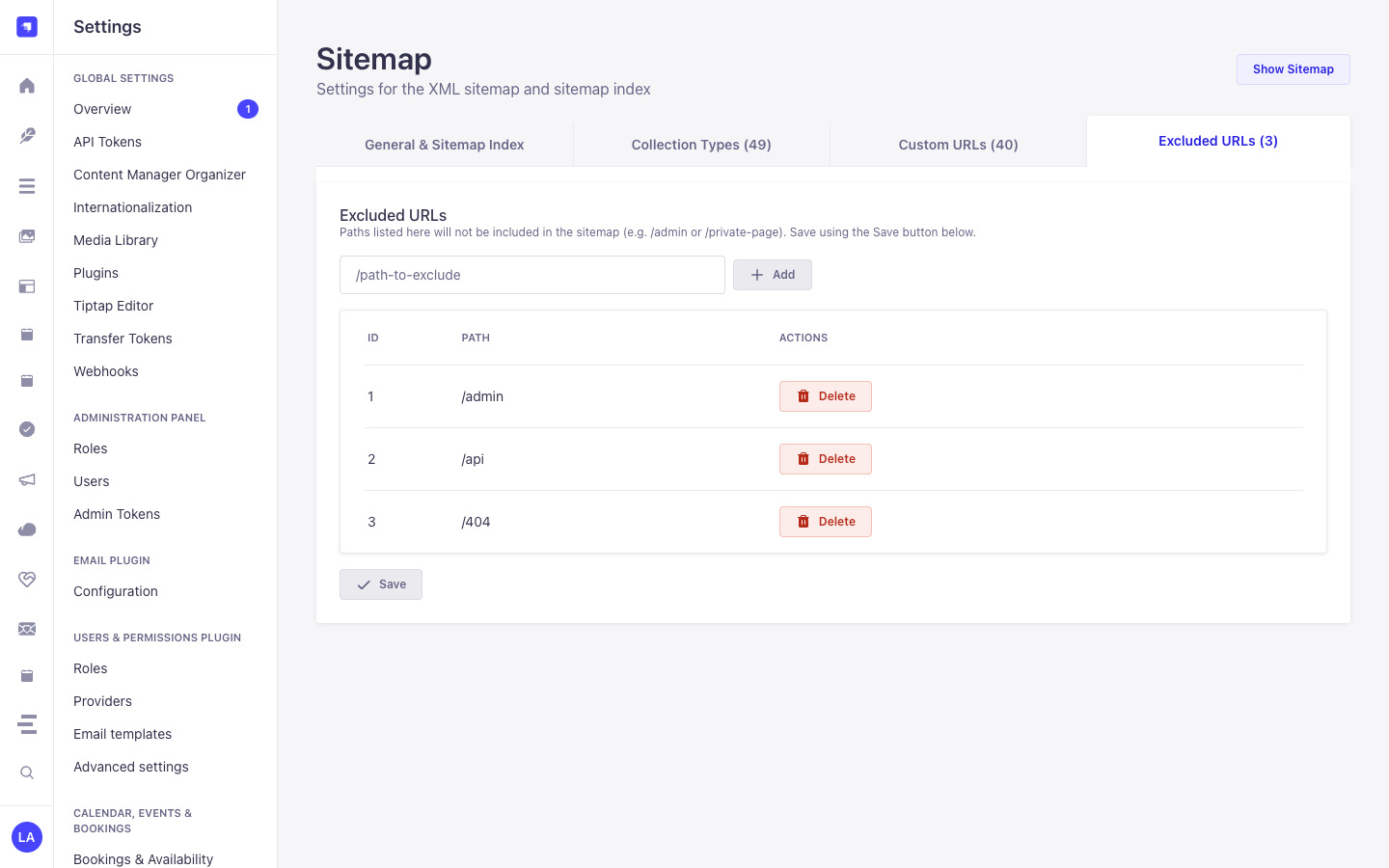
/screenshots/sitemap-excluded-urls.png): Exclude internal or non-indexable route prefixes (/admin,/api,/404) from all generated XML sitemaps.
Permissions
Section titled “Permissions”The sitemap endpoints are public routes. In Settings → Users & Permissions → Roles → Public, enable the Sitemap plugin actions: getSitemap (required) and getSitemapBySlug (only for Sitemap Index mode).
Configuration
Section titled “Configuration”Configure everything in Settings → Sitemap:
- Base URL — prefixed to every generated URL (e.g.
https://example.com). - Collection types — one entry per content type: URL pattern, language code, priority, change frequency, optional
lastmod(fromupdatedAt) and an optional media field used as the image thumbnail. Only published entries are included. - Custom URLs — static paths with their own priority and change frequency.
- Excluded URLs — paths removed from the output (matched on the URL path, with or without a leading or trailing slash).
- Sitemap Index — when enabled,
sitemap.xmlreturns a<sitemapindex>linking to the named sitemaps you define. Each named sitemap selects which collection-type entries it contains and whether custom URLs are included.
URL patterns
Section titled “URL patterns”Patterns use [field] placeholders filled from each entry:
| Pattern | Result |
|---|---|
/blog/[slug] |
/blog/my-post |
/[category.slug]/[slug] |
/news/my-post (relation fields; enable Populate linked models) |
- An entry is skipped when a plain placeholder (e.g.
[slug]) has no value. - A relation placeholder (e.g.
[category.slug]) with no value is dropped from the URL instead. - Repeated slashes are collapsed.
Multilingual (i18n)
Section titled “Multilingual (i18n)”Set the language code of a collection-type entry to a locale (e.g. es) to list that locale’s published entries, or - to not filter by locale. Add one entry per locale to cover several languages.
Migrating from strapi-5-sitemap-plugin
Section titled “Migrating from strapi-5-sitemap-plugin”This package uses the plugin id sitemap instead of strapi-5-sitemap-plugin, so:
- Public URLs change from
/api/strapi-5-sitemap-plugin/sitemap.xmlto/api/sitemap/sitemap.xml. Update anyrobots.txtentries, Search Console submissions and public-role permissions. - Settings are stored in new tables (
sitemap-*content types). Settings saved by the old plugin are not migrated, so re-enter them in Settings → Sitemap.
Development
Section titled “Development”pnpm --filter @vicacha-devs/strapi-plugin-sitemap test # builds first, then runs node:testContent-Type Entities & Where to Find Them
Section titled “Content-Type Entities & Where to Find Them”Registers two internal Collection Types (plugin::sitemap.sitemap-content-type and plugin::sitemap.sitemap-content-type-single-url) and one Single Type (plugin::sitemap.sitemap-option) with content-manager.visible: false, while introspecting all public api::* and plugin::* Content-Type entities to generate /api/sitemap/sitemap.xml and /api/sitemap/sitemap-{slug}.xml.
- Settings Panel (4 Tabs):
/admin/settings/sitemap(Settings -> Sitemap -> Configuration— organized into General & Sitemap Index, Collection Types, Custom URLs, and Excluded URLs tabs) - Internal Persistence Entities:
plugin::sitemap.sitemap-content-type(strapi_5_sitemap_plugin_content_types),plugin::sitemap.sitemap-content-type-single-url(strapi_5_sitemap_plugin_content_type_single_urls), andplugin::sitemap.sitemap-option(strapi_5_sitemap_plugin_options)
Strapi v5 Content Manager Integration (/admin/content-manager)
Section titled “Strapi v5 Content Manager Integration (/admin/content-manager)”Content Manager Sidebar Group:
Maps All Public Content Manager Collection Types & Single Types
Content Manager Entities & Components
Section titled “Content Manager Entities & Components”plugin::sitemap.sitemap-content-type(Internal URL pattern mapping for Content Manager entities)plugin::sitemap.sitemap-content-type-single-url(Internal custom static URL entries)plugin::sitemap.sitemap-option(Internal global sitemap settings)
Why This Plugin Creates & Integrates Content Manager Entities
Section titled “Why This Plugin Creates & Integrates Content Manager Entities”@vicacha-devs/strapi-plugin-sitemap keeps its 3 configuration schemas (sitemap-content-type, sitemap-content-type-single-url, sitemap-option) hidden from the Content Manager sidebar (content-manager.visible: false) to prevent accidental schema edits, while dynamically reading published documents and i18n localizations from every public Content Manager Collection Type (api::* and plugin::*):
- Automatic Sync with Content Manager Publishing: Whenever an editor publishes, updates, or unpublishes an
Article,Event,Donation Campaign, orResource Publicationin Content Manager,/api/sitemap/sitemap.xmlautomatically reflects itslastmodandxhtml:linkhreflangalternates.
How to Use in Strapi Content Manager (Step-by-Step)
Section titled “How to Use in Strapi Content Manager (Step-by-Step)”- Publish Content in Content Manager: Author and publish localized entries in any
api::*orplugin::*collection inside/admin/content-manager. - Map URL Patterns in Sitemap Settings: Open
/admin/settings/sitemap-> Collection Types tab and bind each Content Manager collection UID + locale to its frontend route pattern (e.g.,/[locale]/articles/[slug]). - Configure Sitemap Index, Custom & Excluded URLs: Use the General & Sitemap Index tab (
Use sitemap index with multiple sitemaps+getSitemapBySlug in Users & Permissions → Public → Sitemap), Custom URLs tab, and Excluded URLs tab in/admin/settings/sitemap.
Content Manager & Plugin Workspace Synchronization
Section titled “Content Manager & Plugin Workspace Synchronization”Content Manager Use Cases & Editorial Workflows
Section titled “Content Manager Use Cases & Editorial Workflows”Content Manager Use Case 1 — Auto-Syndicating Published Content Manager Entries to Multilingual XML Sitemaps
Section titled “Content Manager Use Case 1 — Auto-Syndicating Published Content Manager Entries to Multilingual XML Sitemaps”- Why & What it is for: Ensure every newly published localized Event, Article, or Publication in Content Manager is immediately indexed with
hreflangalternates. - How to use in Content Manager: Publish the entry across
es,en,ar, andtrin/admin/content-managerand verify its<url>block inGET /api/sitemap/sitemap.xml.
End-to-End Use Cases & Workflows
Section titled “End-to-End Use Cases & Workflows”Use Case 1 — Dynamic Multilingual Entity URL Pattern Mapping & xhtml:link Hreflang
Section titled “Use Case 1 — Dynamic Multilingual Entity URL Pattern Mapping & xhtml:link Hreflang”- What it is for: Map any localized Strapi Content-Type entity (
api::article.article,plugin::events.event,plugin::resources.publication) to dynamic URL patterns with automatichreflangalternates. - How it works: In
/admin/settings/sitemap(Collection Types tab), map a content type +langcodeto a pattern (e.g.,/[locale]/articles/[slug]),priority, andfrequency(plugin::sitemap.sitemap-content-type).
Use Case 2 — Hybrid Static + CMS Sitemap with Custom Single URLs & Excluded Paths
Section titled “Use Case 2 — Hybrid Static + CMS Sitemap with Custom Single URLs & Excluded Paths”- What it is for: Include static frontend routes (
/es,/es/about-us,/en/about-us) alongside dynamic CMS entries in the same XML sitemap while excluding internal paths (/admin,/api,/404). - How it works: Add static route entries in the Custom URLs tab (
plugin::sitemap.sitemap-content-type-single-url) and exclude internal routes in the Excluded URLs tab of/admin/settings/sitemap.
Use Case 3 — Multi-File Sitemap Index (sitemap-{slug}.xml) for Large Sites
Section titled “Use Case 3 — Multi-File Sitemap Index (sitemap-{slug}.xml) for Large Sites”- What it is for: Split large portals into dedicated sub-sitemaps (e.g.,
/api/sitemap/sitemap-pages.xml,/api/sitemap/sitemap-editorial-and-library.xml,/api/sitemap/sitemap-events-and-liturgy.xml) referenced by a master<sitemapindex>. - How it works: Enable Use sitemap index with multiple sitemaps (
useSitemapIndex: true), grantgetSitemapBySluginUsers & Permissions → Public → Sitemap, and definesitemapDefinitionsin the General & Sitemap Index tab of/admin/settings/sitemap(PUT /sitemap/settings).
Admin Workspace, Content Manager & Settings Panel Preview
Section titled “Admin Workspace, Content Manager & Settings Panel Preview”
Strapi v5 Content Manager Entities (/admin/content-manager)
Section titled “Strapi v5 Content Manager Entities (/admin/content-manager)”
Settings Panel (Settings -> Configuration)
Section titled “Settings Panel (Settings -> Configuration)”
Explore Content Types & Use Cases, the Developer Guide & Admin UI Tour, and the Interactive OpenAPI Reference for complete schema, workflow diagram, and endpoint documentation.