Resources, Galleries & Glossary (@vicacha-devs/strapi-plugin-resources)
Reusable Strapi v5 Media Library, Digital Publications, Photo Galleries & Glossary Plugin (plugin::resources) built natively on top of Strapi v5’s @strapi/upload (plugin::upload.file & plugin::upload.folder) and @vicacha-devs/strapi-plugin-calendar.
Features
Section titled “Features”- Native Strapi v5 Media Library Integration:
- Uses
plugin::upload.filefor PDFs, eBooks, cover artwork, multi-photo gallery albums, and glossary pronunciation audio. - Uses
plugin::upload.folderfor authenticated admin folder-to-album synchronization (POST /resources/galleries/:documentId/sync-media-folder). - Automatic Cloudinary
f_auto,q_autoresponsive URL optimization when@strapi/provider-upload-cloudinaryis active.
- Uses
- 3 Localized Content-Types (
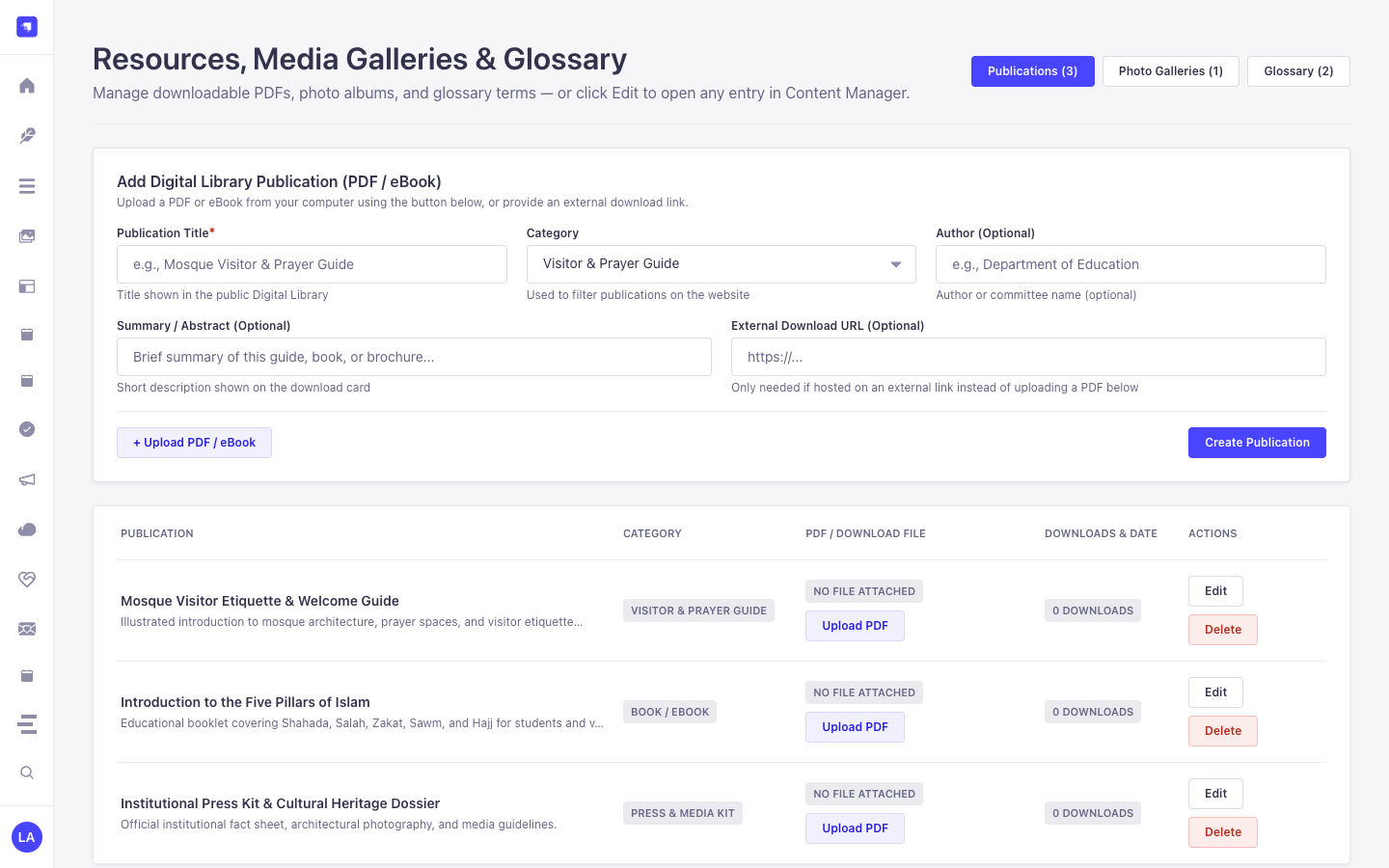
i18n& Draft/Publish Ready):plugin::resources.publication: Digital library guides, books, pamphlets, and press kits with HMAC-SHA256 signed download tickets, atomicdownloadCounttracking, and extension/MIME allow-list enforcement (active-script types such as.svg,.html,.js, and.exeare unconditionally blocked).plugin::resources.gallery-album: Curated photo & video albums withphotoCount, photographer credit, internal framing notes (redacted from public Content-API responses), and secondary calendar dates.plugin::resources.glossary-term: Structured A–Z terminology index with native script, transliteration, definition, and optional audio pronunciation.
- Role-Based Access Control (RBAC):
plugin::resources.read: View catalog hub, media folders, and media files in Strapi Admin.plugin::resources.manage: Create, update, delete, and folder-sync publications, gallery albums, and glossary terms.plugin::resources.settings: Read and update plugin settings (/admin/settings/resources).
- Public Content-API Endpoints (
/api/resources/*,status: "published"enforced):GET /api/resources/hubGET /api/resources/publications&GET /api/resources/publications/:slugPOST /api/resources/publications/:slug/download(returnsapplication/jsonsigned ticket{ data: { documentId, slug, downloadUrl, expiresAt, signature, recommendedHeaders, ... } })GET /api/resources/galleries&GET /api/resources/galleries/:slugGET /api/resources/glossary
- Multi-Calendar Secondary Dates:
- Powered by
@vicacha-devs/strapi-plugin-calendar(islamic-umalqura,islamic-civil,hebrew,persian,buddhist,coptic,ethiopic, ornone).
- Powered by
- 3-Tab Admin Settings Panel (
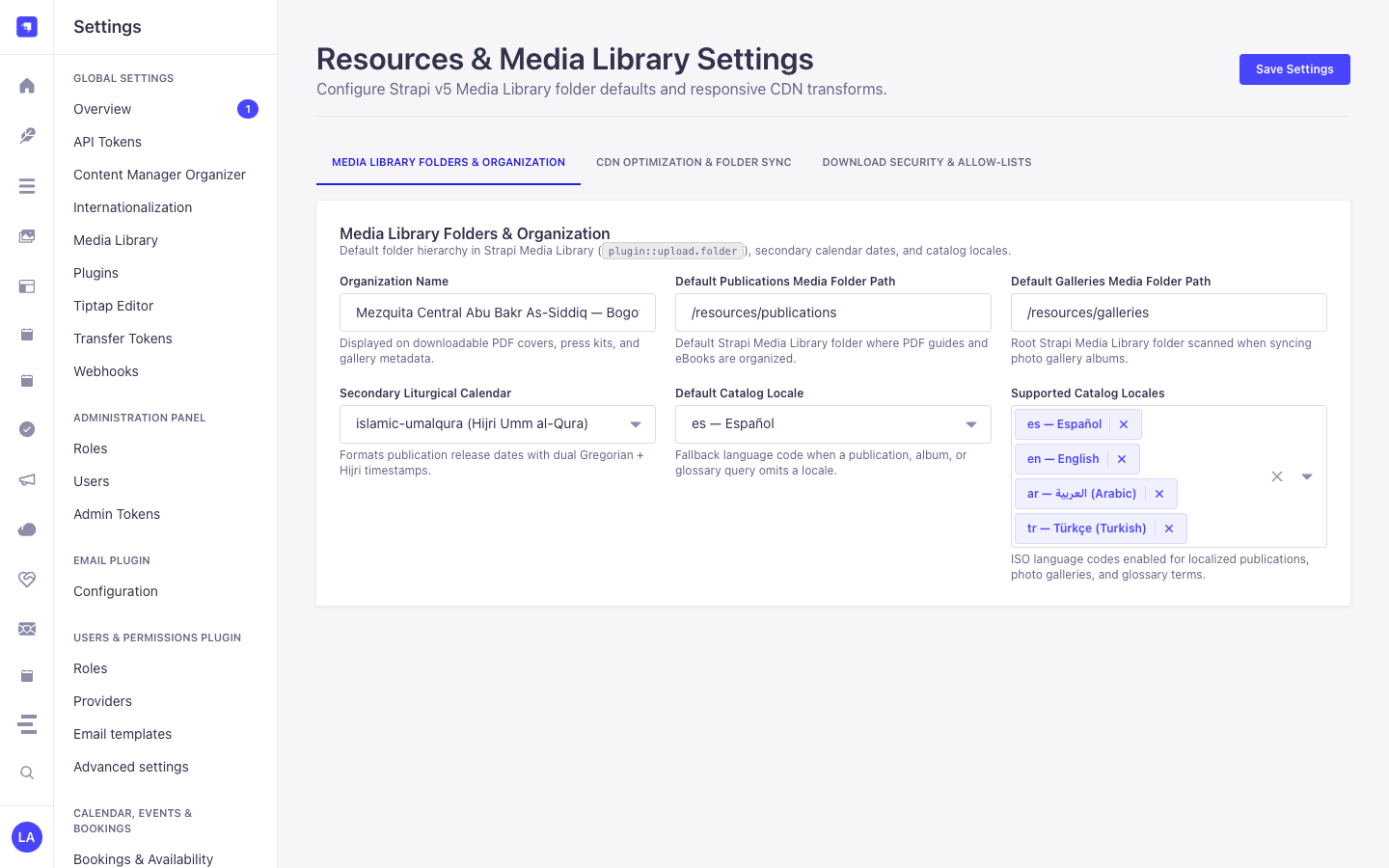
/admin/settings/resources):- Tab 1 — Media Library Folders & Organization: Configure
organizationName,defaultPublicationsFolderPath(default/publications),defaultGalleriesFolderPath(default/galleries),secondaryCalendar,defaultLocale(default"es"), andsupportedLocales(default["es", "en", "ar", "tr"]). - Tab 2 — CDN Optimization & Folder Sync: Toggle
enableCloudinaryOptimization(f_auto,q_auto),autoSyncMediaFolders, andmaxPhotosPerAlbum(1–500, default60). - Tab 3 — Download Security & Allow-Lists: Configure
allowedDownloadExtensionsandallowedDownloadMimeTypesenforced onPOST /api/resources/publications/:slug/download.
- Tab 1 — Media Library Folders & Organization: Configure
- 10 Admin UI Locales:
en,es,ar,tr,fr,de,it,pt,ru,zh.
Quick Installation & Configuration
Section titled “Quick Installation & Configuration”pnpm add @vicacha-devs/strapi-plugin-resources @vicacha-devs/strapi-plugin-calendarSet RESOURCES_DOWNLOAD_SECRET in production (minimum 32 random characters recommended) and configure the plugin in config/plugins.ts:
export default ({ env }) => ({ resources: { enabled: true, config: { downloadSecret: env("RESOURCES_DOWNLOAD_SECRET"), organizationName: env( "RESOURCES_ORG_NAME", "Community Center & Digital Library" ), defaultPublicationsFolderPath: "/publications", defaultGalleriesFolderPath: "/galleries", secondaryCalendar: "islamic-umalqura", defaultLocale: "es", supportedLocales: ["es", "en", "ar", "tr"], enableCloudinaryOptimization: true, autoSyncMediaFolders: true, maxPhotosPerAlbum: 60, allowedDownloadExtensions: [ ".pdf", ".epub", ".png", ".jpg", ".jpeg", ".webp", ".mp3", ".m4a", ".zip", ], allowedDownloadMimeTypes: [ "application/pdf", "application/epub+zip", "image/png", "image/jpeg", "image/webp", "audio/mpeg", "audio/mp4", "application/zip", ], }, },});Content-Type Entities & Where to Find Them
Section titled “Content-Type Entities & Where to Find Them”Registers three localized (i18n.localized: true), draft-and-publish (draftAndPublish: true) Collection Types: plugin::resources.publication, plugin::resources.gallery-album, and plugin::resources.glossary-term, plus a 3-tab settings panel (/admin/settings/resources) covering Media Library folder paths, multi-calendar secondary dates, Cloudinary f_auto,q_auto optimization, album photo caps, and download extension/MIME allow-lists. Supports runtime schemaExtensions in config/plugins.ts.
- Content Manager:
/admin/content-manager/collection-types/plugin::resources.publication,plugin::resources.gallery-album, andplugin::resources.glossary-term(visible: true) - Content-Type Builder:
/admin/plugins/content-type-builderunder Collection Types (Resource Publication,Resource Gallery Album,Resource Glossary Term) - Plugin Workspace:
/admin/plugins/resources(Publications, Gallery Albums, Glossary Terms, Media Folder Sync) - Settings Panel (3 Tabs):
/admin/settings/resources— Media Library Folders & Organization (organizationName,defaultPublicationsFolderPath,defaultGalleriesFolderPath,secondaryCalendar,defaultLocale,supportedLocales), CDN Optimization & Folder Sync (enableCloudinaryOptimization,autoSyncMediaFolders,maxPhotosPerAlbum), and Download Security & Allow-Lists (allowedDownloadExtensions,allowedDownloadMimeTypes) - Database Tables:
resources_publications,resources_gallery_albums, andresources_glossary_terms
Strapi v5 Content Manager Integration (/admin/content-manager)
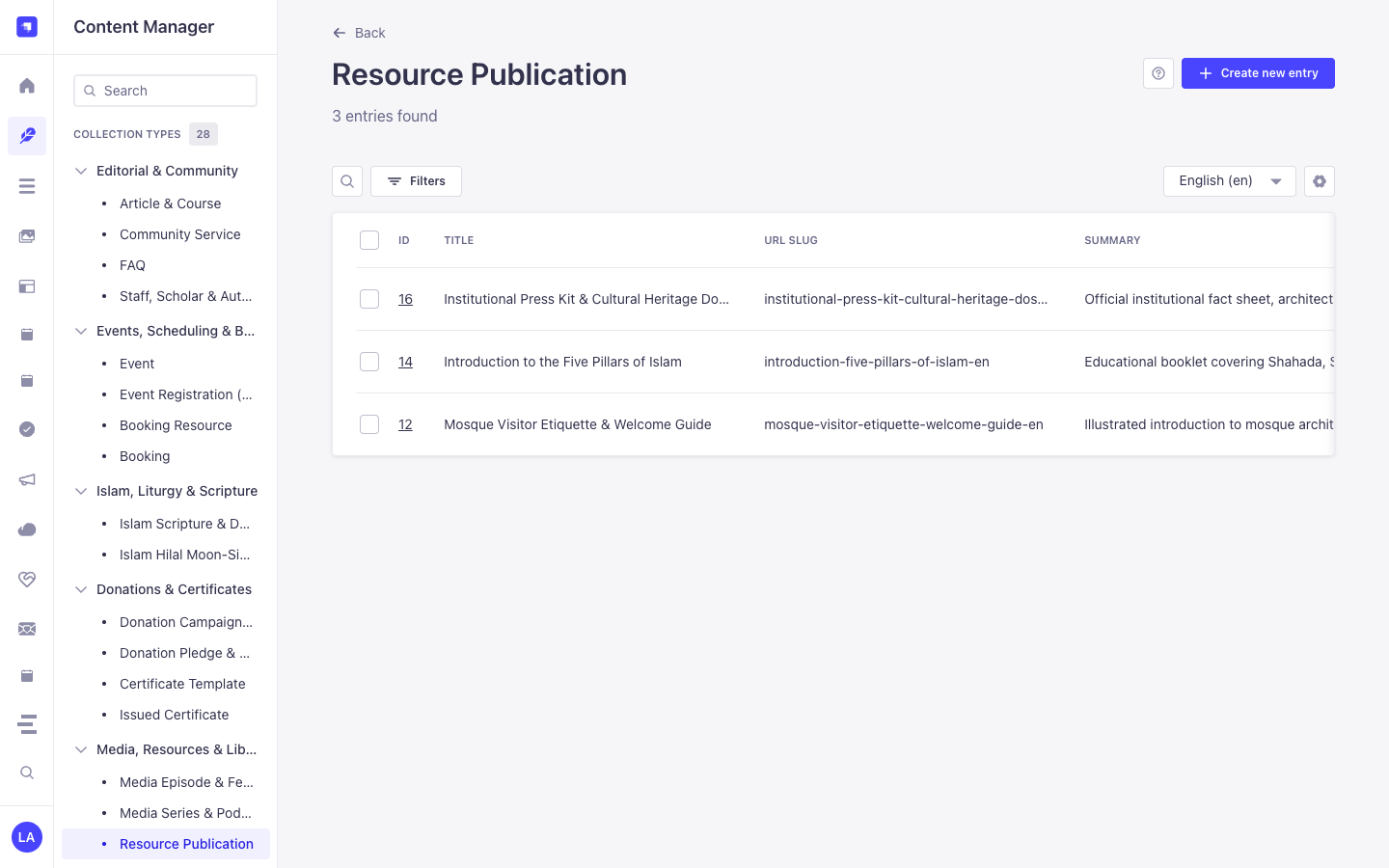
Section titled “Strapi v5 Content Manager Integration (/admin/content-manager)”Content Manager Sidebar Group:
Media, Resources & Library
Content Manager Entities & Components
Section titled “Content Manager Entities & Components”plugin::resources.publication(Resource Publication —/admin/content-manager/collection-types/plugin::resources.publication)plugin::resources.gallery-album(Resource Gallery Album —/admin/content-manager/collection-types/plugin::resources.gallery-album)plugin::resources.glossary-term(Resource Glossary Term —/admin/content-manager/collection-types/plugin::resources.glossary-term)
Why This Plugin Creates & Integrates Content Manager Entities
Section titled “Why This Plugin Creates & Integrates Content Manager Entities”@vicacha-devs/strapi-plugin-resources registers all three of its entities (Resource Publication, Resource Gallery Album, and Resource Glossary Term) with i18n.localized: true, draftAndPublish: true, and content-manager.visible: true so librarians, scholars, and archivists can manage digital books, photo albums, and glossary terms inside the Strapi v5 Content Manager:
- Multilingual (
i18n) Digital Library & Glossary Authoring: Author publications, photo gallery descriptions, and A–Z glossary definitions acrossen,es,ar, andtr(?plugins[i18n][locale]=en) with native Draft & Publish staging. - Relational Author Profile Linking (
authorProfile): In Content Manager, linkResource Publicationrecords directly toStaff, Scholar & Author(api::leader.leader) profiles viaconfig/plugins.ts -> schemaExtensions.publication. - Direct Media Library Asset & Folder Binding: Attach cover images, downloadable PDF files, pronunciation audio clips, and Media Library folder paths directly inside Content Manager forms.
How to Use in Strapi Content Manager (Step-by-Step)
Section titled “How to Use in Strapi Content Manager (Step-by-Step)”- Open in Content Manager: In the left sidebar, expand Content Manager -> Collection Types -> Media, Resources & Library and select Resource Publication (
/admin/content-manager/collection-types/plugin::resources.publication?plugins[i18n][locale]=en), Resource Gallery Album (plugin::resources.gallery-album), or Resource Glossary Term (plugin::resources.glossary-term). - Publish Books, Guides & Press Kits: In Resource Publication, populate
title,slug,summary,category(book,guide,pamphlet,press_kit),fileUrl,pageCount, andauthorProfile, then click Publish. - Curate A–Z Glossary Terms: In Resource Glossary Term, enter
term,nativeScript(Arabic script),transliteration,definition,letterGroup(A–Z), andpronunciationAudioUrl. - Workspace vs. Content Manager: Use Content Manager for multilingual authoring, scholar
authorProfilerelations, and bulk publishing; use the Resources Workspace (/admin/plugins/resources) for 1-click Media Library folder synchronization (Sync Folder) and download analytics.
Content Manager & Plugin Workspace Synchronization
Section titled “Content Manager & Plugin Workspace Synchronization”Content Manager Use Cases & Editorial Workflows
Section titled “Content Manager Use Cases & Editorial Workflows”Content Manager Use Case 1 — Publishing Multilingual PDF Guides Linked to Institutional Authors (api::leader.leader)
Section titled “Content Manager Use Case 1 — Publishing Multilingual PDF Guides Linked to Institutional Authors (api::leader.leader)”- Why & What it is for: Author downloadable PDF guides (
Mosque Welcome & Visitor Etiquette Guide,Introduction to the Five Pillars of Islam) in Content Manager and link each publication to its scholar author. - How to use in Content Manager: Open
/admin/content-manager/collection-types/plugin::resources.publication?plugins[i18n][locale]=en, edit the entry, select theauthorProfilerelation, switch locales (es,ar,tr) to translate, and click Publish.
Content Manager Use Case 2 — Managing Multilingual Glossary Terms with Native Script & Audio
Section titled “Content Manager Use Case 2 — Managing Multilingual Glossary Terms with Native Script & Audio”- Why & What it is for: Curate A–Z glossary entries with vocalized Arabic script, phonetic transliteration, and audio pronunciation links in Content Manager.
- How to use in Content Manager: Open
/admin/content-manager/collection-types/plugin::resources.glossary-term?plugins[i18n][locale]=en, filter byletterGrouporcategory, and publish.
End-to-End Use Cases & Workflows
Section titled “End-to-End Use Cases & Workflows”Use Case 1 — Digital Publications Library with Hardened Download Allow-Lists
Section titled “Use Case 1 — Digital Publications Library with Hardened Download Allow-Lists”- What it is for: Publish downloadable books, PDF guides, pamphlets, and press kits protected by extension (
allowedDownloadExtensions) and MIME (allowedDownloadMimeTypes) allow-lists,X-Content-Type-Options: nosniff, and atomic download counters. - How it works: Configure allowed extensions/MIME types in
/admin/settings/resources(Download Security & Allow-Lists tab), createplugin::resources.publicationrecords, and serve downloads viaPOST /api/resources/publications/{slug}/download.
Use Case 2 — Configuring Media Library Folders, Secondary Calendars, CDN Optimization & Download Security
Section titled “Use Case 2 — Configuring Media Library Folders, Secondary Calendars, CDN Optimization & Download Security”- What it is for: Manage all 11
ResourcesPluginSettingsfields across 3 organized tabs in/admin/settings/resources(Media Library Folders & Organization,CDN Optimization & Folder Sync, andDownload Security & Allow-Lists) and automatically syncplugin::upload.folderassets intoplugin::resources.gallery-albumup tomaxPhotosPerAlbum. - How it works: Configure
defaultPublicationsFolderPath,defaultGalleriesFolderPath,secondaryCalendar,enableCloudinaryOptimization,autoSyncMediaFolders,maxPhotosPerAlbum, and download allow-lists in/admin/settings/resources(PUT /resources/settings), then click Sync Folder (POST /resources/galleries/{documentId}/sync-folder).
Use Case 3 — Multilingual A–Z Glossary with Native Script & Audio Pronunciation
Section titled “Use Case 3 — Multilingual A–Z Glossary with Native Script & Audio Pronunciation”- What it is for: Maintain an educational glossary of Arabic/Islamic or domain terms (
term,nativeScript,transliteration,definition,pronunciationAudio,letterGroup). - How it works: Manage entries in
plugin::resources.glossary-termand query grouped A–Z terms viaGET /api/resources/glossary?letter=A&category=worship.
Admin Workspace, Content Manager & Settings Panel Preview
Section titled “Admin Workspace, Content Manager & Settings Panel Preview”
Strapi v5 Content Manager Entities (/admin/content-manager)
Section titled “Strapi v5 Content Manager Entities (/admin/content-manager)”
Settings Panel (Settings -> Configuration)
Section titled “Settings Panel (Settings -> Configuration)”
Explore Content Types & Use Cases, the Developer Guide & Admin UI Tour, and the Interactive OpenAPI Reference for complete schema, workflow diagram, and endpoint documentation.