Bookings & Reservations — Content Types & Use Cases
Package:
@vicacha-devs/strapi-plugin-bookings· Plugin ID:bookings· Admin Workspace:/admin/plugins/bookings
1. Content-Type Entities, Locations & Schemas (strapi.documents)
Section titled “1. Content-Type Entities, Locations & Schemas (strapi.documents)”Registers two relational Collection Types (plugin::bookings.resource one-to-many plugin::bookings.booking). Resources define weekly/seasonal availability windows, slot duration, buffers, and capacity; Bookings store individual customer reservations, party size, status transitions, and hashed self-service cancellation tokens. Supports runtime schemaExtensions (resource, booking) and customFields in config/plugins.ts.
Where to Find Content-Type Entities in Strapi v5
Section titled “Where to Find Content-Type Entities in Strapi v5”- Content Manager:
/admin/content-manager/collection-types/plugin::bookings.resource&/admin/content-manager/collection-types/plugin::bookings.booking(visible: true) - Content-Type Builder:
/admin/plugins/content-type-builderunder Collection Types (Booking Resource&Booking) - Plugin Workspace & Settings:
/admin/plugins/bookings(Reservations & Resources manager) and/admin/settings/bookings - Database Tables:
booking_resourcesandbookings
plugin::bookings.booking — Booking
Section titled “plugin::bookings.booking — Booking”Reservation, appointment, or resource slot booking
Kind:
collectionType· DB Table:bookings· Admin Location:/admin/content-manager/collection-types/plugin::bookings.booking· Draft & Publish:No· i18n:No
| Attribute | Strapi Type | Required | Constraints / Target |
|---|---|---|---|
bookingCode |
string |
Yes | max: 48 |
title |
string |
No | max: 200 |
resource |
relation |
No | target: plugin::bookings.resource |
customerName |
string |
Yes | max: 120 |
customerEmail |
email |
Yes | — |
customerPhone |
string |
No | max: 40 |
organization |
string |
No | max: 160 |
startDate |
datetime |
Yes | — |
endDate |
datetime |
Yes | — |
slotLabel |
string |
No | max: 80 |
timezone |
string |
No | max: 64; default: "UTC" |
partySize |
integer |
Yes | default: 1 |
status |
enumeration |
Yes | enum: pending, confirmed, completed, cancelled, no_show; default: "pending" |
preferredLanguage |
string |
No | max: 16 |
assignedHost |
string |
No | max: 120 |
notes |
text |
No | max: 2000 |
internalNotes |
text |
No | max: 2000; private: true |
cancelTokenHash |
string |
No | max: 128; private: true |
sourceCollection |
string |
No | default: "plugin::bookings.booking" |
metadata |
json |
No | — |
plugin::bookings.resource — Booking Resource
Section titled “plugin::bookings.resource — Booking Resource”Bookable service, appointment type, room, staff member, or equipment schedule
Kind:
collectionType· DB Table:booking_resources· Admin Location:/admin/content-manager/collection-types/plugin::bookings.resource· Draft & Publish:No· i18n:No
| Attribute | Strapi Type | Required | Constraints / Target |
|---|---|---|---|
name |
string |
Yes | max: 160 |
slug |
uid |
Yes | — |
resourceType |
enumeration |
Yes | enum: service, appointment, room, staff, equipment, other; default: "service" |
description |
text |
No | — |
color |
string |
No | max: 32; default: "#0d9488" |
timezone |
string |
No | max: 64; default: "UTC" |
slotDurationMinutes |
integer |
Yes | default: 60 |
bufferBeforeMinutes |
integer |
No | default: 0 |
bufferAfterMinutes |
integer |
No | default: 0 |
capacityPerSlot |
integer |
Yes | default: 1 |
maxPartySize |
integer |
No | default: 50 |
minLeadTimeHours |
integer |
No | default: 2 |
maxAdvanceDays |
integer |
No | default: 90 |
requiresApproval |
boolean |
No | default: false |
weeklySchedule |
json |
No | — |
seasonalSchedules |
json |
No | — |
holidayRules |
json |
No | — |
blackoutDates |
json |
No | — |
recurrenceRule |
string |
No | — |
supportedLanguages |
json |
No | — |
assignedHosts |
json |
No | — |
location |
string |
No | max: 240 |
price |
decimal |
No | default: 0 |
currency |
string |
No | max: 10; default: "USD" |
isActive |
boolean |
No | default: true |
metadata |
json |
No | — |
bookings |
relation |
No | target: plugin::bookings.booking |
Strapi v5 Content Manager Integration (/admin/content-manager)
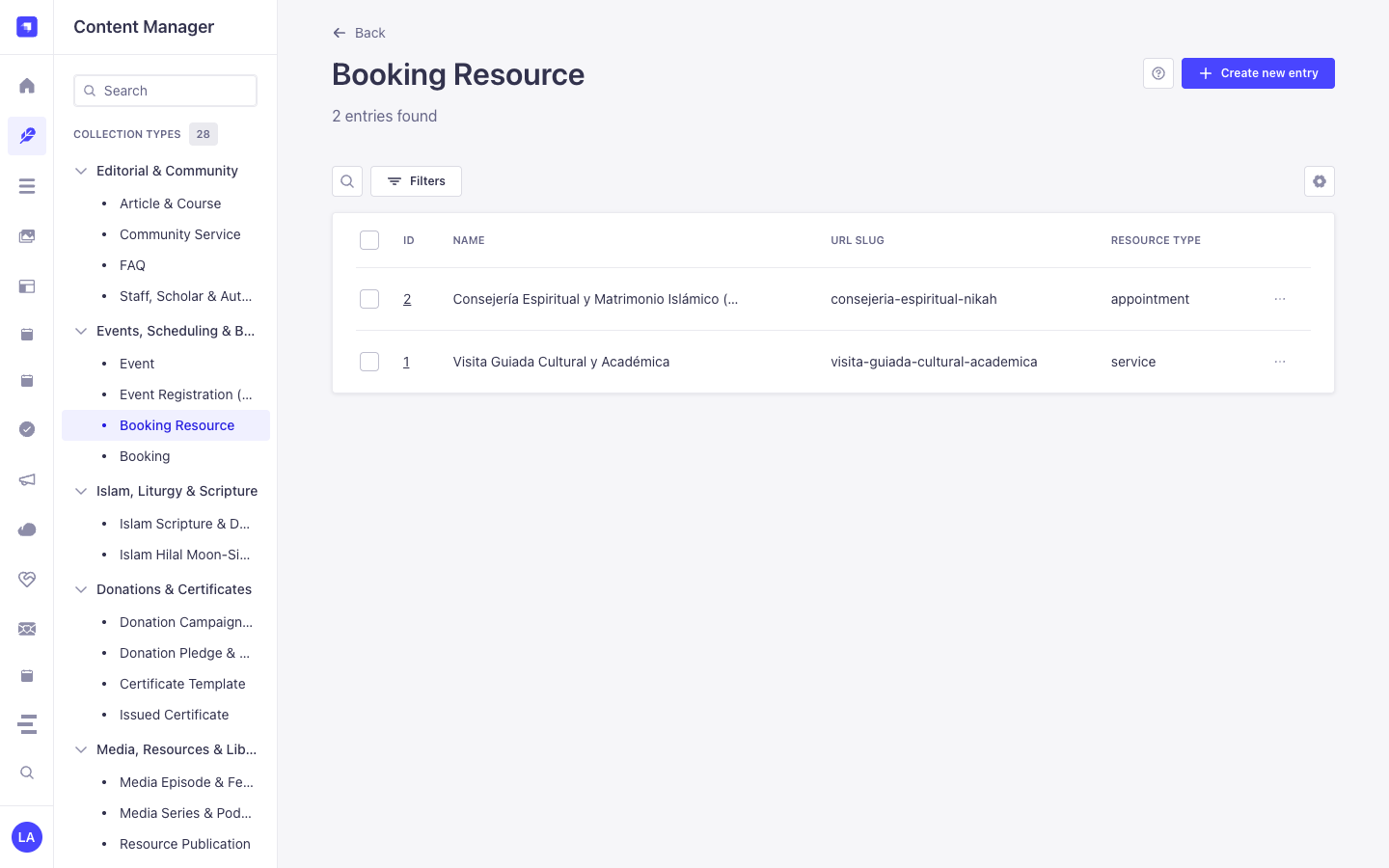
Section titled “Strapi v5 Content Manager Integration (/admin/content-manager)”Content Manager Sidebar Group:
Events, Scheduling & Bookings
Content Manager Entities & Components
Section titled “Content Manager Entities & Components”plugin::bookings.resource(Booking Resource —/admin/content-manager/collection-types/plugin::bookings.resource)plugin::bookings.booking(Booking —/admin/content-manager/collection-types/plugin::bookings.booking)
Why This Plugin Creates & Integrates Content Manager Entities
Section titled “Why This Plugin Creates & Integrates Content Manager Entities”@vicacha-devs/strapi-plugin-bookings registers both Booking Resource (plugin::bookings.resource) and Booking (plugin::bookings.booking) with pluginOptions['content-manager'].visible = true so teams can combine the operational slot-availability engine in /admin/plugins/bookings with Strapi v5’s native Content Manager relational modeling and schema extensibility:
- Relational Linking to Host Entities (
api::*): Link aBooking Resourcedirectly to aStaff, Scholar & Author(api::leader.leader) record, room media gallery, or department viaschemaExtensions.resourceinconfig/plugins.ts. - Custom Intake Attributes (
customFields&schemaExtensions.booking): Inspect and edit custom reservation fields (such asorganizationName,cateringRequired, orequipmentNotes) alongside native Strapi audit columns (createdBy,updatedBy). - Advanced Filtering & Bulk Operations: Filter hundreds of historical reservations by
status,startAt,resource, orcustomerEmailusing Content Manager’s multi-condition filter builder and bulk-delete test records. - Cross-Plugin Side-Panel Ecosystem: Attach internal staff handoff notes via
@vicacha-devs/strapi-plugin-notesin the Content Manager right sidebar or jump straight to a booking viaCmd+K(@vicacha-devs/strapi-plugin-global-search).
How to Use in Strapi Content Manager (Step-by-Step)
Section titled “How to Use in Strapi Content Manager (Step-by-Step)”- Open in Content Manager: In the left sidebar, click Content Manager -> Collection Types -> Events, Scheduling & Bookings and select Booking Resource (
/admin/content-manager/collection-types/plugin::bookings.resource) or Booking (/admin/content-manager/collection-types/plugin::bookings.booking). - Configure Bookable Resources: Click + Create new entry in Booking Resource to define
name,slug,resourceType(room,counselor,equipment,service,appointment),capacity,slotDurationMinutes,bufferBeforeMinutes,bufferAfterMinutes, andweeklyScheduleJSON rules. - Manage & Link Reservations: Open any Booking entry to inspect or update
bookingCode,startAt,endAt,partySize,status, the linkedresourcerelation, and any custom fields registered underconfig.schemaExtensions.booking. - Workspace vs. Content Manager: Use Content Manager for structured resource setup, relational linking, and bulk filtering; use the Bookings Workspace (
/admin/plugins/bookings) for 1-click status transitions (confirmed,completed,no_show) and availability slot testing.
Content Manager & Plugin Workspace Synchronization
Section titled “Content Manager & Plugin Workspace Synchronization”Content Manager Use Cases & Editorial Workflows
Section titled “Content Manager Use Cases & Editorial Workflows”Content Manager Use Case 1 — Linking Counselors & Imams (api::leader.leader) to Bookable Resources
Section titled “Content Manager Use Case 1 — Linking Counselors & Imams (api::leader.leader) to Bookable Resources”- Why & What it is for: Connect each appointment or counseling resource in
plugin::bookings.resourceto an institutional profile inapi::leader.leaderand a Media Library cover photo. - How to use in Content Manager: Extend
resourceviaschemaExtensionsinconfig/plugins.ts, open/admin/content-manager/collection-types/plugin::bookings.resource, select the assigned scholar/counselor relation, and save.
Content Manager Use Case 2 — Auditing & Bulk-Filtering Reservations with Editorial Notes
Section titled “Content Manager Use Case 2 — Auditing & Bulk-Filtering Reservations with Editorial Notes”- Why & What it is for: Filter pending or high-capacity room bookings in Content Manager and attach internal preparation checklists in the right sidebar.
- How to use in Content Manager: Open
/admin/content-manager/collection-types/plugin::bookings.booking, apply a filter onstatus = pendingorpartySize > 20, open the entry, and add a pinned note in the Notes side panel.
3. End-to-End Use Cases & Workflows
Section titled “3. End-to-End Use Cases & Workflows”Use Case 1 — Public Self-Service Slot Discovery & Reservation
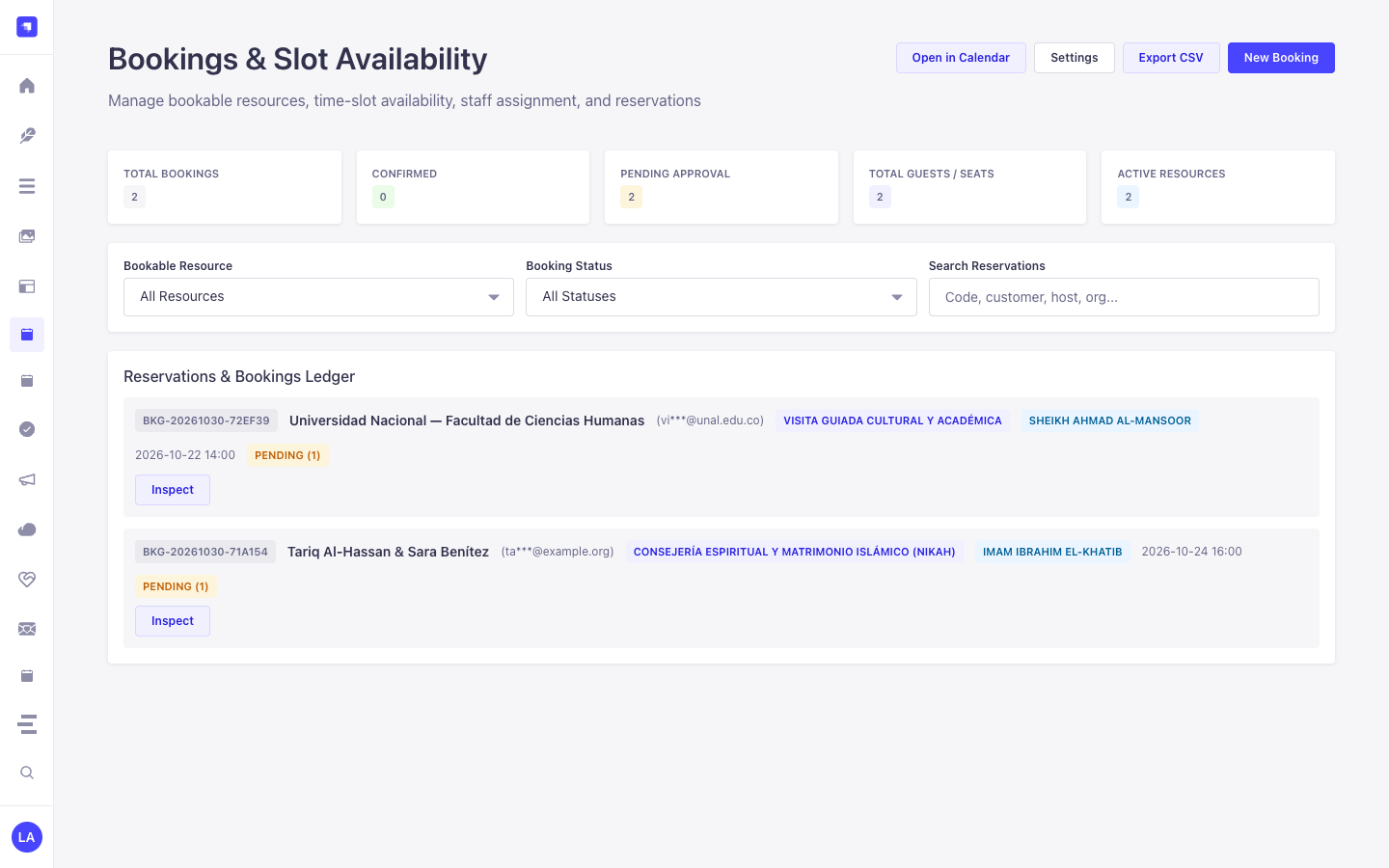
Section titled “Use Case 1 — Public Self-Service Slot Discovery & Reservation”- What it is for: Allow website visitors to query available time slots for a room, counselor, imam, or equipment resource and book a slot without double-booking.
- How it works: Query
GET /api/bookings/available-slots?resourceSlug=main-conference-hall&date=2026-05-15, then submitPOST /api/bookings/reserveto create aplugin::bookings.bookingentity and receive a one-time cancellation token.
Use Case 2 — Multi-Host Appointment & Buffer Enforcement
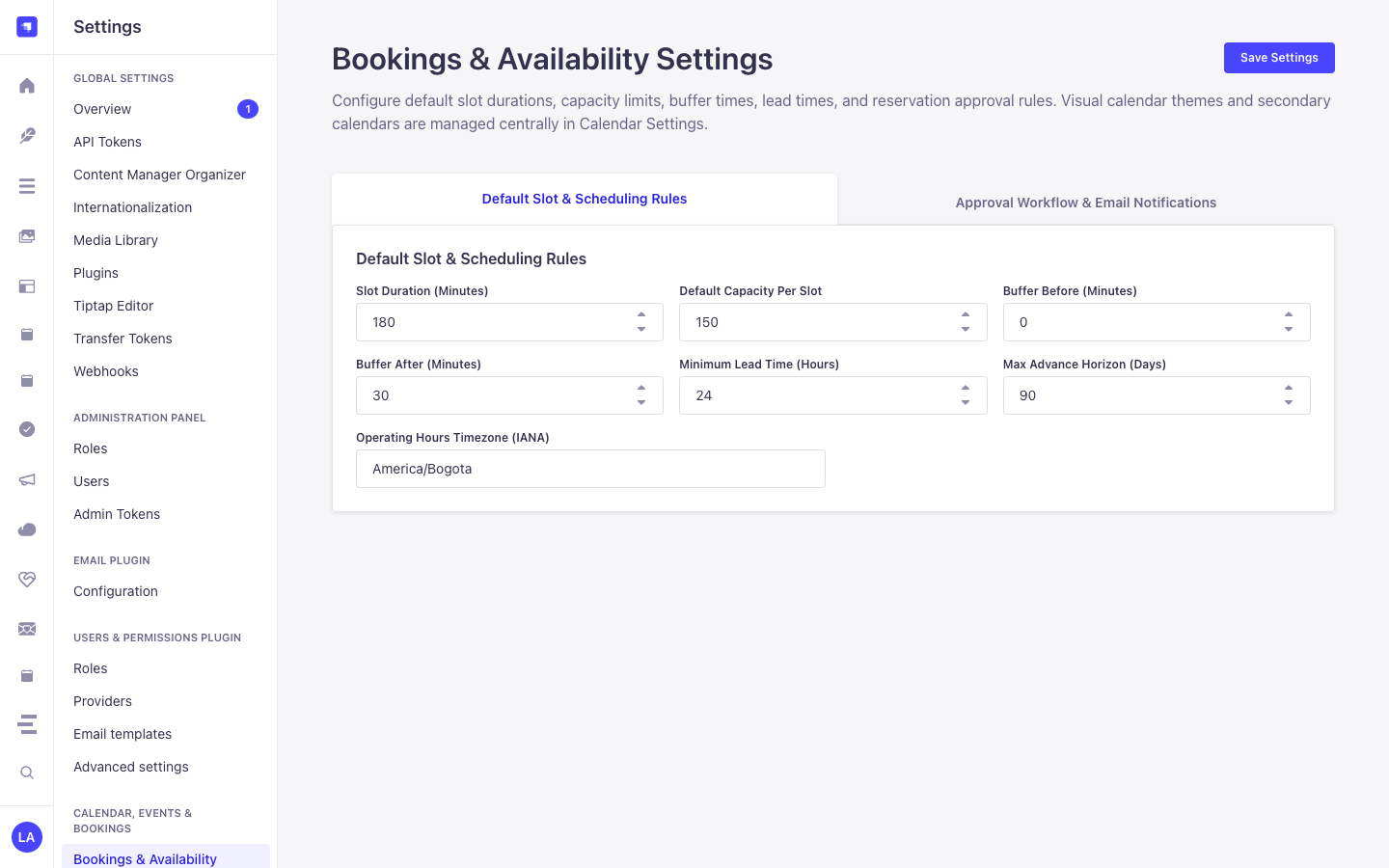
Section titled “Use Case 2 — Multi-Host Appointment & Buffer Enforcement”- What it is for: Manage 1-on-1 consultations or guided tours with automatic pre/post buffer windows (
bufferBeforeMinutes,bufferAfterMinutes), minimum lead time (minLeadTimeHours), and host assignment (assignedHost). - How it works: Configure
weeklySchedule,seasonalSchedules, andblackoutDatesonplugin::bookings.resource; staff approve or markcompleted/no_showviaPUT /bookings/bookings/{documentId}/status.
Use Case 3 — Tokenized Self-Service Rescheduling & Cancellation
Section titled “Use Case 3 — Tokenized Self-Service Rescheduling & Cancellation”- What it is for: Let customers reschedule or cancel their reservation from an email link without requiring a Strapi account.
- How it works: Pass the customer’s
bookingCodeand plaintextcancelToken(verified againstcancelTokenHash) toPOST /api/bookings/rescheduleorPOST /api/bookings/cancel.
Use Case 4 — Unified Calendar & iCal Feed Synchronization
Section titled “Use Case 4 — Unified Calendar & iCal Feed Synchronization”- What it is for: Project all confirmed and pending reservations into the FullCalendar workspace and external Google/Apple Calendar clients.
- How it works: At bootstrap,
bookingsregistersplugin::bookings.bookingwithstrapi.plugin('calendar').service('registry')and exposesGET /api/bookings/feed.ics.