Resources, Galleries & Glossary — Developer Guide & Admin UI
1. Installation & Peer Setup
Section titled “1. Installation & Peer Setup”pnpm add @vicacha-devs/strapi-plugin-resources2. Server Configuration (config/plugins.ts)
Section titled “2. Server Configuration (config/plugins.ts)”Add the plugin configuration to your Strapi v5 config/plugins.ts file:
export default ({ env }: { env: (key: string, defaultValue?: string) => string }) => ({ "resources": { enabled: true, config: { organizationName: env("RESOURCES_ORG_NAME", "Community Resource Center"), defaultPublicationsFolderPath: "/resources/publications", defaultGalleriesFolderPath: "/resources/galleries", secondaryCalendar: "islamic-umalqura", enableCloudinaryOptimization: true, autoSyncMediaFolders: true, maxPhotosPerAlbum: 200, }, },});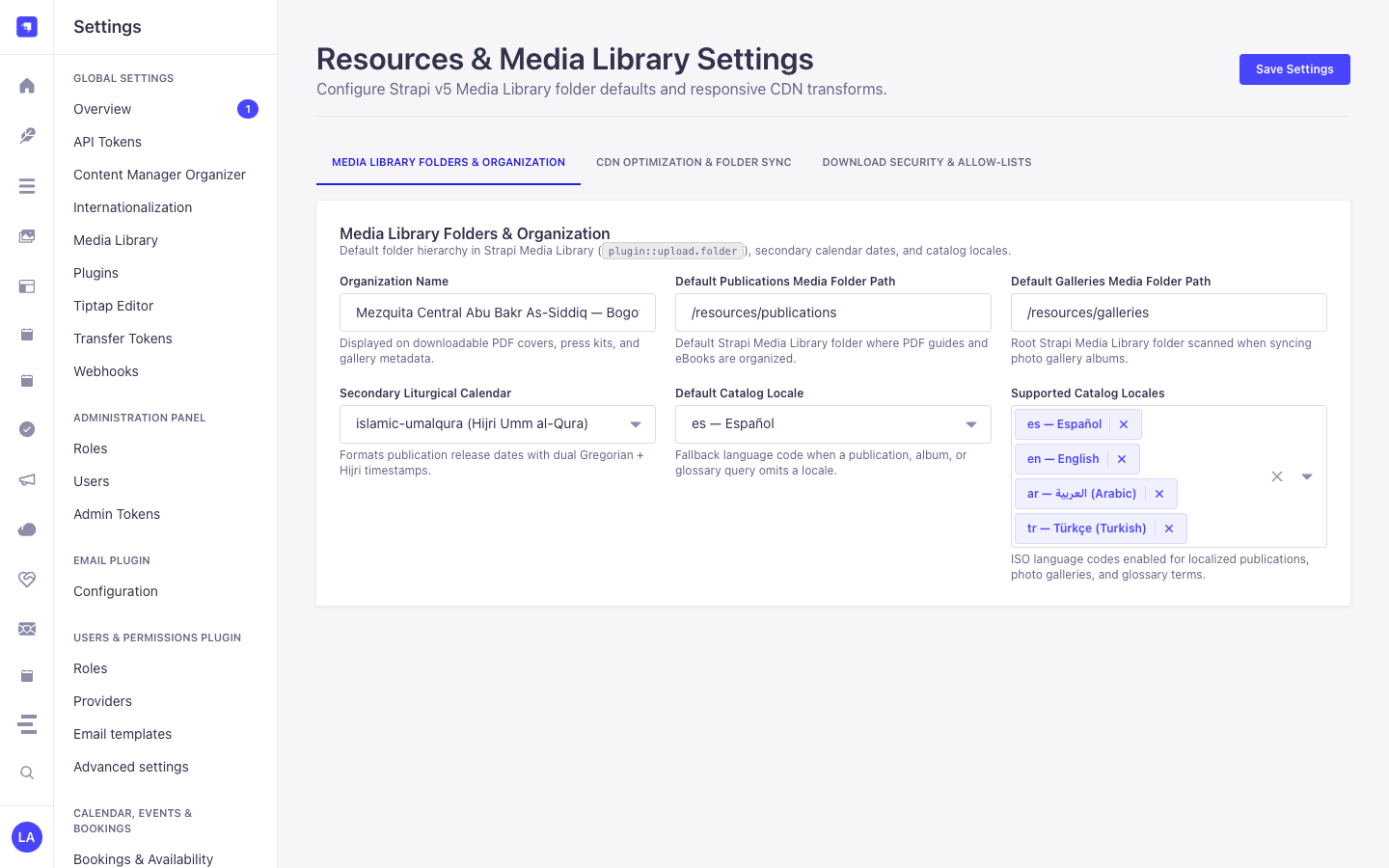
3. Strapi v5 Admin UI Tour
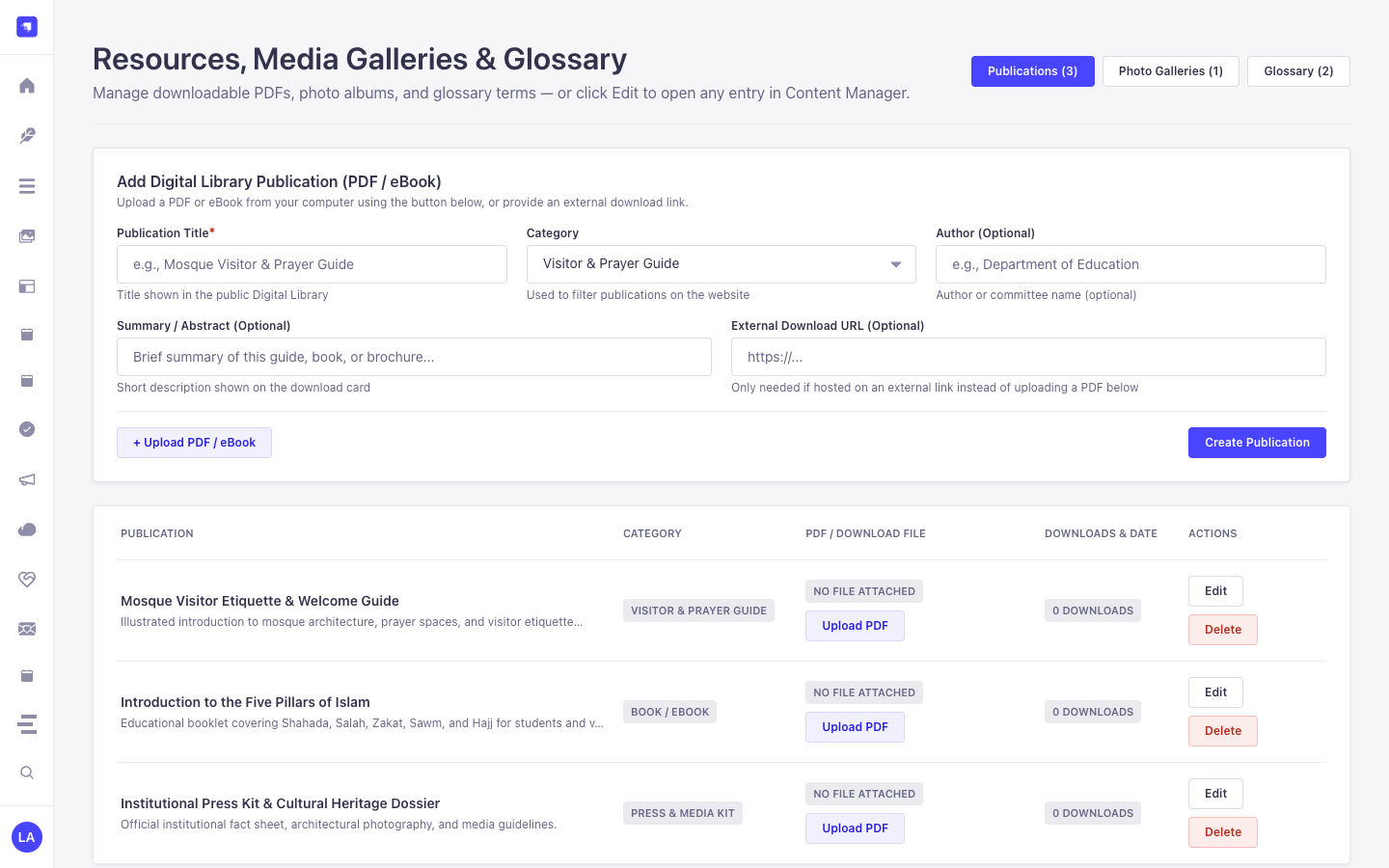
Section titled “3. Strapi v5 Admin UI Tour”Once enabled, the plugin registers its workspace and settings inside the Strapi v5 Admin panel using Strapi Design System v2 components:
Key Localized Admin UI Labels
Section titled “Key Localized Admin UI Labels”| Translation Key | Rendered UI Label |
|---|---|
page.ui.resources_media_galleries_glossary |
Resources, Media Galleries & Glossary |
page.ui.add_digital_library_publication_media_library_pd |
Add Digital Library Publication (PDF / eBook) |
field.publication_title |
Publication Title |
placeholder.e_g_gu_a_de_bienvenida_a_la_mezquita_pdf |
e.g., Mosque Visitor & Prayer Guide |
page.ui.display_title_shown_in_the_public_digital_librar |
Title shown in the public Digital Library |
field.publication_category |
Publication Category |
placeholder.select_category |
Select category |
page.ui.guide_visitor_prayer_guide |
Visitor & Prayer Guide |
4. Content-Type Entities, Locations & Schemas (strapi.documents)
Section titled “4. Content-Type Entities, Locations & Schemas (strapi.documents)”Registers three localized (i18n.localized: true), draft-and-publish (draftAndPublish: true) Collection Types: plugin::resources.publication, plugin::resources.gallery-album, and plugin::resources.glossary-term, plus a 3-tab settings panel (/admin/settings/resources) covering Media Library folder paths, multi-calendar secondary dates, Cloudinary f_auto,q_auto optimization, album photo caps, and download extension/MIME allow-lists. Supports runtime schemaExtensions in config/plugins.ts.
Where to Find Content-Type Entities in Strapi v5
Section titled “Where to Find Content-Type Entities in Strapi v5”- Content Manager:
/admin/content-manager/collection-types/plugin::resources.publication,plugin::resources.gallery-album, andplugin::resources.glossary-term(visible: true) - Content-Type Builder:
/admin/plugins/content-type-builderunder Collection Types (Resource Publication,Resource Gallery Album,Resource Glossary Term) - Plugin Workspace:
/admin/plugins/resources(Publications, Gallery Albums, Glossary Terms, Media Folder Sync) - Settings Panel (3 Tabs):
/admin/settings/resources— Media Library Folders & Organization (organizationName,defaultPublicationsFolderPath,defaultGalleriesFolderPath,secondaryCalendar,defaultLocale,supportedLocales), CDN Optimization & Folder Sync (enableCloudinaryOptimization,autoSyncMediaFolders,maxPhotosPerAlbum), and Download Security & Allow-Lists (allowedDownloadExtensions,allowedDownloadMimeTypes) - Database Tables:
resources_publications,resources_gallery_albums, andresources_glossary_terms
plugin::resources.gallery-album — Resource Gallery Album
Section titled “plugin::resources.gallery-album — Resource Gallery Album”Curated photo and video albums synced with Strapi v5 Media Library folders and Cloudinary optimization
Kind:
collectionType· DB Table:resources_gallery_albums· Admin Location:/admin/content-manager/collection-types/plugin::resources.gallery-album· Draft & Publish:Yes· i18n:Yes
| Attribute | Strapi Type | Required | Constraints / Target |
|---|---|---|---|
title |
string |
Yes | max: 200 |
slug |
uid |
Yes | — |
description |
text |
No | — |
category |
enumeration |
Yes | enum: architecture, community, events, ramadan_eid, heritage, press; default: "community" |
coverPhoto |
media |
No | — |
photos |
media |
No | — |
mediaFolderId |
integer |
No | — |
mediaFolderPath |
string |
No | max: 160 |
eventDate |
date |
No | — |
secondaryDateOverride |
string |
No | max: 80 |
photographerCredit |
string |
No | max: 140 |
framingNotes |
string |
No | max: 500 |
featured |
boolean |
No | default: false |
sortOrder |
integer |
No | default: 0 |
photoCount |
integer |
No | default: 0 |
plugin::resources.glossary-term — Resource Glossary Term
Section titled “plugin::resources.glossary-term — Resource Glossary Term”Multilingual A-Z glossary terms with native script, transliteration, and Strapi Media Library audio pronunciation
Kind:
collectionType· DB Table:resources_glossary_terms· Admin Location:/admin/content-manager/collection-types/plugin::resources.glossary-term· Draft & Publish:Yes· i18n:Yes
| Attribute | Strapi Type | Required | Constraints / Target |
|---|---|---|---|
term |
string |
Yes | max: 120 |
slug |
uid |
Yes | — |
nativeScript |
string |
No | max: 200 |
transliteration |
string |
No | max: 200 |
definition |
text |
Yes | — |
category |
enumeration |
Yes | enum: beliefs, worship, ethics, history, community, general; default: "general" |
letterGroup |
string |
No | max: 4; default: "A" |
pronunciationAudio |
media |
No | — |
relatedTerms |
json |
No | — |
featured |
boolean |
No | default: false |
plugin::resources.publication — Resource Publication
Section titled “plugin::resources.publication — Resource Publication”Localized digital library books, guides, pamphlets, and press kit assets backed by the Strapi v5 Media Library
Kind:
collectionType· DB Table:resources_publications· Admin Location:/admin/content-manager/collection-types/plugin::resources.publication· Draft & Publish:Yes· i18n:Yes
| Attribute | Strapi Type | Required | Constraints / Target |
|---|---|---|---|
title |
string |
Yes | max: 200 |
slug |
uid |
Yes | — |
summary |
text |
No | — |
category |
enumeration |
Yes | enum: guide, book, pamphlet, press_kit, academic, general; default: "guide" |
file |
media |
No | — |
coverImage |
media |
No | — |
authorName |
string |
No | max: 140 |
authorSlug |
string |
No | max: 140 |
isbnOrReference |
string |
No | max: 80 |
pageCount |
integer |
No | — |
languageCode |
string |
No | max: 10; default: "es" |
publishedAtDate |
date |
No | — |
secondaryDateOverride |
string |
No | max: 80 |
mediaFolderPath |
string |
No | max: 160 |
externalDownloadUrl |
string |
No | max: 500 |
downloadCount |
integer |
No | default: 0 |
featured |
boolean |
No | default: false |
allowPublicDownload |
boolean |
No | default: true |
Strapi v5 Content Manager Integration (/admin/content-manager)
Section titled “Strapi v5 Content Manager Integration (/admin/content-manager)”Content Manager Sidebar Group:
Media, Resources & Library
Content Manager Entities & Components
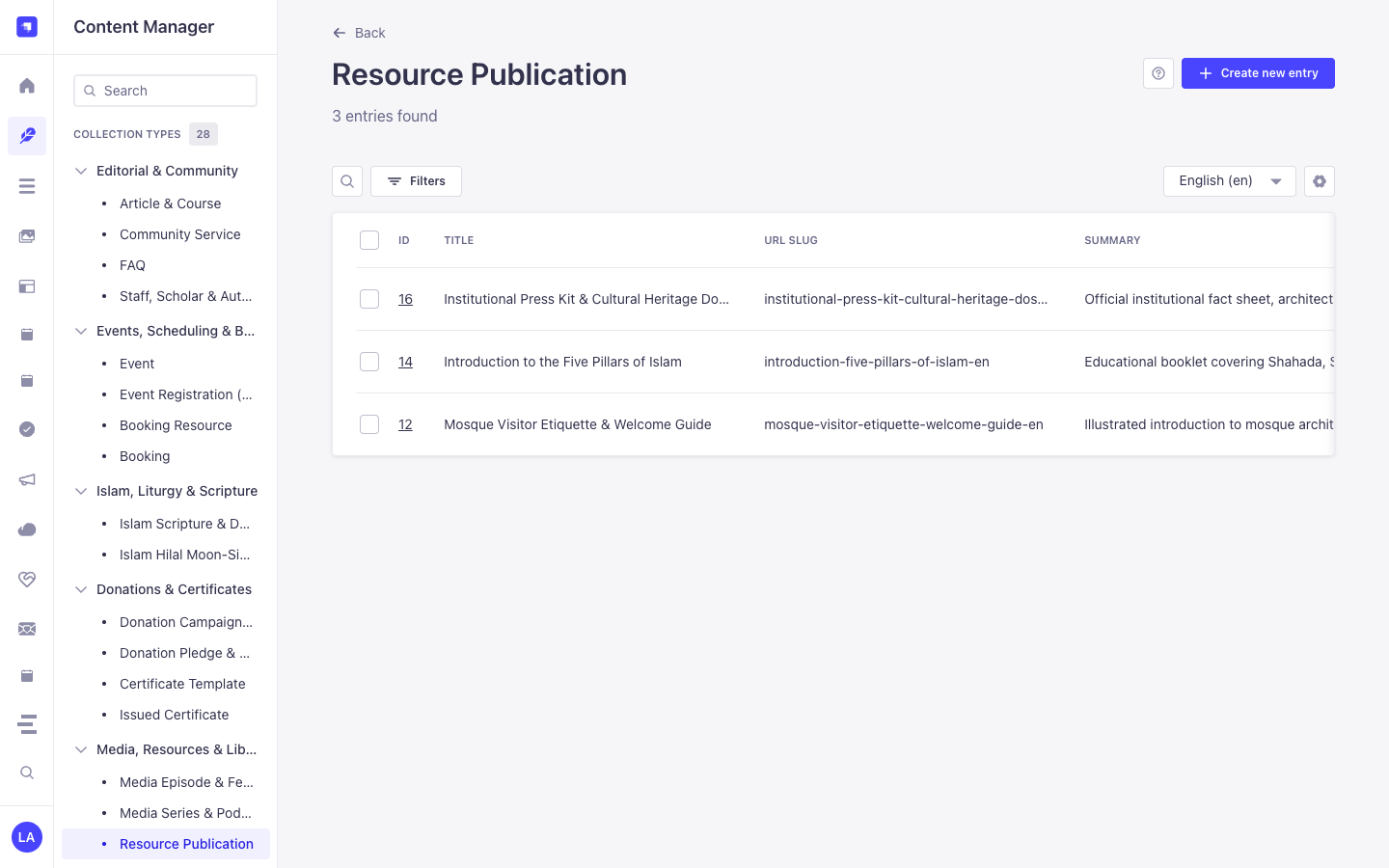
Section titled “Content Manager Entities & Components”plugin::resources.publication(Resource Publication —/admin/content-manager/collection-types/plugin::resources.publication)plugin::resources.gallery-album(Resource Gallery Album —/admin/content-manager/collection-types/plugin::resources.gallery-album)plugin::resources.glossary-term(Resource Glossary Term —/admin/content-manager/collection-types/plugin::resources.glossary-term)
Why This Plugin Creates & Integrates Content Manager Entities
Section titled “Why This Plugin Creates & Integrates Content Manager Entities”@vicacha-devs/strapi-plugin-resources registers all three of its entities (Resource Publication, Resource Gallery Album, and Resource Glossary Term) with i18n.localized: true, draftAndPublish: true, and content-manager.visible: true so librarians, scholars, and archivists can manage digital books, photo albums, and glossary terms inside the Strapi v5 Content Manager:
- Multilingual (
i18n) Digital Library & Glossary Authoring: Author publications, photo gallery descriptions, and A–Z glossary definitions acrossen,es,ar, andtr(?plugins[i18n][locale]=en) with native Draft & Publish staging. - Relational Author Profile Linking (
authorProfile): In Content Manager, linkResource Publicationrecords directly toStaff, Scholar & Author(api::leader.leader) profiles viaconfig/plugins.ts -> schemaExtensions.publication. - Direct Media Library Asset & Folder Binding: Attach cover images, downloadable PDF files, pronunciation audio clips, and Media Library folder paths directly inside Content Manager forms.
How to Use in Strapi Content Manager (Step-by-Step)
Section titled “How to Use in Strapi Content Manager (Step-by-Step)”- Open in Content Manager: In the left sidebar, expand Content Manager -> Collection Types -> Media, Resources & Library and select Resource Publication (
/admin/content-manager/collection-types/plugin::resources.publication?plugins[i18n][locale]=en), Resource Gallery Album (plugin::resources.gallery-album), or Resource Glossary Term (plugin::resources.glossary-term). - Publish Books, Guides & Press Kits: In Resource Publication, populate
title,slug,summary,category(book,guide,pamphlet,press_kit),fileUrl,pageCount, andauthorProfile, then click Publish. - Curate A–Z Glossary Terms: In Resource Glossary Term, enter
term,nativeScript(Arabic script),transliteration,definition,letterGroup(A–Z), andpronunciationAudioUrl. - Workspace vs. Content Manager: Use Content Manager for multilingual authoring, scholar
authorProfilerelations, and bulk publishing; use the Resources Workspace (/admin/plugins/resources) for 1-click Media Library folder synchronization (Sync Folder) and download analytics.
Content Manager & Plugin Workspace Synchronization
Section titled “Content Manager & Plugin Workspace Synchronization”Content Manager Use Cases & Editorial Workflows
Section titled “Content Manager Use Cases & Editorial Workflows”Content Manager Use Case 1 — Publishing Multilingual PDF Guides Linked to Institutional Authors (api::leader.leader)
Section titled “Content Manager Use Case 1 — Publishing Multilingual PDF Guides Linked to Institutional Authors (api::leader.leader)”- Why & What it is for: Author downloadable PDF guides (
Mosque Welcome & Visitor Etiquette Guide,Introduction to the Five Pillars of Islam) in Content Manager and link each publication to its scholar author. - How to use in Content Manager: Open
/admin/content-manager/collection-types/plugin::resources.publication?plugins[i18n][locale]=en, edit the entry, select theauthorProfilerelation, switch locales (es,ar,tr) to translate, and click Publish.
Content Manager Use Case 2 — Managing Multilingual Glossary Terms with Native Script & Audio
Section titled “Content Manager Use Case 2 — Managing Multilingual Glossary Terms with Native Script & Audio”- Why & What it is for: Curate A–Z glossary entries with vocalized Arabic script, phonetic transliteration, and audio pronunciation links in Content Manager.
- How to use in Content Manager: Open
/admin/content-manager/collection-types/plugin::resources.glossary-term?plugins[i18n][locale]=en, filter byletterGrouporcategory, and publish.
5. End-to-End Use Cases & Workflows
Section titled “5. End-to-End Use Cases & Workflows”Use Case 1 — Digital Publications Library with Hardened Download Allow-Lists
Section titled “Use Case 1 — Digital Publications Library with Hardened Download Allow-Lists”- What it is for: Publish downloadable books, PDF guides, pamphlets, and press kits protected by extension (
allowedDownloadExtensions) and MIME (allowedDownloadMimeTypes) allow-lists,X-Content-Type-Options: nosniff, and atomic download counters. - How it works: Configure allowed extensions/MIME types in
/admin/settings/resources(Download Security & Allow-Lists tab), createplugin::resources.publicationrecords, and serve downloads viaPOST /api/resources/publications/{slug}/download.
Use Case 2 — Configuring Media Library Folders, Secondary Calendars, CDN Optimization & Download Security
Section titled “Use Case 2 — Configuring Media Library Folders, Secondary Calendars, CDN Optimization & Download Security”- What it is for: Manage all 11
ResourcesPluginSettingsfields across 3 organized tabs in/admin/settings/resources(Media Library Folders & Organization,CDN Optimization & Folder Sync, andDownload Security & Allow-Lists) and automatically syncplugin::upload.folderassets intoplugin::resources.gallery-albumup tomaxPhotosPerAlbum. - How it works: Configure
defaultPublicationsFolderPath,defaultGalleriesFolderPath,secondaryCalendar,enableCloudinaryOptimization,autoSyncMediaFolders,maxPhotosPerAlbum, and download allow-lists in/admin/settings/resources(PUT /resources/settings), then click Sync Folder (POST /resources/galleries/{documentId}/sync-folder).
Use Case 3 — Multilingual A–Z Glossary with Native Script & Audio Pronunciation
Section titled “Use Case 3 — Multilingual A–Z Glossary with Native Script & Audio Pronunciation”- What it is for: Maintain an educational glossary of Arabic/Islamic or domain terms (
term,nativeScript,transliteration,definition,pronunciationAudio,letterGroup). - How it works: Manage entries in
plugin::resources.glossary-termand query grouped A–Z terms viaGET /api/resources/glossary?letter=A&category=worship.
6. REST API Endpoints (content-api & admin)
Section titled “6. REST API Endpoints (content-api & admin)”| Method | Endpoint Path | Scope | Controller Handler | Auth |
|---|---|---|---|---|
GET |
/resources/hub |
admin |
resourcesController.getAdminHubOverview |
Bearer JWT |
GET |
/resources/publications |
admin |
resourcesController.listAdminPublications |
Bearer JWT |
POST |
/resources/publications |
admin |
resourcesController.createPublication |
Bearer JWT |
PUT |
/resources/publications/{documentId} |
admin |
resourcesController.updatePublication |
Bearer JWT |
DELETE |
/resources/publications/{documentId} |
admin |
resourcesController.deletePublication |
Bearer JWT |
GET |
/resources/galleries |
admin |
resourcesController.listAdminGalleries |
Bearer JWT |
POST |
/resources/galleries |
admin |
resourcesController.createGalleryAlbum |
Bearer JWT |
PUT |
/resources/galleries/{documentId} |
admin |
resourcesController.updateGalleryAlbum |
Bearer JWT |
DELETE |
/resources/galleries/{documentId} |
admin |
resourcesController.deleteGalleryAlbum |
Bearer JWT |
POST |
/resources/galleries/{documentId}/sync-media-folder |
admin |
resourcesController.syncAlbumMediaFolder |
Bearer JWT |
GET |
/resources/glossary |
admin |
resourcesController.listAdminGlossary |
Bearer JWT |
POST |
/resources/glossary |
admin |
resourcesController.createGlossaryTerm |
Bearer JWT |
PUT |
/resources/glossary/{documentId} |
admin |
resourcesController.updateGlossaryTerm |
Bearer JWT |
DELETE |
/resources/glossary/{documentId} |
admin |
resourcesController.deleteGlossaryTerm |
Bearer JWT |
GET |
/resources/media-folders |
admin |
resourcesController.listMediaFolders |
Bearer JWT |
GET |
/resources/media-files |
admin |
resourcesController.listMediaFiles |
Bearer JWT |
GET |
/resources/settings |
admin |
resourcesController.getSettings |
Bearer JWT |
PUT |
/resources/settings |
admin |
resourcesController.updateSettings |
Bearer JWT |
GET |
/api/resources/hub |
content-api |
resourcesController.getHubOverview |
Public |
GET |
/api/resources/publications |
content-api |
resourcesController.listPublications |
Public |
GET |
/api/resources/publications/{slug} |
content-api |
resourcesController.getPublicationBySlug |
Public |
POST |
/api/resources/publications/{slug}/download |
content-api |
resourcesController.downloadPublication |
Public |
GET |
/api/resources/galleries |
content-api |
resourcesController.listGalleries |
Public |
GET |
/api/resources/galleries/{slug} |
content-api |
resourcesController.getGalleryBySlug |
Public |
GET |
/api/resources/glossary |
content-api |
resourcesController.listGlossary |
Public |
7. Programmatic Server Usage (strapi.plugin & strapi.documents)
Section titled “7. Programmatic Server Usage (strapi.plugin & strapi.documents)”// Registered services on plugin "resources": "settings", "mediaLibraryService", "catalogService"const pluginService = strapi.plugin("resources")?.service("mediaLibraryService");
// Querying records via the Strapi v5 Document Service APIconst records = await strapi.documents("plugin::resources.gallery-album").findMany({ limit: 25, sort: "createdAt:desc",});8. Troubleshooting & Verification
Section titled “8. Troubleshooting & Verification”- Admin panel changes not visible: Run
pnpm strapi buildafter modifyingconfig/plugins.ts. - Peer dependency isolation: Keep
hoistPattern: ["*", "!@strapi/*"]inpnpm-workspace.yamlso@strapi/*contexts are never duplicated. - TypeScript type-checking: Validate both
admin/tsconfig.jsonandserver/tsconfig.jsonviapnpm --filter <pkg> test:ts.