Calendar & Scheduling (@vicacha-devs/strapi-plugin-calendar)
Enterprise, 100% generic Multi-Collection Calendar, Scheduler, Non-Gregorian RSCALE Recurrence, Dual-Calendar Overlay, and iCal (.ics) Syndication Plugin for Strapi v5, powered by FullCalendar v6 (@fullcalendar/react) and Unicode CLDR / @internationalized/date.
✨ Key Capabilities
Section titled “✨ Key Capabilities”- Multi-Collection Aggregation & No-Code Field Mapper:
- Aggregate events, bookings, Editorial deadlines, classes, or any Strapi v5 collection on a single unified calendar.
- No-Code Collection/Field Picker in Settings → Calendar Plugin → Sources & Calendar Settings auto-discovers all collections and classifies their date/string/boolean fields so admins can map
titleField,startField,endField,allDayField,rruleField,colorField, andcategoryFieldvia dropdowns. - Companion plugins (
@vicacha-devs/strapi-plugin-events,@vicacha-devs/strapi-plugin-bookings, etc.) can also register sources programmatically viastrapi.plugin('calendar').service('registry').registerSource(...).
- FullCalendar v6 Interactive Scheduler:
- 5 Views out of the box: Month (
dayGridMonth), Week (timeGridWeek), Day (timeGridDay), Agenda (listMonth), and Year (multiMonthYear). - Drag-and-Drop Rescheduling & Resize: Drag events across days/times or resize durations to automatically update the underlying Strapi document’s mapped
startFieldandendField. - Drag-to-Create Slot Selection: Select any time range on the calendar to quick-create a new entry in any mapped collection or jump directly to the Strapi Content Manager.
- Configurable Operating Hours & Time Slots: Customize
slotDuration,startHour,endHour, andfirstDayOfWeek.
- 5 Views out of the box: Month (
- Multi-Calendar Systems & Dual-Calendar Day Cells (
Hijri,Hebrew,Persian, etc.):- Supports 13 built-in Unicode CLDR calendar systems (
islamic-umalqura,islamic-civil,islamic-tbla,hebrew,persian,buddhist,chinese,japanese,indian,coptic,ethiopic,gregory,iso8601). - Renders secondary calendar dates directly inside FullCalendar day cells and inside the Content Manager edit view side panel.
- Supports
dayOffset(-2..+2) for moon-sighting adjustments andoverrideFieldfor explicit document-level date strings (e.g.hijriDate).
- Supports 13 built-in Unicode CLDR calendar systems (
- RFC 5545
RRULE+ RFC 7529RSCALENon-Gregorian Recurrence Engine:- Includes a custom field (
plugin::calendar.rrule) with a visual builder and preset selector. - Supports standard Gregorian recurrence (
FREQ=WEEKLY;BYDAY=FR) and non-GregorianRSCALErecurrence (RSCALE=ISLAMIC-UMALQURA;FREQ=YEARLY;BYMONTH=9;BYMONTHDAY=1for annual 1st of Ramadan, orRSCALE=HEBREW/RSCALE=PERSIAN).
- Includes a custom field (
- Unified RFC 5545 iCalendar (
.ics) Feed:- Content-API
/api/calendar/feed.icsand single-event/api/calendar/:documentId/invite.icsendpoints with?sourceId=,?category=,?from=, and?to=filters for Google Calendar, Apple Calendar, and Outlook subscriptions.
- Content-API
- 10 Admin Locales Included:
en,es,ar(RTL),tr,fr,de,pt,id,ur(RTL),fa(RTL).
📦 Installation
Section titled “📦 Installation”pnpm add @vicacha-devs/strapi-plugin-calendar⚙️ Configuration (config/plugins.ts)
Section titled “⚙️ Configuration (config/plugins.ts)”export default () => ({ calendar: { enabled: true, config: { defaultView: "dayGridMonth", defaultTimezone: "UTC", firstDayOfWeek: 1, // Monday slotDuration: "00:30:00", startHour: "06:00:00", endHour: "22:00:00", sources: [ { id: "events", label: "Community Events", uid: "plugin::events.event", color: "#4945FF", enabled: true, publicFeed: true, fields: { title: "title", startDate: "startDate", endDate: "endDate", rrule: "recurrence", location: "location", category: "category", status: "eventStatus", summary: "summary", slug: "slug", }, }, { id: "bookings", label: "Facility Bookings", uid: "plugin::bookings.booking", color: "#059669", enabled: true, publicFeed: false, fields: { title: "customerName", startDate: "startDate", endDate: "endDate", status: "status", }, }, ], secondaryCalendars: [ { id: "hijri", label: "Hijri (Umm al-Qura)", intlCalendar: "islamic-umalqura", dayOffset: 0, overrideField: "hijriDate", enabled: true, }, ], recurrencePresets: [ { id: "ramadan-start", label: "Every 1st of Ramadan (Hijri Yearly)", rrule: "RSCALE=ISLAMIC-UMALQURA;FREQ=YEARLY;BYMONTH=9;BYMONTHDAY=1", }, ], }, },});🔌 Programmatic Companion Plugin API
Section titled “🔌 Programmatic Companion Plugin API”Other plugins (such as @vicacha-devs/strapi-plugin-events or @vicacha-devs/strapi-plugin-bookings) can register their collections automatically during bootstrap:
const calendarRegistry = strapi.plugin("calendar")?.service("registry");
await calendarRegistry?.registerSource({  id: "events-plugin",  label: "Events",  uid: "plugin::events.event",  color: "#4945FF",  enabled: true,  fields: {    title: "title",    startDate: "startDate",    endDate: "endDate",    rrule: "recurrence",    location: "location",    category: "category",    status: "eventStatus",  },});
🌐 REST API Endpoints
Section titled “🌐 REST API Endpoints”Content API (/api/calendar/*)
Section titled “Content API (/api/calendar/*)”GET /api/calendar/occurrences?from=2026-05-01T00:00:00Z&to=2026-05-31T23:59:59Z&sourceId=eventsGET /api/calendar/feed.ics?sourceId=events&category=ReligiousGET /api/calendar/:documentId/invite.ics
Admin API (/calendar/*)
Section titled “Admin API (/calendar/*)”GET /calendar/calendar— Fetch occurrences across all enabled sourcesPOST /calendar/calendar/reschedule— Drag-and-drop / resize reschedule handlerPOST /calendar/calendar/quick-create— Slot selection quick-create handlerGET /calendar/content-types— Discover collections & fields for the No-Code MapperGET /calendar/settings/PUT /calendar/settings— Read or update plugin settingsPOST /calendar/clear-settings— Reset settings toconfig/plugins.tsdefaults
🧪 Testing
Section titled “🧪 Testing”npm test📄 License
Section titled “📄 License”MIT © Vicacha Devs
Content-Type Entities & Where to Find Them
Section titled “Content-Type Entities & Where to Find Them”Acts as a multi-collection scheduler engine that binds to any Strapi Content-Type entity (api::* or plugin::*) configured in collections[] or registered dynamically via calendar.service('registry').registerSource(). Also registers the plugin::calendar.rrule Custom Field (json) for RFC 5545 RRULE + RFC 7529 RSCALE recurrence rules.
- Bound Content-Type Entities: Any Content Manager collection mapped in
/admin/settings/calendar(e.g.,plugin::events.event,plugin::bookings.booking,api::article.article) - Custom Field in Content-Type Builder: Add the
plugin::calendar.rrulecustom field to any collection type in/admin/plugins/content-type-builder - Plugin Workspace & Settings:
/admin/plugins/calendar(FullCalendar v6 Month/Week/Day/Agenda workspace) and/admin/settings/calendar(General, Prayer & Islamic, Bookings & Availability tabs)
Strapi v5 Content Manager Integration (/admin/content-manager)
Section titled “Strapi v5 Content Manager Integration (/admin/content-manager)”Content Manager Sidebar Group:
Events, Scheduling & Bookings
Content Manager Entities & Components
Section titled “Content Manager Entities & Components”- Custom Field
plugin::calendar.rrule(RFC 5545 RRULE + RFC 7529 RSCALE Recurrence Field inside any Content Manager edit view) - Bound Content Manager Collections (
plugin::events.event,plugin::bookings.booking, and any configuredapi::*collection)
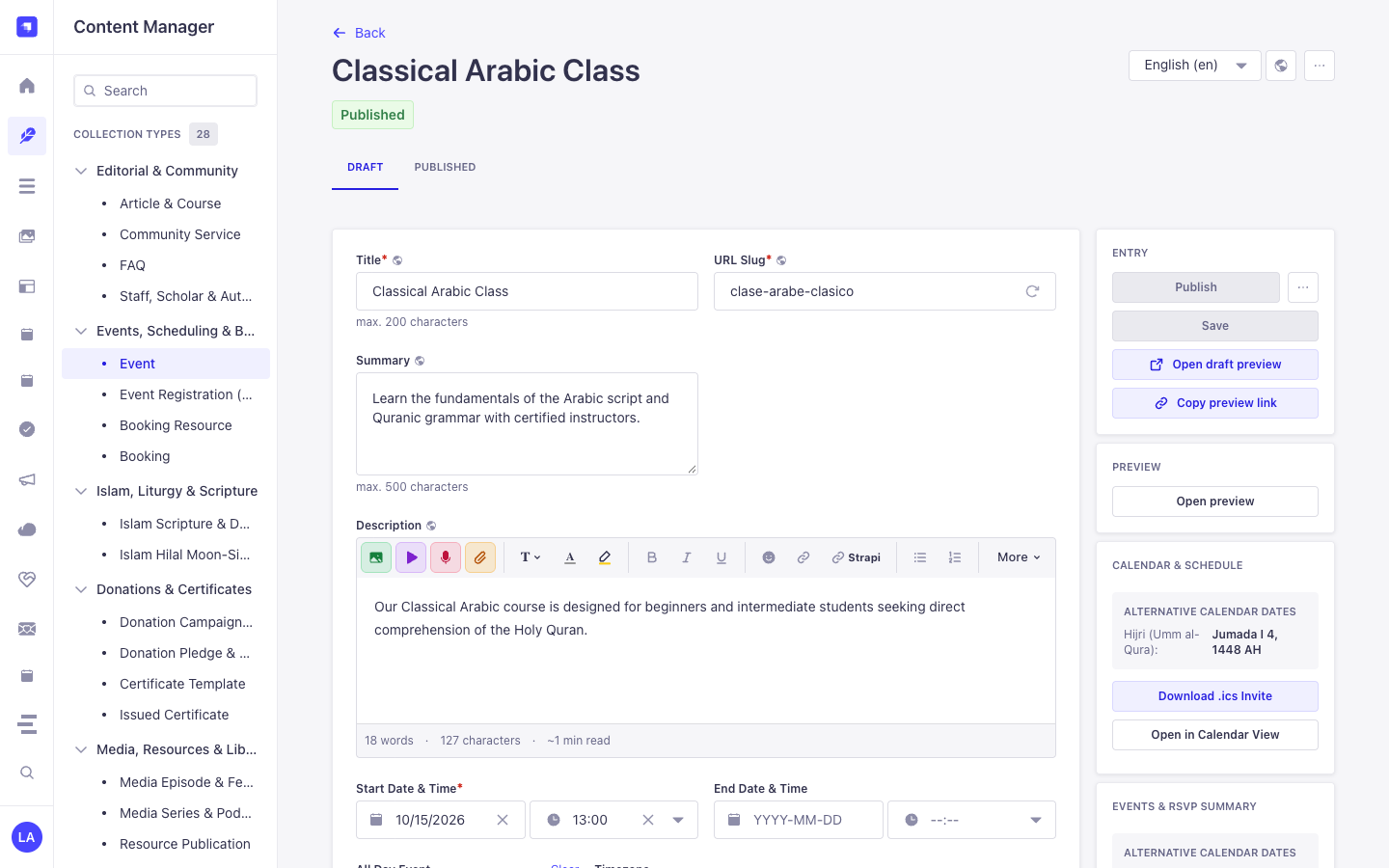
Why This Plugin Creates & Integrates Content Manager Entities
Section titled “Why This Plugin Creates & Integrates Content Manager Entities”Instead of locking schedules inside an isolated table, @vicacha-devs/strapi-plugin-calendar embeds directly into the Strapi v5 Content Manager edit view of any mapped collection (plugin::events.event, plugin::bookings.booking, or custom api::* entities) via its plugin::calendar.rrule Custom Field and right-sidebar Calendar & Schedule widget:
- In-Place Secondary Calendar Preview in Content Manager: When editing an event in Content Manager, the right-sidebar Calendar & Schedule panel automatically computes and displays the corresponding Hijri (Umm al-Qura), Hebrew, or Persian date (
4 Jumada I 1448 AH) plus 1-click.icsdownload and Open in Calendar View buttons. - Visual RFC 5545
RRULE+ RFC 7529RSCALEAuthoring: Theplugin::calendar.rrulecustom field lets editors configure Gregorian or lunar recurrence rules directly inside any Content Manager form. - Zero Data Duplication: Dragging an event in
/admin/plugins/calendaror editing start/end dates in/admin/content-manager/collection-types/plugin::events.eventmutates the exact same Strapi v5 Document Service record.
How to Use in Strapi Content Manager (Step-by-Step)
Section titled “How to Use in Strapi Content Manager (Step-by-Step)”- Open a Bound Collection in Content Manager: Navigate to Content Manager -> Collection Types -> Events, Scheduling & Bookings -> Event (
/admin/content-manager/collection-types/plugin::events.event?plugins[i18n][locale]=en) and open any entry. - Configure Start/End Dates & Recurrence: Edit
startDate,endDate,allDay,timezone, and therrulecustom field directly inside the Content Manager form. - Use the Right-Sidebar Calendar Panel: In the right column of the Content Manager edit view, inspect the live Alternative Calendar Dates badge, click Download .ics Invite, or click Open in Calendar View to jump to
/admin/plugins/calendar. - Bind Additional Content Manager Collections: In
/admin/settings/calendar, map anyapi::*collection’stitleField,startField,endField, andrruleFieldto project its Content Manager entries onto the unified calendar grid.
Content Manager & Plugin Workspace Synchronization
Section titled “Content Manager & Plugin Workspace Synchronization”Content Manager Use Cases & Editorial Workflows
Section titled “Content Manager Use Cases & Editorial Workflows”Content Manager Use Case 1 — Authoring a Localized Recurring Course with Live Hijri Date Preview
Section titled “Content Manager Use Case 1 — Authoring a Localized Recurring Course with Live Hijri Date Preview”- Why & What it is for: Edit a weekly Arabic course (
Classical Arabic Course) in Content Manager while verifying its Umm al-Qura Hijri date and downloading its.icsinvite from the right sidebar. - How to use in Content Manager: Open
/admin/content-manager/collection-types/plugin::events.event/{documentId}?plugins[i18n][locale]=en, setstartDateandrrule, and verify the Calendar & Schedule panel on the right.
End-to-End Use Cases & Workflows
Section titled “End-to-End Use Cases & Workflows”Use Case 1 — Aggregating Multiple Strapi Collections into One Calendar
Section titled “Use Case 1 — Aggregating Multiple Strapi Collections into One Calendar”- What it is for: Display Events, Bookings, Courses, and Editorial Deadlines from different Content-Type entities on a single color-coded FullCalendar grid.
- How it works: Map each collection’s
uid,titleField,startField,endField, andrruleFieldin/admin/settings/calendarorconfig/plugins.ts, then queryGET /api/calendar/occurrences?start=...&end=....
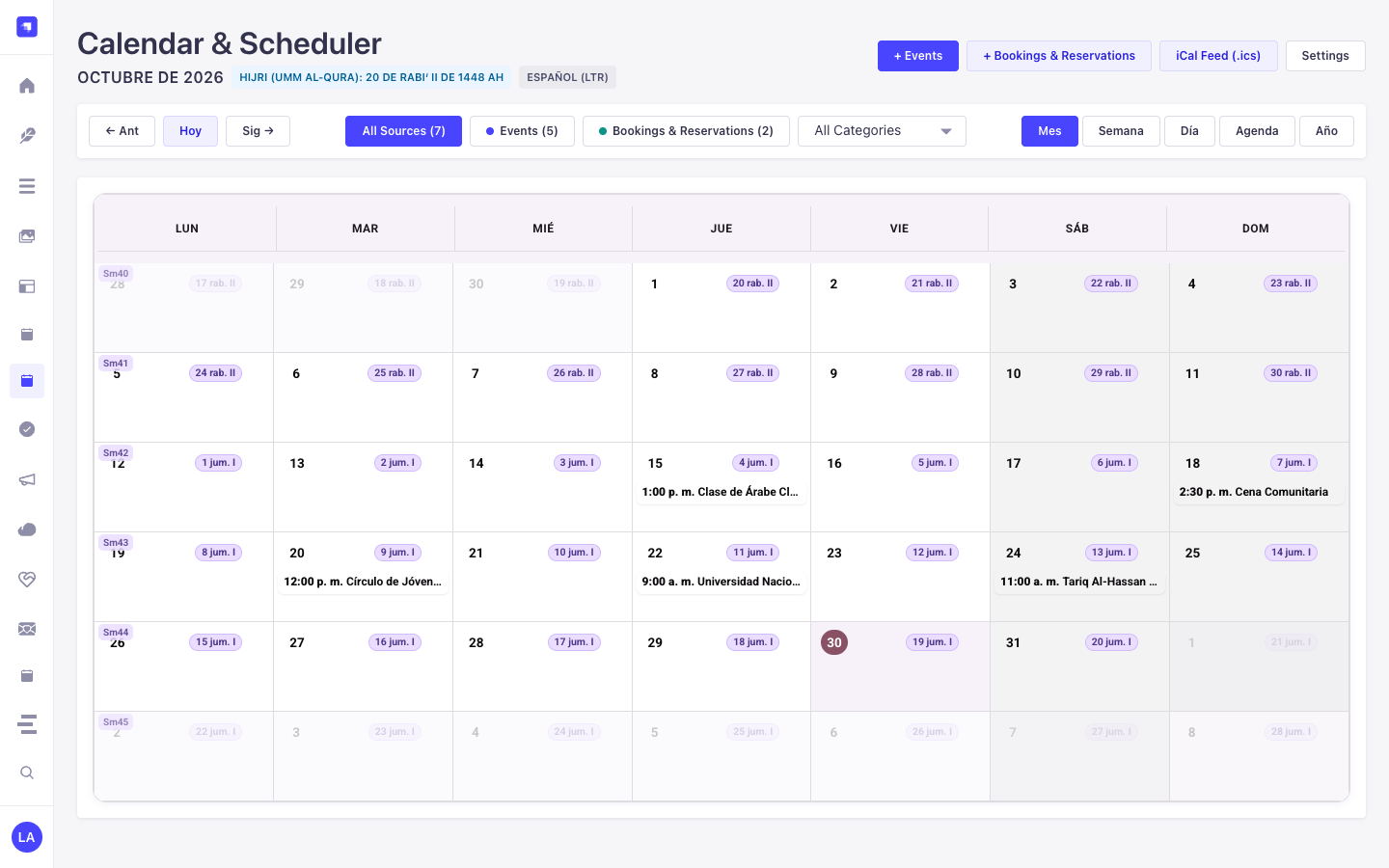
Use Case 2 — Sacred & Lunar Recurrence (RRULE + RSCALE=ISLAMIC-UMALQURA)
Section titled “Use Case 2 — Sacred & Lunar Recurrence (RRULE + RSCALE=ISLAMIC-UMALQURA)”- What it is for: Schedule annual or monthly recurring events that follow the Hijri, Hebrew, or Persian calendar and automatically project onto Gregorian dates.
- How it works: Attach
plugin::calendar.rruleto your Content-Type entity to author RFC 7529 rules (RSCALE=ISLAMIC-UMALQURA;FREQ=YEARLY;BYMONTH=9;BYMONTHDAY=1).
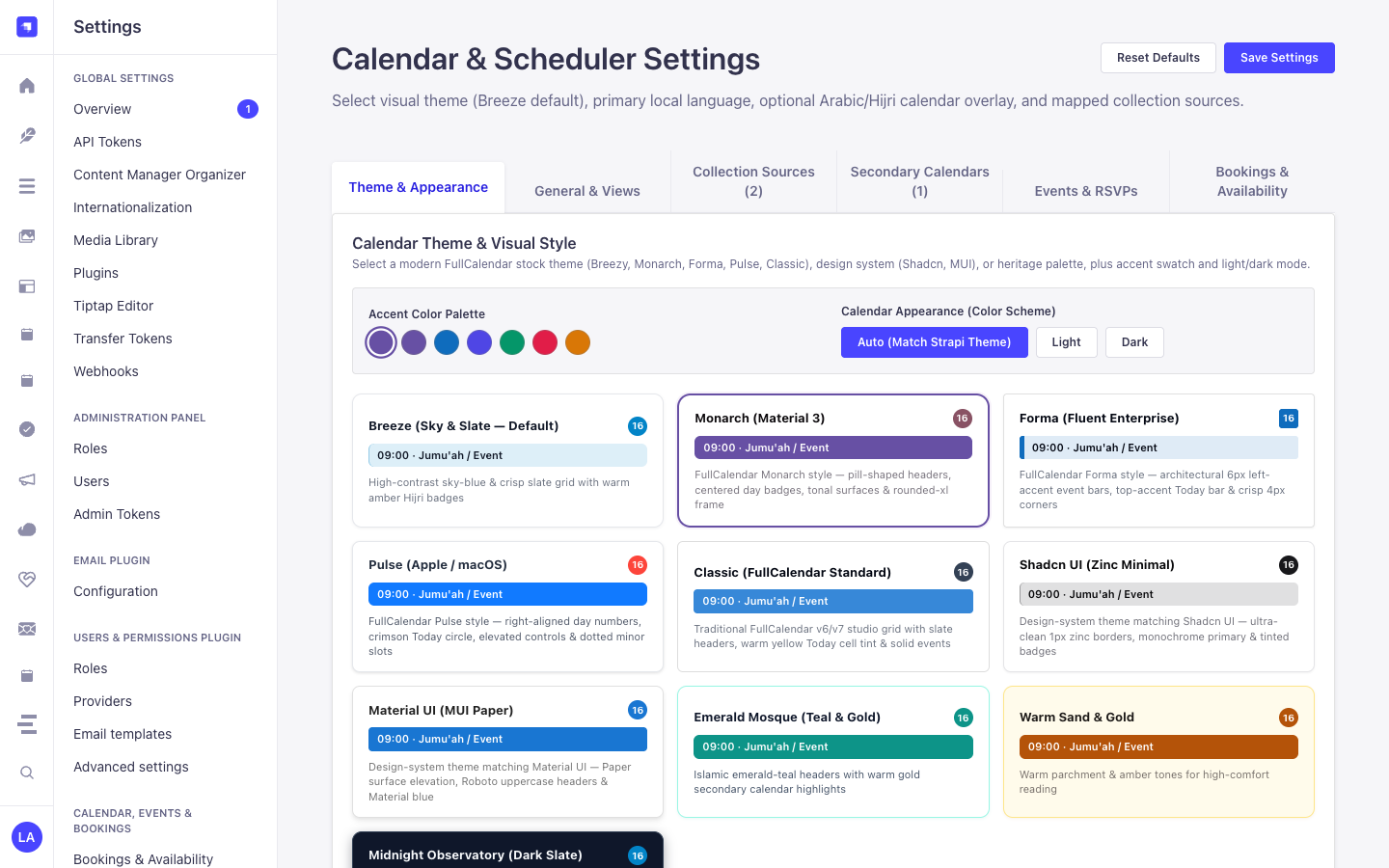
Use Case 3 — Drag-and-Drop Rescheduling & Quick-Create into Target Entities
Section titled “Use Case 3 — Drag-and-Drop Rescheduling & Quick-Create into Target Entities”- What it is for: Let editors drag an event on the calendar grid or click a date cell to create/update the underlying Strapi document directly.
- How it works: Uses
POST /calendar/quick-createandPOST /calendar/rescheduleto mutate the mappedstrapi.documents(uid)record in place.
Use Case 4 — Public RFC 5545 iCal (.ics) Subscription Feeds
Section titled “Use Case 4 — Public RFC 5545 iCal (.ics) Subscription Feeds”- What it is for: Allow users to subscribe to live calendar feeds in Google Calendar, Apple Calendar, or Outlook.
- How it works: Subscribe to
GET /api/calendar/ical.ics(all sources) orGET /api/calendar/ical/{collectionId}.ics(single source).
Admin Workspace, Content Manager & Settings Panel Preview
Section titled “Admin Workspace, Content Manager & Settings Panel Preview”
Strapi v5 Content Manager Entities (/admin/content-manager)
Section titled “Strapi v5 Content Manager Entities (/admin/content-manager)”
Settings Panel (Settings -> Configuration)
Section titled “Settings Panel (Settings -> Configuration)”
Explore Content Types & Use Cases, the Developer Guide & Admin UI Tour, and the Interactive OpenAPI Reference for complete schema, workflow diagram, and endpoint documentation.