Global Command Search — Developer Guide & Admin UI
1. Installation & Peer Setup
Section titled “1. Installation & Peer Setup”pnpm add @vicacha-devs/strapi-plugin-global-search2. Server Configuration (config/plugins.ts)
Section titled “2. Server Configuration (config/plugins.ts)”Add the plugin configuration to your Strapi v5 config/plugins.ts file:
export default ({ env }: { env: (key: string, defaultValue?: string) => string }) => ({ "global-search": { enabled: true, config: { minChars: 2, maxResults: 100, includeDrafts: true, }, },});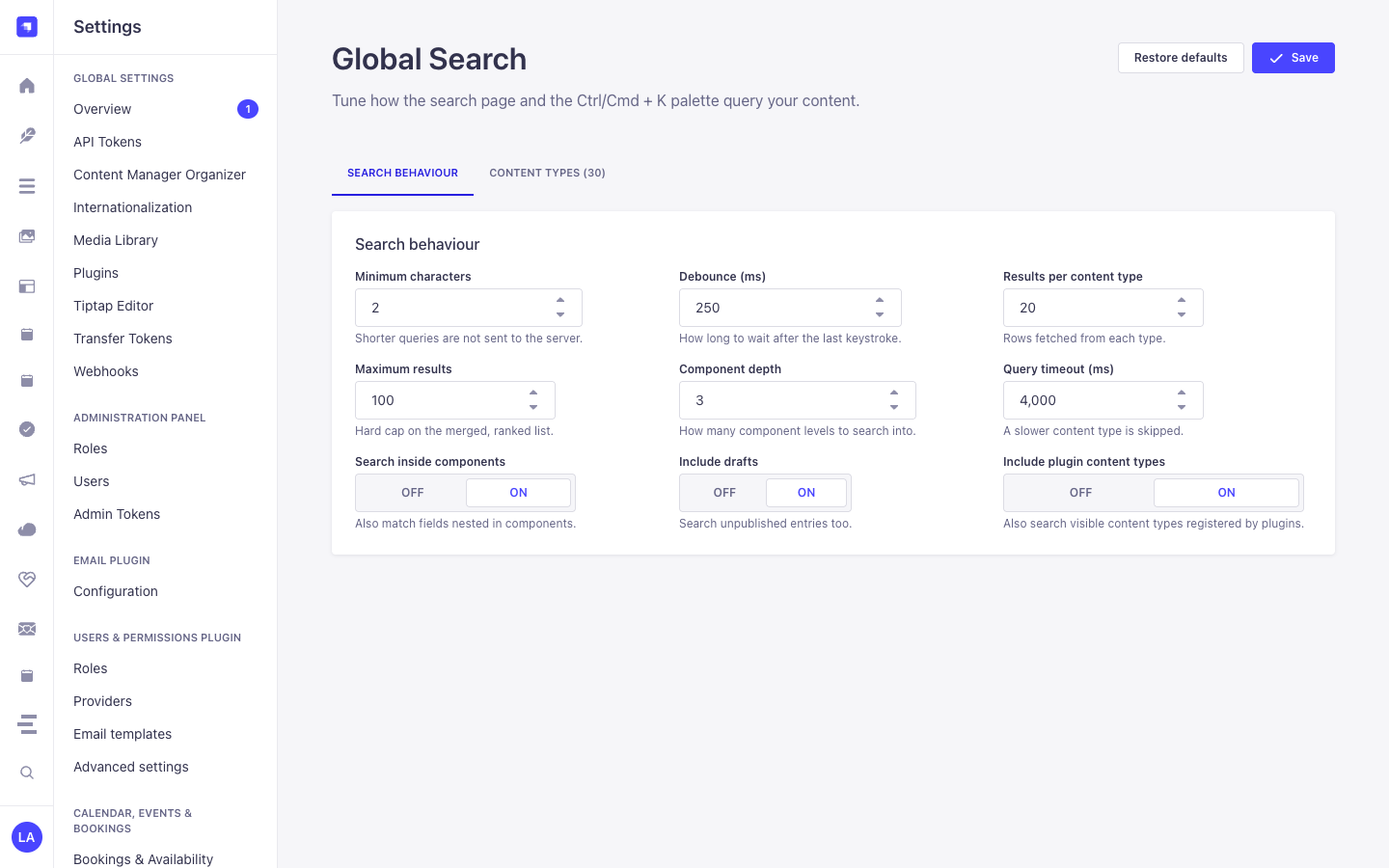
3. Strapi v5 Admin UI Tour
Section titled “3. Strapi v5 Admin UI Tour”Once enabled, the plugin registers its workspace and settings inside the Strapi v5 Admin panel using Strapi Design System v2 components:
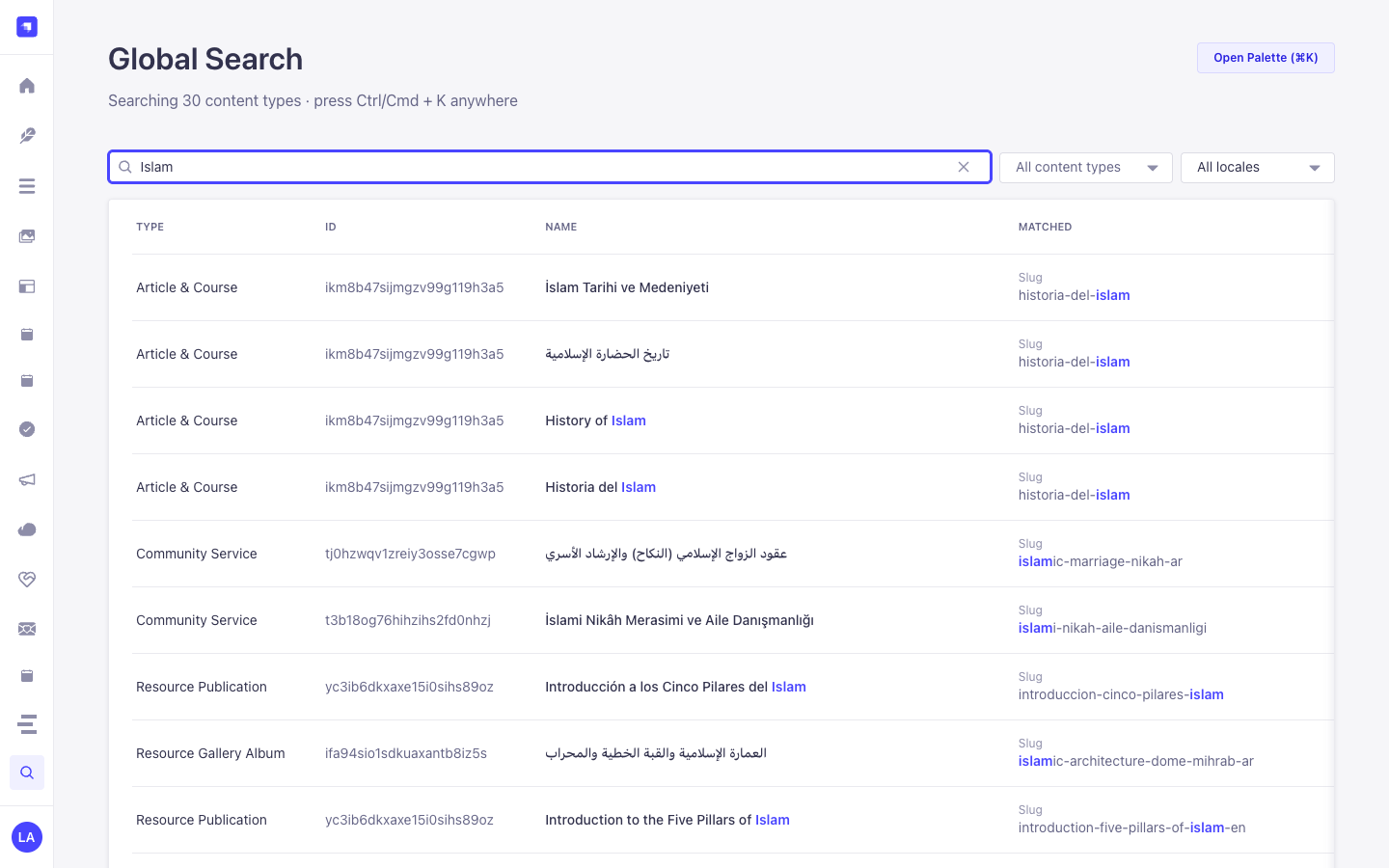
Key Localized Admin UI Labels
Section titled “Key Localized Admin UI Labels”| Translation Key | Rendered UI Label |
|---|---|
plugin.name |
Global Search |
plugin.description |
Search every content type from one place. |
settings.section |
Global Search |
settings.link |
Configuration |
common.searching |
Searching… |
common.no_results |
No results for “{query}”. |
common.on |
On |
common.off |
Off |
4. Content-Type Entities, Locations & Schemas (strapi.documents)
Section titled “4. Content-Type Entities, Locations & Schemas (strapi.documents)”Operates as a universal zero-schema introspection engine over all registered Strapi v5 Content-Type entities (api::* collection types, single types, and plugin::* entities) plus nested components and dynamic zones. Uses strapi.contentTypes metadata and strapi.documents(uid).findMany() with RBAC permission filtering.
Where to Find Content-Type Entities in Strapi v5
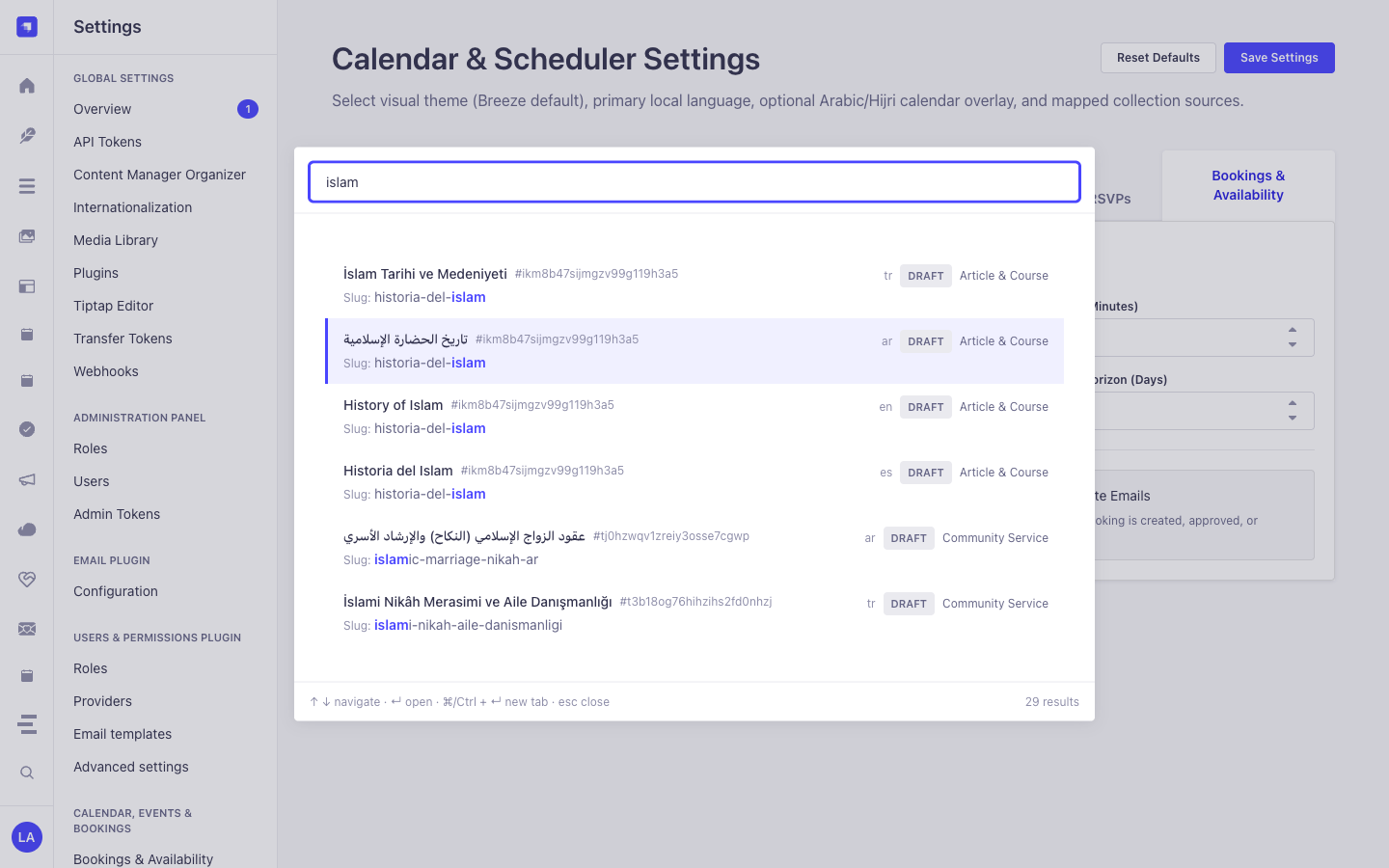
Section titled “Where to Find Content-Type Entities in Strapi v5”- Spotlight Command Palette Overlay: Press
Cmd+K(macOS) orCtrl+K(Windows/Linux) from any Strapi Admin screen (including Content Manager, Calendar, or Settings) - Dedicated Search Workspace:
/admin/plugins/global-search(Global Searchin the main left sidebar) - Settings Panel:
/admin/settings/global-search(Settings -> Global Search -> Configuration— organized into Search behaviour and Content types tabs) - Target Entities: Opens matched documents directly at
/admin/content-manager/collection-types/{uid}/{documentId}?plugins[i18n][locale]={locale}
This plugin operates dynamically across existing Strapi api::* and plugin::* Content-Type entities without creating separate collection tables.
Strapi v5 Content Manager Integration (/admin/content-manager)
Section titled “Strapi v5 Content Manager Integration (/admin/content-manager)”Content Manager Sidebar Group:
All Content Manager Collection Types & Single Types (Cmd+K/Ctrl+K)
Content Manager Entities & Components
Section titled “Content Manager Entities & Components”- Universal Introspection across all
api::*andplugin::*Content Manager Collection Types, Single Types, and Nested Components
Why This Plugin Creates & Integrates Content Manager Entities
Section titled “Why This Plugin Creates & Integrates Content Manager Entities”@vicacha-devs/strapi-plugin-global-search does not create an isolated database table because its entire purpose is to act as a high-speed Content Manager Command Palette & Deep-Link Router over every api::* and plugin::* entity registered in Strapi v5:
- Instant Deep-Linking into Content Manager: Pressing
Enteron any search result navigates directly to/admin/content-manager/collection-types/{uid}/{documentId}?plugins[i18n][locale]={locale}(orsingle-types/{uid}). - Searches Both Host
api::*and Pluginplugin::*Entities: Simultaneously indexes articles, scholars (api::leader.leader), events (plugin::events.event), scripture entries (plugin::islam.scripture-entry), donations (plugin::donations.campaign), and publications (plugin::resources.publication).
How to Use in Strapi Content Manager (Step-by-Step)
Section titled “How to Use in Strapi Content Manager (Step-by-Step)”- Invoke from Anywhere: Press
Cmd+K(macOS) orCtrl+K(Windows/Linux) while inside Content Manager or any plugin page. - Filter by Entity Type, Status & Locale: Type a keyword and narrow results by Collection Type,
Draft/Publishedstatus, ori18nlocale badge. - Open in Content Manager: Press
Enterto open the entry in Content Manager in the current tab, orCmd/Ctrl + Enterto open it in a new tab.
Content Manager & Plugin Workspace Synchronization
Section titled “Content Manager & Plugin Workspace Synchronization”Content Manager Use Cases & Editorial Workflows
Section titled “Content Manager Use Cases & Editorial Workflows”Content Manager Use Case 1 — Jumping Between Plugin Entities & Host Collections Without Leaving the Keyboard
Section titled “Content Manager Use Case 1 — Jumping Between Plugin Entities & Host Collections Without Leaving the Keyboard”- Why & What it is for: Switch from editing a
Booking Resourceto aDonation CampaignorIslam Scripture Entryin Content Manager in under a second. - How to use in Content Manager: Press
Cmd+K, type the title or slug, and pressEnterto load the target document in Content Manager.
5. End-to-End Use Cases & Workflows
Section titled “5. End-to-End Use Cases & Workflows”Use Case 1 — Instant Cmd+K / Ctrl+K Spotlight Navigation Across All Entities
Section titled “Use Case 1 — Instant Cmd+K / Ctrl+K Spotlight Navigation Across All Entities”- What it is for: Jump directly to any Article, Course, Event, Booking, Certificate, or Single Type record from anywhere in Strapi Admin without leaving the keyboard.
- How it works: Press
Cmd+K, type a query (e.g.,islam), navigate with↑/↓, and pressEnterto open the document in Content Manager (orCmd/Ctrl + Enterfor a new tab).
Use Case 2 — Deep Component & Multilingual Script Search (Arabic, Turkish, Spanish)
Section titled “Use Case 2 — Deep Component & Multilingual Script Search (Arabic, Turkish, Spanish)”- What it is for: Find records by text buried inside repeatable components, SEO meta descriptions, or Arabic/RTL localized variants.
- How it works:
GET /global-search/search?q=...&locale=allnormalizes diacritics and Arabic Alef/Teh Marbuta variants and searches both top-level and nested component fields.
Use Case 3 — Tabbed Search Behaviour & Per-Content-Type Inclusion Tuning
Section titled “Use Case 3 — Tabbed Search Behaviour & Per-Content-Type Inclusion Tuning”- What it is for: Fine-tune query thresholds (
Minimum characters,Debounce (ms),Results per content type,Maximum results,Component depth,Query timeout (ms),Search inside components,Include drafts,Include plugin content types) and toggle which Content-Type entities appear in global search. - How it works: Configure the Search behaviour and Content types tabs in
/admin/settings/global-search(PUT /global-search/settings).
6. REST API Endpoints (content-api & admin)
Section titled “6. REST API Endpoints (content-api & admin)”| Method | Endpoint Path | Scope | Controller Handler | Auth |
|---|---|---|---|---|
GET |
/global-search/search |
admin |
search.find |
Bearer JWT |
GET |
/global-search/schema |
admin |
schema.find |
Bearer JWT |
GET |
/global-search/schema/all |
admin |
schema.findAll |
Bearer JWT |
GET |
/global-search/settings |
admin |
settings.find |
Bearer JWT |
PUT |
/global-search/settings |
admin |
settings.update |
Bearer JWT |
POST |
/global-search/settings/reset |
admin |
settings.reset |
Bearer JWT |
7. Programmatic Server Usage (strapi.plugin & strapi.documents)
Section titled “7. Programmatic Server Usage (strapi.plugin & strapi.documents)”// Registered services on plugin "global-search": "schema", "query", "ranking", "permissions", "settings", "search"const pluginService = strapi.plugin("global-search")?.service("schema");
// Retrieving plugin settings via Strapi plugin storeconst store = strapi.store({ type: "plugin", name: "global-search" });const settings = await store.get({ key: "settings" });8. Troubleshooting & Verification
Section titled “8. Troubleshooting & Verification”- Admin panel changes not visible: Run
pnpm strapi buildafter modifyingconfig/plugins.ts. - Peer dependency isolation: Keep
hoistPattern: ["*", "!@strapi/*"]inpnpm-workspace.yamlso@strapi/*contexts are never duplicated. - TypeScript type-checking: Validate both
admin/tsconfig.jsonandserver/tsconfig.jsonviapnpm --filter <pkg> test:ts.