Digital Certificates (Ed25519) (@vicacha-devs/strapi-plugin-certificates)
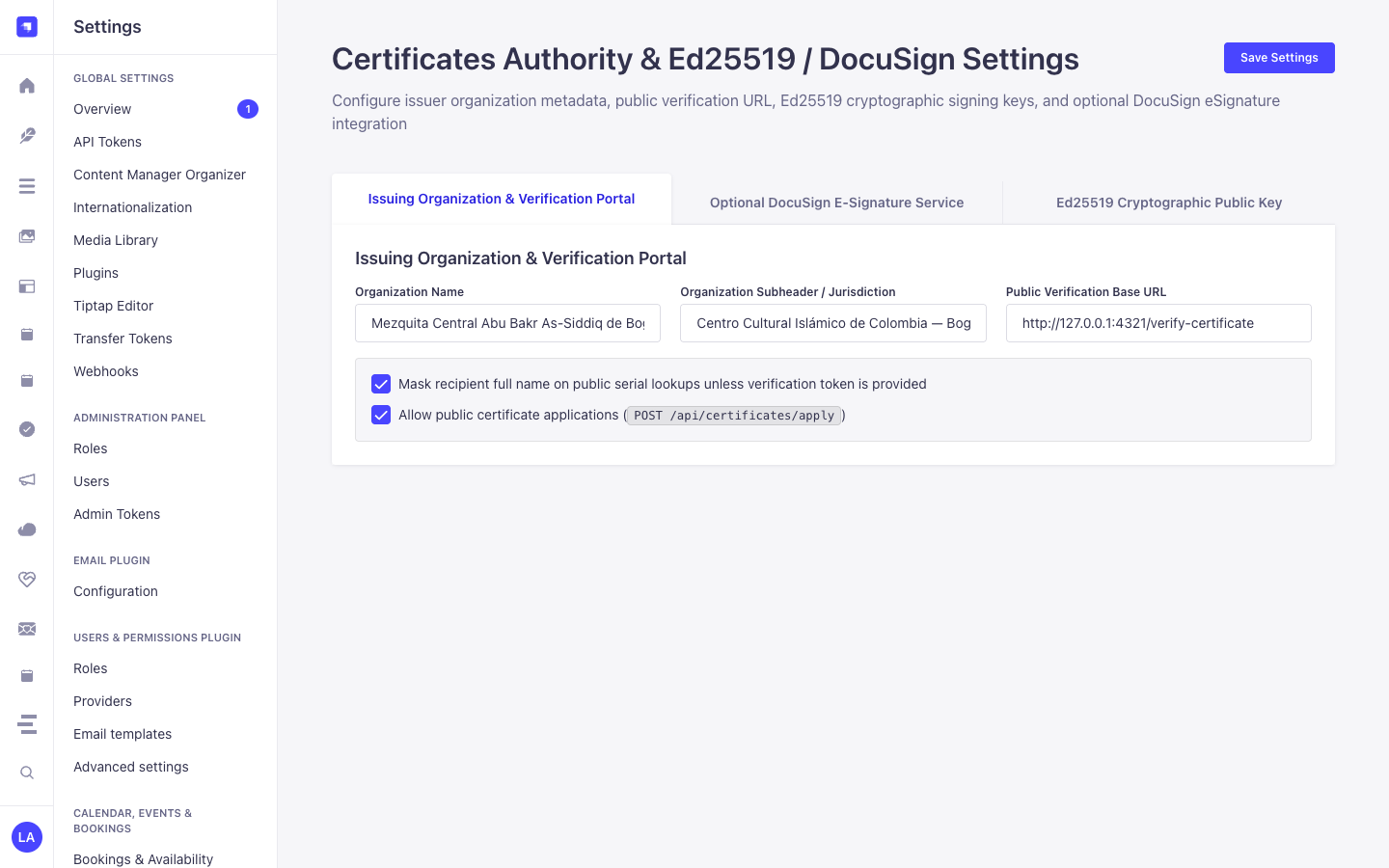
Generic Official Certificates, Cryptographic Ed25519 Signing, Printable Credentials & Public Serial Verification Plugin for Strapi v5, powered by @vicacha-devs/strapi-plugin-calendar.
Key Features
Section titled “Key Features”- Certificate Templates (
plugin::certificates.template):- Configurable credential types (e.g., Shahada / Declaration of Faith, Nikah / Marriage, Course Completion, Tax-Deductible Donation Receipt) with customizable HTML/CSS layouts, placeholders, required applicant fields, and witness requirements.
- Cryptographic Ed25519 Signing & Verification (
plugin::certificates.certificate):- Signs issued certificate payloads (
serialNumber,recipientName,templateSlug,issuedAt,canonicalPayloadHash) using Ed25519 (node:crypto) and exposes the public verification key atGET /api/certificates/public-keyand verification endpoint atGET /api/certificates/verify/:serial.
- Signs issued certificate payloads (
- Self-Service Applications, Printable Credentials & E-Signatures:
- Public application intake (
POST /api/certificates/apply), printable HTML/PDF rendering (GET /api/certificates/verify/:serial/print), and multi-party e-signature routing via self-hosted DocuSeal (ESIGN_PROVIDER=docuseal,POST /api/certificates/webhooks/docuseal) or DocuSign (POST /api/certificates/webhooks/docusign) with constant-time HMAC-SHA256 webhook verification. - 100% Branded Signing Invites (
ESIGN_EMAIL_DELIVERY_MODE=strapi): Defaults to passingsend_email: falseto DocuSeal, validating returnedembed_srcsigning URLs, and dispatching branded HTML signing invites throughstrapi-plugin-email-designer-5(ESIGN_EMAIL_DESIGNER_TEMPLATE_ID) orstrapi.plugin('email')(e.g., Resend SMTP).
- Public application intake (
- Calendar Bridge:
- Automatically syncs ceremony/appointment dates into
@vicacha-devs/strapi-plugin-calendar.
- Automatically syncs ceremony/appointment dates into
- 13-Locale Admin UI:
- Ships with full translations for
en,es,ar,tr,fr,de,pt,it,nl,pl,id,ur, andzh.
- Ships with full translations for
Quick Installation & Configuration
Section titled “Quick Installation & Configuration”pnpm add @vicacha-devs/strapi-plugin-certificatesEnable the plugin in config/plugins.ts:
export default () => ({ "certificates": { enabled: true, },});Content-Type Entities & Where to Find Them
Section titled “Content-Type Entities & Where to Find Them”Registers two Collection Types (plugin::certificates.template and plugin::certificates.certificate). Templates define reusable certificate layouts, signatory rules, witness counts, and serial prefixes; Issued Certificates store canonical JSON payloads signed with Ed25519 (cryptographicSignature, publicKeyFingerprint), salted PII hashes (nationalIdHash), and DocuSign envelope status. Supports schemaExtensions in config/plugins.ts.
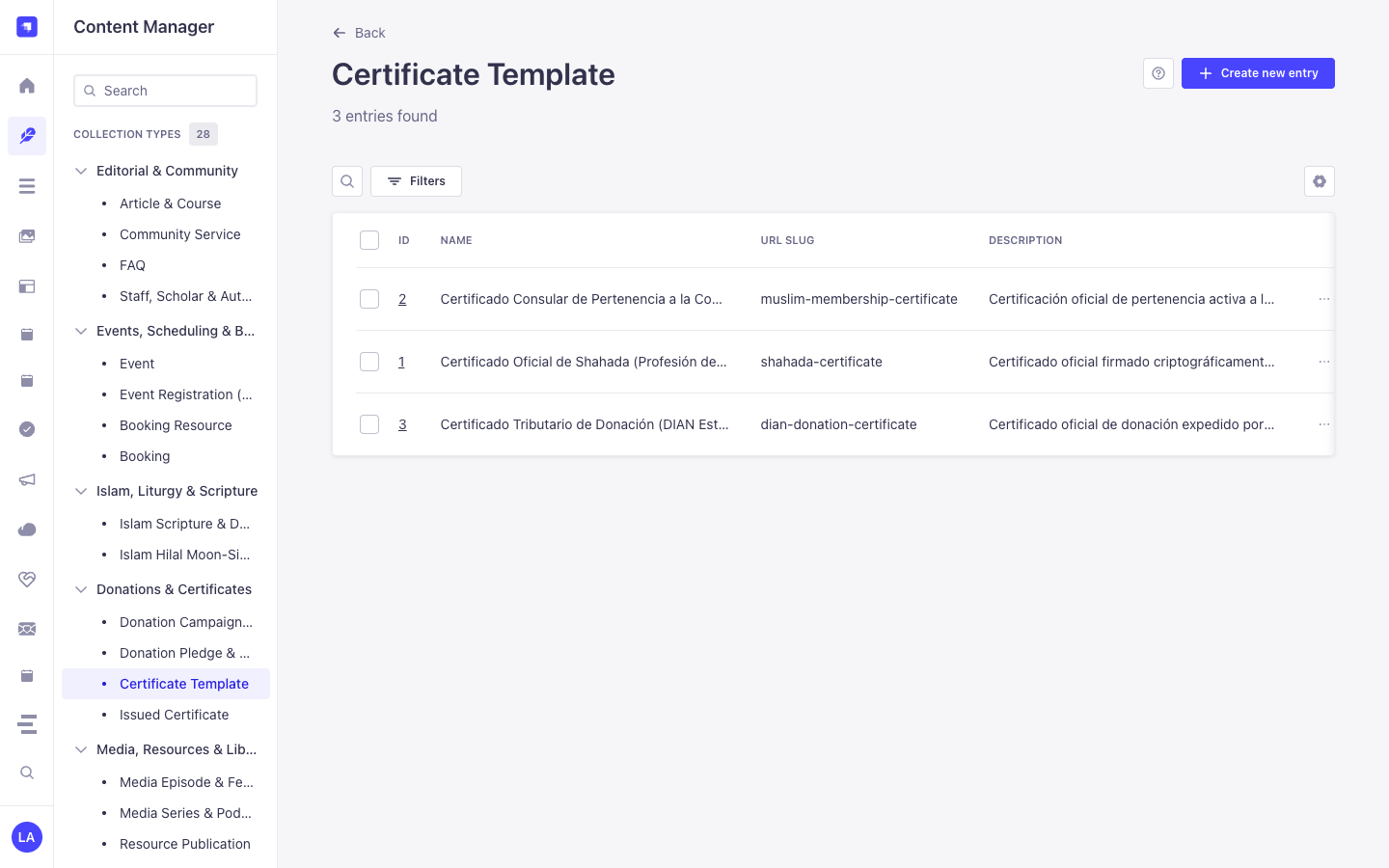
- Content Manager:
/admin/content-manager/collection-types/plugin::certificates.template&/admin/content-manager/collection-types/plugin::certificates.certificate(visible: true) - Content-Type Builder:
/admin/plugins/content-type-builderunder Collection Types (Certificate Template&Issued Certificate) - Plugin Workspace & Settings:
/admin/plugins/certificates(Issuance Wizard, Ledger & Templates) and/admin/settings/certificates - Database Tables:
certificates_templatesandcertificates_records
Strapi v5 Content Manager Integration (/admin/content-manager)
Section titled “Strapi v5 Content Manager Integration (/admin/content-manager)”Content Manager Sidebar Group:
Donations & Certificates
Content Manager Entities & Components
Section titled “Content Manager Entities & Components”plugin::certificates.template(Certificate Template —/admin/content-manager/collection-types/plugin::certificates.template)plugin::certificates.certificate(Issued Certificate —/admin/content-manager/collection-types/plugin::certificates.certificate)
Why This Plugin Creates & Integrates Content Manager Entities
Section titled “Why This Plugin Creates & Integrates Content Manager Entities”@vicacha-devs/strapi-plugin-certificates exposes Certificate Template (plugin::certificates.template) and Issued Certificate (plugin::certificates.certificate) inside the Strapi v5 Content Manager so legal, academic, and finance administrators can manage templates, link signatories, and audit issued credentials using Strapi’s native tools:
- Structured Template & Signatory Management: Create and version
Certificate Templaterecords (shahada,nikah,donation_tax,course_completion,membership) with default signatory titles, serial prefixes, and witness counts in Content Manager. - Cryptographic Audit Trail Inspection: Inspect
serialNumber,canonicalPayloadHash,cryptographicSignature(Ed25519),publicKeyFingerprint,nationalIdMasked(***-***-7720), andesignEnvelopeStatusonIssued Certificateentries while keepingnationalIdHashandverificationTokenprotected (private: true). - Relational & Schema Extensions: Link
Issued Certificaterecords toapi::leader.leaderofficiating scholars or donor profiles viaconfig/plugins.ts -> schemaExtensions.
How to Use in Strapi Content Manager (Step-by-Step)
Section titled “How to Use in Strapi Content Manager (Step-by-Step)”- Open in Content Manager: In the left sidebar, expand Content Manager -> Collection Types -> Donations & Certificates and click Certificate Template (
/admin/content-manager/collection-types/plugin::certificates.template) or Issued Certificate (/admin/content-manager/collection-types/plugin::certificates.certificate). - Manage Certificate Templates: Open Certificate Template to configure
name,slug,category,serialPrefix(e.g.,SHD,DON),bodyTemplate,requiresWitnesses, anddefaultSignatories. - Audit or Revoke Issued Certificates: Open Issued Certificate to filter credentials by
serialNumber,status(active,pending_signature,revoked),recipientName, oresignEnvelopeStatus. - Workspace vs. Content Manager: Use the Certificates Workspace (
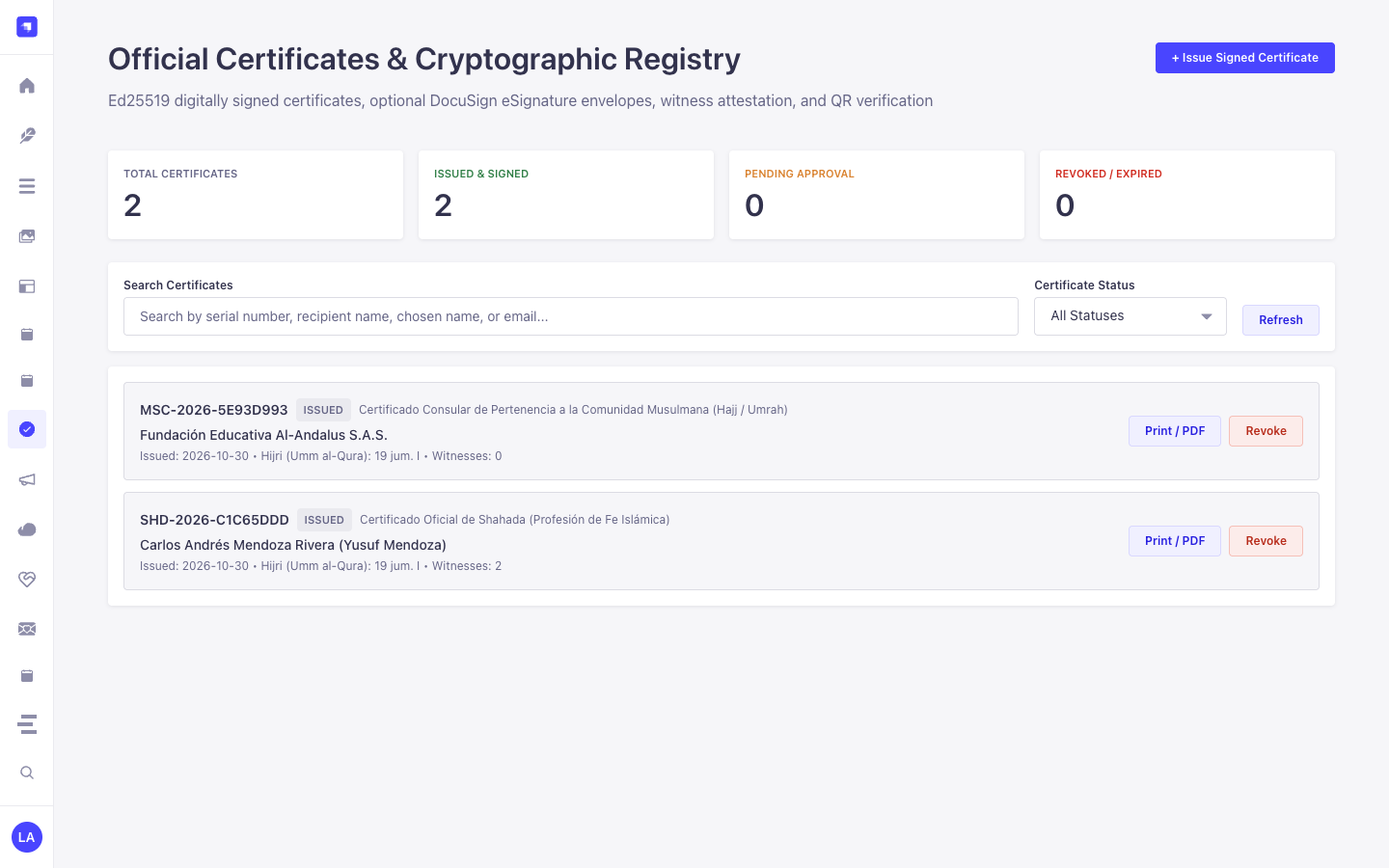
/admin/plugins/certificates) to issue new Ed25519-signed credentials via the cryptographic signing wizard; use Content Manager to maintain templates, inspect audit hashes, and manage custom relational fields.
Content Manager & Plugin Workspace Synchronization
Section titled “Content Manager & Plugin Workspace Synchronization”Content Manager Use Cases & Editorial Workflows
Section titled “Content Manager Use Cases & Editorial Workflows”Content Manager Use Case 1 — Designing & Updating Official Shahada, Nikah & Tax Certificate Templates
Section titled “Content Manager Use Case 1 — Designing & Updating Official Shahada, Nikah & Tax Certificate Templates”- Why & What it is for: Maintain standardized legal wording, serial prefixes (
SHD-,TAX-), and default signatory blocks in Content Manager. - How to use in Content Manager: Open
/admin/content-manager/collection-types/plugin::certificates.template, editOfficial Shahada CertificateorTax-Deductible Donation Certificate, and save.
Content Manager Use Case 2 — Compliance Filtering of Issued Credentials by Status & Fiscal Year
Section titled “Content Manager Use Case 2 — Compliance Filtering of Issued Credentials by Status & Fiscal Year”- Why & What it is for: Audit all active or revoked tax donation and consular certificates for annual compliance reporting.
- How to use in Content Manager: Open
/admin/content-manager/collection-types/plugin::certificates.certificateand filter bycategory = donation_taxandstatus = active.
End-to-End Use Cases & Workflows
Section titled “End-to-End Use Cases & Workflows”Use Case 1 — Issuing Cryptographically Signed Official Credentials
Section titled “Use Case 1 — Issuing Cryptographically Signed Official Credentials”- What it is for: Issue tamper-evident Shahada, Marriage (Nikah), Course Completion, or Tax Donation certificates signed with an Ed25519 private key.
- How it works: Select a
plugin::certificates.templatein/admin/plugins/certificatesor callPOST /certificates/certificates/issue; the service canonicalizes the payload, signs it with Ed25519, and persistsplugin::certificates.certificate.
Use Case 2 — Public QR Code Verification & Tamper Detection
Section titled “Use Case 2 — Public QR Code Verification & Tamper Detection”- What it is for: Let third parties (embassies, employers, auditors) verify a certificate’s authenticity by scanning its QR code.
- How it works: Call
GET /api/certificates/verify/{serialNumber}?token=...to re-verify the Ed25519 signature againstcanonicalPayloadHashand return masked recipient details.
Use Case 3 — Privacy-Preserving National ID Lookup (nationalIdHash)
Section titled “Use Case 3 — Privacy-Preserving National ID Lookup (nationalIdHash)”- What it is for: Verify whether a certificate belongs to a specific national ID number without storing plaintext national IDs in the database.
- How it works: The entity stores only
nationalIdMasked(***-***-7720) and a per-serial salted SHA-256nationalIdHash(private: true).
Use Case 4 — DocuSign / Webhook Multi-Party E-Signature Attestation
Section titled “Use Case 4 — DocuSign / Webhook Multi-Party E-Signature Attestation”- What it is for: Route pending certificates to signatories and witnesses via DocuSign envelopes and automatically transition status upon completion.
- How it works: Webhook events hit
POST /api/certificates/webhooks/esign(verified with constant-time HMAC-SHA256) and updateesignEnvelopeStatusonplugin::certificates.certificate.
Admin Workspace, Content Manager & Settings Panel Preview
Section titled “Admin Workspace, Content Manager & Settings Panel Preview”
Strapi v5 Content Manager Entities (/admin/content-manager)
Section titled “Strapi v5 Content Manager Entities (/admin/content-manager)”
Settings Panel (Settings -> Configuration)
Section titled “Settings Panel (Settings -> Configuration)”
Explore Content Types & Use Cases, the Developer Guide & Admin UI Tour, and the Interactive OpenAPI Reference for complete schema, workflow diagram, and endpoint documentation.