Media Feeds & Podcast RSS (@vicacha-devs/strapi-plugin-media-feeds)
Generic Multi-Language Audio/Video Media Hub, YouTube & OEmbed Enricher, Apple/Spotify Podcast RSS 2.0 Generator & Live Broadcast Status Plugin for Strapi v5, powered by @vicacha-devs/strapi-plugin-calendar.
Key Features
Section titled “Key Features”- Media Episodes & Series (
plugin::media-feeds.media-item,plugin::media-feeds.media-series):- Manage multilingual sermons (khutbahs), lectures, interviews, and podcast series (
GET /api/media-feeds/episodes,GET /api/media-feeds/episodes/:slug,GET /api/media-feeds/series) with duration, transcript, speaker, and downloadable audio/video enclosures.
- Manage multilingual sermons (khutbahs), lectures, interviews, and podcast series (
- YouTube, Vimeo & OEmbed Metadata Enricher:
- Automatically extracts video IDs, thumbnails, embed URLs, and durations from YouTube, Vimeo, and direct media URLs.
- RSS 2.0 & Apple/Spotify Podcast Feeds:
- Generates standard RSS 2.0 XML (
GET /api/media-feeds/rss.xml) and iTunes/Spotify-compliant Podcast XML (GET /api/media-feeds/podcast.xml).
- Generates standard RSS 2.0 XML (
- Live Broadcast Status (
GET /api/media-feeds/live):- Exposes real-time livestream status, embed URL, and upcoming broadcast schedule synced with
@vicacha-devs/strapi-plugin-calendar.
- Exposes real-time livestream status, embed URL, and upcoming broadcast schedule synced with
- 10-Locale Admin UI:
- Ships with full translations for
en,es,ar,tr,fr,de,pt,id,ur, andzh.
- Ships with full translations for
Quick Installation & Configuration
Section titled “Quick Installation & Configuration”pnpm add @vicacha-devs/strapi-plugin-media-feedsEnable the plugin in config/plugins.ts:
export default () => ({ "media-feeds": { enabled: true, },});Content-Type Entities & Where to Find Them
Section titled “Content-Type Entities & Where to Find Them”Registers two localized, draft-and-publish Collection Types (plugin::media-feeds.media-item and plugin::media-feeds.media-series). Media Series group episodes into podcast shows or video playlists; Media Items store multi-language audio/video episodes, OEmbed metadata, audio enclosures, transcripts, and chapter markers. Supports schemaExtensions in config/plugins.ts.
- Content Manager:
/admin/content-manager/collection-types/plugin::media-feeds.media-item&/admin/content-manager/collection-types/plugin::media-feeds.media-series(visible: true) - Content-Type Builder:
/admin/plugins/content-type-builderunder Collection Types (Media Episode & Feed Item&Media Series & Podcast Show) - Plugin Workspace & Settings:
/admin/plugins/media-feeds(Episode Hub, Series, OEmbed Enricher, Live Stream Control) and/admin/settings/media-feeds - Database Tables:
media_feed_itemsandmedia_feed_series
Strapi v5 Content Manager Integration (/admin/content-manager)
Section titled “Strapi v5 Content Manager Integration (/admin/content-manager)”Content Manager Sidebar Group:
Media, Resources & Library
Content Manager Entities & Components
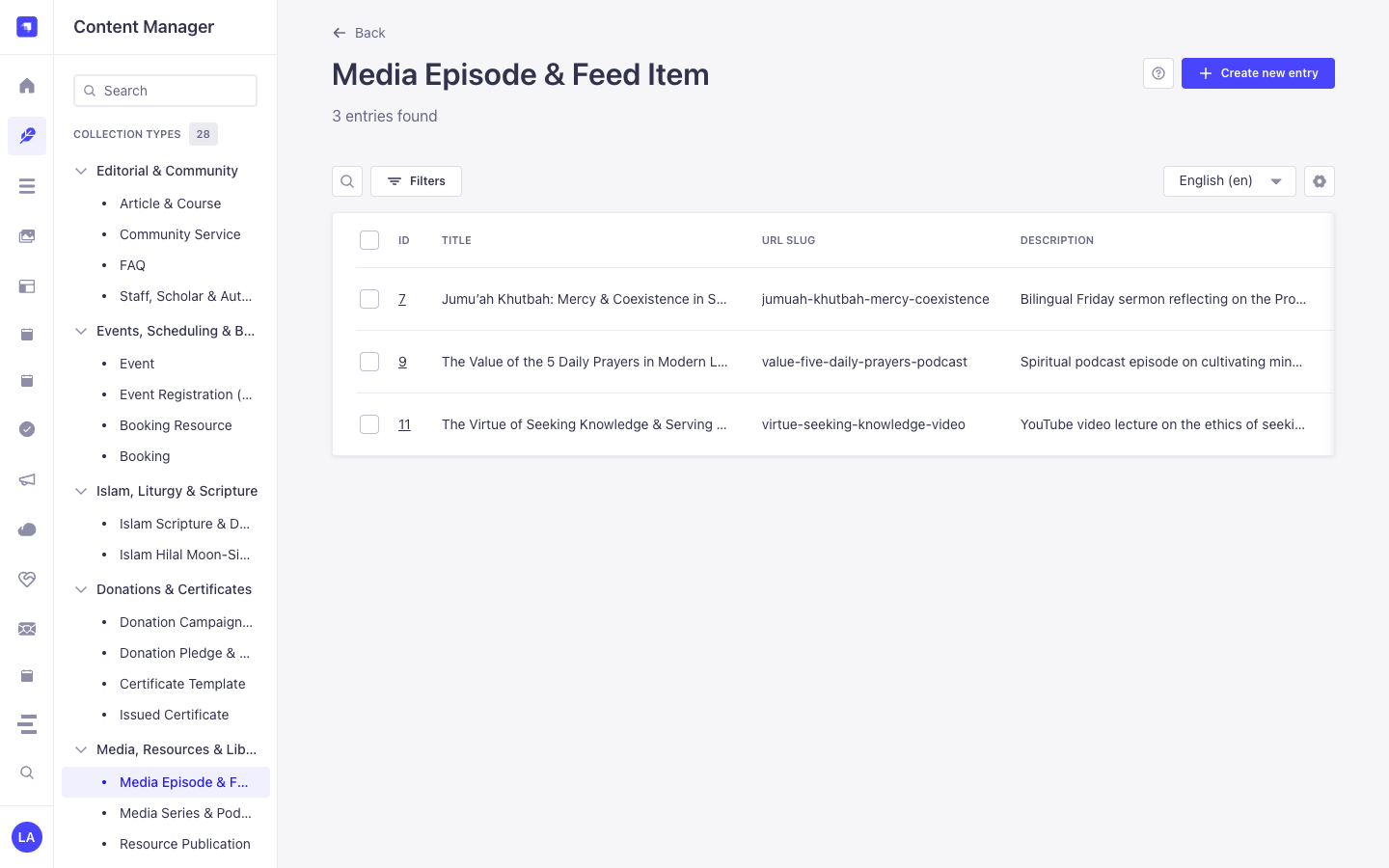
Section titled “Content Manager Entities & Components”plugin::media-feeds.media-item(Media Episode & Feed Item —/admin/content-manager/collection-types/plugin::media-feeds.media-item)plugin::media-feeds.media-series(Media Series & Podcast Show —/admin/content-manager/collection-types/plugin::media-feeds.media-series)
Why This Plugin Creates & Integrates Content Manager Entities
Section titled “Why This Plugin Creates & Integrates Content Manager Entities”@vicacha-devs/strapi-plugin-media-feeds registers Media Episode & Feed Item (plugin::media-feeds.media-item) and Media Series & Podcast Show (plugin::media-feeds.media-series) with i18n.localized: true, draftAndPublish: true, and content-manager.visible: true so media producers can manage multilingual episodes, transcripts, and speaker relations in Content Manager:
- Multilingual (
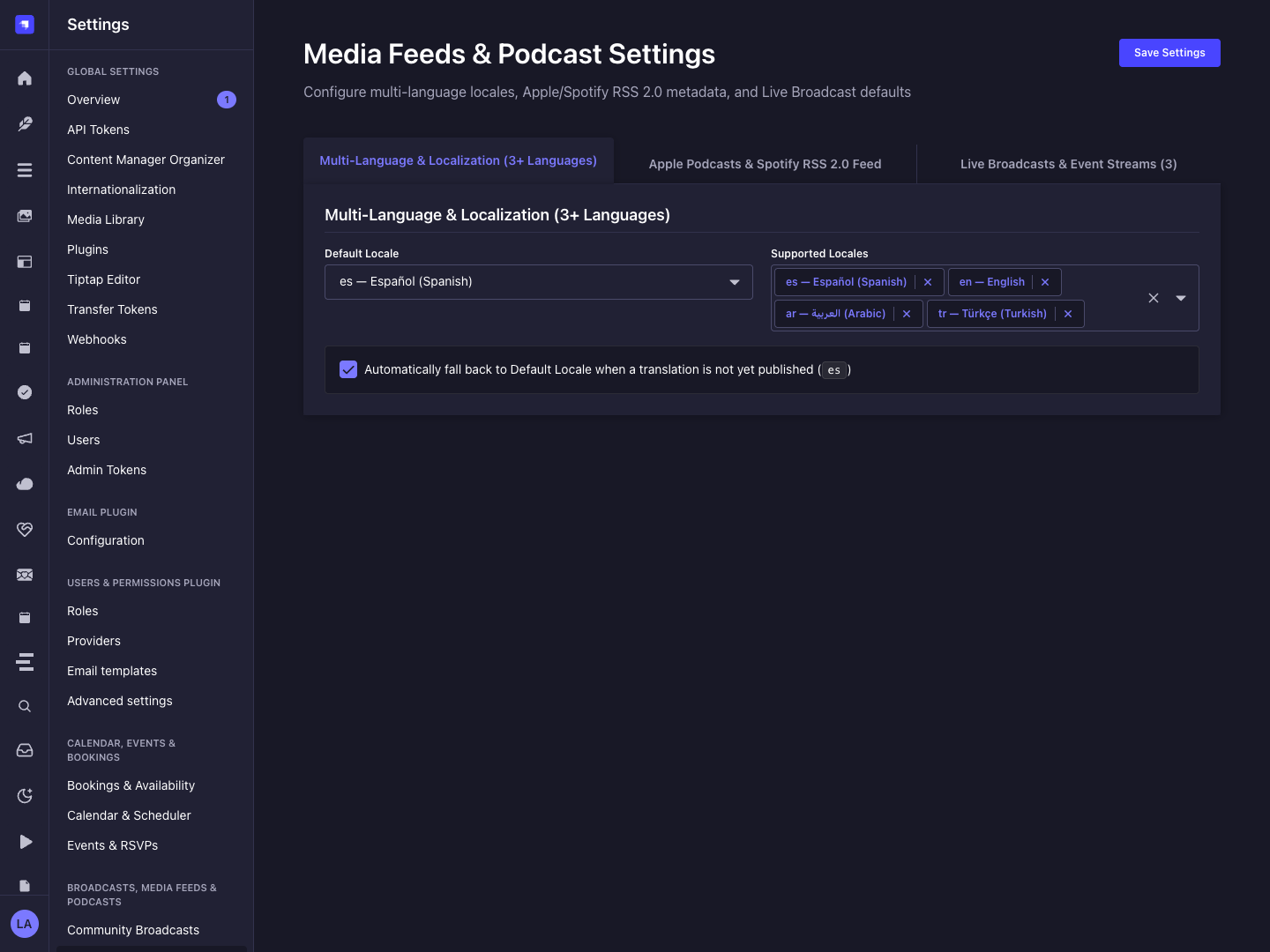
i18n) Episode & Podcast Show Publishing: Localize episode titles, summaries, full transcripts, and chapter markers acrossen,es,ar, andtr(?plugins[i18n][locale]=en). - Relational Speaker & Series Linking: Link episodes in Content Manager to
Staff, Scholar & Author(api::leader.leader) profiles viaschemaExtensionsand group them underMedia Series & Podcast Show(seriesSlug). - Draft Staging Before Podcast RSS Syndication: Only
Publishedplugin::media-feeds.media-itemrecords are emitted in/api/media-feeds/podcast.xml, allowing producers to stage upcoming episodes inDraftstatus inside Content Manager.
How to Use in Strapi Content Manager (Step-by-Step)
Section titled “How to Use in Strapi Content Manager (Step-by-Step)”- Open in Content Manager: In the left sidebar, click Content Manager -> Collection Types -> Media, Resources & Library and select Media Episode & Feed Item (
/admin/content-manager/collection-types/plugin::media-feeds.media-item?plugins[i18n][locale]=en) or Media Series & Podcast Show (/admin/content-manager/collection-types/plugin::media-feeds.media-series). - Create Podcast Shows & Video Series: In Media Series & Podcast Show, define
title,slug,author,coverUrl,itunesCategory, andrssEnabled. - Publish Multilingual Episodes: In Media Episode & Feed Item, populate
title,slug,mediaType(video,audio,podcast,khutbah,live),sourceUrl,audioEnclosureUrl,durationSeconds, andtranscript, then click Publish. - Workspace vs. Content Manager: Use Content Manager for multilingual transcript authoring, draft staging, and speaker relations; use the Media Feeds Workspace (
/admin/plugins/media-feeds) for 1-click SSRF-safe YouTube/Vimeo OEmbed enrichment and live stream banner toggling.
Content Manager & Plugin Workspace Synchronization
Section titled “Content Manager & Plugin Workspace Synchronization”Content Manager Use Cases & Editorial Workflows
Section titled “Content Manager Use Cases & Editorial Workflows”Content Manager Use Case 1 — Staging & Translating Friday Khutbahs and Podcast Episodes
Section titled “Content Manager Use Case 1 — Staging & Translating Friday Khutbahs and Podcast Episodes”- Why & What it is for: Author English, Spanish, and Arabic episode descriptions, chapter markers, and transcripts in Content Manager before publishing to Apple Podcasts and Spotify.
- How to use in Content Manager: Open
/admin/content-manager/collection-types/plugin::media-feeds.media-item?plugins[i18n][locale]=en, editJumu'ah Khutbah: Mercy and Coexistence, switch locales, and click Publish.
End-to-End Use Cases & Workflows
Section titled “End-to-End Use Cases & Workflows”Use Case 1 — Apple Podcasts & Spotify iTunes RSS 2.0 XML Syndication
Section titled “Use Case 1 — Apple Podcasts & Spotify iTunes RSS 2.0 XML Syndication”- What it is for: Automatically generate standards-compliant podcast RSS feeds with
<itunes:image>,<enclosure>, duration, and per-series filtering. - How it works: Organize
plugin::media-feeds.media-itemrecords under aplugin::media-feeds.media-series(rssEnabled: true) and syndicateGET /api/media-feeds/podcast.xmlorGET /api/media-feeds/podcast/{seriesSlug}.xml.
Use Case 2 — SSRF-Hardened YouTube, Vimeo & Spotify OEmbed Auto-Enrichment
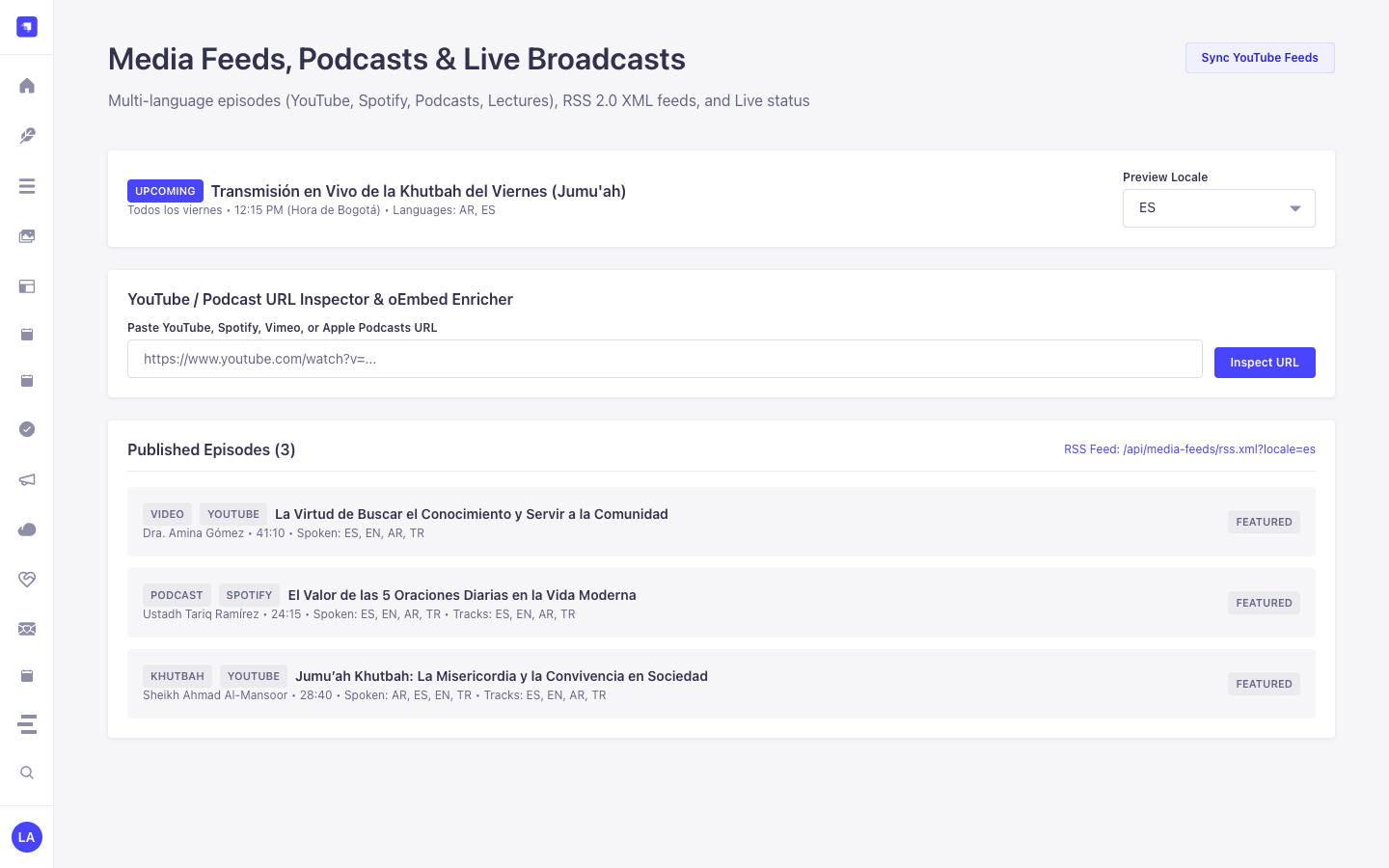
Section titled “Use Case 2 — SSRF-Hardened YouTube, Vimeo & Spotify OEmbed Auto-Enrichment”- What it is for: Allow editors to paste a YouTube or Vimeo URL and automatically populate episode title, thumbnail, embed URL, and provider ID.
- How it works: In
/admin/plugins/media-feeds, triggerPOST /media-feeds/enrich(which validates hostnames against SSRF private IP ranges) before savingplugin::media-feeds.media-item.
Use Case 3 — Live Broadcast Status Banner & Stream Switcher
Section titled “Use Case 3 — Live Broadcast Status Banner & Stream Switcher”- What it is for: Toggle a live khutbah, lecture, or webinar stream on the website header with real-time status polling.
- How it works: Mark an episode
isLive: trueor update live stream settings in/admin/plugins/media-feeds, and pollGET /api/media-feeds/livefrom the frontend.
Admin Workspace, Content Manager & Settings Panel Preview
Section titled “Admin Workspace, Content Manager & Settings Panel Preview”
Strapi v5 Content Manager Entities (/admin/content-manager)
Section titled “Strapi v5 Content Manager Entities (/admin/content-manager)”
Settings Panel (Settings -> Configuration)
Section titled “Settings Panel (Settings -> Configuration)”
Explore Content Types & Use Cases, the Developer Guide & Admin UI Tour, and the Interactive OpenAPI Reference for complete schema, workflow diagram, and endpoint documentation.