الموارد والمعارض والمسرد — كيانات المحتوى وحالات الاستخدام
Package:
@vicacha-devs/strapi-plugin-resources· Plugin ID:resources· Admin Workspace:/admin/plugins/resources
1. كيانات أنواع المحتوى ومواقعها ومخططاتها (strapi.documents)
Section titled “1. كيانات أنواع المحتوى ومواقعها ومخططاتها (strapi.documents)”Registers three localized (i18n.localized: true), draft-and-publish (draftAndPublish: true) Collection Types: plugin::resources.publication, plugin::resources.gallery-album, and plugin::resources.glossary-term, plus a 3-tab settings panel (/admin/settings/resources) covering Media Library folder paths, multi-calendar secondary dates, Cloudinary f_auto,q_auto optimization, album photo caps, and download extension/MIME allow-lists. Supports runtime schemaExtensions in config/plugins.ts.
أين تجد كيانات أنواع المحتوى في Strapi v5
Section titled “أين تجد كيانات أنواع المحتوى في Strapi v5”- Content Manager:
/admin/content-manager/collection-types/plugin::resources.publication,plugin::resources.gallery-album, andplugin::resources.glossary-term(visible: true) - Content-Type Builder:
/admin/plugins/content-type-builderunder Collection Types (Resource Publication,Resource Gallery Album,Resource Glossary Term) - Plugin Workspace:
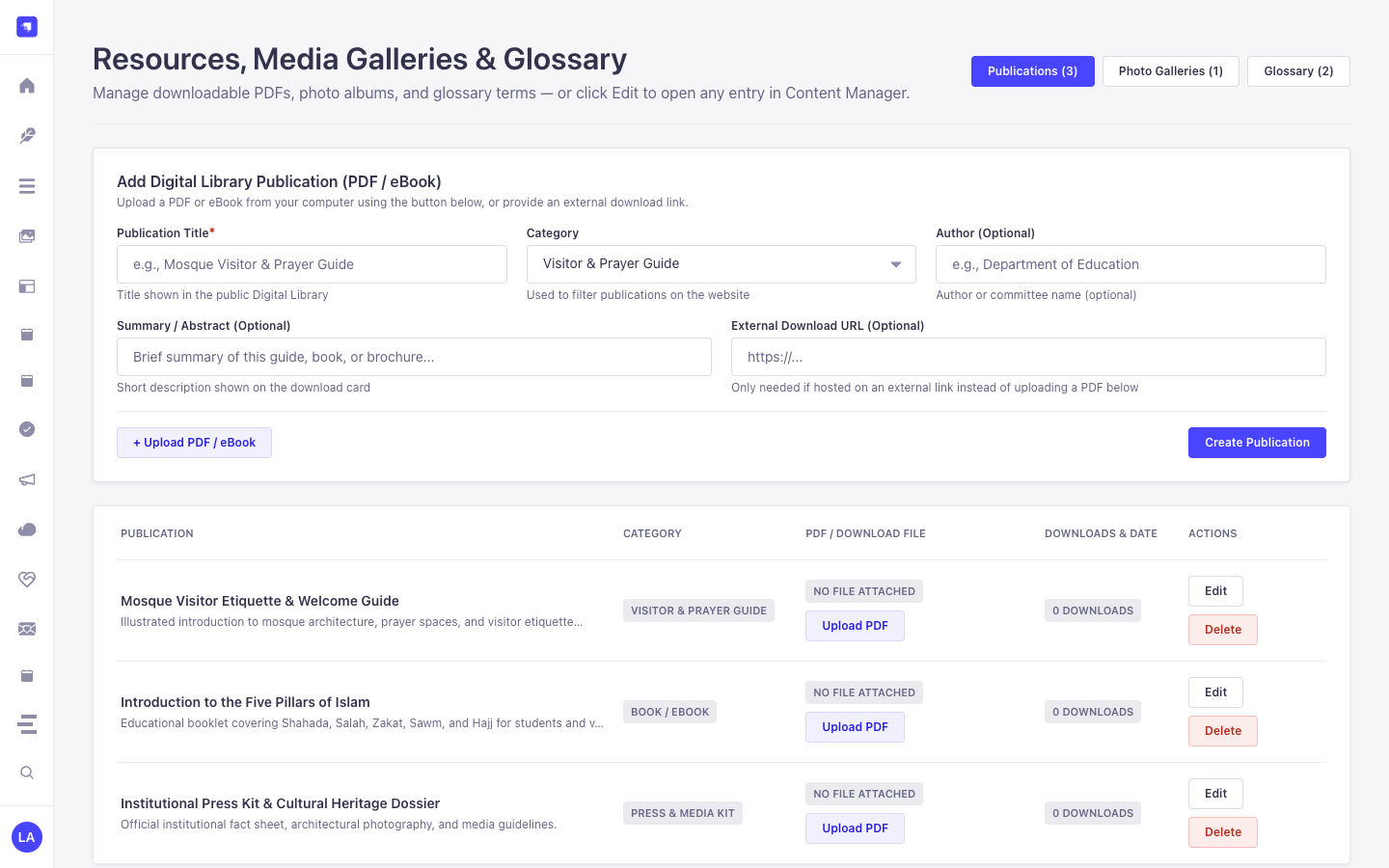
/admin/plugins/resources(Publications, Gallery Albums, Glossary Terms, Media Folder Sync) - Settings Panel (3 Tabs):
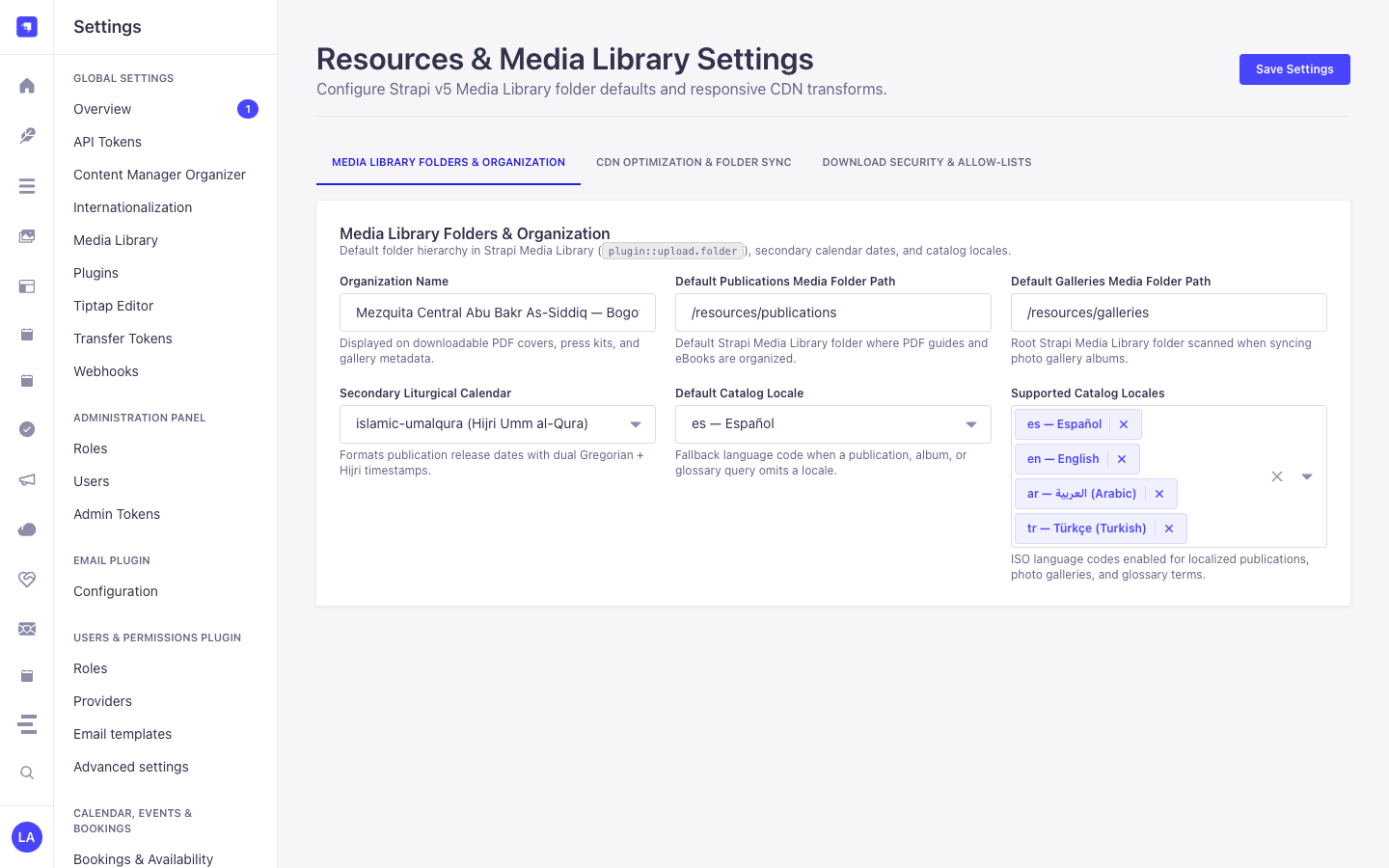
/admin/settings/resources— Media Library Folders & Organization (organizationName,defaultPublicationsFolderPath,defaultGalleriesFolderPath,secondaryCalendar,defaultLocale,supportedLocales), CDN Optimization & Folder Sync (enableCloudinaryOptimization,autoSyncMediaFolders,maxPhotosPerAlbum), and Download Security & Allow-Lists (allowedDownloadExtensions,allowedDownloadMimeTypes) - Database Tables:
resources_publications,resources_gallery_albums, andresources_glossary_terms
plugin::resources.gallery-album — Resource Gallery Album
Section titled “plugin::resources.gallery-album — Resource Gallery Album”Curated photo and video albums synced with Strapi v5 Media Library folders and Cloudinary optimization
Kind:
collectionType· DB Table:resources_gallery_albums· Admin Location:/admin/content-manager/collection-types/plugin::resources.gallery-album· Draft & Publish:Yes· i18n:Yes
| الحقل | النوع في Strapi | إلزامي | القيود / العلاقات |
|---|---|---|---|
title |
string |
Yes | max: 200 |
slug |
uid |
Yes | — |
description |
text |
No | — |
category |
enumeration |
Yes | enum: architecture, community, events, ramadan_eid, heritage, press; default: "community" |
coverPhoto |
media |
No | — |
photos |
media |
No | — |
mediaFolderId |
integer |
No | — |
mediaFolderPath |
string |
No | max: 160 |
eventDate |
date |
No | — |
secondaryDateOverride |
string |
No | max: 80 |
photographerCredit |
string |
No | max: 140 |
framingNotes |
string |
No | max: 500 |
featured |
boolean |
No | default: false |
sortOrder |
integer |
No | default: 0 |
photoCount |
integer |
No | default: 0 |
plugin::resources.glossary-term — Resource Glossary Term
Section titled “plugin::resources.glossary-term — Resource Glossary Term”Multilingual A-Z glossary terms with native script, transliteration, and Strapi Media Library audio pronunciation
Kind:
collectionType· DB Table:resources_glossary_terms· Admin Location:/admin/content-manager/collection-types/plugin::resources.glossary-term· Draft & Publish:Yes· i18n:Yes
| الحقل | النوع في Strapi | إلزامي | القيود / العلاقات |
|---|---|---|---|
term |
string |
Yes | max: 120 |
slug |
uid |
Yes | — |
nativeScript |
string |
No | max: 200 |
transliteration |
string |
No | max: 200 |
definition |
text |
Yes | — |
category |
enumeration |
Yes | enum: beliefs, worship, ethics, history, community, general; default: "general" |
letterGroup |
string |
No | max: 4; default: "A" |
pronunciationAudio |
media |
No | — |
relatedTerms |
json |
No | — |
featured |
boolean |
No | default: false |
plugin::resources.publication — Resource Publication
Section titled “plugin::resources.publication — Resource Publication”Localized digital library books, guides, pamphlets, and press kit assets backed by the Strapi v5 Media Library
Kind:
collectionType· DB Table:resources_publications· Admin Location:/admin/content-manager/collection-types/plugin::resources.publication· Draft & Publish:Yes· i18n:Yes
| الحقل | النوع في Strapi | إلزامي | القيود / العلاقات |
|---|---|---|---|
title |
string |
Yes | max: 200 |
slug |
uid |
Yes | — |
summary |
text |
No | — |
category |
enumeration |
Yes | enum: guide, book, pamphlet, press_kit, academic, general; default: "guide" |
file |
media |
No | — |
coverImage |
media |
No | — |
authorName |
string |
No | max: 140 |
authorSlug |
string |
No | max: 140 |
isbnOrReference |
string |
No | max: 80 |
pageCount |
integer |
No | — |
languageCode |
string |
No | max: 10; default: "es" |
publishedAtDate |
date |
No | — |
secondaryDateOverride |
string |
No | max: 80 |
mediaFolderPath |
string |
No | max: 160 |
externalDownloadUrl |
string |
No | max: 500 |
downloadCount |
integer |
No | default: 0 |
featured |
boolean |
No | default: false |
allowPublicDownload |
boolean |
No | default: true |
التكامل مع مدير المحتوى في Strapi v5 (/admin/content-manager)
Section titled “التكامل مع مدير المحتوى في Strapi v5 (/admin/content-manager)”مجموعة الشريط الجانبي في مدير المحتوى:
Media, Resources & Library
الكيانات والمكونات المسجلة في مدير المحتوى
Section titled “الكيانات والمكونات المسجلة في مدير المحتوى”plugin::resources.publication(Resource Publication —/admin/content-manager/collection-types/plugin::resources.publication)plugin::resources.gallery-album(Resource Gallery Album —/admin/content-manager/collection-types/plugin::resources.gallery-album)plugin::resources.glossary-term(Resource Glossary Term —/admin/content-manager/collection-types/plugin::resources.glossary-term)
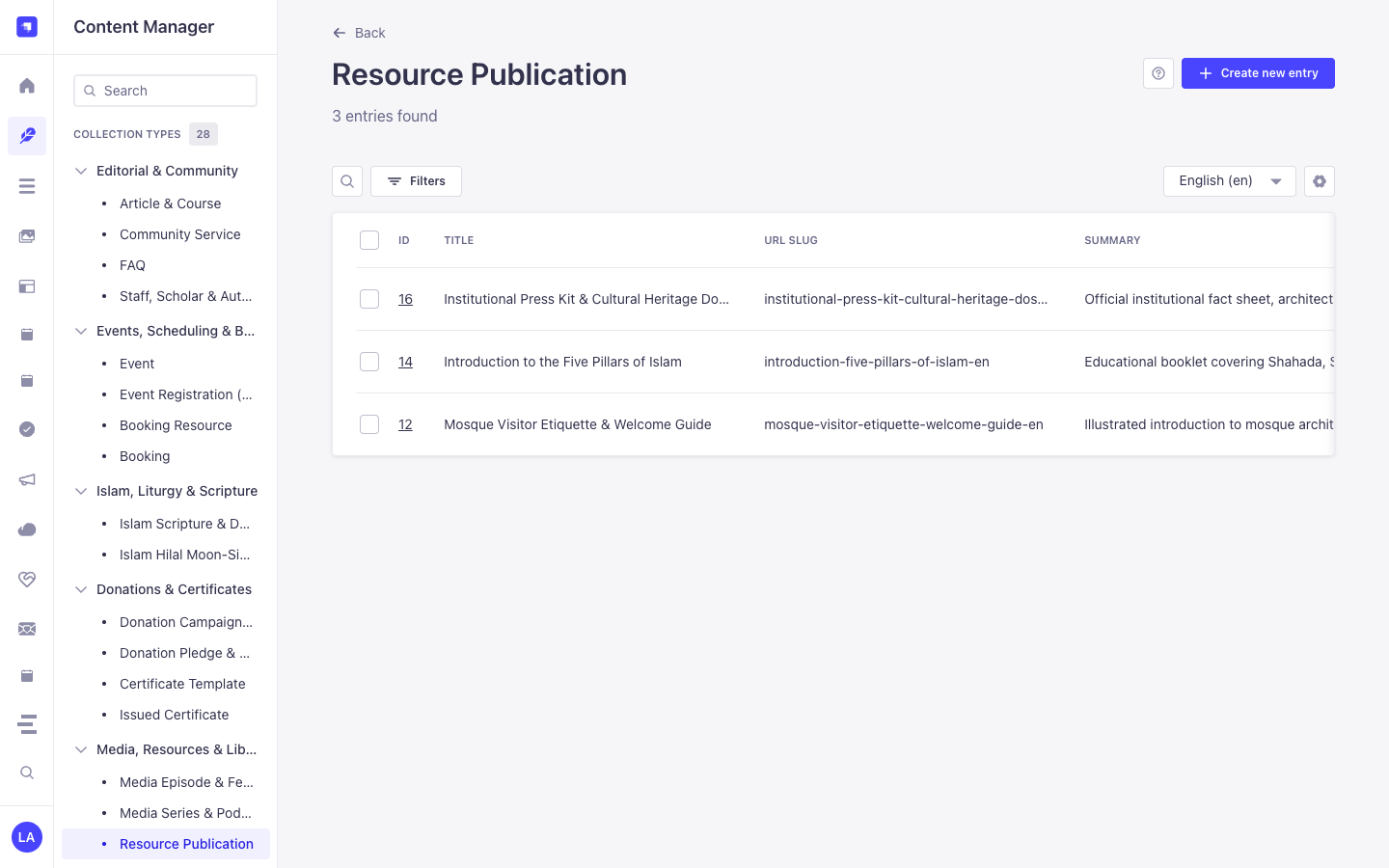
لماذا تنشئ هذه الإضافة كيانات داخل مدير المحتوى (Content Manager)؟
Section titled “لماذا تنشئ هذه الإضافة كيانات داخل مدير المحتوى (Content Manager)؟”@vicacha-devs/strapi-plugin-resources registers all three of its entities (Resource Publication, Resource Gallery Album, and Resource Glossary Term) with i18n.localized: true, draftAndPublish: true, and content-manager.visible: true so librarians, scholars, and archivists can manage digital books, photo albums, and glossary terms inside the Strapi v5 Content Manager:
- Multilingual (
i18n) Digital Library & Glossary Authoring: Author publications, photo gallery descriptions, and A–Z glossary definitions acrossen,es,ar, andtr(?plugins[i18n][locale]=en) with native Draft & Publish staging. - Relational Author Profile Linking (
authorProfile): In Content Manager, linkResource Publicationrecords directly toStaff, Scholar & Author(api::leader.leader) profiles viaconfig/plugins.ts -> schemaExtensions.publication. - Direct Media Library Asset & Folder Binding: Attach cover images, downloadable PDF files, pronunciation audio clips, and Media Library folder paths directly inside Content Manager forms.
كيفية الاستخدام داخل مدير المحتوى في Strapi (خطوة بخطوة)
Section titled “كيفية الاستخدام داخل مدير المحتوى في Strapi (خطوة بخطوة)”- Open in Content Manager: In the left sidebar, expand Content Manager -> Collection Types -> Media, Resources & Library and select Resource Publication (
/admin/content-manager/collection-types/plugin::resources.publication?plugins[i18n][locale]=en), Resource Gallery Album (plugin::resources.gallery-album), or Resource Glossary Term (plugin::resources.glossary-term). - Publish Books, Guides & Press Kits: In Resource Publication, populate
title,slug,summary,category(book,guide,pamphlet,press_kit),fileUrl,pageCount, andauthorProfile, then click Publish. - Curate A–Z Glossary Terms: In Resource Glossary Term, enter
term,nativeScript(Arabic script),transliteration,definition,letterGroup(A–Z), andpronunciationAudioUrl. - Workspace vs. Content Manager: Use Content Manager for multilingual authoring, scholar
authorProfilerelations, and bulk publishing; use the Resources Workspace (/admin/plugins/resources) for 1-click Media Library folder synchronization (Sync Folder) and download analytics.
التزامن بين مدير المحتوى ومساحة عمل الإضافة
Section titled “التزامن بين مدير المحتوى ومساحة عمل الإضافة”حالات الاستخدام داخل مدير المحتوى ومسارات العمل التحريرية
Section titled “حالات الاستخدام داخل مدير المحتوى ومسارات العمل التحريرية”Content Manager Use Case 1 — Publishing Multilingual PDF Guides Linked to Institutional Authors (api::leader.leader)
Section titled “Content Manager Use Case 1 — Publishing Multilingual PDF Guides Linked to Institutional Authors (api::leader.leader)”- الغرض والأهمية: Author downloadable PDF guides (
Mosque Welcome & Visitor Etiquette Guide,Introduction to the Five Pillars of Islam) in Content Manager and link each publication to its scholar author. - خطوات التنفيذ في مدير المحتوى: Open
/admin/content-manager/collection-types/plugin::resources.publication?plugins[i18n][locale]=en, edit the entry, select theauthorProfilerelation, switch locales (es,ar,tr) to translate, and click Publish.
Content Manager Use Case 2 — Managing Multilingual Glossary Terms with Native Script & Audio
Section titled “Content Manager Use Case 2 — Managing Multilingual Glossary Terms with Native Script & Audio”- الغرض والأهمية: Curate A–Z glossary entries with vocalized Arabic script, phonetic transliteration, and audio pronunciation links in Content Manager.
- خطوات التنفيذ في مدير المحتوى: Open
/admin/content-manager/collection-types/plugin::resources.glossary-term?plugins[i18n][locale]=en, filter byletterGrouporcategory, and publish.
3. حالات الاستخدام ومسارات العمل المتكاملة
Section titled “3. حالات الاستخدام ومسارات العمل المتكاملة”Use Case 1 — Digital Publications Library with Hardened Download Allow-Lists
Section titled “Use Case 1 — Digital Publications Library with Hardened Download Allow-Lists”- What it is for: Publish downloadable books, PDF guides, pamphlets, and press kits protected by extension (
allowedDownloadExtensions) and MIME (allowedDownloadMimeTypes) allow-lists,X-Content-Type-Options: nosniff, and atomic download counters. - How it works: Configure allowed extensions/MIME types in
/admin/settings/resources(Download Security & Allow-Lists tab), createplugin::resources.publicationrecords, and serve downloads viaPOST /api/resources/publications/{slug}/download.
Use Case 2 — Configuring Media Library Folders, Secondary Calendars, CDN Optimization & Download Security
Section titled “Use Case 2 — Configuring Media Library Folders, Secondary Calendars, CDN Optimization & Download Security”- What it is for: Manage all 11
ResourcesPluginSettingsfields across 3 organized tabs in/admin/settings/resources(Media Library Folders & Organization,CDN Optimization & Folder Sync, andDownload Security & Allow-Lists) and automatically syncplugin::upload.folderassets intoplugin::resources.gallery-albumup tomaxPhotosPerAlbum. - How it works: Configure
defaultPublicationsFolderPath,defaultGalleriesFolderPath,secondaryCalendar,enableCloudinaryOptimization,autoSyncMediaFolders,maxPhotosPerAlbum, and download allow-lists in/admin/settings/resources(PUT /resources/settings), then click Sync Folder (POST /resources/galleries/{documentId}/sync-folder).
Use Case 3 — Multilingual A–Z Glossary with Native Script & Audio Pronunciation
Section titled “Use Case 3 — Multilingual A–Z Glossary with Native Script & Audio Pronunciation”- What it is for: Maintain an educational glossary of Arabic/Islamic or domain terms (
term,nativeScript,transliteration,definition,pronunciationAudio,letterGroup). - How it works: Manage entries in
plugin::resources.glossary-termand query grouped A–Z terms viaGET /api/resources/glossary?letter=A&category=worship.