الملاحظات التحريرية والتثبيت — دليل المطور وواجهة الإدارة
1. التثبيت وإعداد الاعتماديات
Section titled “1. التثبيت وإعداد الاعتماديات”pnpm add @vicacha-devs/strapi-plugin-notes2. إعدادات الخادم (config/plugins.ts)
Section titled “2. إعدادات الخادم (config/plugins.ts)”أضف إعدادات الإضافة إلى ملف config/plugins.ts في مشروع Strapi v5 الخاص بك:
export default ({ env }: { env: (key: string, defaultValue?: string) => string }) => ({ "notes": { enabled: true, config: { enablePinning: true, enableLocaleScoping: true, }, },});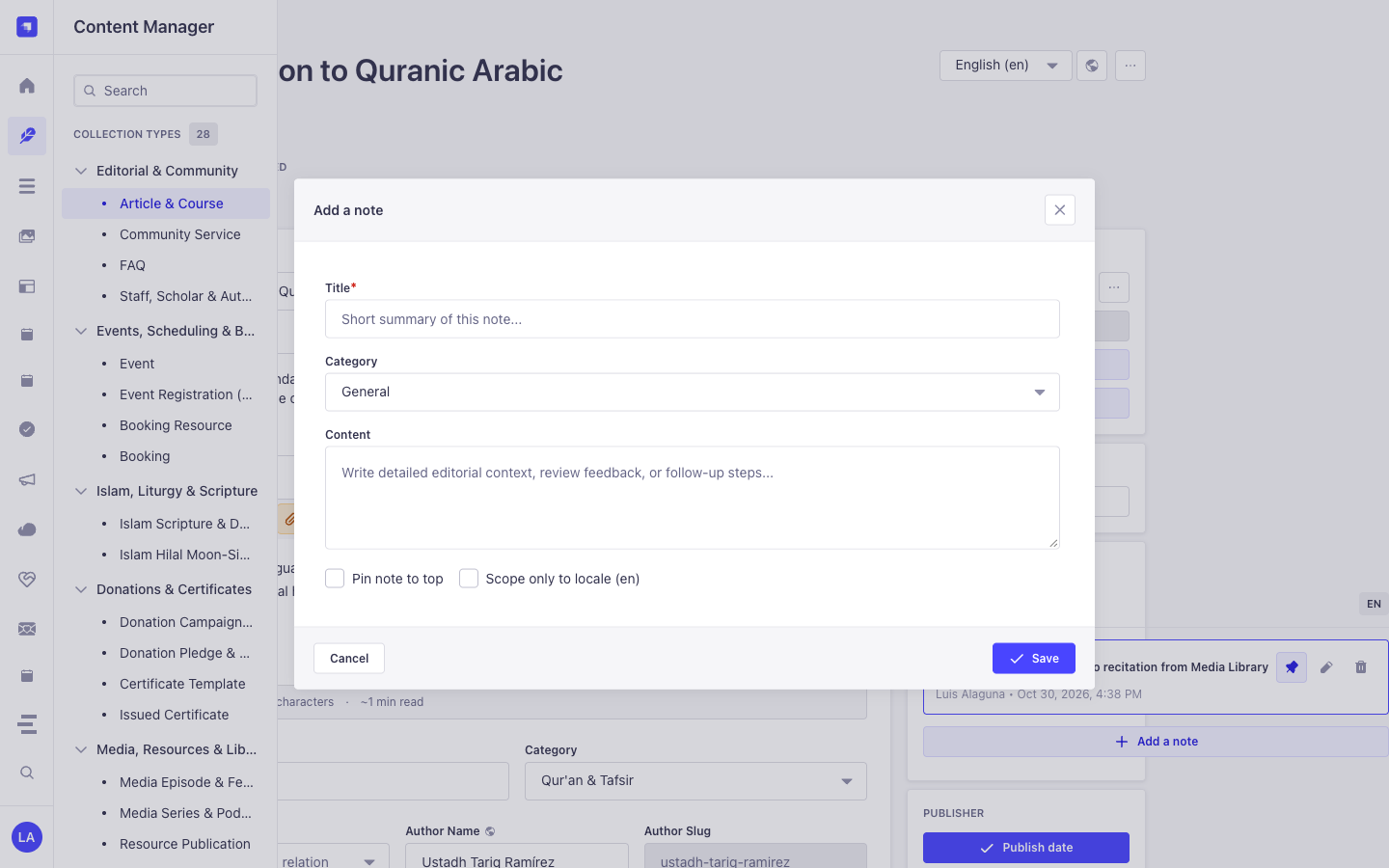
3. جولة في واجهة الإدارة (Strapi v5 Admin UI — دعم RTL)
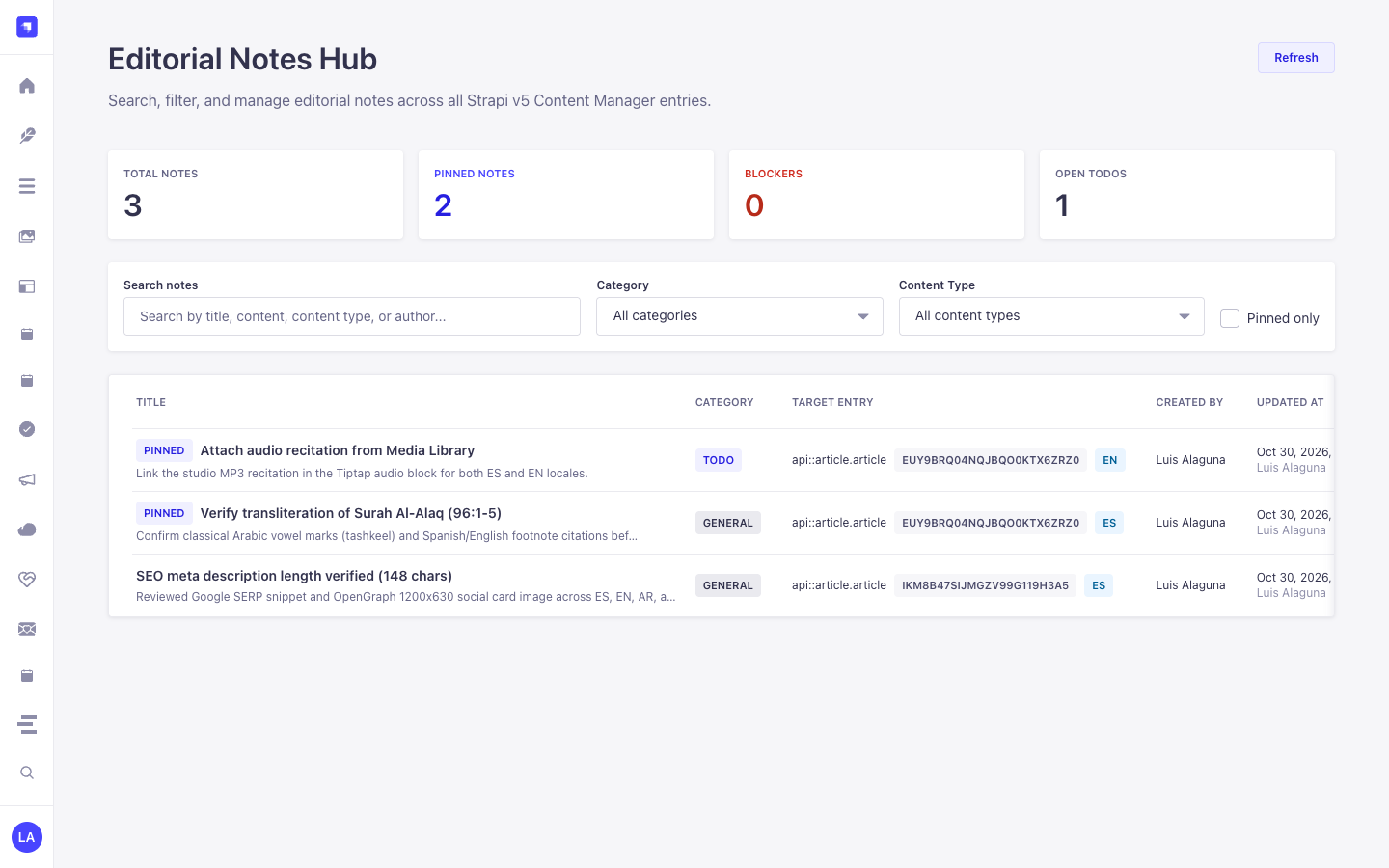
Section titled “3. جولة في واجهة الإدارة (Strapi v5 Admin UI — دعم RTL)”بمجرد تفعيل الإضافة، يتم تسجيل مساحة العمل والإعدادات داخل لوحة تحكم Strapi v5 مع دعم كامل للغة العربية واتجاه RTL:
نماذج من نصوص الواجهة المعربة (العربية)
Section titled “نماذج من نصوص الواجهة المعربة (العربية)”| مفتاح الترجمة | النص المعروض في الواجهة |
|---|---|
plugin.name |
ملاحظات |
notes.loading |
جارٍ تحميل المحتوى … |
notes.notification.loadError |
تعذر تحميل الملاحظات. |
notes.notification.created |
تم إنشاء الملاحظة بنجاح. |
notes.notification.createError |
فشل إنشاء الملاحظة. |
notes.notification.updated |
تم تحديث الملاحظة بنجاح. |
notes.notification.updateError |
فشل تحديث الملاحظة. |
notes.notification.deleted |
تم حذف الملاحظة بنجاح. |
4. كيانات أنواع المحتوى ومواقعها ومخططاتها (strapi.documents)
Section titled “4. كيانات أنواع المحتوى ومواقعها ومخططاتها (strapi.documents)”Registers one internal polymorphic Collection Type (plugin::notes.note, content-manager.visible: false) that attaches editorial annotations to any Strapi Content Manager document via entitySlug (e.g., api::article.article), entityDocumentId, and entityLocale.
أين تجد كيانات أنواع المحتوى في Strapi v5
Section titled “أين تجد كيانات أنواع المحتوى في Strapi v5”- Content Manager Right Side Panel: Open any document in
/admin/content-manager/collection-types/...orsingle-types/...to view, create, and pin notes scoped to that document and locale - Global Notes Hub Workspace:
/admin/plugins/notes(centralized search, category filter, and pin board across all Content-Type entities) - Database Table:
notes(plugin::notes.notequeried viastrapi.documents('plugin::notes.note'))
plugin::notes.note — Notes
Section titled “plugin::notes.note — Notes”Editorial notes attached to Content Manager entity records
Kind:
collectionType· DB Table:notes· Admin Location: Internal (/admin/plugins/notes) · Draft & Publish:No· i18n:No
| الحقل | النوع في Strapi | إلزامي | القيود / العلاقات |
|---|---|---|---|
title |
string |
Yes | max: 255 |
content |
text |
No | — |
category |
enumeration |
Yes | enum: general, todo, blocker, idea; default: "general" |
isPinned |
boolean |
No | default: false |
entityId |
integer |
No | — |
entityDocumentId |
string |
No | max: 128 |
entitySlug |
string |
Yes | max: 160 |
entityLocale |
string |
No | max: 32 |
createdByName |
string |
No | max: 120 |
updatedByName |
string |
No | max: 120 |
التكامل مع مدير المحتوى في Strapi v5 (/admin/content-manager)
Section titled “التكامل مع مدير المحتوى في Strapi v5 (/admin/content-manager)”مجموعة الشريط الجانبي في مدير المحتوى:
Injected into All Content Manager Collection Types & Single Types (Right Sidebar)
الكيانات والمكونات المسجلة في مدير المحتوى
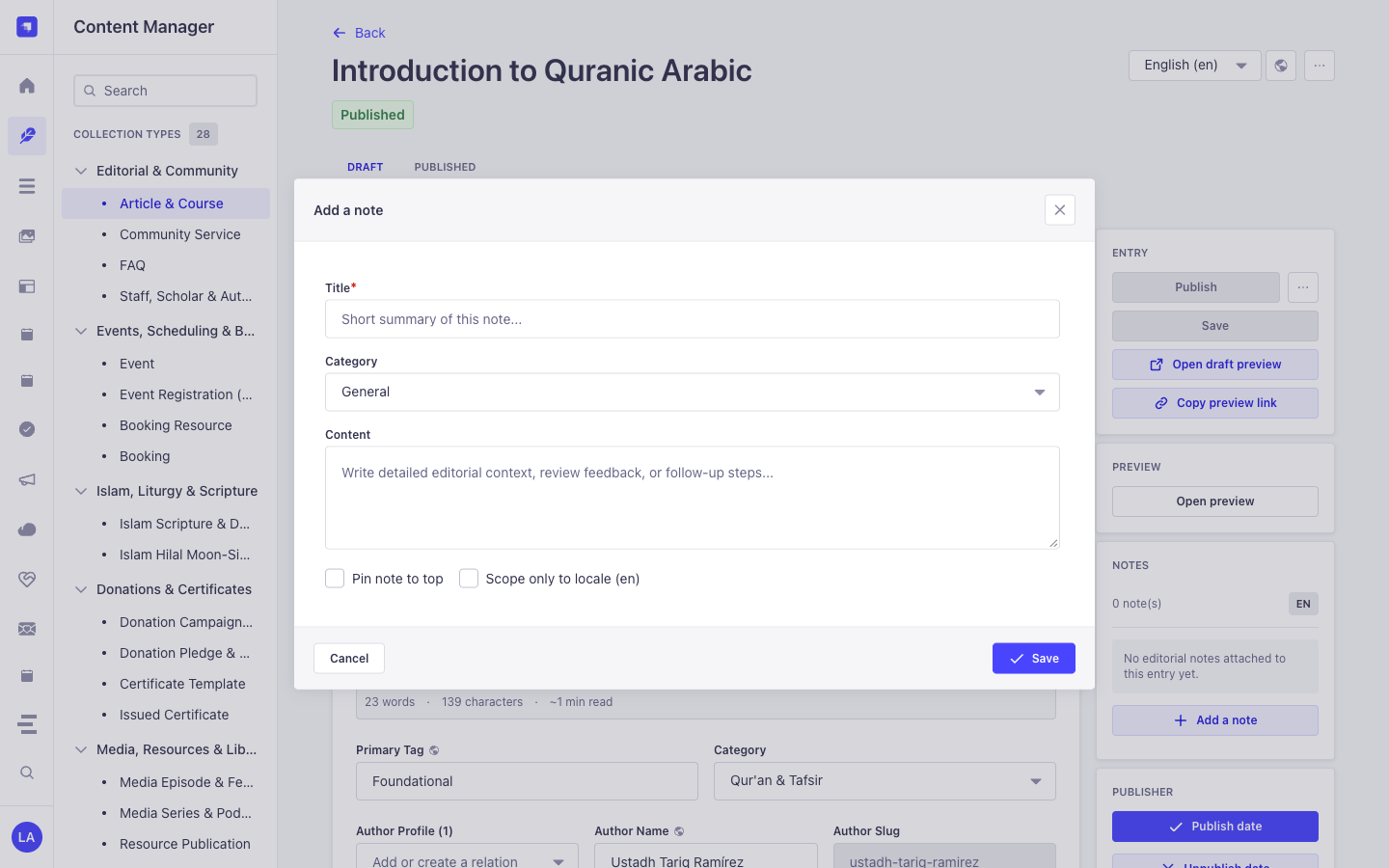
Section titled “الكيانات والمكونات المسجلة في مدير المحتوى”- Right-Sidebar Notes (
NOTES) Panel injected into every/admin/content-manager/collection-types/*and/admin/content-manager/single-types/*edit view - Internal Polymorphic Entity
plugin::notes.note(notestable, managed via Content Manager side panel &/admin/plugins/notes)
لماذا تنشئ هذه الإضافة كيانات داخل مدير المحتوى (Content Manager)؟
Section titled “لماذا تنشئ هذه الإضافة كيانات داخل مدير المحتوى (Content Manager)؟”@vicacha-devs/strapi-plugin-notes is purpose-built for the Strapi v5 Content Manager: it injects an interactive Notes panel directly into the right sidebar of every document edit view while keeping plugin::notes.note (content-manager.visible: false) out of the collection list to avoid cluttering the left sidebar:
- Works on Every
api::*andplugin::*Content Manager Entity: Attachgeneral,todo,blocker, orideanotes to anArticle & Course,Event,Donation Campaign,Islam Scripture Entry, orResource Publicationdirectly inside Content Manager. - Per-Locale (
Scope only to locale) or Cross-Locale Pinning: Scope a translation note specifically toen,es,ar, ortr, and pin critical blockers (Pin note to top) so editors see them immediately upon opening the entry.
كيفية الاستخدام داخل مدير المحتوى في Strapi (خطوة بخطوة)
Section titled “كيفية الاستخدام داخل مدير المحتوى في Strapi (خطوة بخطوة)”- Open Any Entry in Content Manager: Open any document in
/admin/content-manager/collection-types/...or/admin/content-manager/single-types/.... - Click
+ Add a note: In the right-hand sidebar under NOTES, click the button to open the note modal. - Set Category, Pin & Locale Scope: Enter
Title, selectCategory(General,To-Do,Blocker,Idea), write theContent, optionally checkPin note to toporScope only to locale, and click Save. - Triage Across All Entities: Visit
/admin/plugins/notes(Global Notes Hub) to filter all notes across the entire CMS and click any card to jump back into Content Manager.
التزامن بين مدير المحتوى ومساحة عمل الإضافة
Section titled “التزامن بين مدير المحتوى ومساحة عمل الإضافة”حالات الاستخدام داخل مدير المحتوى ومسارات العمل التحريرية
Section titled “حالات الاستخدام داخل مدير المحتوى ومسارات العمل التحريرية”Content Manager Use Case 1 — Attaching Locale-Scoped Translation & Scholar Review Notes
Section titled “Content Manager Use Case 1 — Attaching Locale-Scoped Translation & Scholar Review Notes”- الغرض والأهمية: Leave a
blockerortodoreview note on a course or scripture entry directly inside the Content Manager edit screen. - خطوات التنفيذ في مدير المحتوى: Open
/admin/content-manager/collection-types/api::article.article/{documentId}?plugins[i18n][locale]=en, click + Add a note in the right sidebar, checkScope only to locale (en), and save.
5. حالات الاستخدام ومسارات العمل المتكاملة
Section titled “5. حالات الاستخدام ومسارات العمل المتكاملة”Use Case 1 — In-Context Editorial Review & Translation Handoff Notes
Section titled “Use Case 1 — In-Context Editorial Review & Translation Handoff Notes”- What it is for: Leave
todo,blocker,idea, orgeneralnotes directly on a draft Article, Event, or Donation Campaign for fellow editors and translators. - How it works: Open the record in Content Manager; the injected side panel queries
GET /notes/entity?entitySlug=...&entityDocumentId=...&entityLocale=...and creates notes viaPOST /notes.
Use Case 2 — Pinning Critical Editorial Blockers to the Top of a Document
Section titled “Use Case 2 — Pinning Critical Editorial Blockers to the Top of a Document”- What it is for: Ensure legal, theological, or fact-checking warnings stay pinned (
isPinned: true) at the top of a Content Manager entry. - How it works: Toggle pin status in the Content Manager side panel (
PUT /notes/{id}), surfacing the note both on the document and in the Global Notes Hub.
Use Case 3 — Cross-Collection Editorial Triage in the Global Notes Hub
Section titled “Use Case 3 — Cross-Collection Editorial Triage in the Global Notes Hub”- What it is for: Review all unresolved
blockerandtodoannotations across every collection type from a single dashboard. - How it works: Navigate to
/admin/plugins/notesto filterplugin::notes.noterecords bycategory,isPinned,entitySlug, or keyword and jump straight to the target document.
6. نقاط النهاية البرمجية REST API (content-api و admin)
Section titled “6. نقاط النهاية البرمجية REST API (content-api و admin)”| الطريقة | مسار نقطة النهاية | النطاق | المعالج (Handler) | المصادقة |
|---|---|---|---|---|
GET |
/notes/notes |
admin |
notesController.find |
Bearer JWT |
GET |
/notes/notes/stats |
admin |
notesController.stats |
Bearer JWT |
GET |
/notes/notes/{id} |
admin |
notesController.findOne |
Bearer JWT |
POST |
/notes/notes |
admin |
notesController.create |
Bearer JWT |
PUT |
/notes/notes/{id} |
admin |
notesController.update |
Bearer JWT |
DELETE |
/notes/notes/{id} |
admin |
notesController.delete |
Bearer JWT |
GET |
/api/notes/notes |
content-api |
notesController.find |
Bearer JWT |
GET |
/api/notes/notes/{id} |
content-api |
notesController.findOne |
Bearer JWT |
7. الاستخدام البرمجي داخل الخادم (strapi.plugin و strapi.documents)
Section titled “7. الاستخدام البرمجي داخل الخادم (strapi.plugin و strapi.documents)”// Registered services on plugin "notes": "notesService", "noteService", "note"const pluginService = strapi.plugin("notes")?.service("notesService");
// Querying records via the Strapi v5 Document Service APIconst records = await strapi.documents("plugin::notes.note").findMany({ limit: 25, sort: "createdAt:desc",});8. استكشاف الأخطاء والتحقق من الجودة
Section titled “8. استكشاف الأخطاء والتحقق من الجودة”- عدم ظهور التغييرات في لوحة الإدارة: قم بتشغيل
pnpm strapi buildبعد تعديل ملفconfig/plugins.ts. - عزل حزم Strapi: حافظ على إعداد
hoistPattern: ["*", "!@strapi/*"]داخلpnpm-workspace.yamlلمنع تكرار سياق React. - فحص الأنواع الصارم (TypeScript): قم بتشغيل
pnpm checkللتحقق من سلامة حزمتي الواجهة والخادم.