البث متعدد القنوات — كيانات المحتوى وحالات الاستخدام
Package:
@vicacha-devs/strapi-plugin-broadcasts· Plugin ID:broadcasts· Admin Workspace:/admin/plugins/broadcasts
1. كيانات أنواع المحتوى ومواقعها ومخططاتها (strapi.documents)
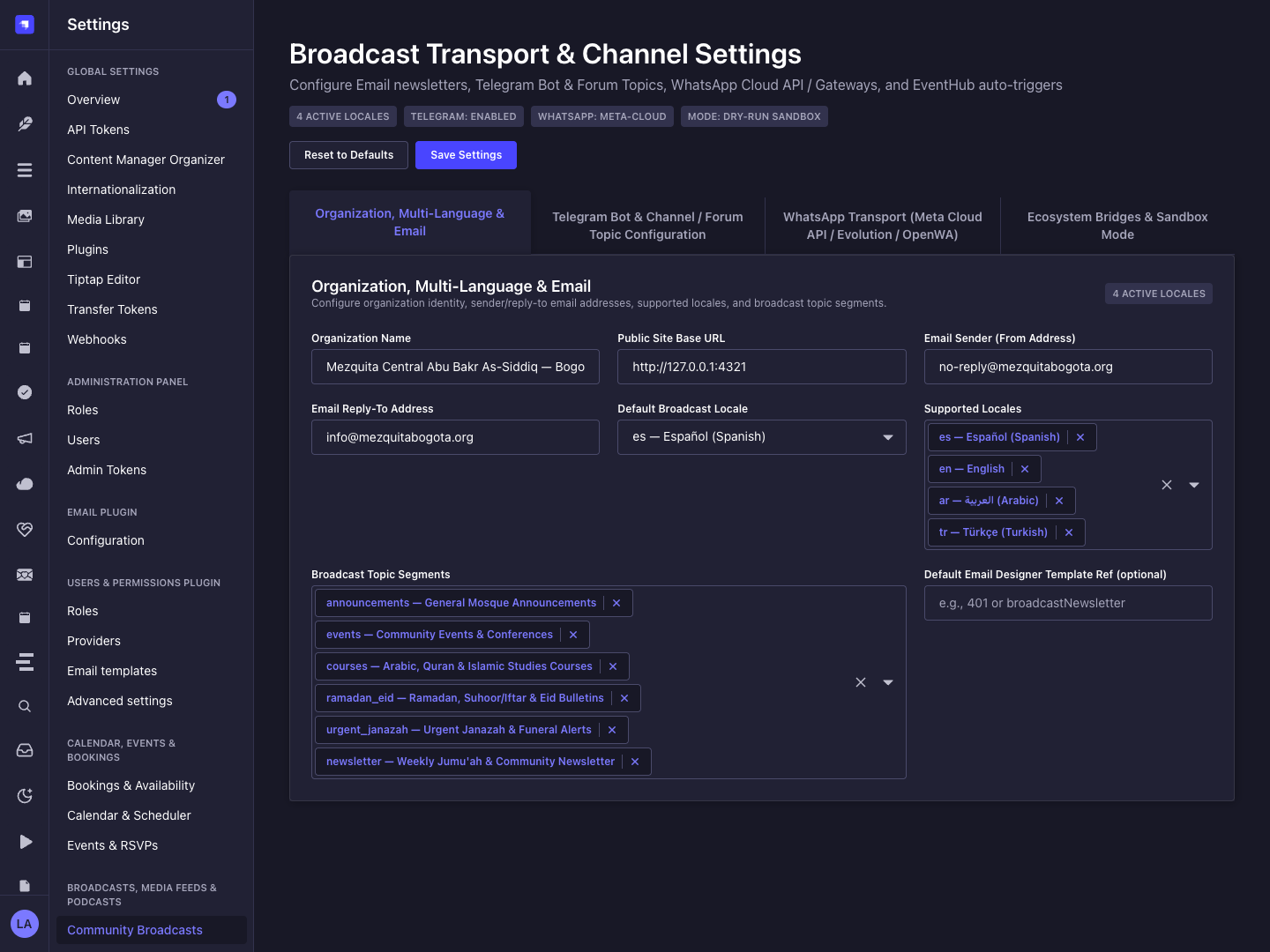
Section titled “1. كيانات أنواع المحتوى ومواقعها ومخططاتها (strapi.documents)”Registers three Collection Types (plugin::broadcasts.campaign, plugin::broadcasts.automation-rule, plugin::broadcasts.delivery-log). Campaigns store multi-channel message payloads; Automation Rules subscribe to Strapi eventHub events (e.g., entry.publish); Delivery Logs store idempotent (idempotencyKey), PII-masked (recipientMasked) audit trails. Supports schemaExtensions in config/plugins.ts.
أين تجد كيانات أنواع المحتوى في Strapi v5
Section titled “أين تجد كيانات أنواع المحتوى في Strapi v5”- Content Manager:
/admin/content-manager/collection-types/plugin::broadcasts.campaign,plugin::broadcasts.automation-rule, andplugin::broadcasts.delivery-log(visible: true) - Content-Type Builder:
/admin/plugins/content-type-builderunder Collection Types - Plugin Workspace & Settings:
/admin/plugins/broadcasts(Campaigns, Automation Rules, Delivery Audit) and/admin/settings/broadcasts - Database Tables:
broadcast_campaigns,broadcast_automation_rules, andbroadcast_delivery_logs
plugin::broadcasts.automation-rule — Broadcast Automation Rule
Section titled “plugin::broadcasts.automation-rule — Broadcast Automation Rule”EventHub-driven automated multi-channel broadcast rule
Kind:
collectionType· DB Table:broadcast_automation_rules· Admin Location:/admin/content-manager/collection-types/plugin::broadcasts.automation-rule· Draft & Publish:No· i18n:No
| الحقل | النوع في Strapi | إلزامي | القيود / العلاقات |
|---|---|---|---|
name |
string |
Yes | — |
slug |
uid |
Yes | — |
eventName |
string |
Yes | — |
targetContentType |
string |
No | — |
topic |
string |
Yes | default: "announcements" |
channels |
json |
Yes | default: ["telegram"] |
active |
boolean |
No | default: true |
priority |
enumeration |
No | enum: low, normal, high, urgent; default: "normal" |
subjectTemplate |
string |
Yes | — |
bodyTextTemplate |
text |
Yes | — |
bodyHtmlTemplate |
richtext |
No | — |
ctaLabelTemplate |
string |
No | — |
ctaUrlTemplate |
string |
No | — |
translations |
json |
No | default: {} |
lastTriggeredAt |
datetime |
No | — |
triggerCount |
integer |
No | default: 0 |
plugin::broadcasts.campaign — Broadcast Campaign
Section titled “plugin::broadcasts.campaign — Broadcast Campaign”Omnichannel Email, Telegram & WhatsApp broadcast campaign
Kind:
collectionType· DB Table:broadcast_campaigns· Admin Location:/admin/content-manager/collection-types/plugin::broadcasts.campaign· Draft & Publish:No· i18n:No
| الحقل | النوع في Strapi | إلزامي | القيود / العلاقات |
|---|---|---|---|
title |
string |
Yes | — |
slug |
uid |
Yes | — |
topic |
string |
Yes | default: "announcements" |
channels |
json |
Yes | default: ["email","telegram"] |
priority |
enumeration |
Yes | enum: low, normal, high, urgent; default: "normal" |
status |
enumeration |
Yes | enum: draft, scheduled, sending, sent, failed, cancelled; default: "draft" |
scheduledAt |
datetime |
No | — |
sentAt |
datetime |
No | — |
subject |
string |
Yes | — |
bodyText |
text |
Yes | — |
bodyHtml |
richtext |
No | — |
ctaLabel |
string |
No | — |
ctaUrl |
string |
No | — |
mediaUrl |
string |
No | — |
emailTemplateRef |
string |
No | — |
whatsappTemplateName |
string |
No | — |
whatsappGroupIds |
json |
No | default: [] |
telegramChatId |
string |
No | — |
telegramThreadId |
integer |
No | — |
translations |
json |
No | default: {} |
secondaryDate |
json |
No | default: {} |
secondaryDateLabel |
string |
No | — |
stats |
json |
No | default: {} |
metadata |
json |
No | default: {} |
plugin::broadcasts.delivery-log — Broadcast Delivery Log
Section titled “plugin::broadcasts.delivery-log — Broadcast Delivery Log”Idempotent, PII-masked multi-channel delivery audit log
Kind:
collectionType· DB Table:broadcast_delivery_logs· Admin Location:/admin/content-manager/collection-types/plugin::broadcasts.delivery-log· Draft & Publish:No· i18n:No
| الحقل | النوع في Strapi | إلزامي | القيود / العلاقات |
|---|---|---|---|
idempotencyKey |
string |
Yes | — |
campaignSlug |
string |
Yes | — |
channel |
enumeration |
Yes | enum: email, telegram, whatsapp |
driver |
string |
Yes | — |
recipientMasked |
string |
Yes | — |
locale |
string |
Yes | default: "es" |
status |
enumeration |
Yes | enum: sent, simulated, skipped_duplicate, failed |
externalMessageId |
string |
No | — |
errorMessage |
text |
No | — |
sentAt |
datetime |
Yes | — |
secondaryDateLabel |
string |
No | — |
التكامل مع مدير المحتوى في Strapi v5 (/admin/content-manager)
Section titled “التكامل مع مدير المحتوى في Strapi v5 (/admin/content-manager)”مجموعة الشريط الجانبي في مدير المحتوى:
Inbox & Omnichannel Broadcasts
الكيانات والمكونات المسجلة في مدير المحتوى
Section titled “الكيانات والمكونات المسجلة في مدير المحتوى”plugin::broadcasts.campaign(Broadcast Campaign —/admin/content-manager/collection-types/plugin::broadcasts.campaign)plugin::broadcasts.automation-rule(Broadcast Automation Rule —/admin/content-manager/collection-types/plugin::broadcasts.automation-rule)plugin::broadcasts.delivery-log(Broadcast Delivery Log —/admin/content-manager/collection-types/plugin::broadcasts.delivery-log)
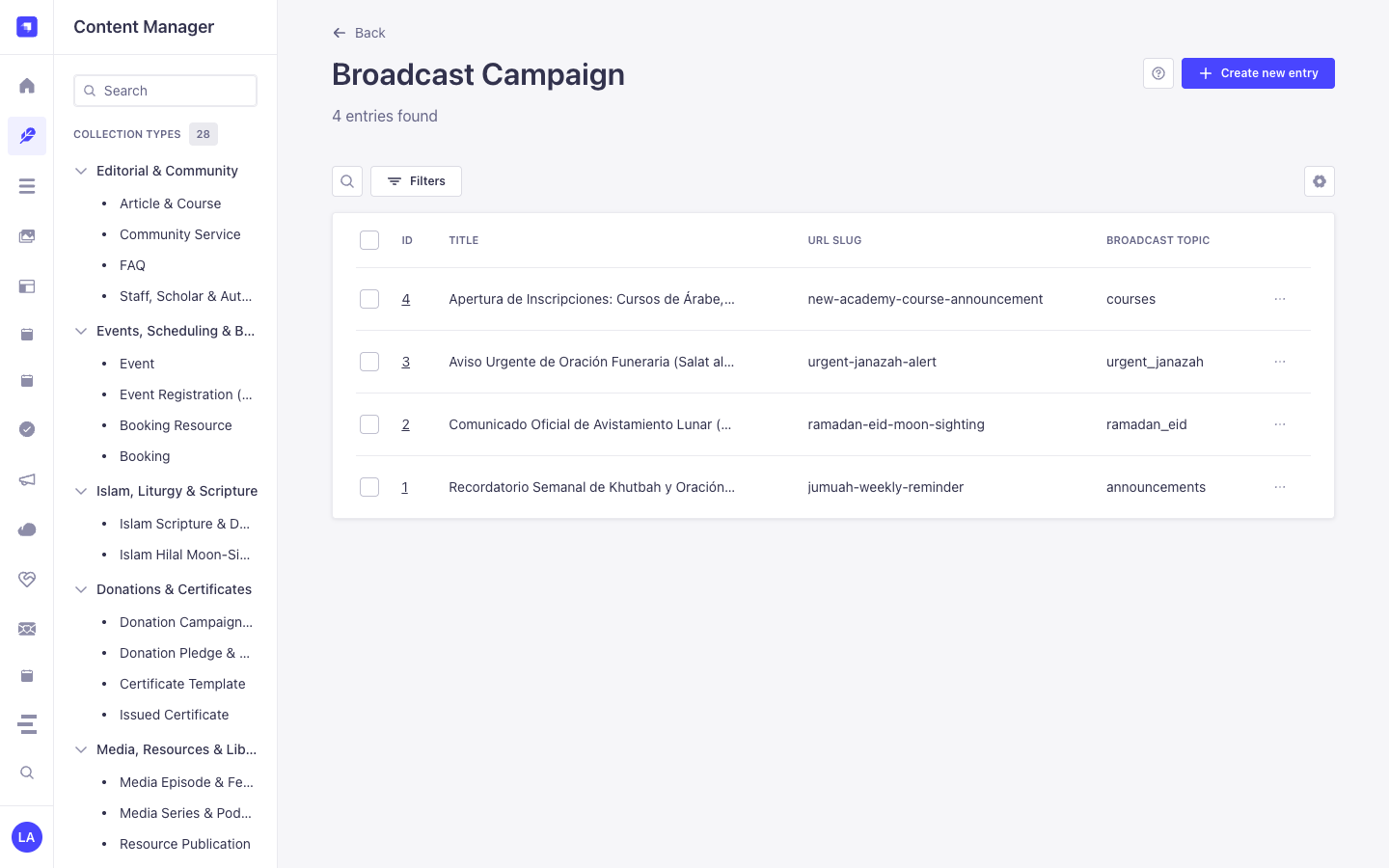
لماذا تنشئ هذه الإضافة كيانات داخل مدير المحتوى (Content Manager)؟
Section titled “لماذا تنشئ هذه الإضافة كيانات داخل مدير المحتوى (Content Manager)؟”@vicacha-devs/strapi-plugin-broadcasts exposes all three of its entities (Broadcast Campaign, Broadcast Automation Rule, and Broadcast Delivery Log) in the Strapi v5 Content Manager so communication teams can author rich campaign payloads, audit PII-masked delivery logs, and govern access via native RBAC:
- Structured Campaign Authoring & Review: Draft
bodyHtml,bodyText,telegramParseMode,whatsappTemplateName, andctaUrlin Content Manager with collaborative@vicacha-devs/strapi-plugin-notesannotations before dispatching from/admin/plugins/broadcasts. - Declarative EventHub Rule Management: Inspect and bulk-toggle
Broadcast Automation Rule(plugin::broadcasts.automation-rule) triggers (entry.publish,entry.create) and Mustache templates ({{title}},{{slug}}) in Content Manager. - Compliance & Delivery Log Auditing: Filter
Broadcast Delivery Log(plugin::broadcasts.delivery-log) bychannel,status(sent,failed,skipped_duplicate),idempotencyKey, andrecipientMaskedusing Content Manager’s native search and pagination. - Role-Based Access Separation: Grant copywriters Content Manager permission to draft
plugin::broadcasts.campaignrecords while restricting actual live dispatch (POST /broadcasts/campaigns/{id}/send) to senior administrators.
كيفية الاستخدام داخل مدير المحتوى في Strapi (خطوة بخطوة)
Section titled “كيفية الاستخدام داخل مدير المحتوى في Strapi (خطوة بخطوة)”- Open in Content Manager: Navigate to Content Manager -> Collection Types -> Inbox & Omnichannel Broadcasts and select Broadcast Campaign, Broadcast Automation Rule, or Broadcast Delivery Log.
- Author & Schedule Campaigns: In Broadcast Campaign (
/admin/content-manager/collection-types/plugin::broadcasts.campaign), create an entry withtitle,slug,topic,targetLocale,channels(['email', 'telegram', 'whatsapp']), and channel-specific templates. - Configure EventHub Automation Rules: In Broadcast Automation Rule (
/admin/content-manager/collection-types/plugin::broadcasts.automation-rule), bindeventName(entry.publish) andtargetContentType(e.g.,plugin::events.eventorplugin::islam.hilal-announcement). - Workspace vs. Content Manager: Use Content Manager to draft campaign copy, attach review notes, and query
Broadcast Delivery Loghistory; use the Broadcasts Workspace (/admin/plugins/broadcasts) to execute dry-run previews and trigger live omnichannel sends.
التزامن بين مدير المحتوى ومساحة عمل الإضافة
Section titled “التزامن بين مدير المحتوى ومساحة عمل الإضافة”حالات الاستخدام داخل مدير المحتوى ومسارات العمل التحريرية
Section titled “حالات الاستخدام داخل مدير المحتوى ومسارات العمل التحريرية”Content Manager Use Case 1 — Two-Stage Editorial Approval Before Omnichannel Dispatch
Section titled “Content Manager Use Case 1 — Two-Stage Editorial Approval Before Omnichannel Dispatch”- الغرض والأهمية: Allow editors to prepare multilingual campaign copy and WhatsApp template variables in Content Manager while a reviewer leaves approval notes before sending.
- خطوات التنفيذ في مدير المحتوى: Create a
Broadcast Campaignwithstatus: 'draft'in/admin/content-manager/collection-types/plugin::broadcasts.campaign, review it via the Content Manager Notes panel, and dispatch it from/admin/plugins/broadcasts.
Content Manager Use Case 2 — Filtering Failed or Skipped Delivery Logs by Channel & Campaign
Section titled “Content Manager Use Case 2 — Filtering Failed or Skipped Delivery Logs by Channel & Campaign”- الغرض والأهمية: Investigate delivery failures or idempotent duplicate skips across Email, Telegram, and WhatsApp without exposing raw subscriber PII.
- خطوات التنفيذ في مدير المحتوى: Open
/admin/content-manager/collection-types/plugin::broadcasts.delivery-logand filter bystatus = failedorchannel = whatsappto inspecterrorMessageandrecipientMasked.
3. حالات الاستخدام ومسارات العمل المتكاملة
Section titled “3. حالات الاستخدام ومسارات العمل المتكاملة”Use Case 1 — Omnichannel Manual & Scheduled Community Campaigns
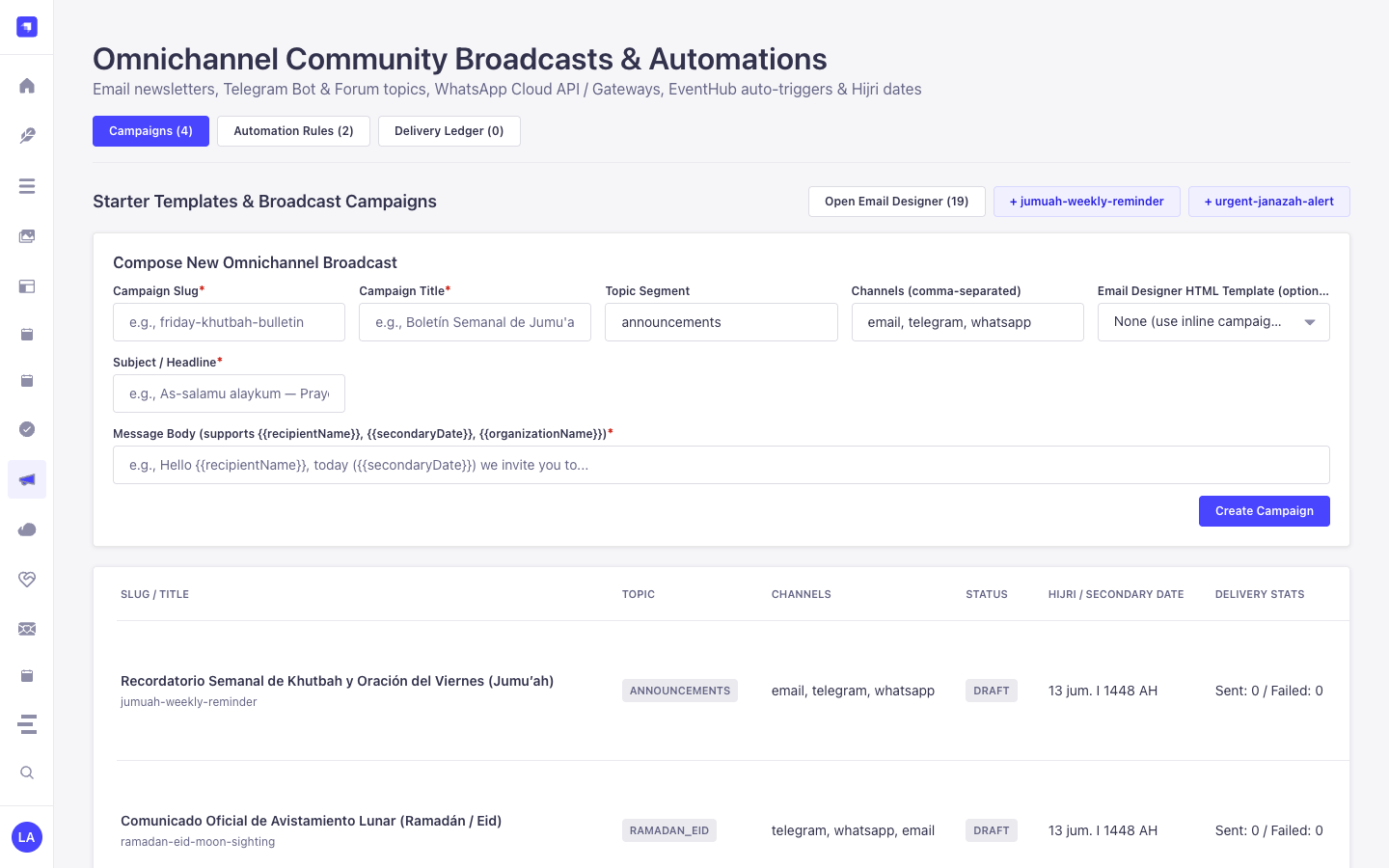
Section titled “Use Case 1 — Omnichannel Manual & Scheduled Community Campaigns”- What it is for: Dispatch announcements simultaneously across Email (SMTP/Resend), Telegram Bot channels/threads, and WhatsApp Cloud API.
- How it works: Create a
plugin::broadcasts.campaignentity withchannels: ['email', 'telegram', 'whatsapp'], preview viaPOST /broadcasts/campaigns/{id}/dry-run, and dispatch viaPOST /broadcasts/campaigns/{id}/send.
Use Case 2 — EventHub Zero-Touch Publish Automation
Section titled “Use Case 2 — EventHub Zero-Touch Publish Automation”- What it is for: Automatically broadcast a Telegram/WhatsApp notification whenever an editor publishes a new Event, Hilal Announcement, or Urgent Campaign.
- How it works: Create a
plugin::broadcasts.automation-ruleentity matchingeventName: 'entry.publish'andtargetContentType: 'plugin::events.event'with Mustache-stylesubjectTemplateandbodyTextTemplate.
Use Case 3 — Idempotent PII-Masked Delivery Auditing
Section titled “Use Case 3 — Idempotent PII-Masked Delivery Auditing”- What it is for: Guarantee no subscriber receives duplicate messages on retry while keeping phone numbers and emails masked in database logs.
- How it works: Every dispatch computes a deterministic
idempotencyKeyrecorded inplugin::broadcasts.delivery-logwithrecipientMasked(j***@example.org,+57***4821).