التقويم والجدولة — دليل المطور وواجهة الإدارة
1. التثبيت وإعداد الاعتماديات
Section titled “1. التثبيت وإعداد الاعتماديات”pnpm add @vicacha-devs/strapi-plugin-calendar2. إعدادات الخادم (config/plugins.ts)
Section titled “2. إعدادات الخادم (config/plugins.ts)”أضف إعدادات الإضافة إلى ملف config/plugins.ts في مشروع Strapi v5 الخاص بك:
export default ({ env }: { env: (key: string, defaultValue?: string) => string }) => ({ "calendar": { enabled: true, config: { defaultView: "dayGridMonth", defaultTimezone: env("CALENDAR_DEFAULT_TIMEZONE", "UTC"), }, },});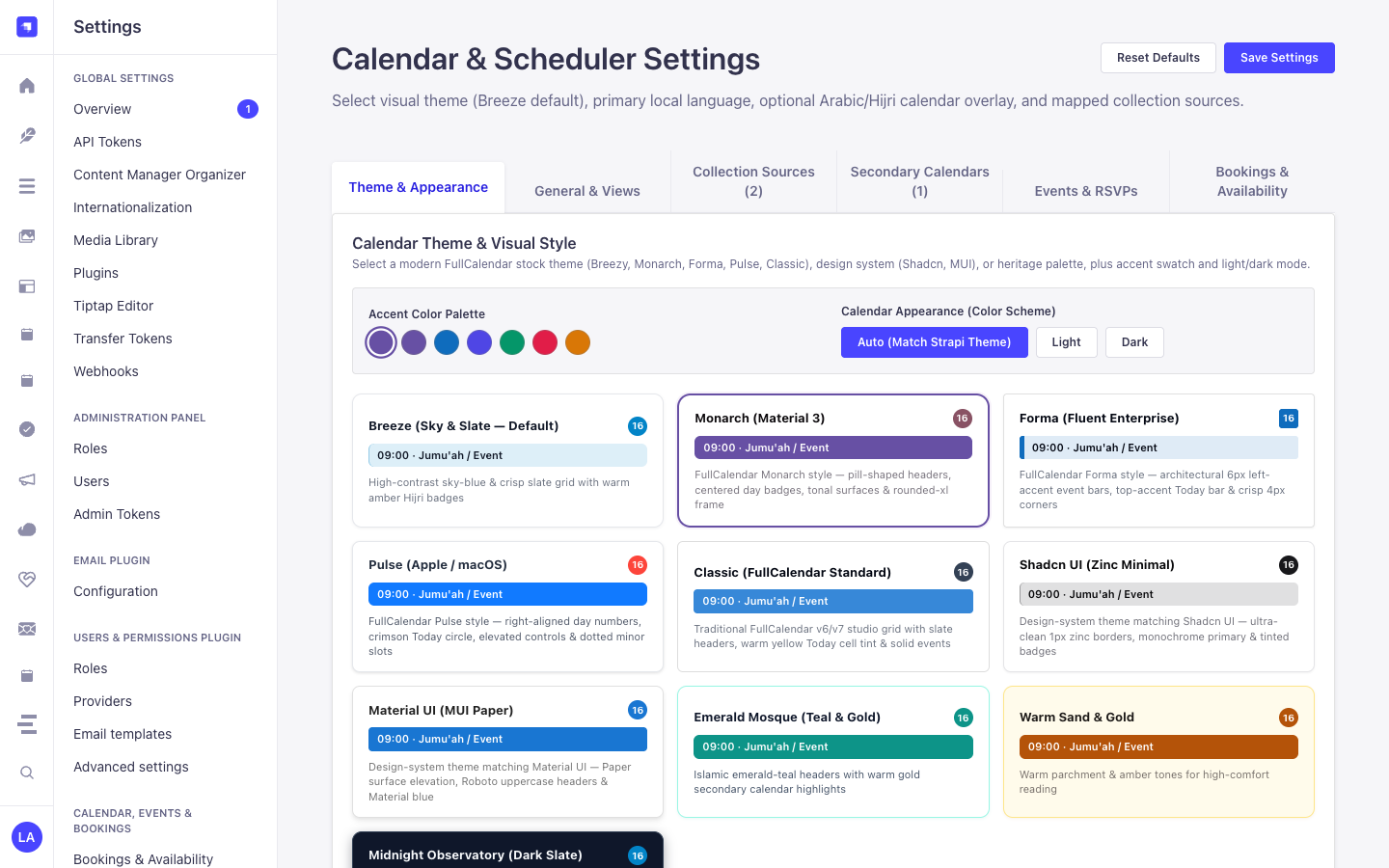
3. جولة في واجهة الإدارة (Strapi v5 Admin UI — دعم RTL)
Section titled “3. جولة في واجهة الإدارة (Strapi v5 Admin UI — دعم RTL)”بمجرد تفعيل الإضافة، يتم تسجيل مساحة العمل والإعدادات داخل لوحة تحكم Strapi v5 مع دعم كامل للغة العربية واتجاه RTL:
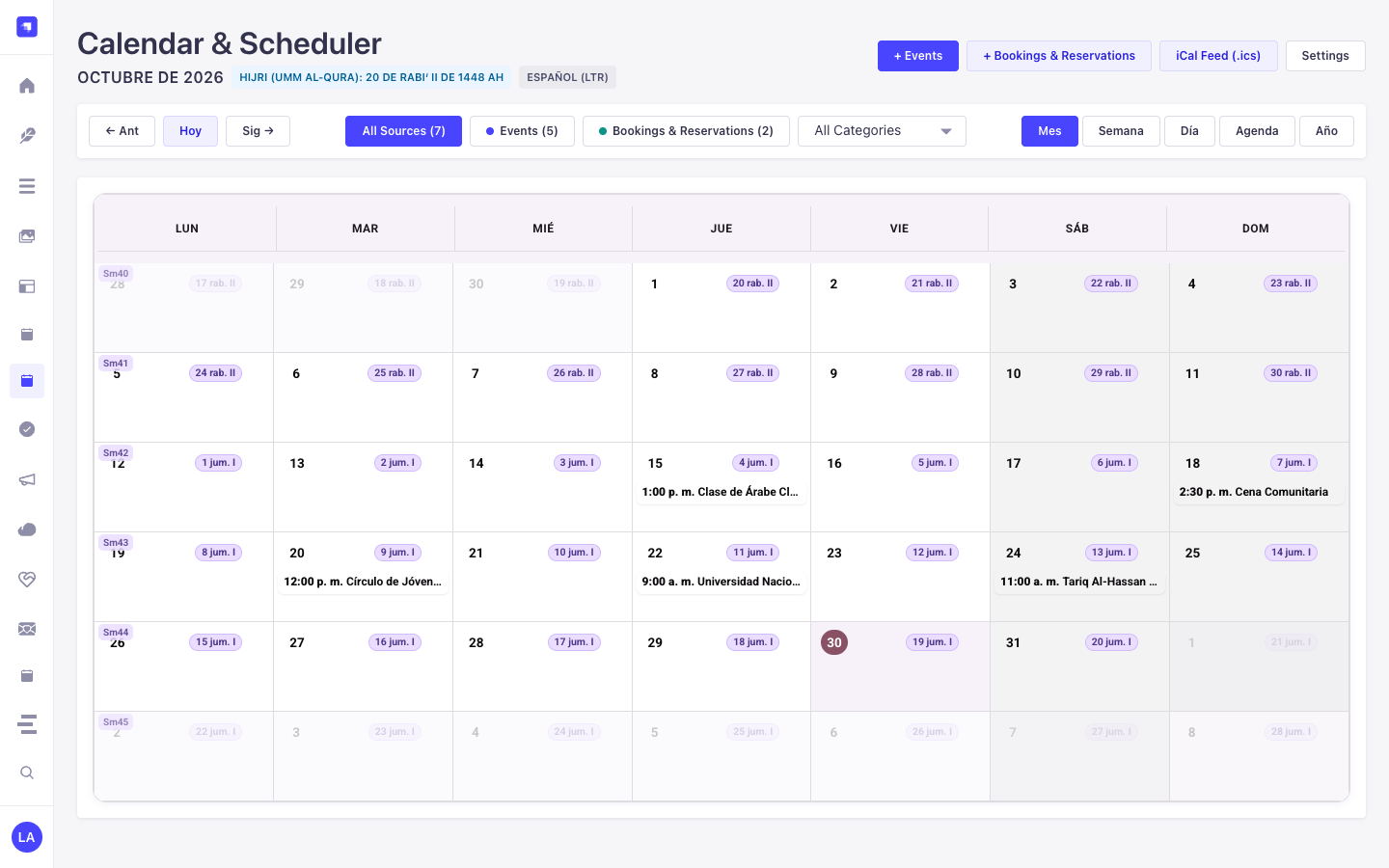
نماذج من نصوص الواجهة المعربة (العربية)
Section titled “نماذج من نصوص الواجهة المعربة (العربية)”| مفتاح الترجمة | النص المعروض في الواجهة |
|---|---|
settings.theme.breeze.label |
نسيم (سماوي وأردوازي — افتراضي) |
settings.theme.breeze.description |
شبكة عالية التباين باللون الأزرق السماوي والأردوازي مع شارات هجرية كهرمانية دافئة |
settings.theme.emerald.label |
المسجد الزمردي (أخضر زمردي وذهبي) |
settings.theme.emerald.description |
ترويسات باللون الأخضر الزمردي الإسلامي مع إبرازات ذهبية دافئة للتقويم الثانوي |
settings.theme.sandstone.label |
الحجر الرملي الأندلسي (ألوان ترابية دافئة) |
settings.theme.sandstone.description |
نغمات التيراكوتا والرق الدافئة المستوحاة من الأفنية الأندلسية |
settings.theme.midnight.label |
مرصد منتصف الليل (داكن) |
settings.theme.midnight.description |
لوحة داكنة عميقة مع لمسات سماوية وذهبية مضيئة |
4. كيانات أنواع المحتوى ومواقعها ومخططاتها (strapi.documents)
Section titled “4. كيانات أنواع المحتوى ومواقعها ومخططاتها (strapi.documents)”Acts as a multi-collection scheduler engine that binds to any Strapi Content-Type entity (api::* or plugin::*) configured in collections[] or registered dynamically via calendar.service('registry').registerSource(). Also registers the plugin::calendar.rrule Custom Field (json) for RFC 5545 RRULE + RFC 7529 RSCALE recurrence rules.
أين تجد كيانات أنواع المحتوى في Strapi v5
Section titled “أين تجد كيانات أنواع المحتوى في Strapi v5”- Bound Content-Type Entities: Any Content Manager collection mapped in
/admin/settings/calendar(e.g.,plugin::events.event,plugin::bookings.booking,api::article.article) - Custom Field in Content-Type Builder: Add the
plugin::calendar.rrulecustom field to any collection type in/admin/plugins/content-type-builder - Plugin Workspace & Settings:
/admin/plugins/calendar(FullCalendar v6 Month/Week/Day/Agenda workspace) and/admin/settings/calendar(General, Prayer & Islamic, Bookings & Availability tabs)
تعمل هذه الإضافة مباشرة على كيانات أنواع المحتوى الحالية في Strapi (api::* و plugin::*).
التكامل مع مدير المحتوى في Strapi v5 (/admin/content-manager)
Section titled “التكامل مع مدير المحتوى في Strapi v5 (/admin/content-manager)”مجموعة الشريط الجانبي في مدير المحتوى:
Events, Scheduling & Bookings
الكيانات والمكونات المسجلة في مدير المحتوى
Section titled “الكيانات والمكونات المسجلة في مدير المحتوى”- Custom Field
plugin::calendar.rrule(RFC 5545 RRULE + RFC 7529 RSCALE Recurrence Field inside any Content Manager edit view) - Bound Content Manager Collections (
plugin::events.event,plugin::bookings.booking, and any configuredapi::*collection)
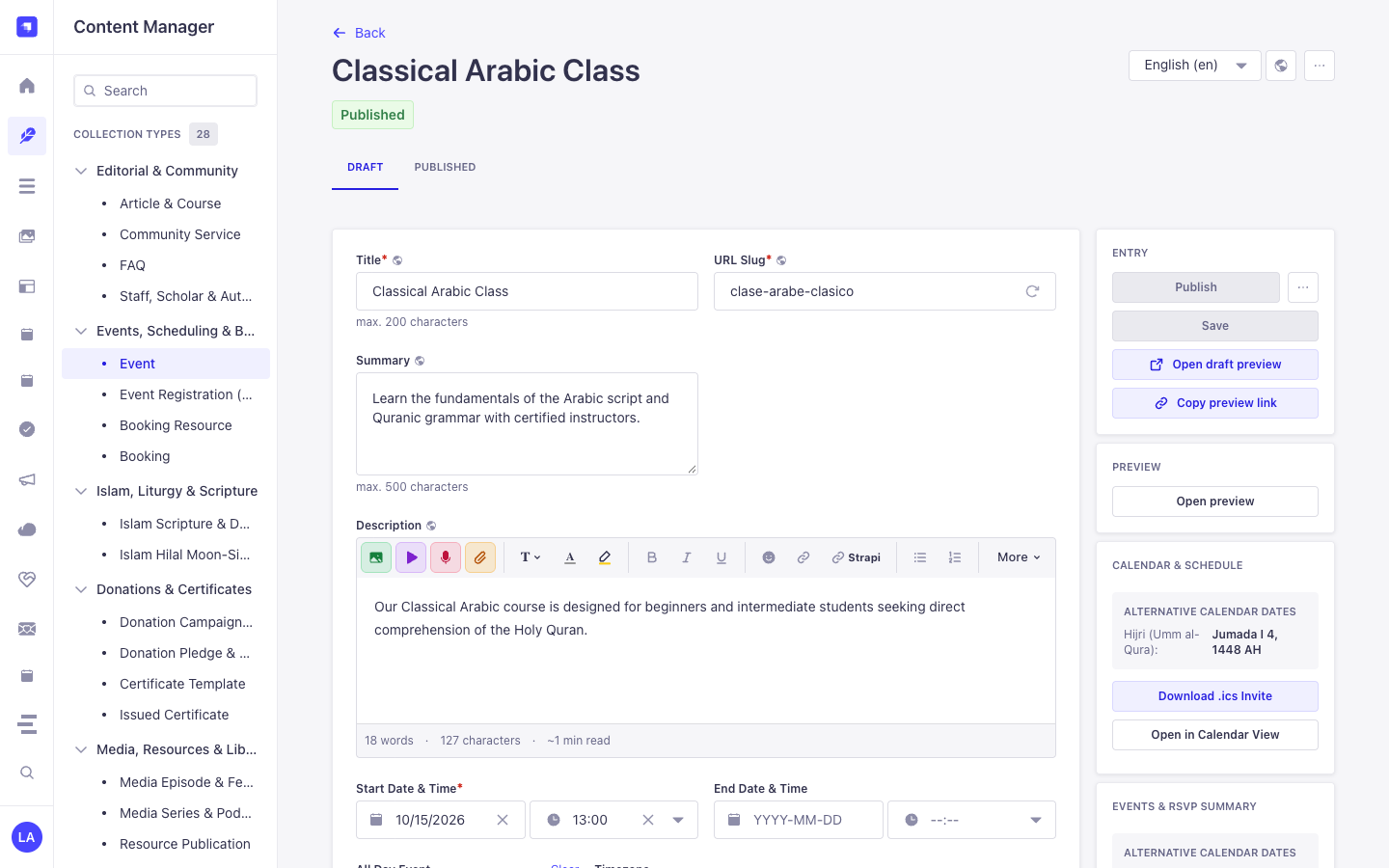
لماذا تنشئ هذه الإضافة كيانات داخل مدير المحتوى (Content Manager)؟
Section titled “لماذا تنشئ هذه الإضافة كيانات داخل مدير المحتوى (Content Manager)؟”Instead of locking schedules inside an isolated table, @vicacha-devs/strapi-plugin-calendar embeds directly into the Strapi v5 Content Manager edit view of any mapped collection (plugin::events.event, plugin::bookings.booking, or custom api::* entities) via its plugin::calendar.rrule Custom Field and right-sidebar Calendar & Schedule widget:
- In-Place Secondary Calendar Preview in Content Manager: When editing an event in Content Manager, the right-sidebar Calendar & Schedule panel automatically computes and displays the corresponding Hijri (Umm al-Qura), Hebrew, or Persian date (
4 Jumada I 1448 AH) plus 1-click.icsdownload and Open in Calendar View buttons. - Visual RFC 5545
RRULE+ RFC 7529RSCALEAuthoring: Theplugin::calendar.rrulecustom field lets editors configure Gregorian or lunar recurrence rules directly inside any Content Manager form. - Zero Data Duplication: Dragging an event in
/admin/plugins/calendaror editing start/end dates in/admin/content-manager/collection-types/plugin::events.eventmutates the exact same Strapi v5 Document Service record.
كيفية الاستخدام داخل مدير المحتوى في Strapi (خطوة بخطوة)
Section titled “كيفية الاستخدام داخل مدير المحتوى في Strapi (خطوة بخطوة)”- Open a Bound Collection in Content Manager: Navigate to Content Manager -> Collection Types -> Events, Scheduling & Bookings -> Event (
/admin/content-manager/collection-types/plugin::events.event?plugins[i18n][locale]=en) and open any entry. - Configure Start/End Dates & Recurrence: Edit
startDate,endDate,allDay,timezone, and therrulecustom field directly inside the Content Manager form. - Use the Right-Sidebar Calendar Panel: In the right column of the Content Manager edit view, inspect the live Alternative Calendar Dates badge, click Download .ics Invite, or click Open in Calendar View to jump to
/admin/plugins/calendar. - Bind Additional Content Manager Collections: In
/admin/settings/calendar, map anyapi::*collection’stitleField,startField,endField, andrruleFieldto project its Content Manager entries onto the unified calendar grid.
التزامن بين مدير المحتوى ومساحة عمل الإضافة
Section titled “التزامن بين مدير المحتوى ومساحة عمل الإضافة”حالات الاستخدام داخل مدير المحتوى ومسارات العمل التحريرية
Section titled “حالات الاستخدام داخل مدير المحتوى ومسارات العمل التحريرية”Content Manager Use Case 1 — Authoring a Localized Recurring Course with Live Hijri Date Preview
Section titled “Content Manager Use Case 1 — Authoring a Localized Recurring Course with Live Hijri Date Preview”- الغرض والأهمية: Edit a weekly Arabic course (
Classical Arabic Course) in Content Manager while verifying its Umm al-Qura Hijri date and downloading its.icsinvite from the right sidebar. - خطوات التنفيذ في مدير المحتوى: Open
/admin/content-manager/collection-types/plugin::events.event/{documentId}?plugins[i18n][locale]=en, setstartDateandrrule, and verify the Calendar & Schedule panel on the right.
5. حالات الاستخدام ومسارات العمل المتكاملة
Section titled “5. حالات الاستخدام ومسارات العمل المتكاملة”Use Case 1 — Aggregating Multiple Strapi Collections into One Calendar
Section titled “Use Case 1 — Aggregating Multiple Strapi Collections into One Calendar”- What it is for: Display Events, Bookings, Courses, and Editorial Deadlines from different Content-Type entities on a single color-coded FullCalendar grid.
- How it works: Map each collection’s
uid,titleField,startField,endField, andrruleFieldin/admin/settings/calendarorconfig/plugins.ts, then queryGET /api/calendar/occurrences?start=...&end=....
Use Case 2 — Sacred & Lunar Recurrence (RRULE + RSCALE=ISLAMIC-UMALQURA)
Section titled “Use Case 2 — Sacred & Lunar Recurrence (RRULE + RSCALE=ISLAMIC-UMALQURA)”- What it is for: Schedule annual or monthly recurring events that follow the Hijri, Hebrew, or Persian calendar and automatically project onto Gregorian dates.
- How it works: Attach
plugin::calendar.rruleto your Content-Type entity to author RFC 7529 rules (RSCALE=ISLAMIC-UMALQURA;FREQ=YEARLY;BYMONTH=9;BYMONTHDAY=1).
Use Case 3 — Drag-and-Drop Rescheduling & Quick-Create into Target Entities
Section titled “Use Case 3 — Drag-and-Drop Rescheduling & Quick-Create into Target Entities”- What it is for: Let editors drag an event on the calendar grid or click a date cell to create/update the underlying Strapi document directly.
- How it works: Uses
POST /calendar/quick-createandPOST /calendar/rescheduleto mutate the mappedstrapi.documents(uid)record in place.
Use Case 4 — Public RFC 5545 iCal (.ics) Subscription Feeds
Section titled “Use Case 4 — Public RFC 5545 iCal (.ics) Subscription Feeds”- What it is for: Allow users to subscribe to live calendar feeds in Google Calendar, Apple Calendar, or Outlook.
- How it works: Subscribe to
GET /api/calendar/ical.ics(all sources) orGET /api/calendar/ical/{collectionId}.ics(single source).
6. نقاط النهاية البرمجية REST API (content-api و admin)
Section titled “6. نقاط النهاية البرمجية REST API (content-api و admin)”| الطريقة | مسار نقطة النهاية | النطاق | المعالج (Handler) | المصادقة |
|---|---|---|---|---|
GET |
/calendar/calendar |
admin |
admin.getCalendar |
Bearer JWT |
POST |
/calendar/calendar/reschedule |
admin |
admin.reschedule |
Bearer JWT |
POST |
/calendar/calendar/quick-create |
admin |
admin.quickCreate |
Bearer JWT |
GET |
/calendar/content-types |
admin |
admin.getContentTypes |
Bearer JWT |
GET |
/calendar/settings |
admin |
admin.getSettings |
Bearer JWT |
PUT |
/calendar/settings |
admin |
admin.updateSettings |
Bearer JWT |
POST |
/calendar/clear-settings |
admin |
admin.clearSettings |
Bearer JWT |
GET |
/api/calendar/occurrences |
content-api |
content-api.getOccurrences |
Bearer JWT |
GET |
/api/calendar/feed.ics |
content-api |
content-api.downloadFeedIcs |
Bearer JWT |
GET |
/api/calendar/{documentId}/invite.ics |
content-api |
content-api.downloadEventIcs |
Bearer JWT |
7. الاستخدام البرمجي داخل الخادم (strapi.plugin و strapi.documents)
Section titled “7. الاستخدام البرمجي داخل الخادم (strapi.plugin و strapi.documents)”// Registered services on plugin "calendar": "settings", "registry", "occurrence", "ical"const pluginService = strapi.plugin("calendar")?.service("registry");
// Retrieving plugin settings via Strapi plugin storeconst store = strapi.store({ type: "plugin", name: "calendar" });const settings = await store.get({ key: "settings" });8. استكشاف الأخطاء والتحقق من الجودة
Section titled “8. استكشاف الأخطاء والتحقق من الجودة”- عدم ظهور التغييرات في لوحة الإدارة: قم بتشغيل
pnpm strapi buildبعد تعديل ملفconfig/plugins.ts. - عزل حزم Strapi: حافظ على إعداد
hoistPattern: ["*", "!@strapi/*"]داخلpnpm-workspace.yamlلمنع تكرار سياق React. - فحص الأنواع الصارم (TypeScript): قم بتشغيل
pnpm checkللتحقق من سلامة حزمتي الواجهة والخادم.