الحجوزات والمواعيد — كيانات المحتوى وحالات الاستخدام
Package:
@vicacha-devs/strapi-plugin-bookings· Plugin ID:bookings· Admin Workspace:/admin/plugins/bookings
1. كيانات أنواع المحتوى ومواقعها ومخططاتها (strapi.documents)
Section titled “1. كيانات أنواع المحتوى ومواقعها ومخططاتها (strapi.documents)”Registers two relational Collection Types (plugin::bookings.resource one-to-many plugin::bookings.booking). Resources define weekly/seasonal availability windows, slot duration, buffers, and capacity; Bookings store individual customer reservations, party size, status transitions, and hashed self-service cancellation tokens. Supports runtime schemaExtensions (resource, booking) and customFields in config/plugins.ts.
أين تجد كيانات أنواع المحتوى في Strapi v5
Section titled “أين تجد كيانات أنواع المحتوى في Strapi v5”- Content Manager:
/admin/content-manager/collection-types/plugin::bookings.resource&/admin/content-manager/collection-types/plugin::bookings.booking(visible: true) - Content-Type Builder:
/admin/plugins/content-type-builderunder Collection Types (Booking Resource&Booking) - Plugin Workspace & Settings:
/admin/plugins/bookings(Reservations & Resources manager) and/admin/settings/bookings - Database Tables:
booking_resourcesandbookings
plugin::bookings.booking — Booking
Section titled “plugin::bookings.booking — Booking”Reservation, appointment, or resource slot booking
Kind:
collectionType· DB Table:bookings· Admin Location:/admin/content-manager/collection-types/plugin::bookings.booking· Draft & Publish:No· i18n:No
| الحقل | النوع في Strapi | إلزامي | القيود / العلاقات |
|---|---|---|---|
bookingCode |
string |
Yes | max: 48 |
title |
string |
No | max: 200 |
resource |
relation |
No | target: plugin::bookings.resource |
customerName |
string |
Yes | max: 120 |
customerEmail |
email |
Yes | — |
customerPhone |
string |
No | max: 40 |
organization |
string |
No | max: 160 |
startDate |
datetime |
Yes | — |
endDate |
datetime |
Yes | — |
slotLabel |
string |
No | max: 80 |
timezone |
string |
No | max: 64; default: "UTC" |
partySize |
integer |
Yes | default: 1 |
status |
enumeration |
Yes | enum: pending, confirmed, completed, cancelled, no_show; default: "pending" |
preferredLanguage |
string |
No | max: 16 |
assignedHost |
string |
No | max: 120 |
notes |
text |
No | max: 2000 |
internalNotes |
text |
No | max: 2000; private: true |
cancelTokenHash |
string |
No | max: 128; private: true |
sourceCollection |
string |
No | default: "plugin::bookings.booking" |
metadata |
json |
No | — |
plugin::bookings.resource — Booking Resource
Section titled “plugin::bookings.resource — Booking Resource”Bookable service, appointment type, room, staff member, or equipment schedule
Kind:
collectionType· DB Table:booking_resources· Admin Location:/admin/content-manager/collection-types/plugin::bookings.resource· Draft & Publish:No· i18n:No
| الحقل | النوع في Strapi | إلزامي | القيود / العلاقات |
|---|---|---|---|
name |
string |
Yes | max: 160 |
slug |
uid |
Yes | — |
resourceType |
enumeration |
Yes | enum: service, appointment, room, staff, equipment, other; default: "service" |
description |
text |
No | — |
color |
string |
No | max: 32; default: "#0d9488" |
timezone |
string |
No | max: 64; default: "UTC" |
slotDurationMinutes |
integer |
Yes | default: 60 |
bufferBeforeMinutes |
integer |
No | default: 0 |
bufferAfterMinutes |
integer |
No | default: 0 |
capacityPerSlot |
integer |
Yes | default: 1 |
maxPartySize |
integer |
No | default: 50 |
minLeadTimeHours |
integer |
No | default: 2 |
maxAdvanceDays |
integer |
No | default: 90 |
requiresApproval |
boolean |
No | default: false |
weeklySchedule |
json |
No | — |
seasonalSchedules |
json |
No | — |
holidayRules |
json |
No | — |
blackoutDates |
json |
No | — |
recurrenceRule |
string |
No | — |
supportedLanguages |
json |
No | — |
assignedHosts |
json |
No | — |
location |
string |
No | max: 240 |
price |
decimal |
No | default: 0 |
currency |
string |
No | max: 10; default: "USD" |
isActive |
boolean |
No | default: true |
metadata |
json |
No | — |
bookings |
relation |
No | target: plugin::bookings.booking |
التكامل مع مدير المحتوى في Strapi v5 (/admin/content-manager)
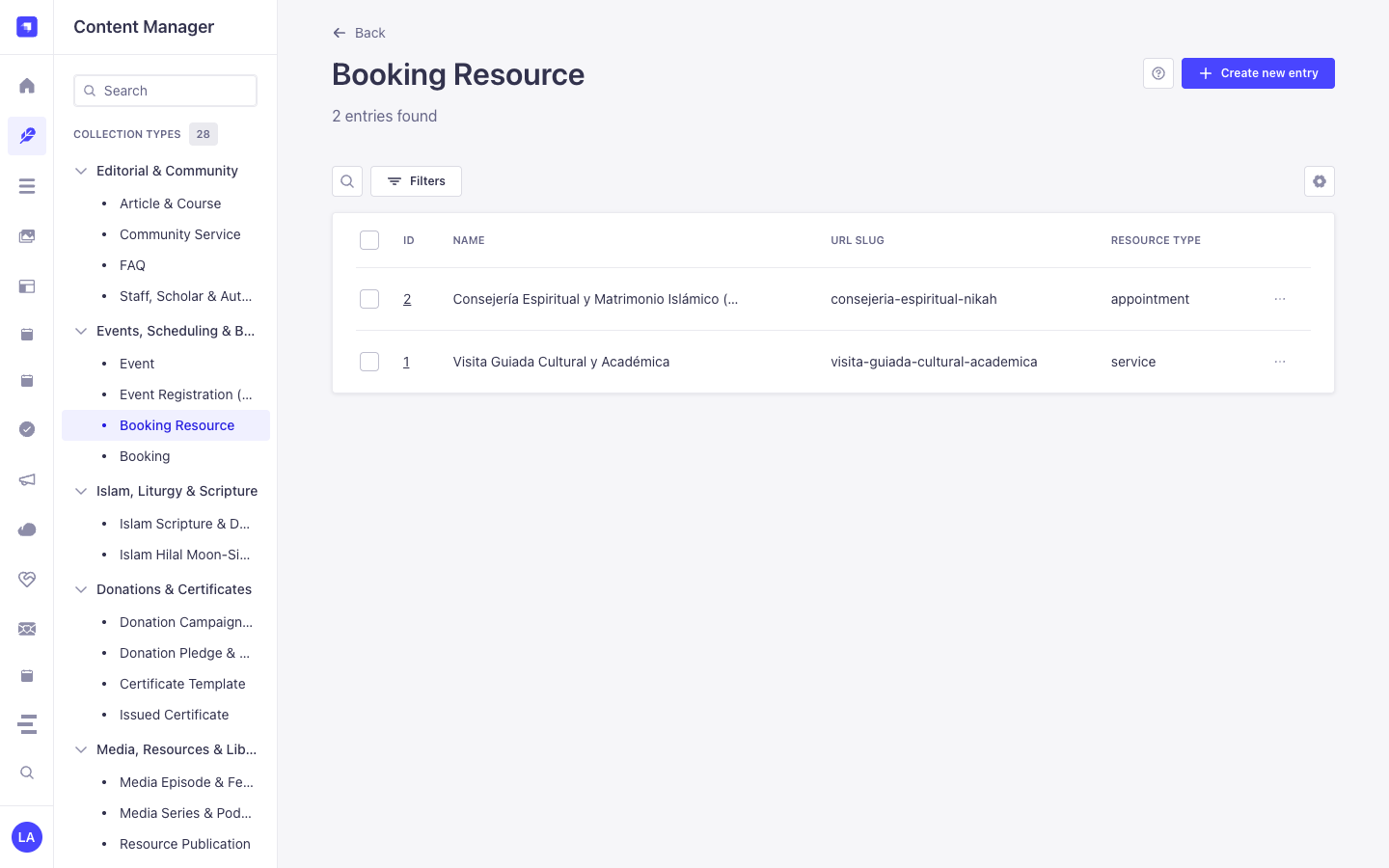
Section titled “التكامل مع مدير المحتوى في Strapi v5 (/admin/content-manager)”مجموعة الشريط الجانبي في مدير المحتوى:
Events, Scheduling & Bookings
الكيانات والمكونات المسجلة في مدير المحتوى
Section titled “الكيانات والمكونات المسجلة في مدير المحتوى”plugin::bookings.resource(Booking Resource —/admin/content-manager/collection-types/plugin::bookings.resource)plugin::bookings.booking(Booking —/admin/content-manager/collection-types/plugin::bookings.booking)
لماذا تنشئ هذه الإضافة كيانات داخل مدير المحتوى (Content Manager)؟
Section titled “لماذا تنشئ هذه الإضافة كيانات داخل مدير المحتوى (Content Manager)؟”@vicacha-devs/strapi-plugin-bookings registers both Booking Resource (plugin::bookings.resource) and Booking (plugin::bookings.booking) with pluginOptions['content-manager'].visible = true so teams can combine the operational slot-availability engine in /admin/plugins/bookings with Strapi v5’s native Content Manager relational modeling and schema extensibility:
- Relational Linking to Host Entities (
api::*): Link aBooking Resourcedirectly to aStaff, Scholar & Author(api::leader.leader) record, room media gallery, or department viaschemaExtensions.resourceinconfig/plugins.ts. - Custom Intake Attributes (
customFields&schemaExtensions.booking): Inspect and edit custom reservation fields (such asorganizationName,cateringRequired, orequipmentNotes) alongside native Strapi audit columns (createdBy,updatedBy). - Advanced Filtering & Bulk Operations: Filter hundreds of historical reservations by
status,startAt,resource, orcustomerEmailusing Content Manager’s multi-condition filter builder and bulk-delete test records. - Cross-Plugin Side-Panel Ecosystem: Attach internal staff handoff notes via
@vicacha-devs/strapi-plugin-notesin the Content Manager right sidebar or jump straight to a booking viaCmd+K(@vicacha-devs/strapi-plugin-global-search).
كيفية الاستخدام داخل مدير المحتوى في Strapi (خطوة بخطوة)
Section titled “كيفية الاستخدام داخل مدير المحتوى في Strapi (خطوة بخطوة)”- Open in Content Manager: In the left sidebar, click Content Manager -> Collection Types -> Events, Scheduling & Bookings and select Booking Resource (
/admin/content-manager/collection-types/plugin::bookings.resource) or Booking (/admin/content-manager/collection-types/plugin::bookings.booking). - Configure Bookable Resources: Click + Create new entry in Booking Resource to define
name,slug,resourceType(room,counselor,equipment,service,appointment),capacity,slotDurationMinutes,bufferBeforeMinutes,bufferAfterMinutes, andweeklyScheduleJSON rules. - Manage & Link Reservations: Open any Booking entry to inspect or update
bookingCode,startAt,endAt,partySize,status, the linkedresourcerelation, and any custom fields registered underconfig.schemaExtensions.booking. - Workspace vs. Content Manager: Use Content Manager for structured resource setup, relational linking, and bulk filtering; use the Bookings Workspace (
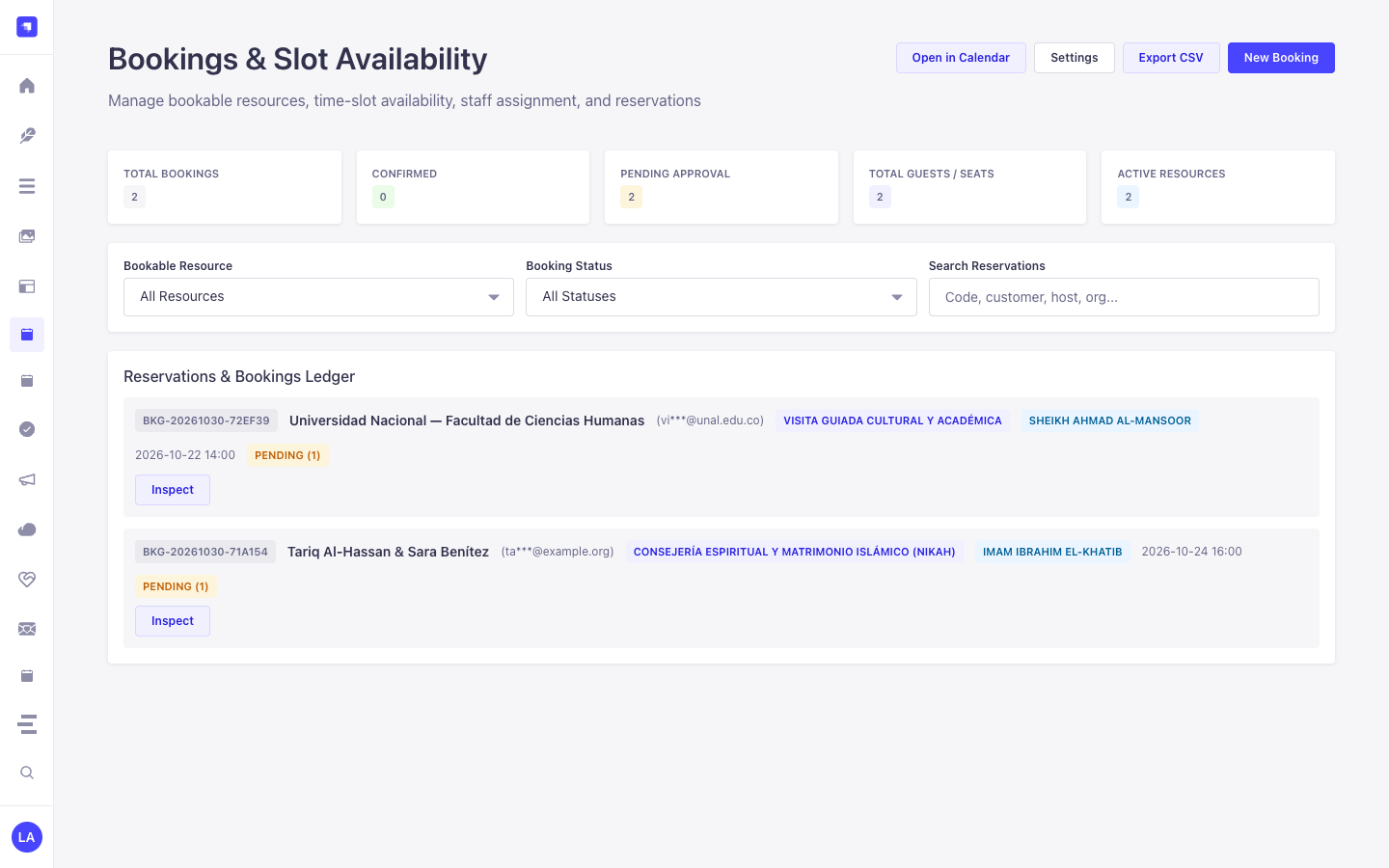
/admin/plugins/bookings) for 1-click status transitions (confirmed,completed,no_show) and availability slot testing.
التزامن بين مدير المحتوى ومساحة عمل الإضافة
Section titled “التزامن بين مدير المحتوى ومساحة عمل الإضافة”حالات الاستخدام داخل مدير المحتوى ومسارات العمل التحريرية
Section titled “حالات الاستخدام داخل مدير المحتوى ومسارات العمل التحريرية”Content Manager Use Case 1 — Linking Counselors & Imams (api::leader.leader) to Bookable Resources
Section titled “Content Manager Use Case 1 — Linking Counselors & Imams (api::leader.leader) to Bookable Resources”- الغرض والأهمية: Connect each appointment or counseling resource in
plugin::bookings.resourceto an institutional profile inapi::leader.leaderand a Media Library cover photo. - خطوات التنفيذ في مدير المحتوى: Extend
resourceviaschemaExtensionsinconfig/plugins.ts, open/admin/content-manager/collection-types/plugin::bookings.resource, select the assigned scholar/counselor relation, and save.
Content Manager Use Case 2 — Auditing & Bulk-Filtering Reservations with Editorial Notes
Section titled “Content Manager Use Case 2 — Auditing & Bulk-Filtering Reservations with Editorial Notes”- الغرض والأهمية: Filter pending or high-capacity room bookings in Content Manager and attach internal preparation checklists in the right sidebar.
- خطوات التنفيذ في مدير المحتوى: Open
/admin/content-manager/collection-types/plugin::bookings.booking, apply a filter onstatus = pendingorpartySize > 20, open the entry, and add a pinned note in the Notes side panel.
3. حالات الاستخدام ومسارات العمل المتكاملة
Section titled “3. حالات الاستخدام ومسارات العمل المتكاملة”Use Case 1 — Public Self-Service Slot Discovery & Reservation
Section titled “Use Case 1 — Public Self-Service Slot Discovery & Reservation”- What it is for: Allow website visitors to query available time slots for a room, counselor, imam, or equipment resource and book a slot without double-booking.
- How it works: Query
GET /api/bookings/available-slots?resourceSlug=main-conference-hall&date=2026-05-15, then submitPOST /api/bookings/reserveto create aplugin::bookings.bookingentity and receive a one-time cancellation token.
Use Case 2 — Multi-Host Appointment & Buffer Enforcement
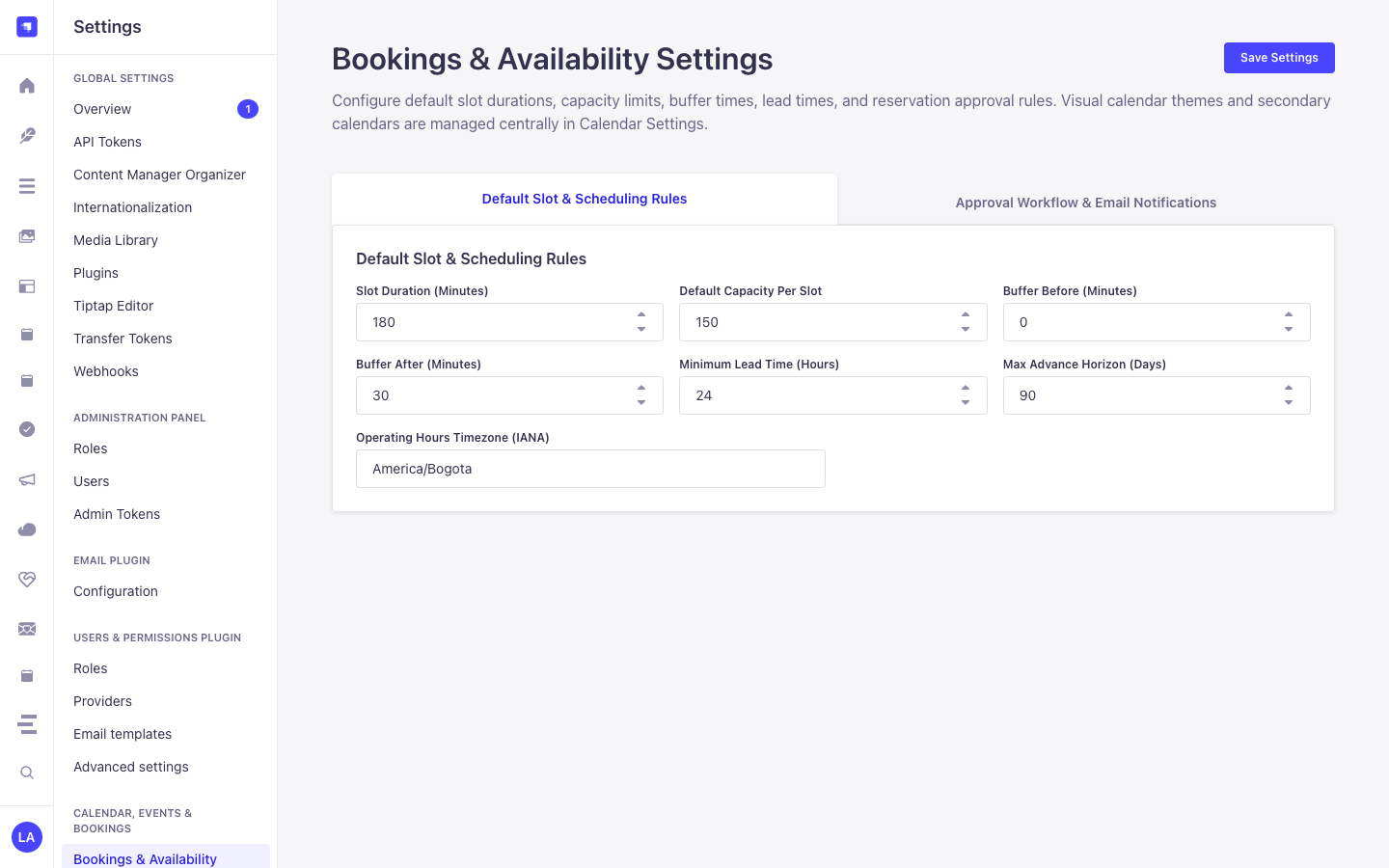
Section titled “Use Case 2 — Multi-Host Appointment & Buffer Enforcement”- What it is for: Manage 1-on-1 consultations or guided tours with automatic pre/post buffer windows (
bufferBeforeMinutes,bufferAfterMinutes), minimum lead time (minLeadTimeHours), and host assignment (assignedHost). - How it works: Configure
weeklySchedule,seasonalSchedules, andblackoutDatesonplugin::bookings.resource; staff approve or markcompleted/no_showviaPUT /bookings/bookings/{documentId}/status.
Use Case 3 — Tokenized Self-Service Rescheduling & Cancellation
Section titled “Use Case 3 — Tokenized Self-Service Rescheduling & Cancellation”- What it is for: Let customers reschedule or cancel their reservation from an email link without requiring a Strapi account.
- How it works: Pass the customer’s
bookingCodeand plaintextcancelToken(verified againstcancelTokenHash) toPOST /api/bookings/rescheduleorPOST /api/bookings/cancel.
Use Case 4 — Unified Calendar & iCal Feed Synchronization
Section titled “Use Case 4 — Unified Calendar & iCal Feed Synchronization”- What it is for: Project all confirmed and pending reservations into the FullCalendar workspace and external Google/Apple Calendar clients.
- How it works: At bootstrap,
bookingsregistersplugin::bookings.bookingwithstrapi.plugin('calendar').service('registry')and exposesGET /api/bookings/feed.ics.