SEO y Analizador SERP — Guía de Desarrollo y Admin UI
1. Instalación y Dependencias
Sección titulada «1. Instalación y Dependencias»pnpm add @vicacha-devs/strapi-plugin-seo2. Configuración del Servidor (config/plugins.ts)
Sección titulada «2. Configuración del Servidor (config/plugins.ts)»Agregue la configuración del plugin en el archivo config/plugins.ts de su aplicación Strapi v5:
export default ({ env }: { env: (key: string, defaultValue?: string) => string }) => ({ "seo": { enabled: true, config: { autoCreateComponent: true, }, },});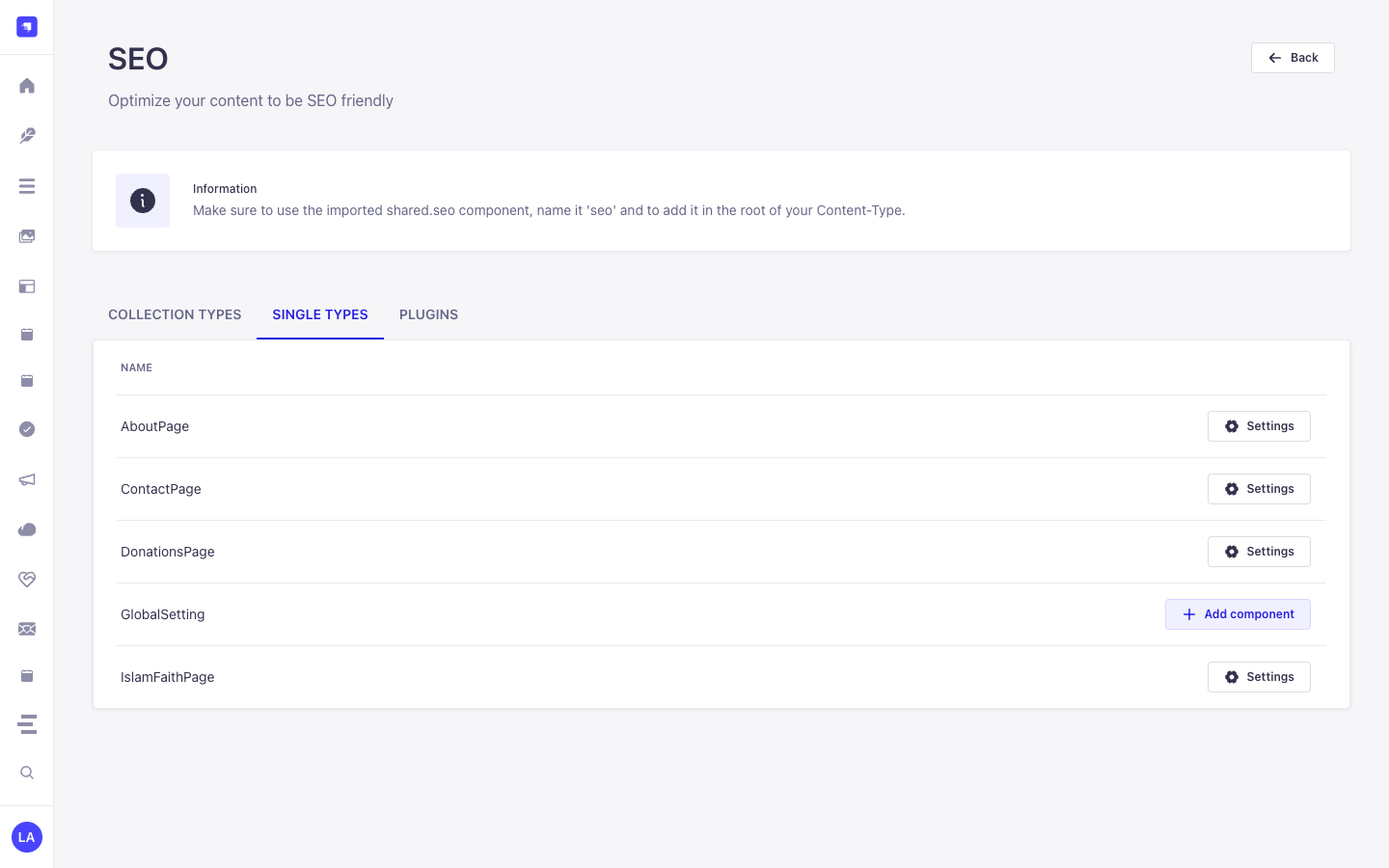
3. Recorrido por la Interfaz de Administración (Strapi v5 Admin UI)
Sección titulada «3. Recorrido por la Interfaz de Administración (Strapi v5 Admin UI)»Una vez habilitado, el plugin registra su espacio de trabajo y ajustes dentro del panel de administración de Strapi v5 utilizando Strapi Design System v2:
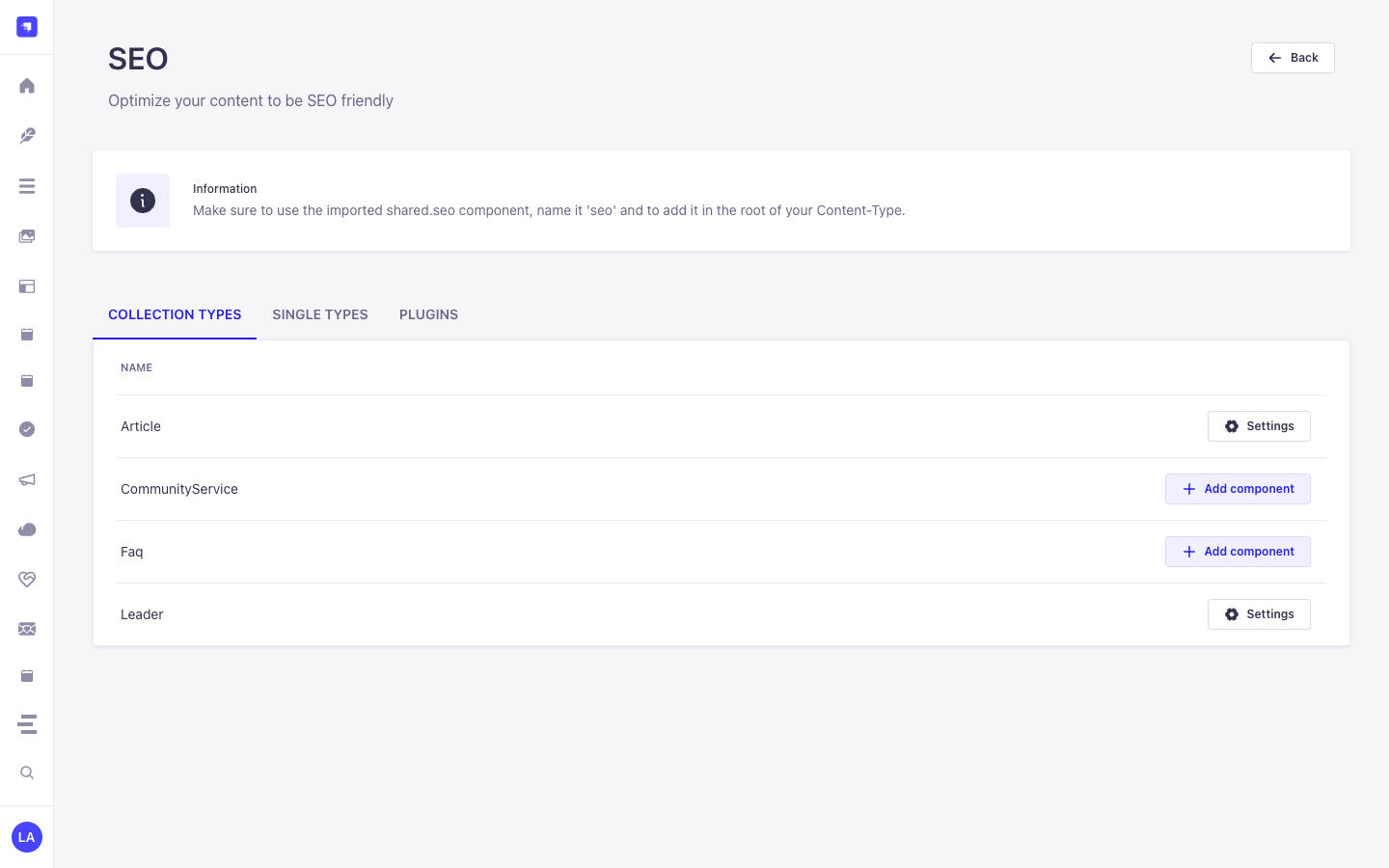
Etiquetas Localizadas de la Interfaz (Español)
Sección titulada «Etiquetas Localizadas de la Interfaz (Español)»| Clave de Traducción | Texto en Interfaz |
|---|---|
Good |
Bueno |
Improvements |
Mejoras |
Bad |
Malo |
Information |
Información |
4. Entidades Content-Type, Ubicación y Esquemas (strapi.documents)
Sección titulada «4. Entidades Content-Type, Ubicación y Esquemas (strapi.documents)»Registers and manages two shared Strapi Components (shared.seo and shared.open-graph) inside the Content-Type Builder and injects a live Google SERP, OpenGraph/X Social Card, and Keyword Density Analyzer into the Content Manager edit view for any api::* Collection Type or Single Type that includes shared.seo.
Dónde Encontrar las Entidades Content-Type en Strapi v5
Sección titulada «Dónde Encontrar las Entidades Content-Type en Strapi v5»- Content-Type Builder (Components):
/admin/plugins/content-type-builderunder COMPONENTS -> Shared (seo->components_shared_seos,openGraph->components_shared_open_graphs) - Content Manager Edit View: Open any Collection Type or Single Type with the
seocomponent attached (e.g.,/admin/content-manager/single-types/api::about-page.about-page) - Plugin Workspace & Settings:
/admin/plugins/seo(Content-Type SEO Coverage Audit & 1-Click Component Attachment) and/admin/settings/seo
shared.open-graph — Component: openGraph
Sección titulada «shared.open-graph — Component: openGraph»Shared Strapi component (shared.open-graph) managed in Content-Type Builder and Content Manager
Kind:
component· DB Table:components_shared_open_graphs· Admin Location:/admin/plugins/content-type-builder(Component) · Draft & Publish:No· i18n:Yes
| Atributo | Tipo en Strapi | Requerido | Restricciones / Relación |
|---|---|---|---|
ogTitle |
string |
Yes | max: 70 |
ogDescription |
string |
Yes | max: 200 |
ogImage |
media |
No | — |
ogUrl |
string |
No | — |
ogType |
string |
No | — |
shared.seo — Component: seo
Sección titulada «shared.seo — Component: seo»Shared Strapi component (shared.seo) managed in Content-Type Builder and Content Manager
Kind:
component· DB Table:components_shared_seos· Admin Location:/admin/plugins/content-type-builder(Component) · Draft & Publish:No· i18n:Yes
| Atributo | Tipo en Strapi | Requerido | Restricciones / Relación |
|---|---|---|---|
metaTitle |
string |
Yes | max: 60 |
metaDescription |
string |
Yes | max: 160 |
metaImage |
media |
No | — |
openGraph |
component |
No | component: shared.open-graph |
keywords |
text |
No | — |
metaRobots |
string |
No | — |
metaViewport |
string |
No | — |
canonicalURL |
string |
No | — |
structuredData |
json |
No | — |
Integración con el Content Manager de Strapi v5 (/admin/content-manager)
Sección titulada «Integración con el Content Manager de Strapi v5 (/admin/content-manager)»Grupo en la Barra Lateral del Content Manager:
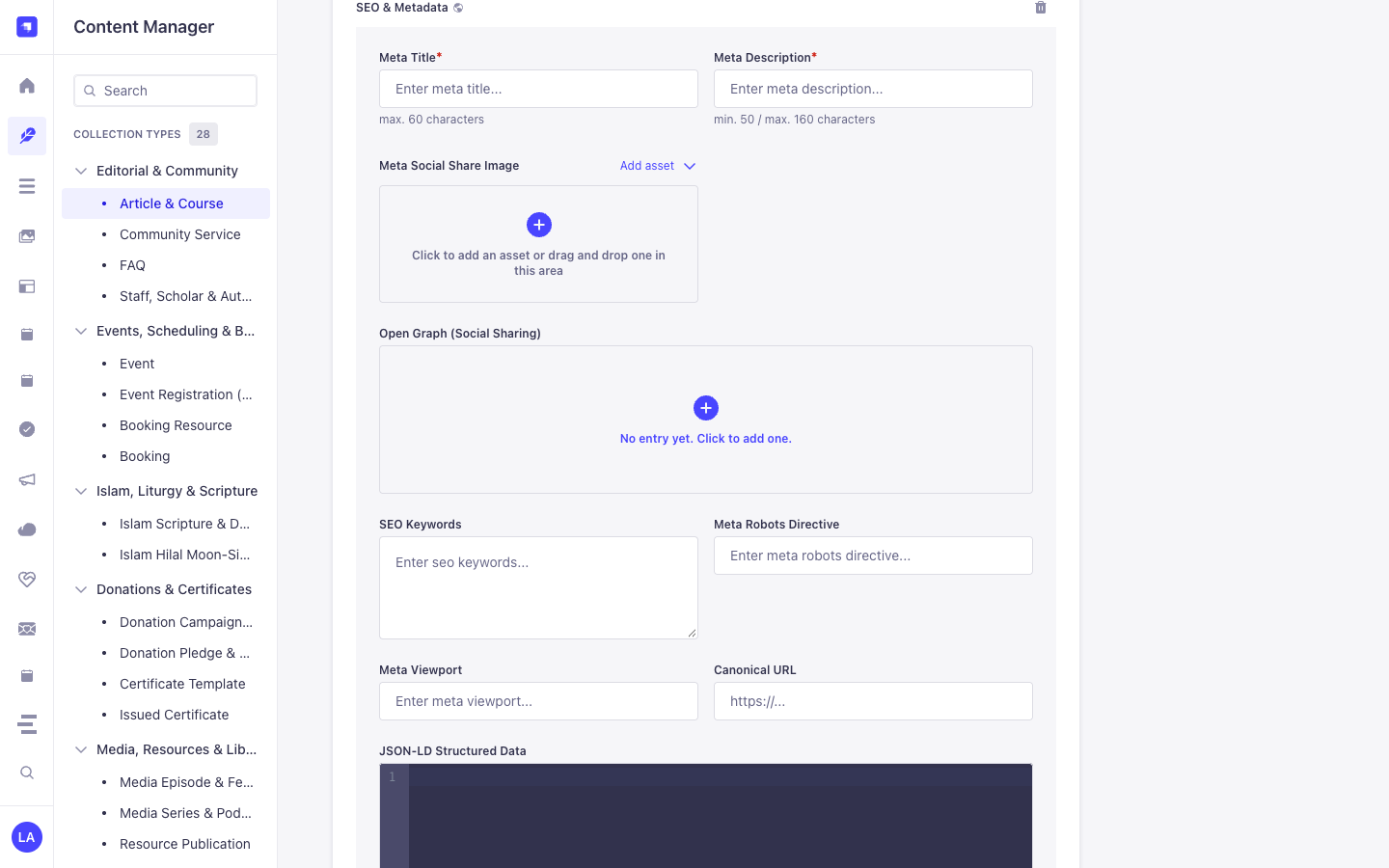
Components (shared.seo— **SEO & Metadata** &shared.open-graph— **Open Graph (Social Sharing)**) inside Content Manager Edit Views
Entidades y Componentes en el Content Manager
Sección titulada «Entidades y Componentes en el Content Manager»- Component
shared.seo(SEO & Metadata attached toapi::article.articleand other Collection/Single Types in Content Manager) - Component
shared.open-graph(Open Graph (Social Sharing) nested insideSEO & Metadata)
Por Qué Este Plugin Crea e Integra Entidades en el Content Manager
Sección titulada «Por Qué Este Plugin Crea e Integra Entidades en el Content Manager»@vicacha-devs/strapi-plugin-seo registers the reusable shared.seo (SEO & Metadata) and shared.open-graph (Open Graph (Social Sharing)) Strapi Components so every Collection Type (api::article.article, api::page.page) and Single Type in the Strapi v5 Content Manager includes a complete, localized SEO & structured-data panel alongside a live SEO Audit sidebar:
- Native Localization & Draft Support via
SEO & Metadata(shared.seo): Becauseshared.seois embedded directly inside Content Manager entries,Meta Title*(metaTitle, max. 60 chars),Meta Description*(metaDescription, 50–160 chars),Meta Social Share Image(metaImage),SEO Keywords(keywords),Meta Robots Directive(metaRobots),Meta Viewport(metaViewport),Canonical URL(canonicalURL), andJSON-LD Structured Data(structuredData) automatically inherit each document’si18nlocale (en,es,ar,tr) and Draft/Publish state. - Nested Open Graph Social Card Component (
shared.open-graph): Expand Open Graph (Social Sharing) insideSEO & Metadatato customizeogTitle,ogDescription,ogImage,ogUrl, andogTypeper locale.
Cómo Usarlo en el Content Manager de Strapi (Paso a Paso)
Sección titulada «Cómo Usarlo en el Content Manager de Strapi (Paso a Paso)»- Attach
shared.seoin/admin/seo: Enable theseocomponent on your target Collection Types and Single Types in/admin/seo(or automatically on bootstrap). - Open Any Entry in Content Manager & Expand
SEO & Metadata: Navigate to/admin/content-manager/collection-types/api::article.article/{documentId}and scroll down to the SEO & Metadata (shared.seo) component panel (click+if no entry has been initialized yet). - Populate Meta, Open Graph & JSON-LD Fields: Fill in
Meta Title*(max. 60 characters),Meta Description*(min. 50 / max. 160 characters), uploadMeta Social Share Image, optionally expandOpen Graph (Social Sharing), configureSEO Keywords,Meta Robots Directive(e.g.index, follow),Meta Viewport(e.g.width=device-width, initial-scale=1),Canonical URL, and paste valid Schema.org JSON intoJSON-LD Structured Data.
Sincronización entre el Content Manager y el Espacio del Plugin
Sección titulada «Sincronización entre el Content Manager y el Espacio del Plugin»Casos de Uso en el Content Manager y Flujos Editoriales
Sección titulada «Casos de Uso en el Content Manager y Flujos Editoriales»Content Manager Use Case 1 — Authoring Localized SEO & Metadata, Open Graph Cards & JSON-LD Structured Data
Sección titulada «Content Manager Use Case 1 — Authoring Localized SEO & Metadata, Open Graph Cards & JSON-LD Structured Data»- Para qué sirve y por qué usarlo: Configure per-locale
Meta Title*,Meta Description*,Canonical URL, andJSON-LD Structured Data(structuredData) directly inside an Article (api::article.article) in Content Manager. - Cómo ejecutarlo en el Content Manager: Open
/admin/content-manager/collection-types/api::article.article/{documentId}?plugins[i18n][locale]=en, expand SEO & Metadata, complete the required meta title (<= 60 chars) and meta description (50–160 chars), add your JSON-LD block, and click Publish.
5. Casos de Uso y Flujos de Trabajo
Sección titulada «5. Casos de Uso y Flujos de Trabajo»Use Case 1 — 1-Click shared.seo Component Bootstrap Across Content Types
Sección titulada «Use Case 1 — 1-Click shared.seo Component Bootstrap Across Content Types»- What it is for: Automatically create the
shared.seoandshared.open-graphcomponents and attach them to Articles, Pages, Events, or Courses without manual field setup. - How it works: On bootstrap (when
autoCreateComponent: true) or via/admin/plugins/seo(POST /seo/component), the plugin registersshared.seoand attaches it to selectedapi::*schemas.
Use Case 2 — Live Google SERP, Social Card Preview & Keyword Density Scoring
Sección titulada «Use Case 2 — Live Google SERP, Social Card Preview & Keyword Density Scoring»- What it is for: Give editors real-time feedback on
metaTitle(<= 60 chars),metaDescription(50–160 chars),canonicalURL,metaRobots, and focus keyword density while editing. - How it works: Edit the
seocomponent inside any Content Manager entry to preview desktop/mobile Google SERP snippets and OpenGraph social cards.
Use Case 3 — Authoring SEO & Metadata (Meta Title, Meta Description, Open Graph, Canonical URL & JSON-LD Structured Data) in Content Manager
Sección titulada «Use Case 3 — Authoring SEO & Metadata (Meta Title, Meta Description, Open Graph, Canonical URL & JSON-LD Structured Data) in Content Manager»- What it is for: Configure localized meta titles (
max. 60 characters), meta descriptions (50–160 characters), Open Graph social cards, robots/viewport directives, canonical URLs, and Schema.org JSON-LD (Article,Event,FAQPage,Organization) directly inside the Content Manager edit view. - How it works: Expand SEO & Metadata (
shared.seo) on any entry in/admin/content-manager, populateMeta Title*(metaTitle),Meta Description*(metaDescription),Meta Social Share Image(metaImage),Open Graph (Social Sharing)(openGraph),SEO Keywords(keywords),Meta Robots Directive(metaRobots),Meta Viewport(metaViewport),Canonical URL(canonicalURL), andJSON-LD Structured Data(structuredData), and query via?populate[seo][populate]=*.
6. Endpoints REST API (content-api y admin)
Sección titulada «6. Endpoints REST API (content-api y admin)»| Método | Ruta del Endpoint | Ámbito | Controlador | Autenticación |
|---|---|---|---|---|
GET |
/seo/component |
admin |
seo.findSeoComponent |
Bearer JWT |
POST |
/seo/component |
admin |
seo.createSeoComponent |
Bearer JWT |
GET |
/seo/content-types |
admin |
seo.findContentTypes |
Bearer JWT |
POST |
/seo/generate |
admin |
seo.generateSeo |
Bearer JWT |
GET |
/seo/settings |
admin |
settings.getSettings |
Bearer JWT |
POST |
/seo/settings |
admin |
settings.setSettings |
Bearer JWT |
7. Uso Programático en el Servidor (strapi.plugin y strapi.documents)
Sección titulada «7. Uso Programático en el Servidor (strapi.plugin y strapi.documents)»// Registered services on plugin "seo": "seo", "settings"const pluginService = strapi.plugin("seo")?.service("seo");
// Retrieving plugin settings via Strapi plugin storeconst store = strapi.store({ type: "plugin", name: "seo" });const settings = await store.get({ key: "settings" });8. Solución de Problemas y Verificación
Sección titulada «8. Solución de Problemas y Verificación»- Cambios no visibles en el panel Admin: Ejecute
pnpm strapi builddespués de editarconfig/plugins.ts. - Aislamiento de dependencias peer: Mantenga
hoistPattern: ["*", "!@strapi/*"]enpnpm-workspace.yamlpara evitar colisiones de contexto en React. - Verificación estricta de TypeScript: Ejecute
pnpm checkpara validaradmin/tsconfig.jsonyserver/tsconfig.json.