Búsqueda Global (Cmd+K) — Guía de Desarrollo y Admin UI
1. Instalación y Dependencias
Sección titulada «1. Instalación y Dependencias»pnpm add @vicacha-devs/strapi-plugin-global-search2. Configuración del Servidor (config/plugins.ts)
Sección titulada «2. Configuración del Servidor (config/plugins.ts)»Agregue la configuración del plugin en el archivo config/plugins.ts de su aplicación Strapi v5:
export default ({ env }: { env: (key: string, defaultValue?: string) => string }) => ({ "global-search": { enabled: true, config: { minChars: 2, maxResults: 100, includeDrafts: true, }, },});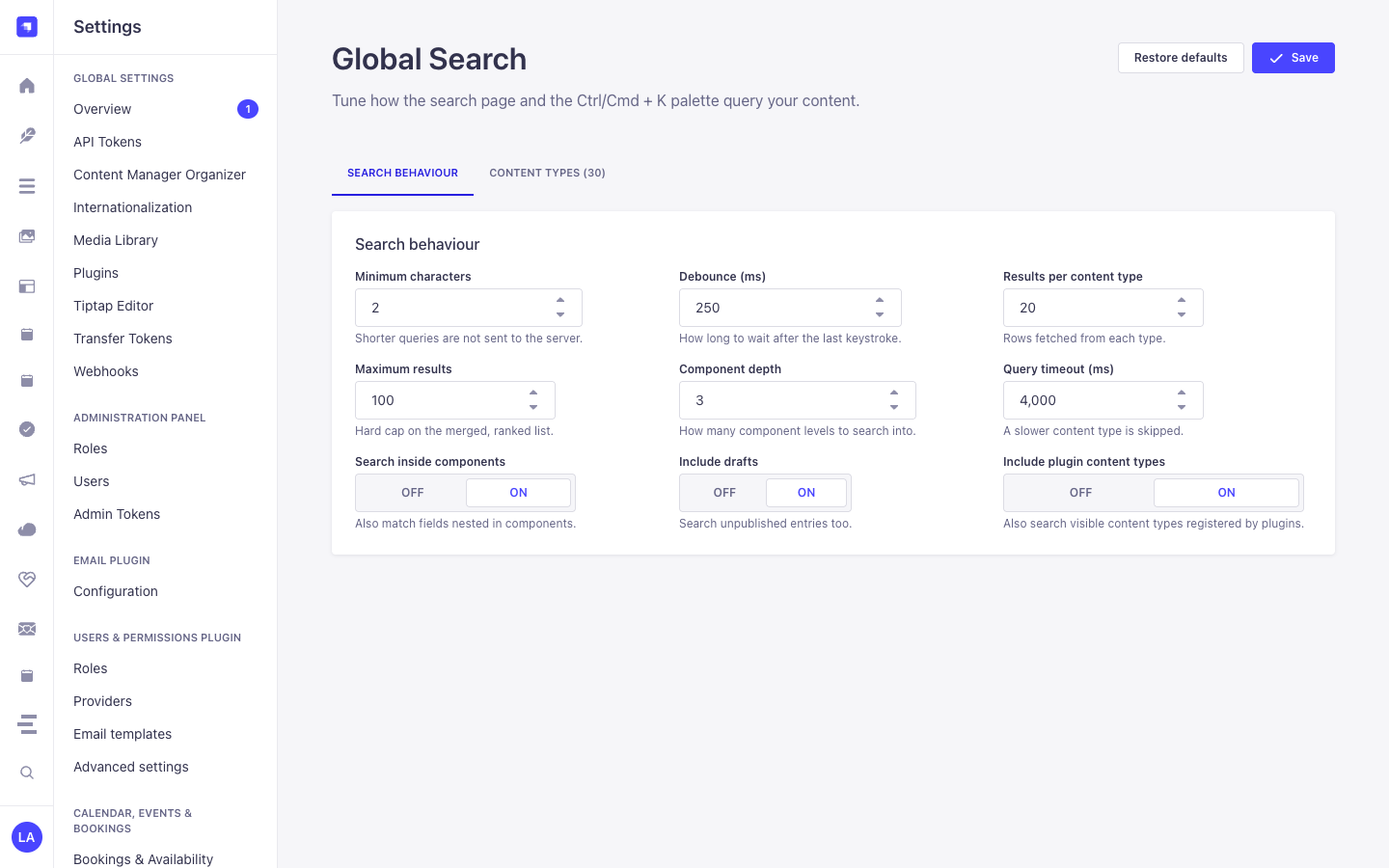
3. Recorrido por la Interfaz de Administración (Strapi v5 Admin UI)
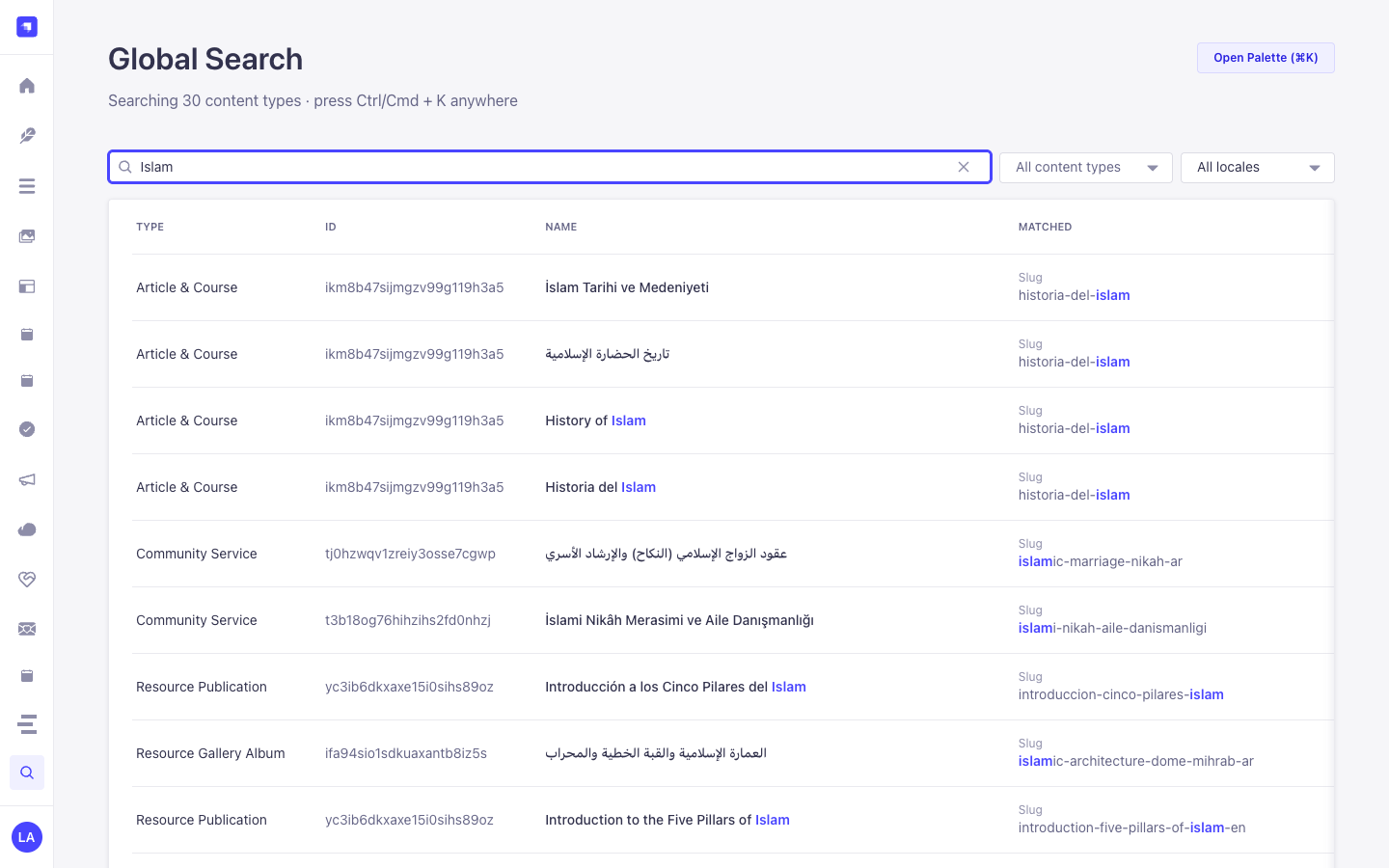
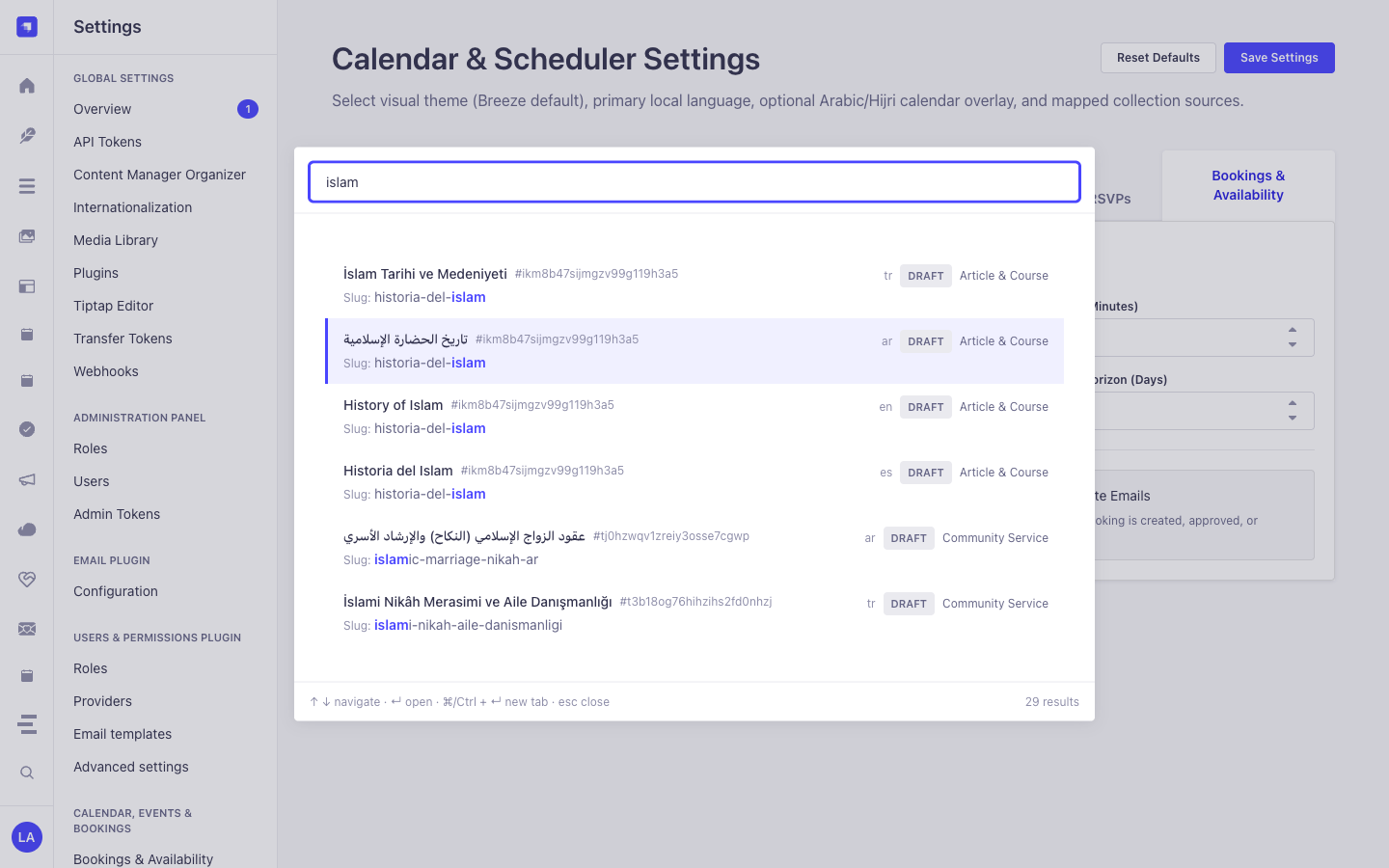
Sección titulada «3. Recorrido por la Interfaz de Administración (Strapi v5 Admin UI)»Una vez habilitado, el plugin registra su espacio de trabajo y ajustes dentro del panel de administración de Strapi v5 utilizando Strapi Design System v2:
Etiquetas Localizadas de la Interfaz (Español)
Sección titulada «Etiquetas Localizadas de la Interfaz (Español)»| Clave de Traducción | Texto en Interfaz |
|---|---|
plugin.name |
Búsqueda Global |
plugin.description |
Busca en todos los tipos de contenido desde un solo lugar. |
settings.section |
Búsqueda Global |
settings.link |
Configuración |
common.searching |
Buscando… |
common.no_results |
Sin resultados para “{query}”. |
common.on |
Sí |
common.off |
No |
4. Entidades Content-Type, Ubicación y Esquemas (strapi.documents)
Sección titulada «4. Entidades Content-Type, Ubicación y Esquemas (strapi.documents)»Operates as a universal zero-schema introspection engine over all registered Strapi v5 Content-Type entities (api::* collection types, single types, and plugin::* entities) plus nested components and dynamic zones. Uses strapi.contentTypes metadata and strapi.documents(uid).findMany() with RBAC permission filtering.
Dónde Encontrar las Entidades Content-Type en Strapi v5
Sección titulada «Dónde Encontrar las Entidades Content-Type en Strapi v5»- Spotlight Command Palette Overlay: Press
Cmd+K(macOS) orCtrl+K(Windows/Linux) from any Strapi Admin screen (including Content Manager, Calendar, or Settings) - Dedicated Search Workspace:
/admin/plugins/global-search(Global Searchin the main left sidebar) - Settings Panel:
/admin/settings/global-search(Settings -> Global Search -> Configuration— organized into Search behaviour and Content types tabs) - Target Entities: Opens matched documents directly at
/admin/content-manager/collection-types/{uid}/{documentId}?plugins[i18n][locale]={locale}
Este plugin opera dinámicamente sobre las entidades Content-Type existentes de Strapi (api::* y plugin::*).
Integración con el Content Manager de Strapi v5 (/admin/content-manager)
Sección titulada «Integración con el Content Manager de Strapi v5 (/admin/content-manager)»Grupo en la Barra Lateral del Content Manager:
All Content Manager Collection Types & Single Types (Cmd+K/Ctrl+K)
Entidades y Componentes en el Content Manager
Sección titulada «Entidades y Componentes en el Content Manager»- Universal Introspection across all
api::*andplugin::*Content Manager Collection Types, Single Types, and Nested Components
Por Qué Este Plugin Crea e Integra Entidades en el Content Manager
Sección titulada «Por Qué Este Plugin Crea e Integra Entidades en el Content Manager»@vicacha-devs/strapi-plugin-global-search does not create an isolated database table because its entire purpose is to act as a high-speed Content Manager Command Palette & Deep-Link Router over every api::* and plugin::* entity registered in Strapi v5:
- Instant Deep-Linking into Content Manager: Pressing
Enteron any search result navigates directly to/admin/content-manager/collection-types/{uid}/{documentId}?plugins[i18n][locale]={locale}(orsingle-types/{uid}). - Searches Both Host
api::*and Pluginplugin::*Entities: Simultaneously indexes articles, scholars (api::leader.leader), events (plugin::events.event), scripture entries (plugin::islam.scripture-entry), donations (plugin::donations.campaign), and publications (plugin::resources.publication).
Cómo Usarlo en el Content Manager de Strapi (Paso a Paso)
Sección titulada «Cómo Usarlo en el Content Manager de Strapi (Paso a Paso)»- Invoke from Anywhere: Press
Cmd+K(macOS) orCtrl+K(Windows/Linux) while inside Content Manager or any plugin page. - Filter by Entity Type, Status & Locale: Type a keyword and narrow results by Collection Type,
Draft/Publishedstatus, ori18nlocale badge. - Open in Content Manager: Press
Enterto open the entry in Content Manager in the current tab, orCmd/Ctrl + Enterto open it in a new tab.
Sincronización entre el Content Manager y el Espacio del Plugin
Sección titulada «Sincronización entre el Content Manager y el Espacio del Plugin»Casos de Uso en el Content Manager y Flujos Editoriales
Sección titulada «Casos de Uso en el Content Manager y Flujos Editoriales»Content Manager Use Case 1 — Jumping Between Plugin Entities & Host Collections Without Leaving the Keyboard
Sección titulada «Content Manager Use Case 1 — Jumping Between Plugin Entities & Host Collections Without Leaving the Keyboard»- Para qué sirve y por qué usarlo: Switch from editing a
Booking Resourceto aDonation CampaignorIslam Scripture Entryin Content Manager in under a second. - Cómo ejecutarlo en el Content Manager: Press
Cmd+K, type the title or slug, and pressEnterto load the target document in Content Manager.
5. Casos de Uso y Flujos de Trabajo
Sección titulada «5. Casos de Uso y Flujos de Trabajo»Use Case 1 — Instant Cmd+K / Ctrl+K Spotlight Navigation Across All Entities
Sección titulada «Use Case 1 — Instant Cmd+K / Ctrl+K Spotlight Navigation Across All Entities»- What it is for: Jump directly to any Article, Course, Event, Booking, Certificate, or Single Type record from anywhere in Strapi Admin without leaving the keyboard.
- How it works: Press
Cmd+K, type a query (e.g.,islam), navigate with↑/↓, and pressEnterto open the document in Content Manager (orCmd/Ctrl + Enterfor a new tab).
Use Case 2 — Deep Component & Multilingual Script Search (Arabic, Turkish, Spanish)
Sección titulada «Use Case 2 — Deep Component & Multilingual Script Search (Arabic, Turkish, Spanish)»- What it is for: Find records by text buried inside repeatable components, SEO meta descriptions, or Arabic/RTL localized variants.
- How it works:
GET /global-search/search?q=...&locale=allnormalizes diacritics and Arabic Alef/Teh Marbuta variants and searches both top-level and nested component fields.
Use Case 3 — Tabbed Search Behaviour & Per-Content-Type Inclusion Tuning
Sección titulada «Use Case 3 — Tabbed Search Behaviour & Per-Content-Type Inclusion Tuning»- What it is for: Fine-tune query thresholds (
Minimum characters,Debounce (ms),Results per content type,Maximum results,Component depth,Query timeout (ms),Search inside components,Include drafts,Include plugin content types) and toggle which Content-Type entities appear in global search. - How it works: Configure the Search behaviour and Content types tabs in
/admin/settings/global-search(PUT /global-search/settings).
6. Endpoints REST API (content-api y admin)
Sección titulada «6. Endpoints REST API (content-api y admin)»| Método | Ruta del Endpoint | Ámbito | Controlador | Autenticación |
|---|---|---|---|---|
GET |
/global-search/search |
admin |
search.find |
Bearer JWT |
GET |
/global-search/schema |
admin |
schema.find |
Bearer JWT |
GET |
/global-search/schema/all |
admin |
schema.findAll |
Bearer JWT |
GET |
/global-search/settings |
admin |
settings.find |
Bearer JWT |
PUT |
/global-search/settings |
admin |
settings.update |
Bearer JWT |
POST |
/global-search/settings/reset |
admin |
settings.reset |
Bearer JWT |
7. Uso Programático en el Servidor (strapi.plugin y strapi.documents)
Sección titulada «7. Uso Programático en el Servidor (strapi.plugin y strapi.documents)»// Registered services on plugin "global-search": "schema", "query", "ranking", "permissions", "settings", "search"const pluginService = strapi.plugin("global-search")?.service("schema");
// Retrieving plugin settings via Strapi plugin storeconst store = strapi.store({ type: "plugin", name: "global-search" });const settings = await store.get({ key: "settings" });8. Solución de Problemas y Verificación
Sección titulada «8. Solución de Problemas y Verificación»- Cambios no visibles en el panel Admin: Ejecute
pnpm strapi builddespués de editarconfig/plugins.ts. - Aislamiento de dependencias peer: Mantenga
hoistPattern: ["*", "!@strapi/*"]enpnpm-workspace.yamlpara evitar colisiones de contexto en React. - Verificación estricta de TypeScript: Ejecute
pnpm checkpara validaradmin/tsconfig.jsonyserver/tsconfig.json.