Calendario y Programación (@vicacha-devs/strapi-plugin-calendar)
Package:
@vicacha-devs/strapi-plugin-calendar· Plugin ID:calendar· Category:Scheduling & Operations· Version:1.1.3· Routes:10
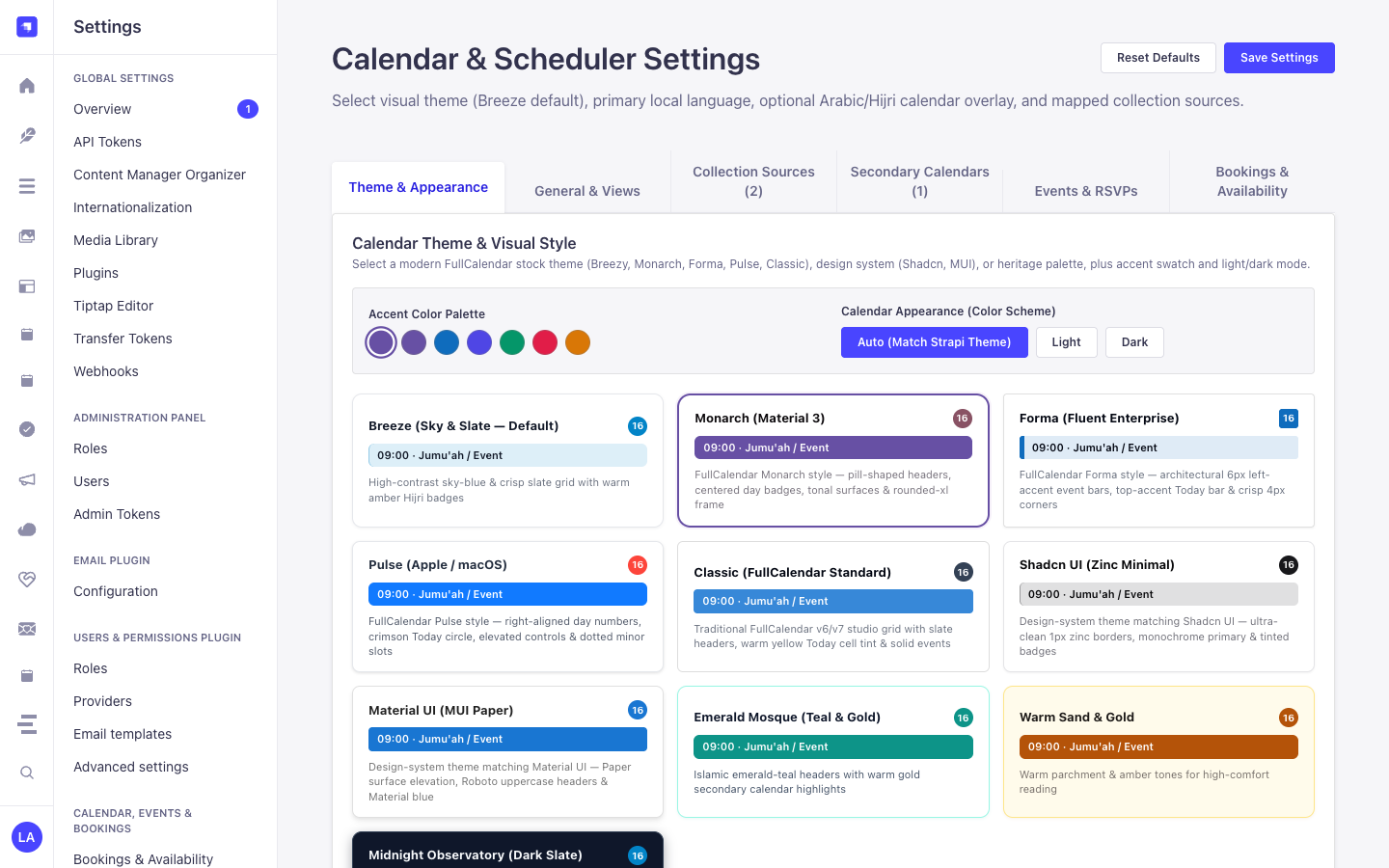
Planificador FullCalendar v6 multicolección, motor de recurrencia RRULE + RSCALE, calendarios secundarios CLDR (Hijri, Hebreo, Persa) y canales iCal (.ics).
pnpm add @vicacha-devs/strapi-plugin-calendar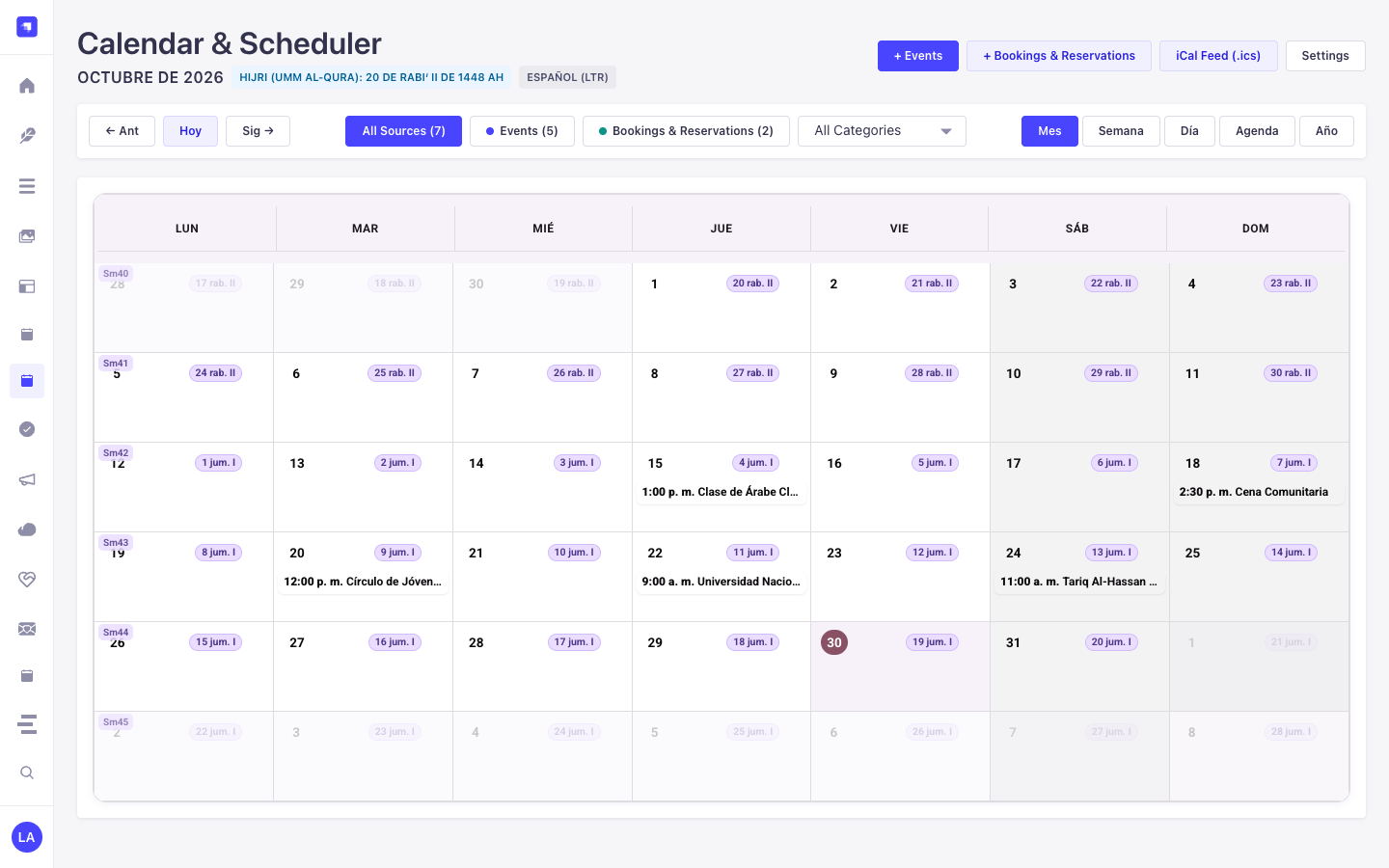
1. Características Principales y Arquitectura
Sección titulada «1. Características Principales y Arquitectura»- Explorar Entidades Content-Type y Casos de Uso (con Diagramas Interactivos)
- Explorar la Guía de Desarrollo y Admin UI
- Explorar la Referencia Interactiva OpenAPI
2. Entidades Content-Type, Ubicación y Esquemas (strapi.documents)
Sección titulada «2. Entidades Content-Type, Ubicación y Esquemas (strapi.documents)»Acts as a multi-collection scheduler engine that binds to any Strapi Content-Type entity (api::* or plugin::*) configured in collections[] or registered dynamically via calendar.service('registry').registerSource(). Also registers the plugin::calendar.rrule Custom Field (json) for RFC 5545 RRULE + RFC 7529 RSCALE recurrence rules.
Dónde Encontrar las Entidades Content-Type en Strapi v5
Sección titulada «Dónde Encontrar las Entidades Content-Type en Strapi v5»- Bound Content-Type Entities: Any Content Manager collection mapped in
/admin/settings/calendar(e.g.,plugin::events.event,plugin::bookings.booking,api::article.article) - Custom Field in Content-Type Builder: Add the
plugin::calendar.rrulecustom field to any collection type in/admin/plugins/content-type-builder - Plugin Workspace & Settings:
/admin/plugins/calendar(FullCalendar v6 Month/Week/Day/Agenda workspace) and/admin/settings/calendar(General, Prayer & Islamic, Bookings & Availability tabs)
Este plugin opera dinámicamente sobre las entidades Content-Type existentes de Strapi (api::* y plugin::*).
Integración con el Content Manager de Strapi v5 (/admin/content-manager)
Sección titulada «Integración con el Content Manager de Strapi v5 (/admin/content-manager)»Grupo en la Barra Lateral del Content Manager:
Events, Scheduling & Bookings
Entidades y Componentes en el Content Manager
Sección titulada «Entidades y Componentes en el Content Manager»- Custom Field
plugin::calendar.rrule(RFC 5545 RRULE + RFC 7529 RSCALE Recurrence Field inside any Content Manager edit view) - Bound Content Manager Collections (
plugin::events.event,plugin::bookings.booking, and any configuredapi::*collection)
Por Qué Este Plugin Crea e Integra Entidades en el Content Manager
Sección titulada «Por Qué Este Plugin Crea e Integra Entidades en el Content Manager»Instead of locking schedules inside an isolated table, @vicacha-devs/strapi-plugin-calendar embeds directly into the Strapi v5 Content Manager edit view of any mapped collection (plugin::events.event, plugin::bookings.booking, or custom api::* entities) via its plugin::calendar.rrule Custom Field and right-sidebar Calendar & Schedule widget:
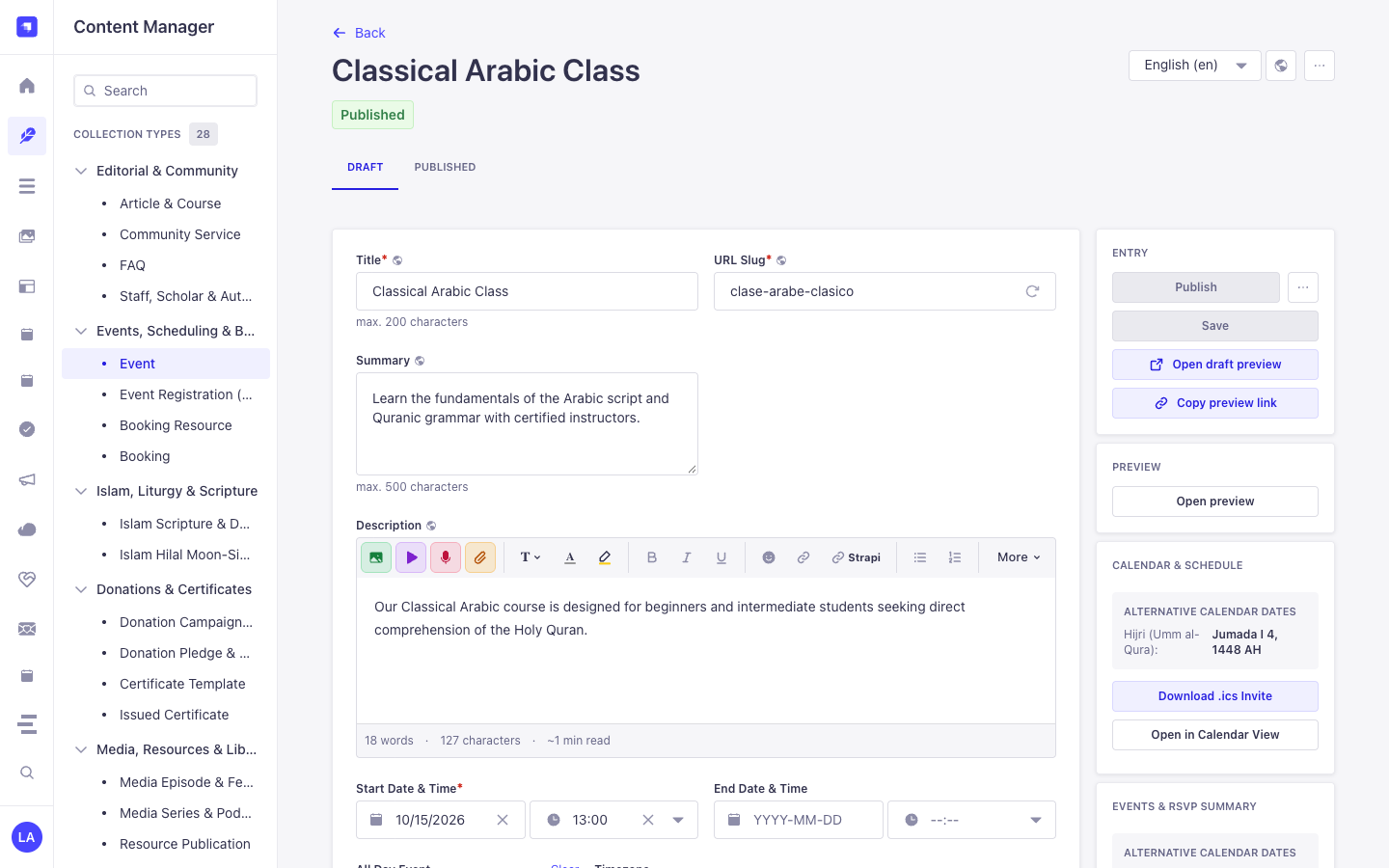
- In-Place Secondary Calendar Preview in Content Manager: When editing an event in Content Manager, the right-sidebar Calendar & Schedule panel automatically computes and displays the corresponding Hijri (Umm al-Qura), Hebrew, or Persian date (
4 Jumada I 1448 AH) plus 1-click.icsdownload and Open in Calendar View buttons. - Visual RFC 5545
RRULE+ RFC 7529RSCALEAuthoring: Theplugin::calendar.rrulecustom field lets editors configure Gregorian or lunar recurrence rules directly inside any Content Manager form. - Zero Data Duplication: Dragging an event in
/admin/plugins/calendaror editing start/end dates in/admin/content-manager/collection-types/plugin::events.eventmutates the exact same Strapi v5 Document Service record.
Cómo Usarlo en el Content Manager de Strapi (Paso a Paso)
Sección titulada «Cómo Usarlo en el Content Manager de Strapi (Paso a Paso)»- Open a Bound Collection in Content Manager: Navigate to Content Manager -> Collection Types -> Events, Scheduling & Bookings -> Event (
/admin/content-manager/collection-types/plugin::events.event?plugins[i18n][locale]=en) and open any entry. - Configure Start/End Dates & Recurrence: Edit
startDate,endDate,allDay,timezone, and therrulecustom field directly inside the Content Manager form. - Use the Right-Sidebar Calendar Panel: In the right column of the Content Manager edit view, inspect the live Alternative Calendar Dates badge, click Download .ics Invite, or click Open in Calendar View to jump to
/admin/plugins/calendar. - Bind Additional Content Manager Collections: In
/admin/settings/calendar, map anyapi::*collection’stitleField,startField,endField, andrruleFieldto project its Content Manager entries onto the unified calendar grid.
Sincronización entre el Content Manager y el Espacio del Plugin
Sección titulada «Sincronización entre el Content Manager y el Espacio del Plugin»Casos de Uso en el Content Manager y Flujos Editoriales
Sección titulada «Casos de Uso en el Content Manager y Flujos Editoriales»Content Manager Use Case 1 — Authoring a Localized Recurring Course with Live Hijri Date Preview
Sección titulada «Content Manager Use Case 1 — Authoring a Localized Recurring Course with Live Hijri Date Preview»- Para qué sirve y por qué usarlo: Edit a weekly Arabic course (
Classical Arabic Course) in Content Manager while verifying its Umm al-Qura Hijri date and downloading its.icsinvite from the right sidebar. - Cómo ejecutarlo en el Content Manager: Open
/admin/content-manager/collection-types/plugin::events.event/{documentId}?plugins[i18n][locale]=en, setstartDateandrrule, and verify the Calendar & Schedule panel on the right.
3. Casos de Uso y Flujos de Trabajo
Sección titulada «3. Casos de Uso y Flujos de Trabajo»Use Case 1 — Aggregating Multiple Strapi Collections into One Calendar
Sección titulada «Use Case 1 — Aggregating Multiple Strapi Collections into One Calendar»- What it is for: Display Events, Bookings, Courses, and Editorial Deadlines from different Content-Type entities on a single color-coded FullCalendar grid.
- How it works: Map each collection’s
uid,titleField,startField,endField, andrruleFieldin/admin/settings/calendarorconfig/plugins.ts, then queryGET /api/calendar/occurrences?start=...&end=....
Use Case 2 — Sacred & Lunar Recurrence (RRULE + RSCALE=ISLAMIC-UMALQURA)
Sección titulada «Use Case 2 — Sacred & Lunar Recurrence (RRULE + RSCALE=ISLAMIC-UMALQURA)»- What it is for: Schedule annual or monthly recurring events that follow the Hijri, Hebrew, or Persian calendar and automatically project onto Gregorian dates.
- How it works: Attach
plugin::calendar.rruleto your Content-Type entity to author RFC 7529 rules (RSCALE=ISLAMIC-UMALQURA;FREQ=YEARLY;BYMONTH=9;BYMONTHDAY=1).
Use Case 3 — Drag-and-Drop Rescheduling & Quick-Create into Target Entities
Sección titulada «Use Case 3 — Drag-and-Drop Rescheduling & Quick-Create into Target Entities»- What it is for: Let editors drag an event on the calendar grid or click a date cell to create/update the underlying Strapi document directly.
- How it works: Uses
POST /calendar/quick-createandPOST /calendar/rescheduleto mutate the mappedstrapi.documents(uid)record in place.
Use Case 4 — Public RFC 5545 iCal (.ics) Subscription Feeds
Sección titulada «Use Case 4 — Public RFC 5545 iCal (.ics) Subscription Feeds»- What it is for: Allow users to subscribe to live calendar feeds in Google Calendar, Apple Calendar, or Outlook.
- How it works: Subscribe to
GET /api/calendar/ical.ics(all sources) orGET /api/calendar/ical/{collectionId}.ics(single source).
4. Endpoints REST API (content-api y admin)
Sección titulada «4. Endpoints REST API (content-api y admin)»| Método | Ruta del Endpoint | Ámbito | Controlador | Autenticación |
|---|---|---|---|---|
GET |
/calendar/calendar |
admin |
admin.getCalendar |
Bearer JWT |
POST |
/calendar/calendar/reschedule |
admin |
admin.reschedule |
Bearer JWT |
POST |
/calendar/calendar/quick-create |
admin |
admin.quickCreate |
Bearer JWT |
GET |
/calendar/content-types |
admin |
admin.getContentTypes |
Bearer JWT |
GET |
/calendar/settings |
admin |
admin.getSettings |
Bearer JWT |
PUT |
/calendar/settings |
admin |
admin.updateSettings |
Bearer JWT |
POST |
/calendar/clear-settings |
admin |
admin.clearSettings |
Bearer JWT |
GET |
/api/calendar/occurrences |
content-api |
content-api.getOccurrences |
Bearer JWT |
GET |
/api/calendar/feed.ics |
content-api |
content-api.downloadFeedIcs |
Bearer JWT |
GET |
/api/calendar/{documentId}/invite.ics |
content-api |
content-api.downloadEventIcs |
Bearer JWT |