SEO ve SERP Analizörü — Geliştirici Kılavuzu ve Yönetim Arayüzü
1. Kurulum ve Bağımlılıklar
Section titled “1. Kurulum ve Bağımlılıklar”pnpm add @vicacha-devs/strapi-plugin-seo2. Sunucu Yapılandırması (config/plugins.ts)
Section titled “2. Sunucu Yapılandırması (config/plugins.ts)”Strapi v5 projenizin config/plugins.ts dosyasına eklenti yapılandırmasını ekleyin:
export default ({ env }: { env: (key: string, defaultValue?: string) => string }) => ({ "seo": { enabled: true, config: { autoCreateComponent: true, }, },});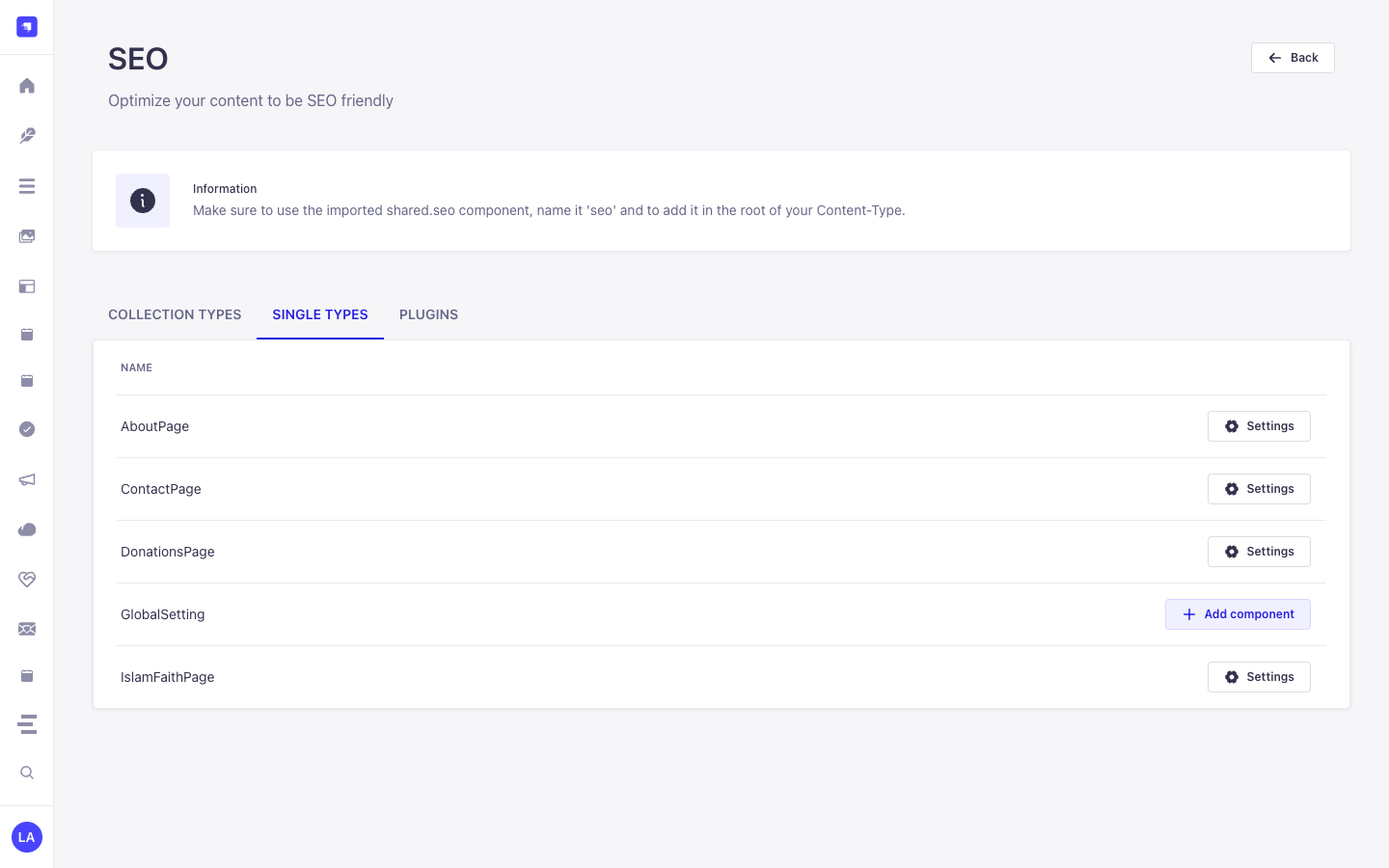
3. Strapi v5 Yönetim Arayüzü (Admin UI) Turu
Section titled “3. Strapi v5 Yönetim Arayüzü (Admin UI) Turu”Etkinleştirildiğinde eklenti, Strapi Design System v2 bileşenlerini kullanarak çalışma alanını ve ayarlarını yönetim paneline kaydeder:
Yerelleştirilmiş Arayüz Etiketleri (Türkçe)
Section titled “Yerelleştirilmiş Arayüz Etiketleri (Türkçe)”| Çeviri Anahtarı | Arayüz Metni |
|---|---|
Good |
İyi |
Improvements |
Geliştirilebilir |
Bad |
Kötü |
Information |
Bilgi |
4. İçerik Türü Varlıkları, Konumları ve Şemaları (strapi.documents)
Section titled “4. İçerik Türü Varlıkları, Konumları ve Şemaları (strapi.documents)”Registers and manages two shared Strapi Components (shared.seo and shared.open-graph) inside the Content-Type Builder and injects a live Google SERP, OpenGraph/X Social Card, and Keyword Density Analyzer into the Content Manager edit view for any api::* Collection Type or Single Type that includes shared.seo.
Strapi v5 İçinde İçerik Türü Varlıkları Nerede Bulunur?
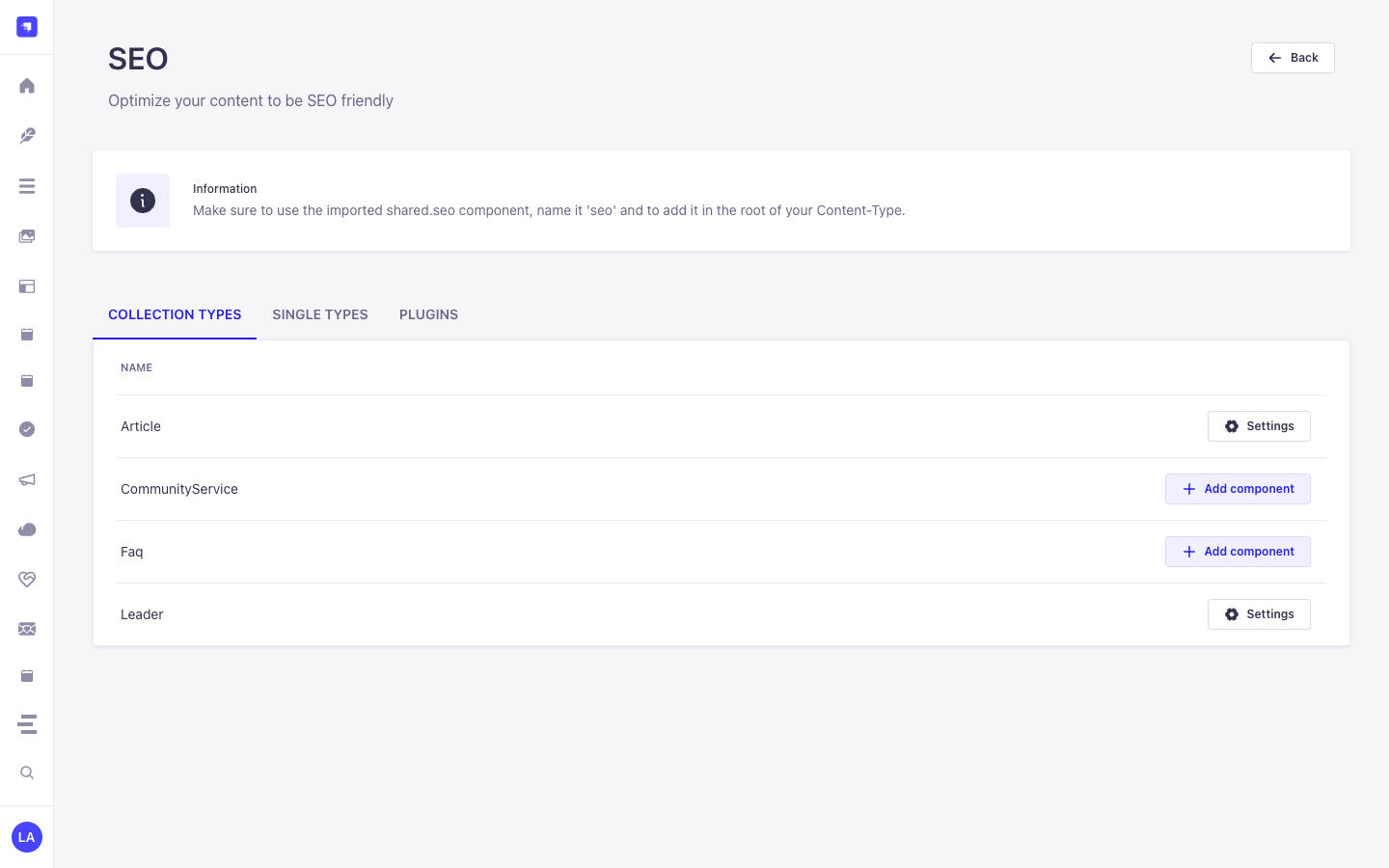
Section titled “Strapi v5 İçinde İçerik Türü Varlıkları Nerede Bulunur?”- Content-Type Builder (Components):
/admin/plugins/content-type-builderunder COMPONENTS -> Shared (seo->components_shared_seos,openGraph->components_shared_open_graphs) - Content Manager Edit View: Open any Collection Type or Single Type with the
seocomponent attached (e.g.,/admin/content-manager/single-types/api::about-page.about-page) - Plugin Workspace & Settings:
/admin/plugins/seo(Content-Type SEO Coverage Audit & 1-Click Component Attachment) and/admin/settings/seo
shared.open-graph — Component: openGraph
Section titled “shared.open-graph — Component: openGraph”Shared Strapi component (shared.open-graph) managed in Content-Type Builder and Content Manager
Kind:
component· DB Table:components_shared_open_graphs· Admin Location:/admin/plugins/content-type-builder(Component) · Draft & Publish:No· i18n:Yes
| Alan (Attribute) | Strapi Türü | Zorunlu | Kısıtlamalar / İlişki |
|---|---|---|---|
ogTitle |
string |
Yes | max: 70 |
ogDescription |
string |
Yes | max: 200 |
ogImage |
media |
No | — |
ogUrl |
string |
No | — |
ogType |
string |
No | — |
shared.seo — Component: seo
Section titled “shared.seo — Component: seo”Shared Strapi component (shared.seo) managed in Content-Type Builder and Content Manager
Kind:
component· DB Table:components_shared_seos· Admin Location:/admin/plugins/content-type-builder(Component) · Draft & Publish:No· i18n:Yes
| Alan (Attribute) | Strapi Türü | Zorunlu | Kısıtlamalar / İlişki |
|---|---|---|---|
metaTitle |
string |
Yes | max: 60 |
metaDescription |
string |
Yes | max: 160 |
metaImage |
media |
No | — |
openGraph |
component |
No | component: shared.open-graph |
keywords |
text |
No | — |
metaRobots |
string |
No | — |
metaViewport |
string |
No | — |
canonicalURL |
string |
No | — |
structuredData |
json |
No | — |
Strapi v5 İçerik Yöneticisi (Content Manager) Entegrasyonu (/admin/content-manager)
Section titled “Strapi v5 İçerik Yöneticisi (Content Manager) Entegrasyonu (/admin/content-manager)”İçerik Yöneticisi Kenar Çubuğu Grubu:
Components (shared.seo— **SEO & Metadata** &shared.open-graph— **Open Graph (Social Sharing)**) inside Content Manager Edit Views
İçerik Yöneticisi Varlıkları ve Bileşenleri
Section titled “İçerik Yöneticisi Varlıkları ve Bileşenleri”- Component
shared.seo(SEO & Metadata attached toapi::article.articleand other Collection/Single Types in Content Manager) - Component
shared.open-graph(Open Graph (Social Sharing) nested insideSEO & Metadata)
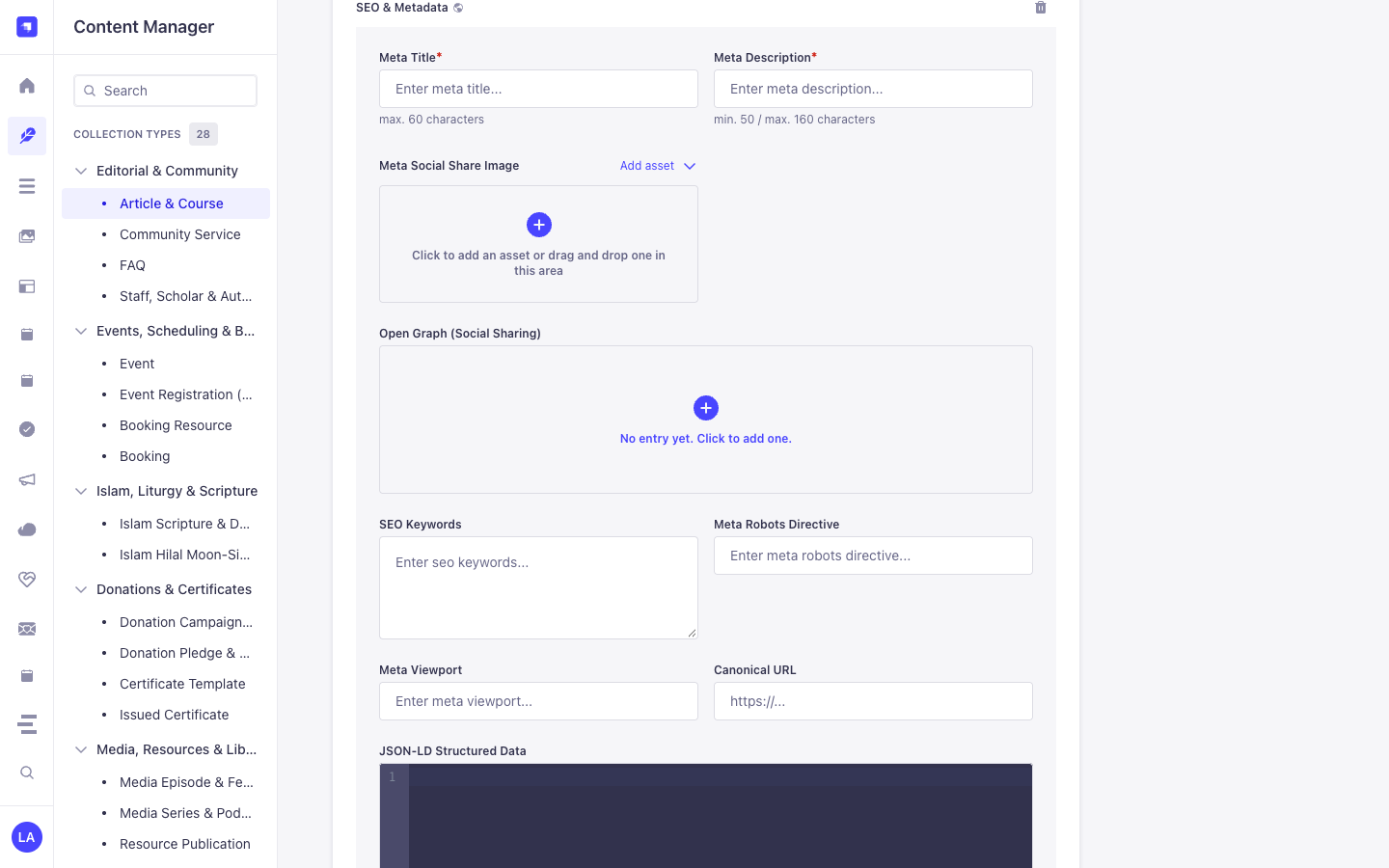
Bu Eklenti Neden Content Manager Varlıkları Oluşturur?
Section titled “Bu Eklenti Neden Content Manager Varlıkları Oluşturur?”@vicacha-devs/strapi-plugin-seo registers the reusable shared.seo (SEO & Metadata) and shared.open-graph (Open Graph (Social Sharing)) Strapi Components so every Collection Type (api::article.article, api::page.page) and Single Type in the Strapi v5 Content Manager includes a complete, localized SEO & structured-data panel alongside a live SEO Audit sidebar:
- Native Localization & Draft Support via
SEO & Metadata(shared.seo): Becauseshared.seois embedded directly inside Content Manager entries,Meta Title*(metaTitle, max. 60 chars),Meta Description*(metaDescription, 50–160 chars),Meta Social Share Image(metaImage),SEO Keywords(keywords),Meta Robots Directive(metaRobots),Meta Viewport(metaViewport),Canonical URL(canonicalURL), andJSON-LD Structured Data(structuredData) automatically inherit each document’si18nlocale (en,es,ar,tr) and Draft/Publish state. - Nested Open Graph Social Card Component (
shared.open-graph): Expand Open Graph (Social Sharing) insideSEO & Metadatato customizeogTitle,ogDescription,ogImage,ogUrl, andogTypeper locale.
Strapi Content Manager İçinde Nasıl Kullanılır? (Adım Adım)
Section titled “Strapi Content Manager İçinde Nasıl Kullanılır? (Adım Adım)”- Attach
shared.seoin/admin/seo: Enable theseocomponent on your target Collection Types and Single Types in/admin/seo(or automatically on bootstrap). - Open Any Entry in Content Manager & Expand
SEO & Metadata: Navigate to/admin/content-manager/collection-types/api::article.article/{documentId}and scroll down to the SEO & Metadata (shared.seo) component panel (click+if no entry has been initialized yet). - Populate Meta, Open Graph & JSON-LD Fields: Fill in
Meta Title*(max. 60 characters),Meta Description*(min. 50 / max. 160 characters), uploadMeta Social Share Image, optionally expandOpen Graph (Social Sharing), configureSEO Keywords,Meta Robots Directive(e.g.index, follow),Meta Viewport(e.g.width=device-width, initial-scale=1),Canonical URL, and paste valid Schema.org JSON intoJSON-LD Structured Data.
Content Manager ve Eklenti Çalışma Alanı Senkronizasyonu
Section titled “Content Manager ve Eklenti Çalışma Alanı Senkronizasyonu”Content Manager Kullanım Senaryoları ve Editöryal İş Akışları
Section titled “Content Manager Kullanım Senaryoları ve Editöryal İş Akışları”Content Manager Use Case 1 — Authoring Localized SEO & Metadata, Open Graph Cards & JSON-LD Structured Data
Section titled “Content Manager Use Case 1 — Authoring Localized SEO & Metadata, Open Graph Cards & JSON-LD Structured Data”- Amacı ve Neden Kullanıldığı: Configure per-locale
Meta Title*,Meta Description*,Canonical URL, andJSON-LD Structured Data(structuredData) directly inside an Article (api::article.article) in Content Manager. - Content Manager İçinde Uygulama Adımları: Open
/admin/content-manager/collection-types/api::article.article/{documentId}?plugins[i18n][locale]=en, expand SEO & Metadata, complete the required meta title (<= 60 chars) and meta description (50–160 chars), add your JSON-LD block, and click Publish.
5. Uçtan Uca Kullanım Senaryoları ve İş Akışları
Section titled “5. Uçtan Uca Kullanım Senaryoları ve İş Akışları”Use Case 1 — 1-Click shared.seo Component Bootstrap Across Content Types
Section titled “Use Case 1 — 1-Click shared.seo Component Bootstrap Across Content Types”- What it is for: Automatically create the
shared.seoandshared.open-graphcomponents and attach them to Articles, Pages, Events, or Courses without manual field setup. - How it works: On bootstrap (when
autoCreateComponent: true) or via/admin/plugins/seo(POST /seo/component), the plugin registersshared.seoand attaches it to selectedapi::*schemas.
Use Case 2 — Live Google SERP, Social Card Preview & Keyword Density Scoring
Section titled “Use Case 2 — Live Google SERP, Social Card Preview & Keyword Density Scoring”- What it is for: Give editors real-time feedback on
metaTitle(<= 60 chars),metaDescription(50–160 chars),canonicalURL,metaRobots, and focus keyword density while editing. - How it works: Edit the
seocomponent inside any Content Manager entry to preview desktop/mobile Google SERP snippets and OpenGraph social cards.
Use Case 3 — Authoring SEO & Metadata (Meta Title, Meta Description, Open Graph, Canonical URL & JSON-LD Structured Data) in Content Manager
Section titled “Use Case 3 — Authoring SEO & Metadata (Meta Title, Meta Description, Open Graph, Canonical URL & JSON-LD Structured Data) in Content Manager”- What it is for: Configure localized meta titles (
max. 60 characters), meta descriptions (50–160 characters), Open Graph social cards, robots/viewport directives, canonical URLs, and Schema.org JSON-LD (Article,Event,FAQPage,Organization) directly inside the Content Manager edit view. - How it works: Expand SEO & Metadata (
shared.seo) on any entry in/admin/content-manager, populateMeta Title*(metaTitle),Meta Description*(metaDescription),Meta Social Share Image(metaImage),Open Graph (Social Sharing)(openGraph),SEO Keywords(keywords),Meta Robots Directive(metaRobots),Meta Viewport(metaViewport),Canonical URL(canonicalURL), andJSON-LD Structured Data(structuredData), and query via?populate[seo][populate]=*.
6. REST API Uç Noktaları (content-api ve admin)
Section titled “6. REST API Uç Noktaları (content-api ve admin)”| Metot | Uç Nokta Yolu | Kapsam | Denetleyici (Handler) | Kimlik Doğrulama |
|---|---|---|---|---|
GET |
/seo/component |
admin |
seo.findSeoComponent |
Bearer JWT |
POST |
/seo/component |
admin |
seo.createSeoComponent |
Bearer JWT |
GET |
/seo/content-types |
admin |
seo.findContentTypes |
Bearer JWT |
POST |
/seo/generate |
admin |
seo.generateSeo |
Bearer JWT |
GET |
/seo/settings |
admin |
settings.getSettings |
Bearer JWT |
POST |
/seo/settings |
admin |
settings.setSettings |
Bearer JWT |
7. Sunucu Tarafı Programatik Kullanım (strapi.plugin ve strapi.documents)
Section titled “7. Sunucu Tarafı Programatik Kullanım (strapi.plugin ve strapi.documents)”// Registered services on plugin "seo": "seo", "settings"const pluginService = strapi.plugin("seo")?.service("seo");
// Retrieving plugin settings via Strapi plugin storeconst store = strapi.store({ type: "plugin", name: "seo" });const settings = await store.get({ key: "settings" });8. Sorun Giderme ve Doğrulama
Section titled “8. Sorun Giderme ve Doğrulama”- Yönetim paneli değişiklikleri görünmüyor:
config/plugins.tsdosyasını güncelledikten sonrapnpm strapi buildkomutunu çalıştırın. - Strapi bağımlılık izolasyonu: React bağlam çakışmalarını önlemek için
pnpm-workspace.yamliçindehoistPattern: ["*", "!@strapi/*"]ayarını koruyun. - Sıkı TypeScript kontrolü: Hem
adminhem deserverpaketlerini doğrulamak içinpnpm checkkomutunu çalıştırın.