Editöryal Notlar ve Sabitlemeler (@vicacha-devs/strapi-plugin-notes)
Package:
@vicacha-devs/strapi-plugin-notes· Plugin ID:notes· Category:Editorial & SEO· Version:1.1.3· Routes:8
Çok biçimli editöryal notlar, renk kodlu kategori rozetleri, İçerik Yöneticisi yan panelinde sabitlenmiş notlar ve merkezi Küresel Notlar Merkezi.
pnpm add @vicacha-devs/strapi-plugin-notes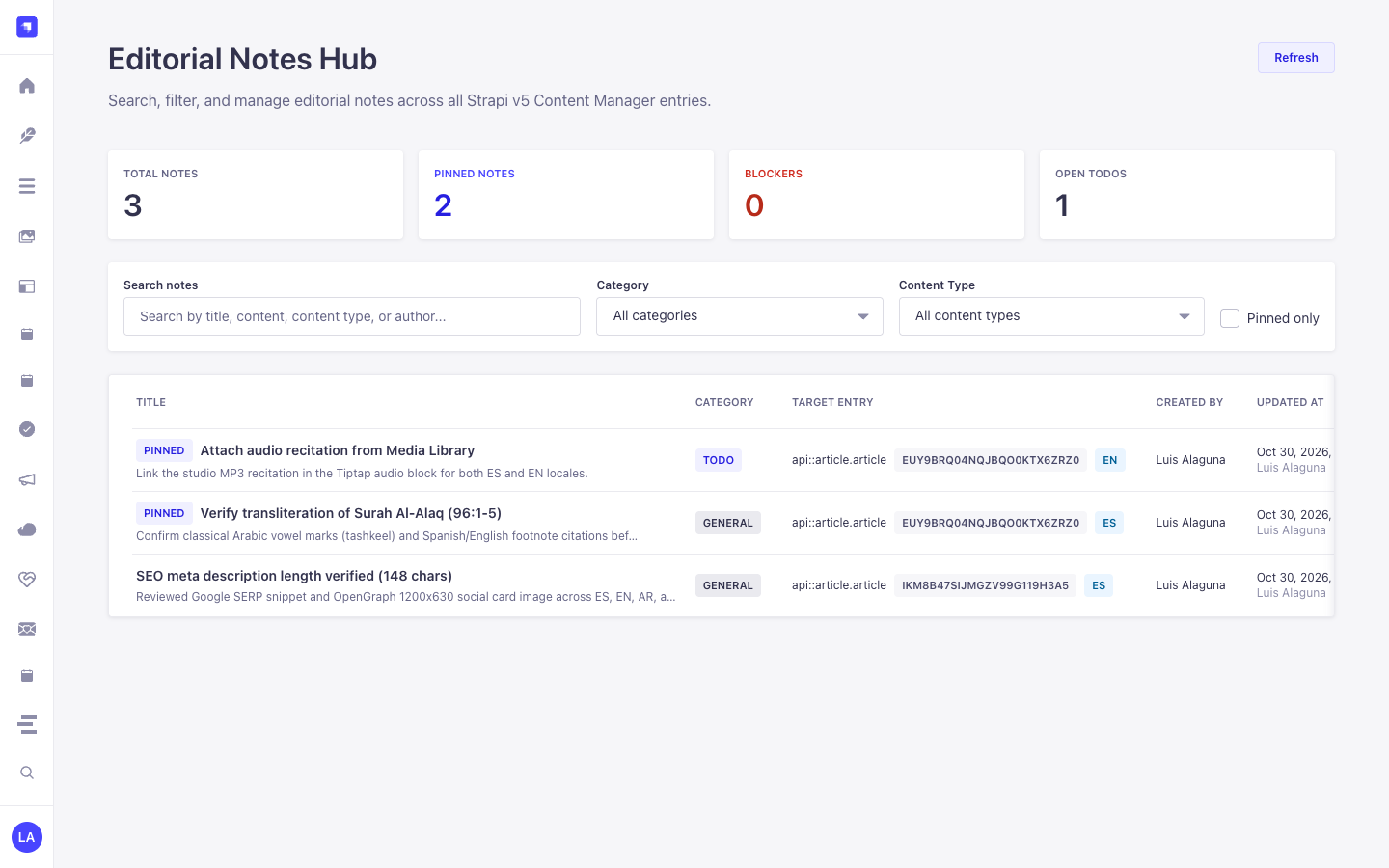
1. Temel Yetenekler ve Mimari Özellikler
Section titled “1. Temel Yetenekler ve Mimari Özellikler”- İçerik Türü Varlıkları ve Kullanım Senaryolarını İnceleyin (Diyagramlarla)
- Geliştirici Kılavuzu ve Admin UI Turunu İnceleyin
- Etkileşimli OpenAPI Referansını İnceleyin
2. İçerik Türü Varlıkları, Konumları ve Şemaları (strapi.documents)
Section titled “2. İçerik Türü Varlıkları, Konumları ve Şemaları (strapi.documents)”Registers one internal polymorphic Collection Type (plugin::notes.note, content-manager.visible: false) that attaches editorial annotations to any Strapi Content Manager document via entitySlug (e.g., api::article.article), entityDocumentId, and entityLocale.
Strapi v5 İçinde İçerik Türü Varlıkları Nerede Bulunur?
Section titled “Strapi v5 İçinde İçerik Türü Varlıkları Nerede Bulunur?”- Content Manager Right Side Panel: Open any document in
/admin/content-manager/collection-types/...orsingle-types/...to view, create, and pin notes scoped to that document and locale - Global Notes Hub Workspace:
/admin/plugins/notes(centralized search, category filter, and pin board across all Content-Type entities) - Database Table:
notes(plugin::notes.notequeried viastrapi.documents('plugin::notes.note'))
plugin::notes.note — Notes
Section titled “plugin::notes.note — Notes”Editorial notes attached to Content Manager entity records
Kind:
collectionType· DB Table:notes· Admin Location: Internal (/admin/plugins/notes) · Draft & Publish:No· i18n:No
| Alan (Attribute) | Strapi Türü | Zorunlu | Kısıtlamalar / İlişki |
|---|---|---|---|
title |
string |
Yes | max: 255 |
content |
text |
No | — |
category |
enumeration |
Yes | enum: general, todo, blocker, idea; default: "general" |
isPinned |
boolean |
No | default: false |
entityId |
integer |
No | — |
entityDocumentId |
string |
No | max: 128 |
entitySlug |
string |
Yes | max: 160 |
entityLocale |
string |
No | max: 32 |
createdByName |
string |
No | max: 120 |
updatedByName |
string |
No | max: 120 |
Strapi v5 İçerik Yöneticisi (Content Manager) Entegrasyonu (/admin/content-manager)
Section titled “Strapi v5 İçerik Yöneticisi (Content Manager) Entegrasyonu (/admin/content-manager)”İçerik Yöneticisi Kenar Çubuğu Grubu:
Injected into All Content Manager Collection Types & Single Types (Right Sidebar)
İçerik Yöneticisi Varlıkları ve Bileşenleri
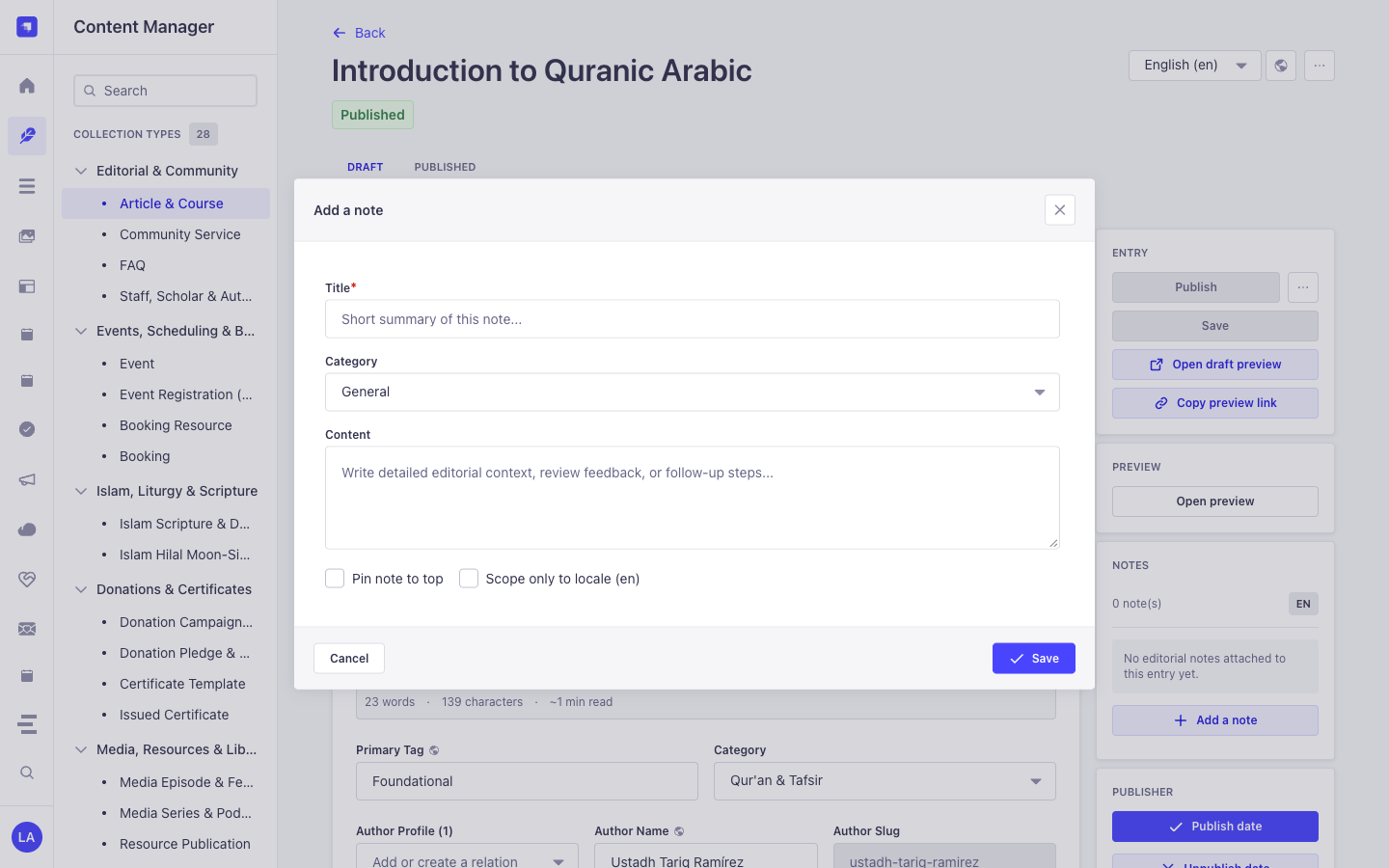
Section titled “İçerik Yöneticisi Varlıkları ve Bileşenleri”- Right-Sidebar Notes (
NOTES) Panel injected into every/admin/content-manager/collection-types/*and/admin/content-manager/single-types/*edit view - Internal Polymorphic Entity
plugin::notes.note(notestable, managed via Content Manager side panel &/admin/plugins/notes)
Bu Eklenti Neden Content Manager Varlıkları Oluşturur?
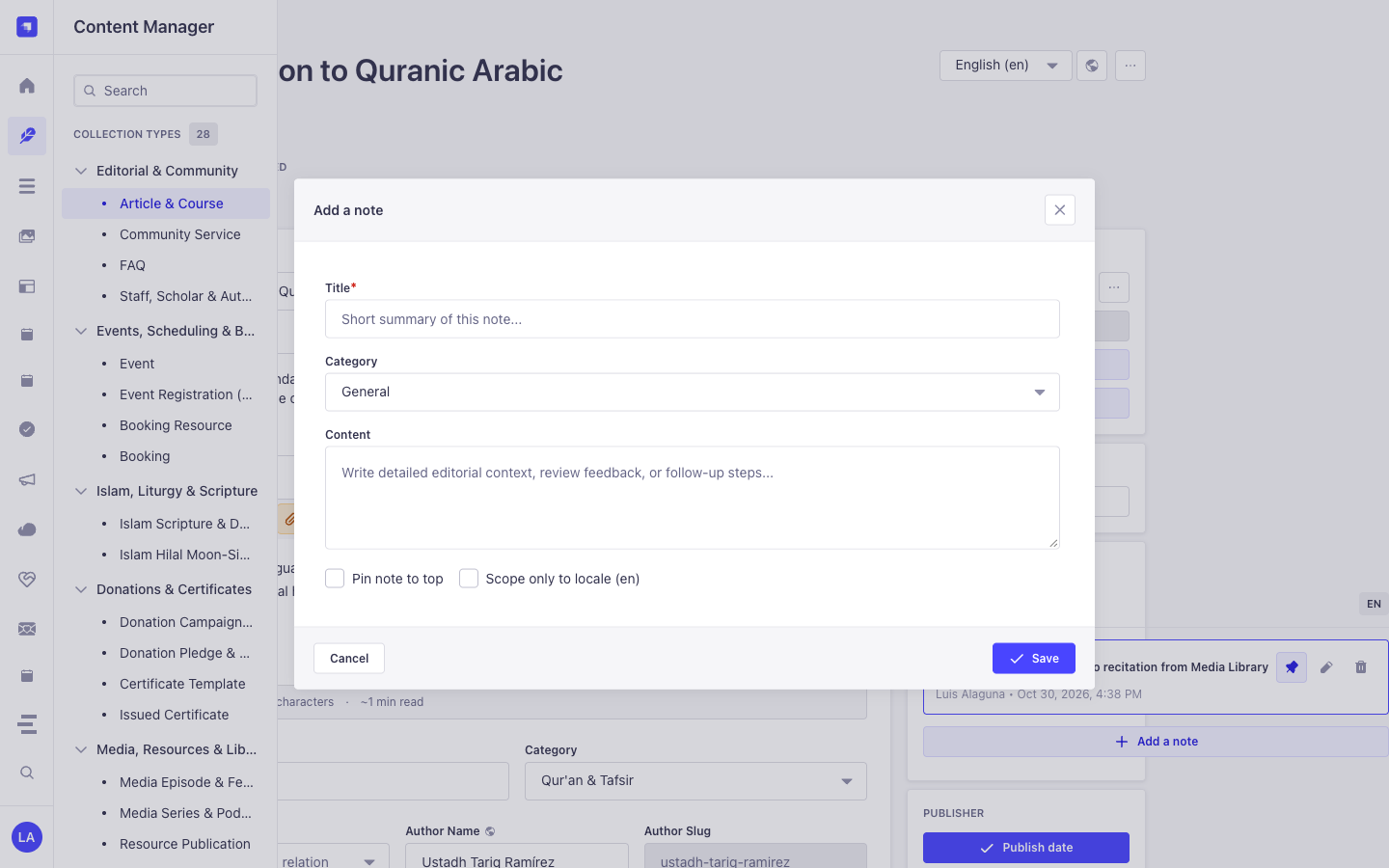
Section titled “Bu Eklenti Neden Content Manager Varlıkları Oluşturur?”@vicacha-devs/strapi-plugin-notes is purpose-built for the Strapi v5 Content Manager: it injects an interactive Notes panel directly into the right sidebar of every document edit view while keeping plugin::notes.note (content-manager.visible: false) out of the collection list to avoid cluttering the left sidebar:
- Works on Every
api::*andplugin::*Content Manager Entity: Attachgeneral,todo,blocker, orideanotes to anArticle & Course,Event,Donation Campaign,Islam Scripture Entry, orResource Publicationdirectly inside Content Manager. - Per-Locale (
Scope only to locale) or Cross-Locale Pinning: Scope a translation note specifically toen,es,ar, ortr, and pin critical blockers (Pin note to top) so editors see them immediately upon opening the entry.
Strapi Content Manager İçinde Nasıl Kullanılır? (Adım Adım)
Section titled “Strapi Content Manager İçinde Nasıl Kullanılır? (Adım Adım)”- Open Any Entry in Content Manager: Open any document in
/admin/content-manager/collection-types/...or/admin/content-manager/single-types/.... - Click
+ Add a note: In the right-hand sidebar under NOTES, click the button to open the note modal. - Set Category, Pin & Locale Scope: Enter
Title, selectCategory(General,To-Do,Blocker,Idea), write theContent, optionally checkPin note to toporScope only to locale, and click Save. - Triage Across All Entities: Visit
/admin/plugins/notes(Global Notes Hub) to filter all notes across the entire CMS and click any card to jump back into Content Manager.
Content Manager ve Eklenti Çalışma Alanı Senkronizasyonu
Section titled “Content Manager ve Eklenti Çalışma Alanı Senkronizasyonu”Content Manager Kullanım Senaryoları ve Editöryal İş Akışları
Section titled “Content Manager Kullanım Senaryoları ve Editöryal İş Akışları”Content Manager Use Case 1 — Attaching Locale-Scoped Translation & Scholar Review Notes
Section titled “Content Manager Use Case 1 — Attaching Locale-Scoped Translation & Scholar Review Notes”- Amacı ve Neden Kullanıldığı: Leave a
blockerortodoreview note on a course or scripture entry directly inside the Content Manager edit screen. - Content Manager İçinde Uygulama Adımları: Open
/admin/content-manager/collection-types/api::article.article/{documentId}?plugins[i18n][locale]=en, click + Add a note in the right sidebar, checkScope only to locale (en), and save.
3. Uçtan Uca Kullanım Senaryoları ve İş Akışları
Section titled “3. Uçtan Uca Kullanım Senaryoları ve İş Akışları”Use Case 1 — In-Context Editorial Review & Translation Handoff Notes
Section titled “Use Case 1 — In-Context Editorial Review & Translation Handoff Notes”- What it is for: Leave
todo,blocker,idea, orgeneralnotes directly on a draft Article, Event, or Donation Campaign for fellow editors and translators. - How it works: Open the record in Content Manager; the injected side panel queries
GET /notes/entity?entitySlug=...&entityDocumentId=...&entityLocale=...and creates notes viaPOST /notes.
Use Case 2 — Pinning Critical Editorial Blockers to the Top of a Document
Section titled “Use Case 2 — Pinning Critical Editorial Blockers to the Top of a Document”- What it is for: Ensure legal, theological, or fact-checking warnings stay pinned (
isPinned: true) at the top of a Content Manager entry. - How it works: Toggle pin status in the Content Manager side panel (
PUT /notes/{id}), surfacing the note both on the document and in the Global Notes Hub.
Use Case 3 — Cross-Collection Editorial Triage in the Global Notes Hub
Section titled “Use Case 3 — Cross-Collection Editorial Triage in the Global Notes Hub”- What it is for: Review all unresolved
blockerandtodoannotations across every collection type from a single dashboard. - How it works: Navigate to
/admin/plugins/notesto filterplugin::notes.noterecords bycategory,isPinned,entitySlug, or keyword and jump straight to the target document.
4. REST API Uç Noktaları (content-api ve admin)
Section titled “4. REST API Uç Noktaları (content-api ve admin)”| Metot | Uç Nokta Yolu | Kapsam | Denetleyici (Handler) | Kimlik Doğrulama |
|---|---|---|---|---|
GET |
/notes/notes |
admin |
notesController.find |
Bearer JWT |
GET |
/notes/notes/stats |
admin |
notesController.stats |
Bearer JWT |
GET |
/notes/notes/{id} |
admin |
notesController.findOne |
Bearer JWT |
POST |
/notes/notes |
admin |
notesController.create |
Bearer JWT |
PUT |
/notes/notes/{id} |
admin |
notesController.update |
Bearer JWT |
DELETE |
/notes/notes/{id} |
admin |
notesController.delete |
Bearer JWT |
GET |
/api/notes/notes |
content-api |
notesController.find |
Bearer JWT |
GET |
/api/notes/notes/{id} |
content-api |
notesController.findOne |
Bearer JWT |